GV

GeezerVison

The World Wide Web, restored to 800 pixels of glory.

Home|About|Gaming cabinet|Archives|How it works|Starter sites

On this site

  • Documentation
  • Privacy Statement
  • License Agreement
  • Contact Us

This view

  • Original page
  • New address

GeezerVison is showing docs.voltdb.com — Chapter 11. Availability

  • Volt Active Data
  • Developer Hub
  • Books
    • VoltDB Tutorial
    • Using VoltDB
    • VoltDB Guide to Performance and Customization
    • VoltDB Administrator's Guide
    • Volt Kubernetes Administrator's Guide
    • VoltDB Quick Reference
  • VoltDB V16
    • VoltDB V16
    • VoltDB V15.3 LTS
    • VoltDB V14.3 LTS
    • VoltDB V13.3 LTS
    • VoltDB V12.3 LTS
    • VoltDB V11.4
    • VoltDB V10.2
    • VoltDB V9.3
Chapter 11. Availability

Using VoltDB

  • About This Book
  • 1. Overview▶
    • 1.1. What is VoltDB?
    • 1.2. Who Should Use VoltDB
    • 1.3. How VoltDB Works
      • 1.3.1. Partitioning
      • 1.3.2. Serialized (Single-Threaded) Processing
      • 1.3.3. Partitioned vs. Replicated Tables
      • 1.3.4. Ease of Scaling to Meet Application Needs
    • 1.4. Working with VoltDB Effectively
  • 2. Installing VoltDB▶
    • 2.1. Operating System and Software Requirements
    • 2.2. Installing VoltDB
      • 2.2.1. Upgrading From Older Versions
    • 2.3. Setting Up Your Environment
    • 2.4. What is Included in the VoltDB Distribution
  • 3. Starting the Database▶
    • 3.1. Initializing and Starting a VoltDB Database
    • 3.2. Initializing and Starting a VoltDB Database on a Cluster
    • 3.3. Stopping a VoltDB Database
    • 3.4. Saving the Data
    • 3.5. Restarting a VoltDB Database
    • 3.6. Updating Nodes on the Cluster
    • 3.7. Defining the Cluster Configuration
      • 3.7.1. Determining How Many Sites per Host
      • 3.7.2. Configuring Paths for Runtime Features
      • 3.7.3. Verifying your Hardware Configuration
  • 4. Designing the Database Schema▶
    • 4.1. How to Enter DDL Statements
    • 4.2. Creating Tables and Primary Keys
    • 4.3. Analyzing Data Volume and Workload
    • 4.4. Partitioning Database Tables
      • 4.4.1. Choosing a Column on which to Partition Table Rows
      • 4.4.2. Specifying Partitioned Tables
      • 4.4.3. Design Rules for Partitioning Tables
    • 4.5. Replicating Database Tables
      • 4.5.1. Choosing Replicated Tables
      • 4.5.2. Specifying Replicated Tables
    • 4.6. Modifying the Schema
      • 4.6.1. Effects of Schema Changes on Data and Clients
      • 4.6.2. Viewing the Schema
      • 4.6.3. Modifying Tables
      • 4.6.4. Adding and Dropping Indexes
      • 4.6.5. Modifying Partitioning for Tables and Stored Procedures
  • 5. Designing Stored Procedures to Access the Database▶
    • 5.1. How Stored Procedures Work
      • 5.1.1. VoltDB Stored Procedures are Transactional
      • 5.1.2. VoltDB Stored Procedures are Deterministic
    • 5.2. The Anatomy of a VoltDB Stored Procedure
      • 5.2.1. The Structure of the Stored Procedure
      • 5.2.2. Passing Arguments to a Stored Procedure
      • 5.2.3. Creating and Executing SQL Queries in Stored Procedures
      • 5.2.4. Interpreting the Results of SQL Queries
      • 5.2.5. Returning Results from a Stored Procedure
      • 5.2.6. Rolling Back a Transaction
    • 5.3. Installing Stored Procedures into the Database
      • 5.3.1. Compiling, Packaging, and Loading Stored Procedures
      • 5.3.2. Declaring Stored Procedures in the Schema
      • 5.3.3. Partitioning Stored Procedures in the Schema
  • 6. Designing VoltDB Client Applications▶
    • 6.1. Connecting to the VoltDB Database
      • 6.1.1. How Connections To The Cluster Work
      • 6.1.2. Specifying Multiple Servers
    • 6.2. Invoking Stored Procedures
    • 6.3. Invoking Stored Procedures Asynchronously
    • 6.4. Defining Options on a Per-Call Basis
    • 6.5. Closing the Connection
    • 6.6. Handling Errors
      • 6.6.1. Interpreting Execution Errors
      • 6.6.2. Handling Timeouts
      • 6.6.3. Writing Handlers to Interpret Other Errors
    • 6.7. Compiling and Running Client Applications
      • 6.7.1. Starting the Client Application
      • 6.7.2. Running Clients from Outside the Cluster
  • 7. Simplifying Application Development▶
    • 7.1. Using Default Procedures
    • 7.2. Shortcut for Defining Simple Stored Procedures
    • 7.3. Verifying Expected Query Results
    • 7.4. Scheduling Stored Procedures as Tasks
    • 7.5. Directed Procedures: Distributing Transactions to Every Partition
  • 8. Using VoltDB with Other Programming Languages▶
    • 8.1. C++ Client Interface
      • 8.1.1. Writing VoltDB Client Applications in C++
      • 8.1.2. Creating a Connection to the Database Cluster
      • 8.1.3. Invoking Stored Procedures
      • 8.1.4. Invoking Stored Procedures Asynchronously
      • 8.1.5. Interpreting the Results
    • 8.2. JSON HTTP Interface
      • 8.2.1. How the JSON Interface Works
      • 8.2.2. Using the JSON Interface from Client Applications
      • 8.2.3. How Parameters Are Interpreted
      • 8.2.4. Interpreting the JSON Results
      • 8.2.5. Error Handling using the JSON Interface
      • 8.2.6. Managing Client Sessions
    • 8.3. JDBC Interface
      • 8.3.1. Using JDBC to Connect to a VoltDB Database
      • 8.3.2. Using JDBC to Query a VoltDB Database
    • 8.4. Python Client Interface
      • 8.4.1. Creating a Connection to the Database Cluster
      • 8.4.2. Invoking Stored Procedures
      • 8.4.3. Invoking Stored Procedures Asynchronously
      • 8.4.4. Interpreting the Results
      • 8.4.5. Closing the Connections to the Database Cluster
  • 9. Integrating Volt Active Data with AI Agents and Chatbots▶
    • 9.1. Volt Agent Skills
      • 9.1.1. Installing Volt Skills
      • 9.1.2. Using Volt Skills Effectively
    • 9.2. The VoltDB MCP Server
      • 9.2.1. Installing the VoltDB MCP Server
      • 9.2.2. Configuring the MCP Server
      • 9.2.3. How to Use the VoltDB MCP Server
  • 10. Using VoltDB in a Cluster▶
    • 10.1. Starting a Database Cluster
    • 10.2. Defining the Cluster Configuration
    • 10.3. Elastic Scaling to Resize the Cluster
      • 10.3.1. Adding Nodes with Elastic Scaling
      • 10.3.2. Removing Nodes with Elastic Scaling
      • 10.3.3. Configuring How VoltDB Rebalances Nodes During Elastic Scaling
  • 11. Availability▶
    • 11.1. How K-Safety Works
    • 11.2. Enabling K-Safety
      • 11.2.1. What Happens When You Enable K-Safety
      • 11.2.2. Calculating the Appropriate Number of Nodes for K-Safety
    • 11.3. Recovering from System Failures
      • 11.3.1. What Happens When a Node Rejoins the Cluster
      • 11.3.2. Where and When Recovery May Fail
    • 11.4. Avoiding Network Partitions
      • 11.4.1. K-Safety and Network Partitions
      • 11.4.2. Network Fault Protection
  • 12. Active(N) Database Replication▶
    • 12.1. How Database Replication Works
      • 12.1.1. Starting Database Replication
      • 12.1.2. Database Replication, Availability, and Disaster Recovery
      • 12.1.3. Database Replication and Completeness
    • 12.2. Using Active(N) Cross Datacenter Replication
      • 12.2.1. Designing Your Schema for Active Replication
      • 12.2.2. Configuring the Database Clusters
      • 12.2.3. Starting the Database Clusters
      • 12.2.4. Loading a Matching Schema and Starting Replication
      • 12.2.5. Stopping Replication
      • 12.2.6. Example XDCR Configurations
      • 12.2.7. Understanding Conflict Resolution
    • 12.3. Updating the Schema During Replication
      • 12.3.1. Safely Updating the Schema While the Clusters are Paused
      • 12.3.2. Adding and Removing Tables Without Pausing
      • 12.3.3. Using Dynamic Schema Change to Add, Remove, and Modify Table Columns Without Pausing
    • 12.4. Monitoring Database Replication
    • 12.5. Tuning Active(N) to Meet Your Application Needs
      • 12.5.1. The XDCR Workflow
      • 12.5.2. Detecting and Correcting Bottlenecks in the XDCR Workflow
  • 13. Security▶
    • 13.1. How Security Works in VoltDB
    • 13.2. Enabling Authentication and Authorization
    • 13.3. Defining Users and Roles
    • 13.4. Assigning Access to Stored Procedures
    • 13.5. Assigning Access by Function (System Procedures, SQL Queries, and Default Procedures)
    • 13.6. Using Built-in Roles
    • 13.7. Encrypting VoltDB Communication Using TLS/SSL
      • 13.7.1. Creating the TLS/SSL Certificates
      • 13.7.2. Using Certificate Revocation Lists (CRLs)
      • 13.7.3. Configuring TLS/SSL on the VoltDB Server
      • 13.7.4. Configuring Mutual TLS/SSL on the Server and Clients
      • 13.7.5. Using the VoltDB Command Line Utilities with TLS/SSL
      • 13.7.6. Implementing TLS/SSL in the Java Client Applications
      • 13.7.7. Configuring Database Replication (XDCR) With TLS/SSL
      • 13.7.8. Updating TLS/SSL Certificates and Certificate Revocation Lists (CRLs)
    • 13.8. Integrating LDAP Security with VoltDB
      • 13.8.1. Configuring LDAP Security in VoltDB
      • 13.8.2. Configuring VoltDB Security in LDAP
    • 13.9. Integrating Kerberos Security with VoltDB
      • 13.9.1. Installing and Configuring Kerberos
      • 13.9.2. Configuring Java Security
      • 13.9.3. Configuring the VoltDB Servers and Clients
      • 13.9.4. Accessing the Database from the Command Line and the Web
  • 14. Saving & Restoring a VoltDB Database▶
    • 14.1. Performing a Manual Save and Restore of a VoltDB Cluster
      • 14.1.1. How to Save the Contents of a VoltDB Database
      • 14.1.2. How to Restore the Contents of a VoltDB Database Manually
      • 14.1.3. Changing the Cluster Configuration Using Save and Restore
    • 14.2. Scheduling Automated Snapshots
    • 14.3. Tuning the Snapshot Process
    • 14.4. Managing Snapshot Files
    • 14.5. Special Notes Concerning Save and Restore
  • 15. Command Logging and Recovery▶
    • 15.1. How Command Logging Works
    • 15.2. Controlling Command Logging
    • 15.3. Configuring Command Logging for Optimal Performance
      • 15.3.1. Log Size
      • 15.3.2. Log Frequency
      • 15.3.3. Synchronous vs. Asynchronous Logging
      • 15.3.4. Hardware Considerations
  • 16. Streaming Data: Import, Export, and Migration▶
    • 16.1. How Data Streaming Works in VoltDB
      • 16.1.1. Understanding Import
      • 16.1.2. Understanding Export
      • 16.1.3. Understanding Migration
    • 16.2. The Business Case for Streaming Data
      • 16.2.1. Extract, Transform, Load (ETL)
      • 16.2.2. Change Data Capture
      • 16.2.3. Streaming Data Validation
      • 16.2.4. Caching
      • 16.2.5. Archiving
    • 16.3. VoltDB Export Connectors
      • 16.3.1. How Export Works
      • 16.3.2. The File Export Connector
      • 16.3.3. The HTTP Export Connector
      • 16.3.4. The JDBC Export Connector
      • 16.3.5. The Kafka Export Connector
      • 16.3.6. The Elasticsearch Export Connector
    • 16.4. VoltDB Import Connectors
      • 16.4.1. Bulk Loading Data Using VoltDB Standalone Utilities
      • 16.4.2. Streaming Import Using Built-in Import Features
      • 16.4.3. The Kafka Importer
    • 16.5. VoltDB Import Formatters
  • A. Supported SQL DDL Statements▶
    • ALTER STREAM
    • ALTER TABLE
    • ALTER TASK
    • ALTER VIEW
    • CREATE INDEX
    • CREATE PROCEDURE AS
    • CREATE PROCEDURE FROM CLASS
    • CREATE ROLE
    • CREATE STREAM
    • CREATE TABLE
    • CREATE TASK
    • CREATE VIEW
    • DR TABLE
    • DROP INDEX
    • DROP PROCEDURE
    • DROP ROLE
    • DROP STREAM
    • DROP TABLE
    • DROP TASK
    • DROP VIEW
    • PARTITION TABLE
  • B. Supported SQL Statements▶
    • DELETE
    • INSERT
    • MIGRATE
    • SELECT
    • TRUNCATE TABLE
    • UPDATE
    • UPSERT
  • C. SQL Functions▶
    • ABS()
    • APPROX_COUNT_DISTINCT()
    • AREA()
    • ARRAY_ELEMENT()
    • ARRAY_LENGTH()
    • ASTEXT()
    • AVG()
    • BIN()
    • BIT_SHIFT_LEFT()
    • BIT_SHIFT_RIGHT()
    • BITAND()
    • BITNOT()
    • BITOR()
    • BITXOR()
    • CAST()
    • CEILING()
    • CENTROID()
    • CHAR()
    • CHAR_LENGTH()
    • COALESCE()
    • CONCAT()
    • CONTAINS()
    • COS()
    • COT()
    • COUNT()
    • CSC()
    • CURRENT_DATE()
    • CURRENT_TIMESTAMP()
    • DATEADD()
    • DATEDIFF()
    • DAY(), DAYOFMONTH()
    • DAYOFWEEK()
    • DAYOFYEAR()
    • DECODE()
    • DEGREES()
    • DISTANCE()
    • DWITHIN()
    • EXP()
    • EXTRACT()
    • FIELD()
    • FLOOR()
    • FORMAT()
    • FORMAT_CURRENCY()
    • FORMAT_TIMESTAMP()
    • FROM_UNIXTIME()
    • HEX()
    • HOUR()
    • INET6_ATON()
    • INET6_NTOA()
    • INET_ATON()
    • INET_NTOA()
    • ISINVALIDREASON()
    • ISVALID()
    • IS_VALID_TIMESTAMP()
    • LATITUDE()
    • LEFT()
    • LN(), LOG()
    • LOG10()
    • LONGITUDE()
    • LOWER()
    • MAKEVALIDPOLYGON()
    • MASK_CCN()
    • MASK_EMAIL()
    • MASK_INNER()
    • MASK_OUTER()
    • MASK_PAN()
    • MASK_PAN_RELAXED()
    • MASK_PARTIAL()
    • MASK_TEXT()
    • MAX()
    • MAX_VALID_TIMESTAMP()
    • MIGRATING()
    • MIN()
    • MIN_VALID_TIMESTAMP()
    • MINUTE()
    • MOD()
    • MONTH()
    • NOW()
    • NUMINTERIORRINGS()
    • NUMPOINTS()
    • OCTET_LENGTH()
    • OVERLAY()
    • PI()
    • POINTFROMTEXT()
    • POLYGONFROMTEXT()
    • POSITION()
    • POWER()
    • QUARTER()
    • RADIANS()
    • REGEXP_POSITION()
    • REPEAT()
    • REPLACE()
    • RIGHT()
    • ROUND()
    • SEC()
    • SECOND()
    • SET_FIELD()
    • SIGN()
    • SIN()
    • SINCE_EPOCH()
    • SPACE()
    • SQRT()
    • STR()
    • SUBSTRING()
    • SUM()
    • TAN()
    • TIME_WINDOW()
    • TO_TIMESTAMP()
    • TRIM()
    • TRUNCATE()
    • UPPER()
    • VALIDPOLYGONFROMTEXT()
    • WEEK(), WEEKOFYEAR()
    • WEEKDAY()
    • YEAR()
  • D. VoltDB CLI Commands▶
    • csvloader
    • jdbcloader
    • kafkaloader
    • sqlcmd
    • voltadmin
    • voltdb
  • E. YAML Configuration Properties▶
    • E.1. Understanding YAML Syntax
      • E.1.1. YAML Files
      • E.1.2. Dot Notation
    • E.2. YAML Properties for Configuring Volt Databases on Bare Metal
  • F. VoltDB Datatype Compatibility▶
    • F.1. Java and VoltDB Datatype Compatibility
  • G. System Procedures▶
    • @AdHoc
    • @AdjustLogging
    • @Explain
    • @ExplainProc
    • @ExplainView
    • @GetPartitionKeys
    • @GetYamlConfiguration
    • @Metrics
    • @Note
    • @Pause
    • @Ping
    • @Quiesce
    • @Resume
    • @SetYamlConfiguration
    • @Shutdown
    • @SnapshotDelete
    • @SnapshotRestore
    • @SnapshotSave
    • @SnapshotScan
    • @Statistics
    • @StopNode
    • @SwapTables
    • @SystemCatalog
    • @SystemInformation
    • @UpdateClasses
    • @UpdateLogging

Chapter 11. Availability

Durability is one of the four key ACID attributes required to ensure the accurate and reliable operation of a transactional database. Durability refers to the ability to maintain database consistency and availability in the face of external problems, such as hardware or operating system failure. Durability is provided by four features of VoltDB: snapshots, command logging, K-safety, and disaster recovery through database replication.

  • Snapshots are a "snapshot" of the data within the database at a given point in time written to disk. You can use these snapshot files to restore the database to a previous, known state after a failure which brings down the database. The snapshots are guaranteed to be transactionally consistent at the point at which the snapshot was taken. Chapter 14, Saving & Restoring a VoltDB Database describes how to create and restore database snapshots.

  • Command Logging is a feature where, in addition to periodic snapshots, the system keeps a log of every stored procedure (or "command") as it is invoked. If, for any reason, the servers fail, they can "replay" the log on startup to reinstate the database contents completely rather than just to an arbitrary point-in-time. Chapter 15, Command Logging and Recovery describes how to enable, configure, and replay command logs.

  • K-safety refers to the practice of duplicating database partitions so that the database can withstand the loss of cluster nodes without interrupting the service. For example, a K value of zero means that there is no duplication and losing any servers will result in a loss of data and database operations. If there are two copies of every partition (a K value of one), then the cluster can withstand the loss of at least one node (and possibly more) without any interruption in service.

  • Database Replication is similar to K-safety, since it involves replicating data. However, rather than creating redundant partitions within a single database, database replication involves creating and maintaining a complete copy of the entire database. Database replication has a number of uses, but specifically in terms of durability, replication lets you maintain two copies of the database in separate geographic locations. In case of catastrophic events, such as fires, earthquakes, or large scale power outages, the replica can be used as a replacement for a disabled cluster.

Subsequent chapters describe snapshots and command logging. The next chapter describes how you can use database replication for disaster recovery. This chapter explains how K-safety works, how to configure your VoltDB database for different values of K, and how to recover in the case of a system failure.

11.1. How K-Safety Works

K-safety involves duplicating database partitions so that if a partition is lost (either due to hardware or software problems) the database can continue to function with the remaining duplicates. In the case of VoltDB, the duplicate partitions are fully functioning members of the cluster, including all read and write operations that apply to those partitions. (In other words, the duplicates function as peers rather than in a master-slave relationship.)

It is also important to note that K-safety is different than WAN replication. In replication the entire database cluster is replicated (usually at a remote location to provide for disaster recovery in case the entire cluster or site goes down due to catastrophic failure of some type).

In replication, the replicated cluster operates independently and cannot assist when only part of the active cluster fails. The replicate is intended to take over only when the primary database cluster fails entirely. So, in cases where the database is mission critical, it is not uncommon to use both K-safety and replication to achieve the highest levels of service.

To achieve K=1, it is necessary to duplicate all partitions. (If you don't, failure of a node that contains a non-duplicated partition would cause the database to fail.) Similarly, K=2 requires two duplicates of every partition, and so on.

What happens during normal operations is that any work assigned to a duplicated partition is sent to all copies (as shown in Figure 11.1, “K-Safety in Action”). If a node fails, the database continues to function sending the work to the unaffected copies of the partition.

Figure 11.1. K-Safety in Action
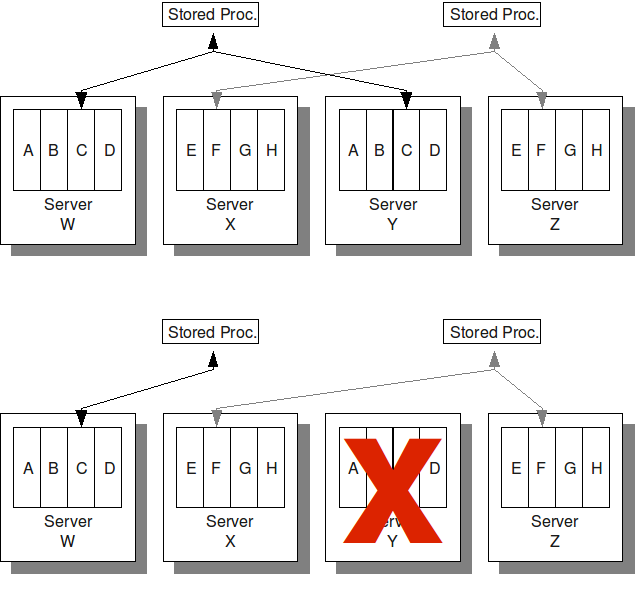
K-Safety in Action

You are visitor 01402775 — GeezerVison does not store the pages you look up.
Best viewed with Netscape Navigator 4.7 or Internet Explorer 6 at 800×600. No cookies required.