GV

GeezerVison

The World Wide Web, restored to 800 pixels of glory.

Home|About|Gaming cabinet|Archives|How it works|Starter sites

On this site

  • V11 Documentation
  • Privacy Statement
  • License Agreement
  • Contact Us

This view

  • Original page
  • New address

GeezerVison is showing docs.voltdb.com — Chapter 11. Database Replication

  • Volt Active Data
  • Developer Hub
  • Books
    • VoltDB Tutorial
    • Using VoltDB
    • VoltDB Guide to Performance and Customization
    • VoltDB Administrator's Guide
    • Volt Kubernetes Administrator's Guide
    • VoltDB Quick Reference
  • Current docs ▶
  • VoltDB V11
    • VoltDB V16
    • VoltDB V15.3 LTS
    • VoltDB V14.3 LTS
    • VoltDB V13.3 LTS
    • VoltDB V12.3 LTS
    • VoltDB V11.4
    • VoltDB V10.2
    • VoltDB V9.3
Chapter 11. Database Replication

Using VoltDB

  • About This Book
  • 1. Overview▶
    • 1.1. What is VoltDB?
    • 1.2. Who Should Use VoltDB
    • 1.3. How VoltDB Works
      • 1.3.1. Partitioning
      • 1.3.2. Serialized (Single-Threaded) Processing
      • 1.3.3. Partitioned vs. Replicated Tables
      • 1.3.4. Ease of Scaling to Meet Application Needs
    • 1.4. Working with VoltDB Effectively
  • 2. Installing VoltDB▶
    • 2.1. Operating System and Software Requirements
    • 2.2. Installing VoltDB
      • 2.2.1. Upgrading From Older Versions
      • 2.2.2. Building a New VoltDB Distribution Kit
    • 2.3. Setting Up Your Environment
    • 2.4. What is Included in the VoltDB Distribution
    • 2.5. VoltDB in Action: Running the Sample Applications
  • 3. Starting the Database▶
    • 3.1. Initializing and Starting a VoltDB Database
    • 3.2. Initializing and Starting a VoltDB Database on a Cluster
    • 3.3. Stopping a VoltDB Database
    • 3.4. Saving the Data
    • 3.5. Restarting a VoltDB Database
    • 3.6. Updating Nodes on the Cluster
    • 3.7. Defining the Cluster Configuration
      • 3.7.1. Determining How Many Sites per Host
      • 3.7.2. Configuring Paths for Runtime Features
      • 3.7.3. Verifying your Hardware Configuration
  • 4. Designing the Database Schema▶
    • 4.1. How to Enter DDL Statements
    • 4.2. Creating Tables and Primary Keys
    • 4.3. Analyzing Data Volume and Workload
    • 4.4. Partitioning Database Tables
      • 4.4.1. Choosing a Column on which to Partition Table Rows
      • 4.4.2. Specifying Partitioned Tables
      • 4.4.3. Design Rules for Partitioning Tables
    • 4.5. Replicating Database Tables
      • 4.5.1. Choosing Replicated Tables
      • 4.5.2. Specifying Replicated Tables
    • 4.6. Modifying the Schema
      • 4.6.1. Effects of Schema Changes on Data and Clients
      • 4.6.2. Viewing the Schema
      • 4.6.3. Modifying Tables
      • 4.6.4. Adding and Dropping Indexes
      • 4.6.5. Modifying Partitioning for Tables and Stored Procedures
  • 5. Designing Stored Procedures to Access the Database▶
    • 5.1. How Stored Procedures Work
      • 5.1.1. VoltDB Stored Procedures are Transactional
      • 5.1.2. VoltDB Stored Procedures are Deterministic
    • 5.2. The Anatomy of a VoltDB Stored Procedure
      • 5.2.1. The Structure of the Stored Procedure
      • 5.2.2. Passing Arguments to a Stored Procedure
      • 5.2.3. Creating and Executing SQL Queries in Stored Procedures
      • 5.2.4. Interpreting the Results of SQL Queries
      • 5.2.5. Returning Results from a Stored Procedure
      • 5.2.6. Rolling Back a Transaction
    • 5.3. Installing Stored Procedures into the Database
      • 5.3.1. Compiling, Packaging, and Loading Stored Procedures
      • 5.3.2. Declaring Stored Procedures in the Schema
      • 5.3.3. Partitioning Stored Procedures in the Schema
  • 6. Designing VoltDB Client Applications▶
    • 6.1. Connecting to the VoltDB Database
      • 6.1.1. Connecting to Multiple Servers
      • 6.1.2. Using the Auto-Connecting Client
    • 6.2. Invoking Stored Procedures
    • 6.3. Invoking Stored Procedures Asynchronously
    • 6.4. Closing the Connection
    • 6.5. Handling Errors
      • 6.5.1. Interpreting Execution Errors
      • 6.5.2. Handling Timeouts
      • 6.5.3. Writing a Status Listener to Interpret Other Errors
    • 6.6. Compiling and Running Client Applications
      • 6.6.1. Starting the Client Application
      • 6.6.2. Running Clients from Outside the Cluster
  • 7. Simplifying Application Development▶
    • 7.1. Using Default Procedures
    • 7.2. Shortcut for Defining Simple Stored Procedures
    • 7.3. Verifying Expected Query Results
    • 7.4. Scheduling Stored Procedures as Tasks
    • 7.5. Directed Procedures: Distributing Transactions to Every Partition
  • 8. Using VoltDB with Other Programming Languages▶
    • 8.1. C++ Client Interface
      • 8.1.1. Writing VoltDB Client Applications in C++
      • 8.1.2. Creating a Connection to the Database Cluster
      • 8.1.3. Invoking Stored Procedures
      • 8.1.4. Invoking Stored Procedures Asynchronously
      • 8.1.5. Interpreting the Results
    • 8.2. JSON HTTP Interface
      • 8.2.1. How the JSON Interface Works
      • 8.2.2. Using the JSON Interface from Client Applications
      • 8.2.3. How Parameters Are Interpreted
      • 8.2.4. Interpreting the JSON Results
      • 8.2.5. Error Handling using the JSON Interface
    • 8.3. JDBC Interface
      • 8.3.1. Using JDBC to Connect to a VoltDB Database
      • 8.3.2. Using JDBC to Query a VoltDB Database
  • 9. Using VoltDB in a Cluster▶
    • 9.1. Starting a Database Cluster
    • 9.2. Updating the Cluster Configuration
    • 9.3. Elastic Scaling to Resize the Cluster
      • 9.3.1. Adding Nodes with Elastic Scaling
      • 9.3.2. Removing Nodes with Elastic Scaling
      • 9.3.3. Configuring How VoltDB Rebalances Nodes During Elastic Scaling
  • 10. Availability▶
    • 10.1. How K-Safety Works
    • 10.2. Enabling K-Safety
      • 10.2.1. What Happens When You Enable K-Safety
      • 10.2.2. Calculating the Appropriate Number of Nodes for K-Safety
    • 10.3. Recovering from System Failures
      • 10.3.1. What Happens When a Node Rejoins the Cluster
      • 10.3.2. Where and When Recovery May Fail
    • 10.4. Avoiding Network Partitions
      • 10.4.1. K-Safety and Network Partitions
      • 10.4.2. Using Network Fault Protection
  • 11. Database Replication▶
    • 11.1. How Database Replication Works
      • 11.1.1. Starting Database Replication
      • 11.1.2. Database Replication, Availability, and Disaster Recovery
      • 11.1.3. Database Replication and Completeness
    • 11.2. Using Passive Database Replication
      • 11.2.1. Specifying the DR Tables in the Schema
      • 11.2.2. Configuring the Clusters
      • 11.2.3. Starting the Clusters
      • 11.2.4. Loading the Schema and Starting Replication
      • 11.2.5. Updating the Schema During Replication
      • 11.2.6. Stopping Replication
      • 11.2.7. Database Replication and Read-only Clients
    • 11.3. Using Cross Datacenter Replication
      • 11.3.1. Designing Your Schema for Active Replication
      • 11.3.2. Configuring the Database Clusters
      • 11.3.3. Starting the Database Clusters
      • 11.3.4. Loading a Matching Schema and Starting Replication
      • 11.3.5. Updating the Schema During Active Replication
      • 11.3.6. Stopping Replication
      • 11.3.7. Example XDCR Configurations
      • 11.3.8. Understanding Conflict Resolution
    • 11.4. Monitoring Database Replication
  • 12. Security▶
    • 12.1. How Security Works in VoltDB
    • 12.2. Enabling Authentication and Authorization
    • 12.3. Defining Users and Roles
    • 12.4. Assigning Access to Stored Procedures
    • 12.5. Assigning Access by Function (System Procedures, SQL Queries, and Default Procedures)
    • 12.6. Using Built-in Roles
    • 12.7. Encrypting VoltDB Communication Using TLS/SSL
      • 12.7.1. Configuring TLS/SSL on the VoltDB Server
      • 12.7.2. Choosing What Ports to Encrypt with TLS/SSL
      • 12.7.3. Using the VoltDB Command Line Utilities with TLS/SSL
      • 12.7.4. Implementing TLS/SSL in the Java Client Applications
      • 12.7.5. Configuring Database Replication (DR) With TLS/SSL
    • 12.8. Integrating Kerberos Security with VoltDB
      • 12.8.1. Installing and Configuring Kerberos
      • 12.8.2. Installing and Configuring the Java Security Extensions
      • 12.8.3. Configuring the VoltDB Servers and Clients
      • 12.8.4. Accessing the Database from the Command Line and the Web
  • 13. Saving & Restoring a VoltDB Database▶
    • 13.1. Performing a Manual Save and Restore of a VoltDB Cluster
      • 13.1.1. How to Save the Contents of a VoltDB Database
      • 13.1.2. How to Restore the Contents of a VoltDB Database Manually
      • 13.1.3. Changing the Cluster Configuration Using Save and Restore
    • 13.2. Scheduling Automated Snapshots
    • 13.3. Managing Snapshots
    • 13.4. Special Notes Concerning Save and Restore
  • 14. Command Logging and Recovery▶
    • 14.1. How Command Logging Works
    • 14.2. Controlling Command Logging
    • 14.3. Configuring Command Logging for Optimal Performance
      • 14.3.1. Log Size
      • 14.3.2. Log Frequency
      • 14.3.3. Synchronous vs. Asynchronous Logging
      • 14.3.4. Hardware Considerations
  • 15. Streaming Data: Import, Export, and Migration▶
    • 15.1. How Data Streaming Works in VoltDB
      • 15.1.1. Understanding Import
      • 15.1.2. Understanding Export
      • 15.1.3. Understanding Migration
      • 15.1.4. Understanding Topics
    • 15.2. The Business Case for Streaming Data
      • 15.2.1. Extract, Transform, Load (ETL)
      • 15.2.2. Change Data Capture
      • 15.2.3. Streaming Data Validation
      • 15.2.4. Caching
      • 15.2.5. Archiving
    • 15.3. VoltDB Export Connectors
      • 15.3.1. How Export Works
      • 15.3.2. The File Export Connector
      • 15.3.3. The HTTP Export Connector
      • 15.3.4. The JDBC Export Connector
      • 15.3.5. The Kafka Export Connector
      • 15.3.6. The Elasticsearch Export Connector
    • 15.4. VoltDB Import Connectors
      • 15.4.1. Bulk Loading Data Using VoltDB Standalone Utilities
      • 15.4.2. Streaming Import Using Built-in Import Features
      • 15.4.3. The Kafka Importer
      • 15.4.4. The Kinesis Importer
    • 15.5. VoltDB Import Formatters
    • 15.6. VoltDB Topics
      • 15.6.1. Types of VoltDB Topics
      • 15.6.2. Declaring VoltDB Topics
      • 15.6.3. Configuring and Managing Topics
      • 15.6.4. Configuring the Topic Server
      • 15.6.5. Calling Topics from Consumers and Producers
      • 15.6.6. Using Opaque Topics
  • A. Supported SQL DDL Statements▶
    • ALTER STREAM
    • ALTER TABLE
    • ALTER TASK
    • ALTER VIEW
    • CREATE AGGREGATE FUNCTION
    • CREATE FUNCTION
    • CREATE INDEX
    • CREATE PROCEDURE AS
    • CREATE PROCEDURE FROM CLASS
    • CREATE ROLE
    • CREATE STREAM
    • CREATE TABLE
    • CREATE TASK
    • CREATE VIEW
    • DR TABLE
    • DROP FUNCTION
    • DROP INDEX
    • DROP PROCEDURE
    • DROP ROLE
    • DROP STREAM
    • DROP TABLE
    • DROP TASK
    • DROP VIEW
    • PARTITION TABLE
  • B. Supported SQL Statements▶
    • DELETE
    • INSERT
    • MIGRATE
    • SELECT
    • TRUNCATE TABLE
    • UPDATE
    • UPSERT
  • C. SQL Functions▶
    • ABS()
    • APPROX_COUNT_DISTINCT()
    • AREA()
    • ARRAY_ELEMENT()
    • ARRAY_LENGTH()
    • ASTEXT()
    • AVG()
    • BIN()
    • BIT_SHIFT_LEFT()
    • BIT_SHIFT_RIGHT()
    • BITAND()
    • BITNOT()
    • BITOR()
    • BITXOR()
    • CAST()
    • CEILING()
    • CENTROID()
    • CHAR()
    • CHAR_LENGTH()
    • COALESCE()
    • CONCAT()
    • CONTAINS()
    • COS()
    • COT()
    • COUNT()
    • CSC()
    • CURRENT_TIMESTAMP()
    • DATEADD()
    • DATEDIFF()
    • DAY(), DAYOFMONTH()
    • DAYOFWEEK()
    • DAYOFYEAR()
    • DECODE()
    • DEGREES()
    • DISTANCE()
    • DWITHIN()
    • EXP()
    • EXTRACT()
    • FIELD()
    • FLOOR()
    • FORMAT_CURRENCY()
    • FORMAT_TIMESTAMP()
    • FROM_UNIXTIME()
    • HEX()
    • HOUR()
    • INET6_ATON()
    • INET6_NTOA()
    • INET_ATON()
    • INET_NTOA()
    • ISINVALIDREASON()
    • ISVALID()
    • IS_VALID_TIMESTAMP()
    • LATITUDE()
    • LEFT()
    • LN(), LOG()
    • LOG10()
    • LONGITUDE()
    • LOWER()
    • MAKEVALIDPOLYGON()
    • MAX()
    • MAX_VALID_TIMESTAMP()
    • MIGRATING()
    • MIN()
    • MIN_VALID_TIMESTAMP()
    • MINUTE()
    • MOD()
    • MONTH()
    • NOW()
    • NUMINTERIORRINGS()
    • NUMPOINTS()
    • OCTET_LENGTH()
    • OVERLAY()
    • PI()
    • POINTFROMTEXT()
    • POLYGONFROMTEXT()
    • POSITION()
    • POWER()
    • QUARTER()
    • RADIANS()
    • REGEXP_POSITION()
    • REPEAT()
    • REPLACE()
    • RIGHT()
    • ROUND()
    • SEC()
    • SECOND()
    • SET_FIELD()
    • SIN()
    • SINCE_EPOCH()
    • SPACE()
    • SQRT()
    • STR()
    • SUBSTRING()
    • SUM()
    • TAN()
    • TIME_WINDOW()
    • TO_TIMESTAMP()
    • TRIM()
    • TRUNCATE()
    • UPPER()
    • VALIDPOLYGONFROMTEXT()
    • WEEK(), WEEKOFYEAR()
    • WEEKDAY()
    • YEAR()
  • D. VoltDB CLI Commands▶
    • csvloader
    • jdbcloader
    • kafkaloader
    • sqlcmd
    • voltadmin
    • voltdb
  • E. Configuration File (deployment.xml)▶
    • E.1. Understanding XML Syntax
    • E.2. The Structure of the Configuration File
  • F. VoltDB Datatype Compatibility▶
    • F.1. Java and VoltDB Datatype Compatibility
  • G. System Procedures▶
    • @AdHoc
    • @Explain
    • @ExplainProc
    • @ExplainView
    • @GetPartitionKeys
    • @Note
    • @Pause
    • @Ping
    • @Promote
    • @QueryStats
    • @Quiesce
    • @Resume
    • @Shutdown
    • @SnapshotDelete
    • @SnapshotRestore
    • @SnapshotSave
    • @SnapshotScan
    • @Statistics
    • @StopNode
    • @SwapTables
    • @SystemCatalog
    • @SystemInformation
    • @UpdateApplicationCatalog
    • @UpdateClasses
    • @UpdateLogging

Chapter 11. Database Replication

There are times when it is useful to create multiple copies of a database. Not just a snapshot of a moment in time, but live, constantly updated copies.

K-safety maintains redundant copies of partitions within a single VoltDB database, which helps protect the database cluster against individual node failure. Database replication also creates a copy. However, database replication creates and maintains copies in separate, often remote, databases.

VoltDB supports two forms of database replication:

  • One-way (Passive)

  • Two-way (Cross Datacenter)

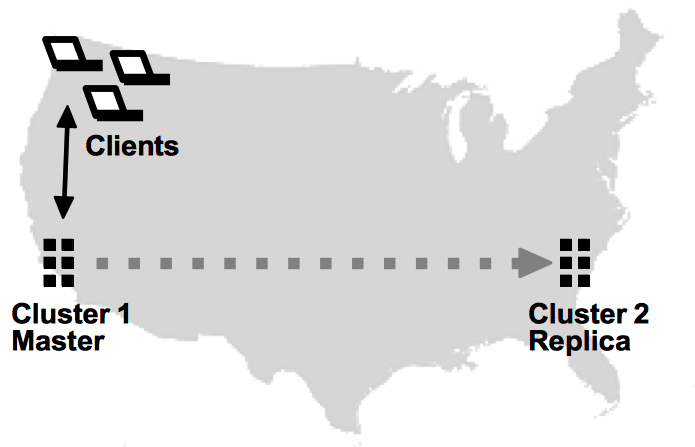
Passive replication copies the contents from one database, known as the master database, to the other, known as the replica. In passive replication, replication occurs in one direction: from the master to the replica. Clients can connect to the master database and perform all normal database operations, including INSERT, UPDATE, and DELETE statements. As shown in Figure 11.1, “Passive Database Replication” changes are copied from the master to the replica. To ensure consistency between the two databases, the replica is started as a read-only database, where only transactions replicated from the master can modify the database contents.

Figure 11.1. Passive Database Replication
Passive Database Replication

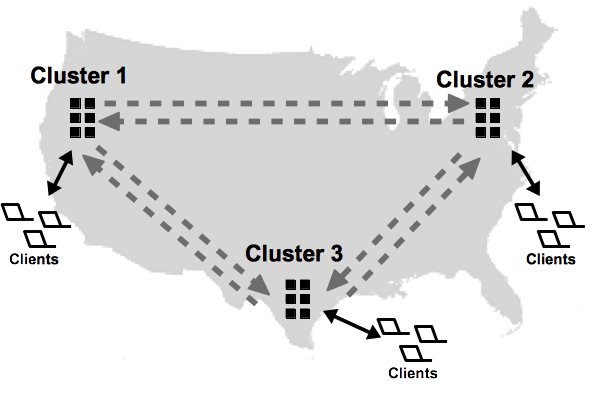
Cross Datacenter Replication (XDCR), or active replication, copies changes in both directions. XDCR can be set up on multiple clusters (not just two). Client applications can then perform read/write operations on any of the participating clusters and changes in one database are then copied and applied to all the other databases. Figure 11.2, “Cross Datacenter Replication” shows how XDCR can support client applications attached to each database instance.

Figure 11.2. Cross Datacenter Replication
Cross Datacenter Replication

Database replication (DR) provides two key business advantages. The first is protecting your business data against catastrophic events, such as power outages or natural disasters, which could take down an entire cluster. This is often referred to as disaster recovery. Because the clusters can be in different geographic locations, both passive DR and XDCR allow other clusters to continue unaffected when one becomes inoperable. Because the replica is available for read-only transactions, passive DR also allows you to offload read-only workloads, such as reporting, from the main database instance.

The second business issue that DR addresses is the need to maintain separate, active copies of the database in separate locations. For example, XDCR allows you to maintain copies of a product inventory database at two or more separate warehouses, close to the applications that need the data. This feature makes it possible to support massive numbers of clients that could not be supported by a single database instance or might result in unacceptable latency when the database and the users are geographically separated. The databases can even reside on separate continents.

It is important to note, however, that database replication is not instantaneous. The transactions are committed locally, then copied to the other database or databases. So when using XDCR to maintain multiple active clusters you must be careful to design your applications to avoid possible conflicts when transactions change the same record in two databases at approximately the same time. See Section 11.3.8, “Understanding Conflict Resolution” for more information about conflict resolution.

The remainder of this chapter discusses the following topics:

  • Section 11.1, “How Database Replication Works”

  • Section 11.2, “Using Passive Database Replication”

  • Section 11.3, “Using Cross Datacenter Replication”

  • Section 11.4, “Monitoring Database Replication”

11.1. How Database Replication Works

Database replication (DR) involves duplicating the contents of selected tables between two database clusters. In passive DR, the contents are copied in one direction: from master to replica. In active or cross datacenter DR, changes are copied in both directions.

You identify which tables to replicate in the schema, by specifying the table name in a DR TABLE statement. For example, to replicate all tables in the voter sample application, you would execute three DR TABLE statements when defining the database schema:

DR TABLE contestants;
DR TABLE votes;
DR TABLE area_code_state;

11.1.1. Starting Database Replication

You enable DR by including the <dr> tag in the configuration files when initializing the database. The <dr> element identifies three pieces of information:

  • A unique cluster ID for each database. The ID is required and can be any number between 0 and 127, as long as each cluster has a different ID.

  • The role the cluster plays, whether master, replica, or xdcr. The default is master.

  • For the replica and xdcr roles, a connection source listing the host name or IP address of one or more nodes from the other databases.

For example:

<dr id="2" role="replica">
  <connection source="serverA1,serverA2" />
</dr>

Each cluster must have a unique ID. For passive DR, only the replica needs a <connection> element, since replication occurs in only one direction.

For cross datacenter replication (XDCR), all clusters must include the <connection> element pointing to at each one other cluster. If you are establishing an XDCR network with multiple clusters, the <connection> tag can specify hosts from one or more of the other clusters. The participating clusters will coordinate establishing the correct connections, even if the <connection> element does not list them all.

Note that for XDCR, you must specify the attribute role="xdcr" before starting each cluster. You cannot mix active and passive DR in the same database group.

For passive DR, you must start the replica database with the role="replica" attribute to ensure the replica is in read-only mode. Once the clusters are configured properly and the schema of the DR tables match in the databases, replication starts.

The actual replication process is performed in multiple parallel streams; each unique partition on one cluster sends a binary log of completed transactions to the other clusters. Replicating by partition has two key advantages:

  • The process is faster — Because the replication process uses a binary log of the results of the transaction (rather than the transaction itself), the receiving cluster (or consumer) does not need to reprocess the transaction; it simply applies the results. Also, since each partition replicates autonomously, multiple streams of data are processed in parallel, significantly increasing throughout.

  • The process is more durable — In a K-safe environment, if a server fails on a DR cluster, individual partition streams can be redirected to other nodes or a stream can wait for the server to rejoin — without interfering with the replication of the other partitions.

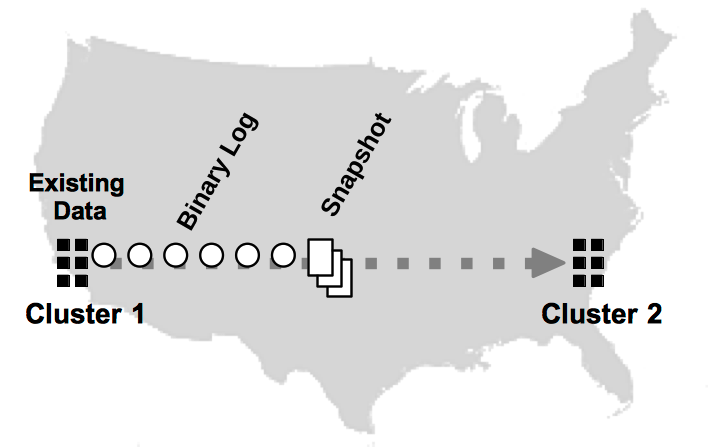
If data already exists in one of the clusters before database replication starts for the first time, that database sends a snapshot of the existing data to the other, as shown in Figure 11.3, “Replicating an Existing Database”. Once the snapshot is received and applied (and the two clusters are in sync), the partitions start sending binary logs of transaction results to keep the clusters synchronized.

Figure 11.3. Replicating an Existing Database
Replicating an Existing Database


For passive DR, only the master database can have existing data before starting replication for the first time. The replica's DR tables must be empty. For XDCR, the first database that is started can have data in the DR tables. If other clusters contain data, replication cannot start. Once DR has started, the databases can stop and recover using command logging without having to restart DR from the beginning.

11.1.2. Database Replication, Availability, and Disaster Recovery

Once replication begins, the DR process is designed to withstand normal failures and operational downtime. When using K-safety, if a node fails on any cluster, you can rejoin the node (or a replacement) using the voltdb start command without breaking replication. Similarly, if a cluster shuts down, you can use voltdb start to restart the database and restart replication where it left off. The ability to restart DR assumes you are using command logging. Specifically, synchronous command logging is recommended to ensure complete durability.

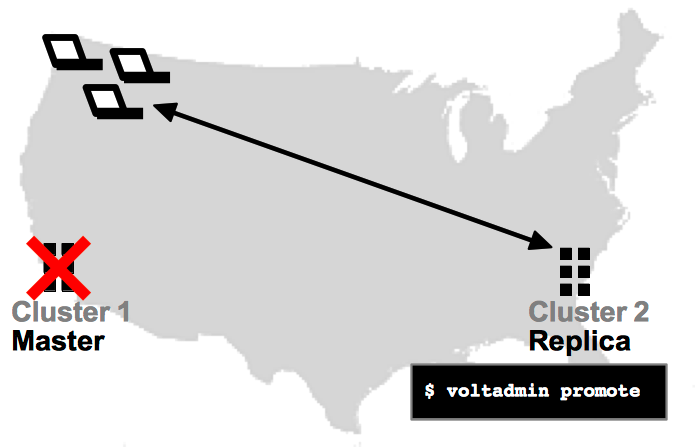
If unforeseen events occur that make a database unreachable, database replication lets you replace the missing database with its copy. This process is known as disaster recovery. For cross datacenter replication (XDCR), you simply need to redirect your client applications to the remaining cluster(s). For passive DR, there is an extra step. To replace the master database with the replica, you must issue the voltadmin promote command on the replica to switch it from read-only mode to a fully operational database.

Figure 11.4. Promoting the Replica
Promoting the Replica

See Section 11.2.6.3, “Promoting the Replica When the Master Becomes Unavailable” for more information on promoting the replica database.

11.1.3. Database Replication and Completeness

It is important to note that, unlike K-safety where multiple copies of each partition are updated simultaneously, database replication involves shipping the results of completed transactions from one database to another. Because replication happens after the fact, there is no guarantee that the contents of the clusters are identical at any given point in time. Instead, the receiving database (or consumer) "catches up" with the sending database (or producer) after the binary logs are received and applied by each partition.

Also, because DR occurs on a per partition basis, changes to partitions may not occur in the same order on the consumer, since one partition may replicate faster than another. Normally this is not a problem because the results of all transactions are atomic in the binary log. However, if the producer cluster crashes, there is no guarantee that the consumer has managed to retrieve all the logs that were queued. Therefore, it is possible that some transactions that completed on the producer are not reflected on the consumer.

Fortunately, using command logging, when you restart the failed cluster, any unacknowledged transactions will be replayed from the failed cluster's disk-based DR cache, allowing the clusters to recover and resume DR where they left off. However, if the failed cluster does not recover, you will need to decide how to proceed. You can choose to restart DR from scratch or, if you are using passive DR, you can promote the replica to replace the master.

To ensure effective recovery, the use of synchronous command logging is recommended for DR. Synchronous command logging guarantees that all transactions are recorded in the command log and no transactions are lost. If you use asynchronous command logging, there is a possibility that a binary log is applied but not captured by the command log before the cluster crashes. Then when the database recovers, the clusters will not agree on the last acknowledged DR transaction, and DR will not be able to resume.

The decision whether to promote the replica or wait for the master to return (and hopefully recover all transactions from the command log) is not an easy one. Promoting the replica and using it to replace the original master may involve losing one or more transactions per partition. However, if the master cannot be recovered or cannot not be recovered quickly, waiting for the master to return can result in significant business loss or interruption.

Your own business requirements and the specific situation that caused the outage will determine which choice to make — whether to wait for the failed cluster to recover or to continue operations on the remaining cluster only. The important point is that database replication makes the choice possible and significantly eases the dangers of unforeseen events.

You are visitor 01402775 — GeezerVison does not store the pages you look up.
Best viewed with Netscape Navigator 4.7 or Internet Explorer 6 at 800×600. No cookies required.