GeezerVisonThe World Wide Web, restored to 800 pixels of glory. | ||||||||
| Home|About|Gaming cabinet|Archives|How it works|Starter sites | ||||||||
GeezerVison is showing docs.voltdb.com — 11.5. Tuning Active(N) to Meet Your Application Needs Using VoltDB11.5. Tuning Active(N) to Meet Your Application NeedsActive(N) database replication is designed to accommodate different workloads and will provide outstanding performance for most active database applications. However, the default settings may not meet the needs of all business use cases. There are a number of configuration options available to help you optimize replication to meet your specific needs. Before adjusting the configuration, you need to understand how the DR consumers and producers interoperate so you can understand what effect each option has on the flow of data between the clusters. The following sections explain the XDCR workflow process and how to detect and resolve possible bottlenecks in runtime performance. 11.5.1. The XDCR WorkflowIn an Active(N) environment, each unique partition within the cluster acts as both a DR producer and consumer. As a producer, the cluster sends the results of any transactions that modify the database content to the participating clusters. At the same time, as a consumer the cluster receives transaction results from the other clusters and applies them to its copy of the database. The producer and consumer operations are performed on a per partition basis, as shown in Figure 11.7, “The XDCR Producer/Consumer Workflow”. Figure 11.7. The XDCR Producer/Consumer Workflow 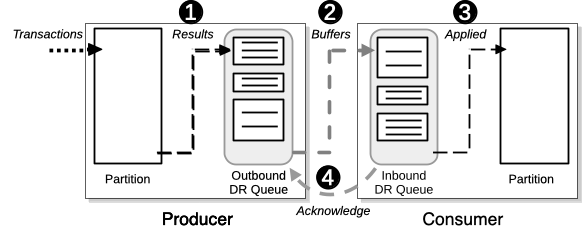 The workflow consists of four main steps:
The workflow is optimized to allow each component to operate independently, maximizing efficiency:
11.5.2. Detecting and Correcting Bottlenecks in the XDCR WorkflowUnder normal conditions, there will be occasional buffers discarded by the consumer and some sent multiple times from the producer. This is not a problem because the workflow accommodates the exceptions and allows each cluster to perform its functions at maximum speed. The producer periodically sending too many buffers or duplicate buffers does not result in any noticeable performance impact. However, if there are continual or increasingly frequent buffers rejected or resent, the condition points to bottlenecks in the workflow that can result in delays in data replication. Volt provides metrics that help you detect and correct these situations. In particular, there are three statistics that help detect issues with XDCR:
These statistics are available from the @Statistics system procedure or from the corresponding Prometheus metrics, as described in the Volt Administrator's Guide. By tracking these statistics over time, you can detect potential issues in the replication workflow, as described in the following sections. 11.5.2.1. Not Enough Space in the DR Consumer QueueIf the number of ignored buffers (IGNORED_BUFFERS) is high or steadily increasing, while the number of duplicate buffers remains low, it means that the maximum queue size for the consumer is not large enough to hold the amount of buffered DR transactions being sent by the producer(s). By increasing the maximum size you can provide the space needed to hold the volume of incoming buffers. You specify the size in bytes[3] as part of the connection configuration, using the consumerlimit. deployment:
dr:
id: 1
role: xdcr
connection:
source: chicago,boston
consumerlimit:
maxsize: 104857600Of course, increasing the queue size can reduce the number of ignored buffers, but it also increases memory utilization across the cluster. By specifying the limit in bytes you can estimate how much of an increase that will be, since the total memory required for the consumer queues is approximately the size of the queue limit in bytes times the number of unique partitions on the cluster. The calculation is not exact because if there is any room in the queue when the consumer receives buffers from the producer, at least one buffer will be placed on the queue, even if that buffer extends the queue beyond its configured size. So be sure to allow some additional space for this overflow. You can increase the consumer queue size on a running cluster using the voltadmin update or set command. After making the adjustment, be sure to measure the number of ignored buffers again to verify that the change has the desired effect and the count of ignored buffers has gone down. 11.5.2.2. Unbalanced Workload or ServersIf the duplicate buffer count (DUPLICATE_BUFFERS) is high, and especially if it is increasing over time, it means that the consumer cluster is not able to keep up processing the incoming buffers at the same rate they are being generated. There are several possible causes for this situation and the resolution depends on the cause.
11.5.2.3. Too Much Latency Between ClustersThe DR_ROUNDTRIPTIME_* columns returned by the @Statistics DRPRODUCER selector tell you how long it is taking for transactions to be sent from the producer to the consumer, be applied, and then acknowledged. If the consumer queue is too small or other activity on the server is delaying the processing of buffers in the DR consumer queue, this latency will be reflected in the round trip times reported by @Statistics, as well as in the IGNORED_BUFFERS and DUPLICATE_BUFFERS counts reported by the @Statistics DRCONSUMER selector. However, if the consumer buffer is not overflowing and DR transaction results are being applied efficiently but the latency reported by the round trip time is still high, there are two other possible issues that need to be addressed. The first is to investigate whether the latency is due to slow or erratic network performance. You can use standard networking utilities such as ping to evaluate the network performance between the clusters. The other situation that can result in unexpected latency in DR processing is if the volume of write transactions is so low or erratic, there is not enough traffic to actually fill the outbound buffers in a timely fashion. In this case the producer waits for additional transaction results to fill the buffer before adding it to the outbound queue. Eventually, even if no additional transactions arrive, the producer will submit whatever transaction results are waiting into a buffer and add them to the queue. However, the period between when a transaction is executed and when the buffer is finally submitted will result in increased latency. For workloads of this nature, there is a setting that helps reduce the latency between transaction execution and adding the results to the outbound queue and this is the DR flush interval. The flush interval specifies a timeout period where, even if there are not enough results to fill a buffer, the
results are submitted to the queue. The flush interval defaults to one second, but if you have an low or erratic
workload you can specify a shorter flush interval using the
deployment:
  systemsettings:
    flushinterval:
      minimum: 400
      dr:
        interval: 500
[3] It is also possible to specify the consumer queue size in number of buffers. However, that is not recommended since buffers can vary dramatically in size. Specifying the queue size in bytes rather than buffers gives you control over how much memory may be consumed at run time. | ||||||||
| You are visitor 01402775 — GeezerVison does not store the pages you look up. Best viewed with Netscape Navigator 4.7 or Internet Explorer 6 at 800×600. No cookies required. |


