GV

GeezerVison

The World Wide Web, restored to 800 pixels of glory.

Home|About|Gaming cabinet|Archives|How it works|Starter sites

On this site

  • V14 Documentation
  • Privacy Statement
  • License Agreement
  • Contact Us

This view

  • Original page
  • New address

GeezerVison is showing docs.voltdb.com — 10.4. Avoiding Network Partitions

  • Volt Active Data
  • Developer Hub
  • Books
    • VoltDB Tutorial
    • Using VoltDB
    • VoltDB Guide to Performance and Customization
    • VoltDB Administrator's Guide
    • Volt Kubernetes Administrator's Guide
    • VoltDB Quick Reference
  • Current docs ▶
  • VoltDB V14
    • VoltDB V16
    • VoltDB V15.3 LTS
    • VoltDB V14.3 LTS
    • VoltDB V13.3 LTS
    • VoltDB V12.3 LTS
    • VoltDB V11.4
    • VoltDB V10.2
    • VoltDB V9.3
10.4. Avoiding Network Partitions

Using VoltDB

  • About This Book
  • 1. Overview▶
    • 1.1. What is VoltDB?
    • 1.2. Who Should Use VoltDB
    • 1.3. How VoltDB Works
      • 1.3.1. Partitioning
      • 1.3.2. Serialized (Single-Threaded) Processing
      • 1.3.3. Partitioned vs. Replicated Tables
      • 1.3.4. Ease of Scaling to Meet Application Needs
    • 1.4. Working with VoltDB Effectively
  • 2. Installing VoltDB▶
    • 2.1. Operating System and Software Requirements
    • 2.2. Installing VoltDB
      • 2.2.1. Upgrading From Older Versions
    • 2.3. Setting Up Your Environment
    • 2.4. What is Included in the VoltDB Distribution
  • 3. Starting the Database▶
    • 3.1. Initializing and Starting a VoltDB Database
    • 3.2. Initializing and Starting a VoltDB Database on a Cluster
    • 3.3. Stopping a VoltDB Database
    • 3.4. Saving the Data
    • 3.5. Restarting a VoltDB Database
    • 3.6. Updating Nodes on the Cluster
    • 3.7. Defining the Cluster Configuration
      • 3.7.1. Determining How Many Sites per Host
      • 3.7.2. Configuring Paths for Runtime Features
      • 3.7.3. Verifying your Hardware Configuration
  • 4. Designing the Database Schema▶
    • 4.1. How to Enter DDL Statements
    • 4.2. Creating Tables and Primary Keys
    • 4.3. Analyzing Data Volume and Workload
    • 4.4. Partitioning Database Tables
      • 4.4.1. Choosing a Column on which to Partition Table Rows
      • 4.4.2. Specifying Partitioned Tables
      • 4.4.3. Design Rules for Partitioning Tables
    • 4.5. Replicating Database Tables
      • 4.5.1. Choosing Replicated Tables
      • 4.5.2. Specifying Replicated Tables
    • 4.6. Modifying the Schema
      • 4.6.1. Effects of Schema Changes on Data and Clients
      • 4.6.2. Viewing the Schema
      • 4.6.3. Modifying Tables
      • 4.6.4. Adding and Dropping Indexes
      • 4.6.5. Modifying Partitioning for Tables and Stored Procedures
  • 5. Designing Stored Procedures to Access the Database▶
    • 5.1. How Stored Procedures Work
      • 5.1.1. VoltDB Stored Procedures are Transactional
      • 5.1.2. VoltDB Stored Procedures are Deterministic
    • 5.2. The Anatomy of a VoltDB Stored Procedure
      • 5.2.1. The Structure of the Stored Procedure
      • 5.2.2. Passing Arguments to a Stored Procedure
      • 5.2.3. Creating and Executing SQL Queries in Stored Procedures
      • 5.2.4. Interpreting the Results of SQL Queries
      • 5.2.5. Returning Results from a Stored Procedure
      • 5.2.6. Rolling Back a Transaction
    • 5.3. Installing Stored Procedures into the Database
      • 5.3.1. Compiling, Packaging, and Loading Stored Procedures
      • 5.3.2. Declaring Stored Procedures in the Schema
      • 5.3.3. Partitioning Stored Procedures in the Schema
  • 6. Designing VoltDB Client Applications▶
    • 6.1. Connecting to the VoltDB Database
      • 6.1.1. How Connections To The Cluster Work
      • 6.1.2. Specifying Multiple Servers
    • 6.2. Invoking Stored Procedures
    • 6.3. Invoking Stored Procedures Asynchronously
    • 6.4. Defining Options on a Per-Call Basis
    • 6.5. Closing the Connection
    • 6.6. Handling Errors
      • 6.6.1. Interpreting Execution Errors
      • 6.6.2. Handling Timeouts
      • 6.6.3. Writing Handlers to Interpret Other Errors
    • 6.7. Compiling and Running Client Applications
      • 6.7.1. Starting the Client Application
      • 6.7.2. Running Clients from Outside the Cluster
  • 7. Simplifying Application Development▶
    • 7.1. Using Default Procedures
    • 7.2. Shortcut for Defining Simple Stored Procedures
    • 7.3. Verifying Expected Query Results
    • 7.4. Scheduling Stored Procedures as Tasks
    • 7.5. Directed Procedures: Distributing Transactions to Every Partition
  • 8. Using VoltDB with Other Programming Languages▶
    • 8.1. C++ Client Interface
      • 8.1.1. Writing VoltDB Client Applications in C++
      • 8.1.2. Creating a Connection to the Database Cluster
      • 8.1.3. Invoking Stored Procedures
      • 8.1.4. Invoking Stored Procedures Asynchronously
      • 8.1.5. Interpreting the Results
    • 8.2. JSON HTTP Interface
      • 8.2.1. How the JSON Interface Works
      • 8.2.2. Using the JSON Interface from Client Applications
      • 8.2.3. How Parameters Are Interpreted
      • 8.2.4. Interpreting the JSON Results
      • 8.2.5. Error Handling using the JSON Interface
    • 8.3. JDBC Interface
      • 8.3.1. Using JDBC to Connect to a VoltDB Database
      • 8.3.2. Using JDBC to Query a VoltDB Database
  • 9. Using VoltDB in a Cluster▶
    • 9.1. Starting a Database Cluster
    • 9.2. Defining the Cluster Configuration
    • 9.3. Elastic Scaling to Resize the Cluster
      • 9.3.1. Adding Nodes with Elastic Scaling
      • 9.3.2. Removing Nodes with Elastic Scaling
      • 9.3.3. Configuring How VoltDB Rebalances Nodes During Elastic Scaling
  • 10. Availability▶
    • 10.1. How K-Safety Works
    • 10.2. Enabling K-Safety
      • 10.2.1. What Happens When You Enable K-Safety
      • 10.2.2. Calculating the Appropriate Number of Nodes for K-Safety
    • 10.3. Recovering from System Failures
      • 10.3.1. What Happens When a Node Rejoins the Cluster
      • 10.3.2. Where and When Recovery May Fail
    • 10.4. Avoiding Network Partitions
      • 10.4.1. K-Safety and Network Partitions
      • 10.4.2. Network Fault Protection
  • 11. Active(N) Database Replication▶
    • 11.1. How Database Replication Works
      • 11.1.1. Starting Database Replication
      • 11.1.2. Database Replication, Availability, and Disaster Recovery
      • 11.1.3. Database Replication and Completeness
    • 11.2. Using Active(N) Cross Datacenter Replication
      • 11.2.1. Designing Your Schema for Active Replication
      • 11.2.2. Configuring the Database Clusters
      • 11.2.3. Starting the Database Clusters
      • 11.2.4. Loading a Matching Schema and Starting Replication
      • 11.2.5. Stopping Replication
      • 11.2.6. Example XDCR Configurations
      • 11.2.7. Understanding Conflict Resolution
    • 11.3. Updating the Schema During Replication
      • 11.3.1. Safely Updating the Schema While the Clusters are Paused
      • 11.3.2. Adding and Removing Tables Without Pausing
      • 11.3.3. Using Dynamic Schema Change to Add, Remove, and Modify Table Columns Without Pausing
    • 11.4. Monitoring Database Replication
    • 11.5. Tuning Active(N) to Meet Your Application Needs
      • 11.5.1. The XDCR Workflow
      • 11.5.2. Detecting and Correcting Bottlenecks in the XDCR Workflow
  • 12. Security▶
    • 12.1. How Security Works in VoltDB
    • 12.2. Enabling Authentication and Authorization
    • 12.3. Defining Users and Roles
    • 12.4. Assigning Access to Stored Procedures
    • 12.5. Assigning Access by Function (System Procedures, SQL Queries, and Default Procedures)
    • 12.6. Using Built-in Roles
    • 12.7. Encrypting VoltDB Communication Using TLS/SSL
      • 12.7.1. Creating the TLS/SSL Certificates
      • 12.7.2. Using Certificate Revocation Lists (CRLs)
      • 12.7.3. Configuring TLS/SSL on the VoltDB Server
      • 12.7.4. Configuring Mutual TLS/SSL on the Server and Clients
      • 12.7.5. Using the VoltDB Command Line Utilities with TLS/SSL
      • 12.7.6. Implementing TLS/SSL in the Java Client Applications
      • 12.7.7. Configuring Database Replication (XDCR) With TLS/SSL
      • 12.7.8. Updating TLS/SSL Certificates and Certificate Revocation Lists (CRLs)
    • 12.8. Integrating LDAP Security with VoltDB
      • 12.8.1. Configuring LDAP Security in VoltDB
      • 12.8.2. Configuring VoltDB Security in LDAP
    • 12.9. Integrating Kerberos Security with VoltDB
      • 12.9.1. Installing and Configuring Kerberos
      • 12.9.2. Installing and Configuring the Java Security Extensions
      • 12.9.3. Configuring the VoltDB Servers and Clients
      • 12.9.4. Accessing the Database from the Command Line and the Web
  • 13. Saving & Restoring a VoltDB Database▶
    • 13.1. Performing a Manual Save and Restore of a VoltDB Cluster
      • 13.1.1. How to Save the Contents of a VoltDB Database
      • 13.1.2. How to Restore the Contents of a VoltDB Database Manually
      • 13.1.3. Changing the Cluster Configuration Using Save and Restore
    • 13.2. Scheduling Automated Snapshots
    • 13.3. Tuning the Snapshot Process
    • 13.4. Managing Snapshot Files
    • 13.5. Special Notes Concerning Save and Restore
  • 14. Command Logging and Recovery▶
    • 14.1. How Command Logging Works
    • 14.2. Controlling Command Logging
    • 14.3. Configuring Command Logging for Optimal Performance
      • 14.3.1. Log Size
      • 14.3.2. Log Frequency
      • 14.3.3. Synchronous vs. Asynchronous Logging
      • 14.3.4. Hardware Considerations
  • 15. Streaming Data: Import, Export, and Migration▶
    • 15.1. How Data Streaming Works in VoltDB
      • 15.1.1. Understanding Import
      • 15.1.2. Understanding Export
      • 15.1.3. Understanding Migration
      • 15.1.4. Understanding Topics
    • 15.2. The Business Case for Streaming Data
      • 15.2.1. Extract, Transform, Load (ETL)
      • 15.2.2. Change Data Capture
      • 15.2.3. Streaming Data Validation
      • 15.2.4. Caching
      • 15.2.5. Archiving
    • 15.3. VoltDB Export Connectors
      • 15.3.1. How Export Works
      • 15.3.2. The File Export Connector
      • 15.3.3. The HTTP Export Connector
      • 15.3.4. The JDBC Export Connector
      • 15.3.5. The Kafka Export Connector
      • 15.3.6. The Elasticsearch Export Connector
    • 15.4. VoltDB Import Connectors
      • 15.4.1. Bulk Loading Data Using VoltDB Standalone Utilities
      • 15.4.2. Streaming Import Using Built-in Import Features
      • 15.4.3. The Kafka Importer
    • 15.5. VoltDB Import Formatters
    • 15.6. VoltDB Topics
      • 15.6.1. Types of VoltDB Topics
      • 15.6.2. Declaring VoltDB Topics
      • 15.6.3. Configuring and Managing Topics
      • 15.6.4. Configuring the Topic Server
      • 15.6.5. Calling Topics from Consumers and Producers
      • 15.6.6. Using Opaque Topics
  • A. Supported SQL DDL Statements▶
    • ALTER STREAM
    • ALTER TABLE
    • ALTER TASK
    • ALTER VIEW
    • CREATE AGGREGATE FUNCTION
    • CREATE FUNCTION
    • CREATE INDEX
    • CREATE PROCEDURE AS
    • CREATE PROCEDURE FROM CLASS
    • CREATE ROLE
    • CREATE STREAM
    • CREATE TABLE
    • CREATE TASK
    • CREATE VIEW
    • DR TABLE
    • DROP FUNCTION
    • DROP INDEX
    • DROP PROCEDURE
    • DROP ROLE
    • DROP STREAM
    • DROP TABLE
    • DROP TASK
    • DROP VIEW
    • PARTITION TABLE
  • B. Supported SQL Statements▶
    • DELETE
    • INSERT
    • MIGRATE
    • SELECT
    • TRUNCATE TABLE
    • UPDATE
    • UPSERT
  • C. SQL Functions▶
    • ABS()
    • APPROX_COUNT_DISTINCT()
    • AREA()
    • ARRAY_ELEMENT()
    • ARRAY_LENGTH()
    • ASTEXT()
    • AVG()
    • BIN()
    • BIT_SHIFT_LEFT()
    • BIT_SHIFT_RIGHT()
    • BITAND()
    • BITNOT()
    • BITOR()
    • BITXOR()
    • CAST()
    • CEILING()
    • CENTROID()
    • CHAR()
    • CHAR_LENGTH()
    • COALESCE()
    • CONCAT()
    • CONTAINS()
    • COS()
    • COT()
    • COUNT()
    • CSC()
    • CURRENT_TIMESTAMP()
    • DATEADD()
    • DATEDIFF()
    • DAY(), DAYOFMONTH()
    • DAYOFWEEK()
    • DAYOFYEAR()
    • DECODE()
    • DEGREES()
    • DISTANCE()
    • DWITHIN()
    • EXP()
    • EXTRACT()
    • FIELD()
    • FLOOR()
    • FORMAT()
    • FORMAT_CURRENCY()
    • FORMAT_TIMESTAMP()
    • FROM_UNIXTIME()
    • HEX()
    • HOUR()
    • INET6_ATON()
    • INET6_NTOA()
    • INET_ATON()
    • INET_NTOA()
    • ISINVALIDREASON()
    • ISVALID()
    • IS_VALID_TIMESTAMP()
    • LATITUDE()
    • LEFT()
    • LN(), LOG()
    • LOG10()
    • LONGITUDE()
    • LOWER()
    • MAKEVALIDPOLYGON()
    • MAX()
    • MAX_VALID_TIMESTAMP()
    • MIGRATING()
    • MIN()
    • MIN_VALID_TIMESTAMP()
    • MINUTE()
    • MOD()
    • MONTH()
    • NOW()
    • NUMINTERIORRINGS()
    • NUMPOINTS()
    • OCTET_LENGTH()
    • OVERLAY()
    • PI()
    • POINTFROMTEXT()
    • POLYGONFROMTEXT()
    • POSITION()
    • POWER()
    • QUARTER()
    • RADIANS()
    • REGEXP_POSITION()
    • REPEAT()
    • REPLACE()
    • RIGHT()
    • ROUND()
    • SEC()
    • SECOND()
    • SET_FIELD()
    • SIGN()
    • SIN()
    • SINCE_EPOCH()
    • SPACE()
    • SQRT()
    • STR()
    • SUBSTRING()
    • SUM()
    • TAN()
    • TIME_WINDOW()
    • TO_TIMESTAMP()
    • TRIM()
    • TRUNCATE()
    • UPPER()
    • VALIDPOLYGONFROMTEXT()
    • WEEK(), WEEKOFYEAR()
    • WEEKDAY()
    • YEAR()
  • D. VoltDB CLI Commands▶
    • csvloader
    • jdbcloader
    • kafkaloader
    • sqlcmd
    • voltadmin
    • voltdb
  • E. YAML Configuration Properties▶
    • E.1. Understanding YAML Syntax
      • E.1.1. YAML Files
      • E.1.2. Dot Notation
    • E.2. YAML Properties for Configuring Volt Databases on Bare Metal
  • F. VoltDB Datatype Compatibility▶
    • F.1. Java and VoltDB Datatype Compatibility
  • G. System Procedures▶
    • @AdHoc
    • @AdjustLogging
    • @Explain
    • @ExplainProc
    • @ExplainView
    • @GetPartitionKeys
    • @GetYamlConfiguration
    • @Metrics
    • @Note
    • @Pause
    • @Ping
    • @QueryStats
    • @Quiesce
    • @Resume
    • @SetYamlConfiguration
    • @Shutdown
    • @SnapshotDelete
    • @SnapshotRestore
    • @SnapshotSave
    • @SnapshotScan
    • @Statistics
    • @StopNode
    • @SwapTables
    • @SystemCatalog
    • @SystemInformation
    • @UpdateClasses
    • @UpdateLogging

10.4. Avoiding Network Partitions

VoltDB achieves scalability by creating a tightly bound network of servers that distribute both data and processing. When you configure and manage your own server hardware, you can ensure that the cluster resides on a single network switch, guaranteeing the best network connection between nodes and reducing the possibility of network faults interfering with communication.

However, there are situations where this is not the case. For example, if you run VoltDB "in the cloud", you may not control or even know what is the physical configuration of your cluster.

The danger is that a network fault — between switches, for example — can interrupt communication between nodes in the cluster. The server nodes continue to run, and may even be able to communicate with others nodes on their side of the fault, but cannot "see" the rest of the cluster. In fact, both halves of the cluster think that the other half has failed. This condition is known as a network partition.

10.4.1. K-Safety and Network Partitions

When you run a VoltDB cluster without availability (in other words, no K-safety) the danger of a network partition is simple: loss of the database. Any node failure makes the cluster incomplete and the database will stop, You will need to reestablish network communications, restart VoltDB, and restore the database from the last snapshot.

However, if you are running a cluster with K-safety, it is possible that when a network partition occurs, the two separate segments of the cluster might have enough partitions each to continue running, each thinking the other group of nodes has failed.

For example, if you have a 3 node cluster with 2 sites per node, and a K-safety value of 2, each node is a separate, self-sustaining copy of the database, as shown in Figure 10.2, “Network Partition”. If a network partition separates nodes A and B from node C, each segment has sufficient partitions remaining to sustain the database. Nodes A and B think node C has failed; node C thinks that nodes A and B have failed.

Figure 10.2. Network Partition
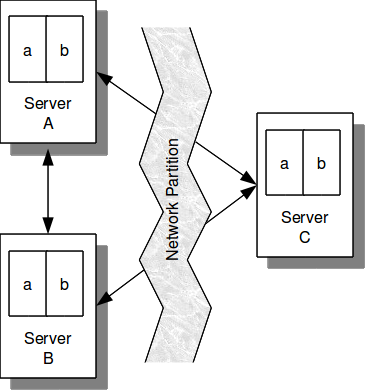
Network Partition

The problem is that you never want two separate copies of the database continuing to operate and accepting requests thinking they are the only viable copy. If the cluster is physically on a single network switch, the threat of a network partition is reduced. But if the cluster is on multiple switches, the risk increases significantly and must be accounted for.

10.4.2. Network Fault Protection

VoltDB provides a mechanism for guaranteeing that a network partition does not accidentally create two separate copies of the database. The feature is called network fault protection. When a fault is detected (either due to a network fault or one or more servers failing), any viable segment of the cluster will perform the following steps:

  1. Determine what nodes are missing

  2. Determine if the missing nodes are also a viable self-sustained cluster. If so...

  3. Determine which segment is the larger segment (that is, contains more nodes).

    • If the current segment is larger, continue to operate assuming the nodes in the smaller segment have failed.

    • If the other segment is larger, shutdown to avoid creating two separate copies of the database.

For example, in the case shown in Figure 10.2, “Network Partition”, if a network partition separates nodes A and B from C, the larger segment (nodes A and B) will continue to run and node C will shutdown (as shown in Figure 10.3, “Network Fault Protection in Action”).

Figure 10.3. Network Fault Protection in Action
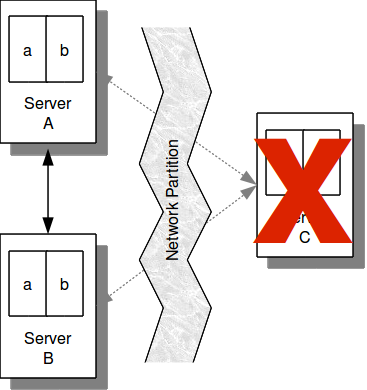
Network Fault Protection in Action

If a network partition creates two viable segments of the same size (for example, if a four node cluster is split into two two-node segments), a special case is invoked where one segment is uniquely chosen to continue, based on the internal numbering of the host nodes. Thereby ensuring that only one viable segment of the partitioned database continues.

Network fault protection is a very valuable tool when running VoltDB clusters in a distributed or uncontrolled environment where network partitions may occur. The one downside is that there is no way to differentiate between network partitions and actual node failures. In the case where no network partition occurs but a large number of nodes actually fail, the remaining nodes may believe they are the smaller segment. In this case, the remaining nodes will shut themselves down to avoid partitioning.

For example, in the previous case shown in Figure 10.3, “Network Fault Protection in Action”, if rather than a network partition, nodes A and B fail, node C is the only node still running. Although node C is viable and could continue because the database was configured with K-safety set to 2, with fault protection node C will shut itself down to avoid a partition. For higher values of K-safety, the calculation of which segment stays up becomes more complex since the network topology can change dynamically if network partitions happen in sequence. However, the principle remains the same: to ensure that only one segment continues to run and it is possible all segments will shut down if there is ambiguity about which segments may still be viable. Specifically, if a node loses contact with all other nodes, even if it would normally be the surviving node, if it was previously part of a cluster with three or more nodes, it will shut itself down to avoid a potential network partition.

In the worst case, if half the nodes of a cluster fail, the remaining nodes may actually shut themselves down under the special provisions for a network partition that splits a cluster into two equal parts. For example, consider the situation where a two node cluster with a k-safety value of one has network partition detection enabled. If one of the nodes fails (half the cluster), there is only a 50/50 chance the remaining node is the "blessed" node chosen to continue under these conditions. If the remaining node is not the chosen node, it will shut itself down to avoid a conflict, taking the database out of service in the process.

Because this situation — a 50/50 split — could result in either a network partition or a viable cluster shutting down, VoltDB recommends always using clusters with an odd number of nodes when creating small clusters. By using an odd number of servers, you avoid even the possibility of a 50/50 split, whether caused by partitioning or node failures. For larger clusters, the chance of losing exactly half the cluster is relatively small and so an even number of nodes (such as six, eight, or larger) is rarely a problem.

You are visitor 01402775 — GeezerVison does not store the pages you look up.
Best viewed with Netscape Navigator 4.7 or Internet Explorer 6 at 800×600. No cookies required.