GeezerVisonThe World Wide Web, restored to 800 pixels of glory. |
| Home|About|Gaming cabinet|Archives|How it works|Starter sites |
GeezerVison is showing flight-manual.atom-editor.cc — Snippets Chapter 1: Getting StartedChapter 2: Using Atom
Chapter 3: Hacking Atom
Chapter 4: Behind Atom
Reference: API
Appendix A: ResourcesAppendix B: FAQ
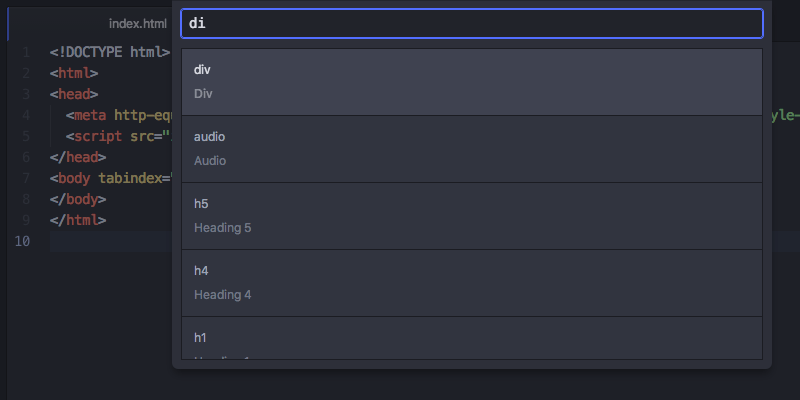
Appendix C: Shadow DOMAppendix D: Upgrading to 1.0 APIsAppendix E: Atom server-side APIsImprove this pageSnippetsSnippets are an incredibly powerful way to quickly generate commonly needed code syntax from a shortcut. The idea is that you can type something like Many Core and Community packages come bundled with their own snippets that are specific to it. For example, the It will also position the cursor in the To see all the available snippets for the file type that you currently have open, choose "Snippets: Available" in the Command Palette.
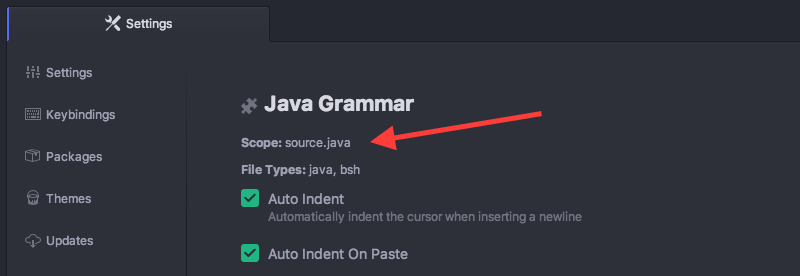
You can also use fuzzy search to filter this list down by typing in the selection box. Selecting one of them will execute the snippet where your cursor is (or multiple cursors are). Creating Your Own SnippetsSo that's pretty cool, but what if there is something the language package didn't include or something that is custom to the code you write? Luckily it's incredibly easy to add your own snippets. There is a text file in your Snippet FormatSo let's look at how to write a snippet. The basic snippet format looks like this: The leftmost keys are the selectors where these snippets should be active. The easiest way to determine what this should be is to go to the language package of the language you want to add a snippet for and look for the "Scope" string. For example, if we wanted to add a snippet that would work for Java files, we would look up the
The next level of keys are the snippet names. These are used for describing the snippet in a more readable way in the snippet menu. You can name them whatever you want. Under each snippet name is a Each Tab stops with the same number will create multiple cursors. The above example adds a The string Snippet keys, unlike CSS selectors, can only be repeated once per level. If there are duplicate keys at the same level, then only the last one will be read. See Configuring with CSON for more information. Multi-line Snippet BodyYou can also use CoffeeScript multi-line syntax using As you might expect, there is a snippet to create snippets. If you open up a snippets file and type
Multiple Snippets per SourceYou can see below the format for including multiple snippets for the same scope in your Again, see Configuring with CSON for more information on CSON key structure and non-repeatability. More InfoThe snippets functionality is implemented in the snippets package. For more examples, see the snippets in the language-html and language-javascript packages. |
| You are visitor 01402503 — GeezerVison does not store the pages you look up. Best viewed with Netscape Navigator 4.7 or Internet Explorer 6 at 800×600. No cookies required. |
 just fill that bad boy out and you have yourself a snippet. As soon as you save the file, Atom should reload the snippets and you will immediately be able to try it out.