Install the widget
Three things have to exist: an instance (the worker, its PostgreSQL and its console), a site,
made in the console, and the widget, which goes on the pages of that site. The widget writes to the
worker, and the worker answers only the sites its console made.
Do the instance first, then the site. The widget needs the address of the worker and the id of the
site.
Which mode you are installing changes step 3 and nothing else. Step 3 is where public mode puts the
widget on the page, team mode ships it dormant, and extension mode ships nothing at all: there the
extension mounts it, and the reviewer’s side is reviewing.md. modes.md is
the page that picks between the three, and it is worth reading first: who may read a site is the
visibility you choose at step 2, and the mode decides who can satisfy it.
The packages are on npm: fruitback, @fruitback/react, @fruitback/element, @fruitback/widget
and @fruitback/shared. A site with no bundler takes the <script> route instead. The console
serves the script of the widget at /v/<version>/fruitback.iife.js, which its snippet gives, and at
/fruitback.iife.js. pnpm --filter @fruitback/widget build produces the same file from this
repository.
1. The instance
Fruitback Cloud runs it for you. Self-hosted, it is three containers that one compose file
starts: self-hosting.md goes from an empty folder to a pin in seven steps, and this
page does not repeat them. Every instance keeps its notes, its sites and its accounts in PostgreSQL,
and has an administrator who signs in to the console. A visitor who leaves a note needs no account.
Two things matter whatever you deploy with:
/health checks the configuration, not the database or a tracker. It answers 503 and names
each variable that is missing or wrong. It answers 200 while the database does not answer, or
while Linear refuses a key: those show on the first read, as 502 store-unavailable. So check a
read as well, at step 2.TRUSTED_PROXY_HOPS is the number of proxies in front of the container: 0 when the port is
published directly, 1 behind one Traefik. Too high behind a proxy that appends to
X-Forwarded-For, and a caller escapes the rate limit with a forged header. Too low, and every
caller shares one bucket. Behind a reverse proxy has the
measured cases and a check you can run.
To try the whole loop from the sources with no Linear account at all, pnpm dev runs the worker with
a database in its process and an in-memory Linear, and serves the playground next to it. Nothing is
written to anyone’s workspace.
2. The site
In the console, add the address of the site, and choose who sees the notes:
- Members of the workspace, the default. A read needs the session of a member. The visibility
does not pick the mode: in team mode the extension supplies the session once the reviewer connects
it, and extension mode carries none (modes.md). « Who can leave a note » is « Members
only » on a new site: a visitor with no session is refused. With « Anyone on the page »,
a visitor can send a note, and sees no pin, theirs included.
- « Everyone who visits »: a read needs nothing: this is the public mode. Every note, the name its
reporter typed and the replies are readable by anybody who knows a page address and the id of the
site, with or without the widget.
The console then gives the script tag of the site. data-fruitback-client in it is the id of the
site, site_…: it is the clientId of every example below. The worker answers the page of each site
by itself; nothing to add to ALLOWED_ORIGINS.
Check a read before going further, with the address of a page of the site, encoded, and its id:
curl -H 'Origin: https://staging.acme.test' \
  'https://api.feedback.acme.dev/feedback?url=https%3A%2F%2Fstaging.acme.test%2F&client=site_…'
# {"url":"https://staging.acme.test/","issues":[],…}
On a site that only members read, that read answers 401 with no session, which is expected.
A Linear team for the whole instance
The notes of a site go to the database of the instance, unless its workspace connects a tracker in the
console, and the site chooses it. A self-hosted instance can also send the notes of every site with no
tracker of its own to one Linear team: FRUITBACK_STORE=linear, with two values and a key in .env.
The API key: a personal API key from your Linear settings. It is a secret: it must never reach a
browser, and that is one reason the worker exists.
The team, and optionally the project. Both are UUIDs. The quickest way to read them is to ask
Linear:
curl -s https://api.linear.app/graphql \
  -H "Authorization: $LINEAR_API_KEY" \
  -H 'Content-Type: application/json' \
  -d '{"query":"{ teams { nodes { id key name } } }"}'
Swap teams for projects for the other one. A project is optional: without it, issues are created
in the team’s default.
FRUITBACK_STORE=linear
LINEAR_API_KEY=lin_api_…
LINEAR_TEAM_ID=…
Labels need no setup. Fruitback creates fruitback, and a label for the site of the note, on
demand, on first use. A label that cannot be created is dropped and the feedback still goes
through: losing a label is a triage annoyance, losing someone’s note is a bug.
3. The widget
A script tag
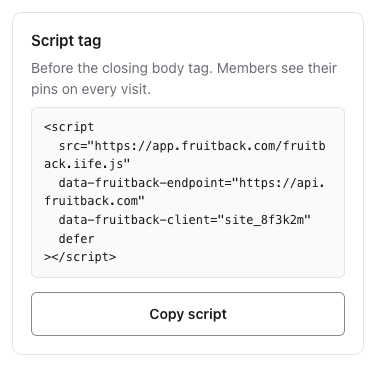
For a site with no build step. endpoint and client are required and are the whole configuration;
label is optional. The console gives this tag, with the address of its own copy of the script and
the id of the site.
<script
  src="https://cdn.acme.dev/fruitback.iife.js"
  data-fruitback-endpoint="https://api.feedback.acme.dev"
  data-fruitback-client="site_…"
  data-fruitback-label="Leave a note"
  defer
></script>
Add data-fruitback-include-env="true" to send the reporter’s user agent, language and platform
with each note. It is off by default, and privacy.md says what that means for your
notice.
defer matters: the widget mounts into <body>. It auto-mounts only when both endpoint and
client are on the tag; with either missing it does nothing and Fruitback.init(…) is yours to call,
which is what a site with its own bootstrap wants.
An import
import { init } from 'fruitback';

const widget = init({
  endpoint: 'https://api.feedback.acme.dev',
  clientId: 'site_…',
});
In React, mount it in an effect: the widget points at elements your app has rendered, so it has to
arrive after they do:
useEffect(() => {
  const widget = init({ endpoint: WORKER_URL, clientId: 'site_…' });

  return () => widget.destroy();
}, []);
init is browser-only and says so if called while server-rendering, rather than failing somewhere
inside a bundle.
A React component
import { Fruitback } from '@fruitback/react';

<Fruitback endpoint="https://api.feedback.acme.dev" clientId="site_…" />;
It renders nothing, mounts the widget in an effect and destroys it when it unmounts. Its props are
the options of init. A parent that renders again does not mount the widget again: an object such as
theme is compared by its value, and a function such as identityToken is always the one of the
last render. onMount hands you the widget, for refresh() or feedbackAsText(), and for a way in of your own:
leaveFeedback() starts choosing an element, showEveryNote() opens the list, and pageCounts() says
how many notes of each stage the page shows.
A custom element
import '@fruitback/element/auto'; // registers <fruitback-widget>
<fruitback-widget endpoint="https://api.feedback.acme.dev" client-id="site_…"></fruitback-widget>
On a page with no build step, load fruitback-element.iife.js from the package’s dist instead of
the import. The element reads endpoint, client-id, label, locale and include-env. What an
attribute cannot carry goes through a property: element.options = { theme, identityToken }. Without
an endpoint and a client-id it mounts nothing, and it takes the widget away when it leaves the page.
Team mode: dormant until a reviewer arrives
Ship the widget and call init only when a reviewer with the extension opens the page. Your users
see nothing; your reviewers see their pins.
import { init, type FruitbackTransport } from 'fruitback';

// The extension puts this on the page. It is not part of the package, so your project declares it.
declare global {
  interface Window {
    fruitbackExtension?: { version: number; transport: FruitbackTransport };
  }
}

let widget: ReturnType<typeof init> | undefined;

const sync = () => {
  const extension = window.fruitbackExtension;

  // Gone: the reviewer switched this site off, or to extension mode. The extension cannot destroy a
  // widget your site owns, so it tells you and you do.
  if (extension === undefined) {
    widget?.destroy();
    widget = undefined;

    return;
  }

  if (widget !== undefined) return;

  widget = init({
    endpoint: 'https://api.feedback.acme.dev',
    clientId: 'site_…',
    // Every call goes through the extension, which attaches the reviewer's session.
    transport: extension.transport,
  });
};

window.addEventListener('fruitback:extension', sync);
sync();
Both halves are needed: the event for a page that loaded before the extension announced itself, the
call for one that loaded after. The same event fires when the extension withdraws, so sync
reads the property rather than assuming an arrival, and it is written so a second announcement
cannot mount a second widget.
The reviewer then turns your origin on in the extension’s popup, in « Team » mode, and pairs with
the worker, from the console. Until they do, the extension relays nothing: see
the threat model for why, and for
the five other things the relay checks first.
This mode is worth turning on only for a site that « Members of … » read. On a site that everyone
reads, the same pins are readable by anyone who can build the URL, and all it buys is a page your
users do not see the widget on.
No worker: the notes go where you say
The widget can run with no worker. Give init a notes option in place of endpoint and
clientId: the widget hands each note to write, and asks read for the notes of a page to draw
their pins.
import { init, localNotes } from 'fruitback';

init({ notes: localNotes() });
localNotes() keeps the notes in localStorage, in this browser only, under fruitback:notes. It
is for a demo, a test, or a page with no server. On a page with no build step, the script tag gives it
as Fruitback.localNotes().
To send the notes to a route of your own, write the two functions:
import { init, type FruitbackNotes } from 'fruitback';

function routeNotes(url: string): FruitbackNotes {
  return {
    async write(note) {
      const response = await fetch(url, {
        method: 'POST',
        headers: { 'Content-Type': 'application/json' },
        body: JSON.stringify(note),
      });
      if (!response.ok) throw new Error(`${url} answered ${response.status}`);

      return { id: note.id };
    },
    async read(page) {
      const response = await fetch(`${url}?page=${encodeURIComponent(page.url)}`);

      return response.ok ? response.json() : [];
    },
  };
}

init({ notes: routeNotes('/api/feedback') });
write(note) gets the note as @fruitback/shared describes it, the shape parseNote reads. It
answers { id }. A rejection, or an answer with no id, is a send that failed: the composer keeps
the text and says so. The same note can come twice after a failed send, with the same note.id:
keep it once.read(page) is optional. It answers the notes of page.url, each as { id, note, stage? }. A note
with no stage is « New ». Without read, a note goes and no pin comes back.- With
notes, the widget offers no reply, no place to choose, no address to ask and no file. It
sends no request of its own. endpoint and transport go with a worker, and init refuses them
beside notes.
- What
read answers is checked: a note that parseNote refuses, or a note of another page, is
dropped.
- With
@fruitback/react, create notes once, outside the component or in a useMemo. The widget
keeps the notes of its first mount. @fruitback/element sends to a worker only.
Next steps