


An End-to-End Hardware Exploration, Co-Simulation, and FPGA Synthesis Environment for the OpenHW Group CVA6 RISC-V Processor
Overview • Repository Layout • Quick Start • Documentation • Results at a Glance
CVA6-lab is an independent, end-to-end educational and developmental framework built around the CVA6 RISC-V CPU. The primary goal of this project was to break away from the "black box" automated scripts provided by the official repository and achieve a deep, hands-on understanding of a production-grade RISC-V core. This repository documents the entire journey: from setting up the complex environment and toolchains, to running custom behavioral simulations from scratch, analyzing the hardware architecture at the signal level, and ultimately modifying the RTL to improve performance.
A significant portion of this project focuses on mastering the hardware design flow. Instead of relying solely on predefined Python wrappers, this project establishes a completely manual, automated-via-Makefile simulation environment using Verilator and Spike (for co-simulation/verification). Furthermore, it comprehensively details the Vivado Synthesis process, exploring how different processor configurations (e.g., 32-bit vs. 64-bit, single-issue vs. dual-issue) impact logic utilization, critical paths, and overall Fmax.
The capstone of this project is the Custom 64-bit Architecture Implementation. By analyzing the pipeline behavior under specific workloads, a structural hazard was identified in the execution stage: multi-cycle operations (like division) were blocking the shared write-back bus, forcing fast, single-cycle ALU instructions to stall. Through targeted RTL modifications—including decoupling ready signals, introducing holding buffers, and implementing back-pressure mechanisms—the write-back contention was resolved. The result is a custom configuration that offers a measurable performance boost (+3.57% in division-heavy benchmarks) with virtually zero hardware overhead compared to the standard single-issue baseline.
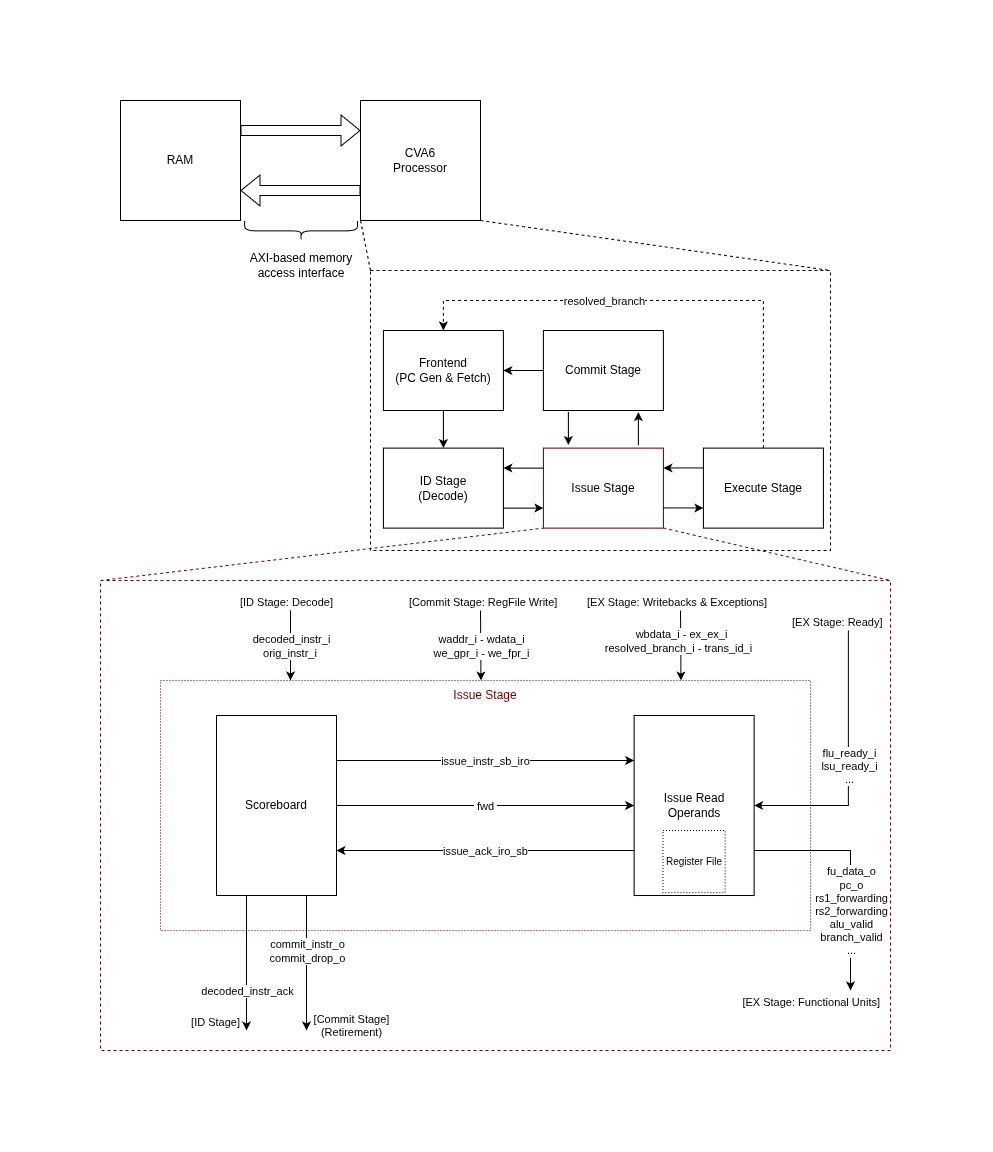
Top-level CVA6 pipeline architecture with a detailed view of the Issue Stage (Scoreboard & Operand Read) and its interface with Execution/Commit stages.
- Transparent Environment: Detailed guides on setting up the RISC-V toolchain, Bender, Verilator, and Spike from scratch.
- Custom Simulation Flow: A self-checking C++ testbench using Verilator, bypassing opaque default scripts.
- In-Depth FPGA Synthesis: Scripts and analysis for synthesizing standard and superscalar configurations in Vivado.
- Architectural Analysis: Waveform-level tracing of the issue, execution, and commit stages.
- RTL Modification & Verification: A step-by-step guide on resolving structural hazards, verified by custom benchmarks and fault-injection scenarios.

Pipeline Stage Tracing: Tracking instruction flow (A–D) across Issue, Execute, and Commit stages. |

The Structural Hazard: Baseline 64-bit core stalling fast ALU ops during a long division. |

Issue Decoupling & Bug Fix: Resolving pointer lockups to allow continuous instruction dispatch. |

Custom Holding Buffer in Action: Verifying collision-free write-back under forced hazard scenarios (A–F). |
Click on any waveform to view full-resolution signal traces. Detailed cycle-by-cycle explanations are available in Doc 4 and Doc 5.
CVA6-lab/ - Main repository root
benchmarks/ - Software only (formerly firmware)
├── src/                        # Source files
│   ├── avg.c
│   ├── boot.S
│   ├── bug_32.S
│   ├── bug_64.S
│   ├── complex_32.S
│   ├── complex_64.S
│   ├── complex_avg.c
│   ├── main_.c
│   ├── main-syn.S
│   ├── main_32.S
│   ├── main_64.S
│   └── matmul.c
├── linker/                     # Linker scripts
│   └── link.ld
└── spike-checking/             # Spike simulation logs
docs/ - Documentation files
├── 1-environment-setup.md      # Unified setup: Clone, Bender, GCC, and Spike installation
├── 2-vivado-synthesis.md       # Vivado synthesis flow and resource reports
├── 3-simulation-flow.md        # Official and manual simulation with Verilator (+ Post-Synthesis Simulation)
├── 4-arch-32b-analysis.md      # 32-bit analysis
└── 5-arch-64b-custom.md        # 64-bit dev history, FLU Write-back architecture, and results
fpga/ - FPGA and Synthesis files
├── vivado                      # Vivado Tcl scripts
│   ├── cv32a6_imac_sv32.tcl
│   ├── cv32a6_imac_sv32_syn.tcl
│   ├── cv32a6_imac_sv32_post_syn_sim.tcl
│   ├── cv64a6_imafdc_sv39.tcl
│   ├── cv64a6_imafdc_sv39_syn.tcl
│   └── cv64a6_imafdc_sv39_post_syn_sim.tcl
├── constraints/
│   └── cva6_ooc.xdc
└── build/                      # (gitignored) All Vivado outputs generated here
    ├── vivado_prj_cv32a6/
    └── vivado_prj_cv64a6/
scripts/ - Helper scripts
├── plotting			        # Generating plots
└── f-maker                     # CVA6 File Tree Copier & .f File Updater
sim/ - Simulation execution environment (Workspace)
├── Makefile                    # Makefile for Verilator simulation
└── filelists/                  # Bender output .f files
    ├── cv32a6_imac_sv32_verilator.f
    └── cv64a6_imafdc_sv39_verilator.f
tb/ - All verification sources
├── sv/                         # SystemVerilog testbenches
│   └── cva6_tb.sv
├── cpp/                        # Verilator testbenches
│   ├── tb_cva6_ww.cpp          # With waveform
│   └── tb_cva6_wow.cpp         # Without waveform
└── wrappers/                   # Simulation wrappers
    └── cva6_axi_wrapper.sv
rtl/ & Root Files
├── rtl/                        # Processor RTL only (no testbenches)
├── README.md                   # Main README
├── Makefile                    # Main Makefile
└── .git
A single root Makefile drives both flows — simulation (delegated to sim/Makefile) and FPGA/Vivado. Print the full target list, variables, and options any time:
make help1. Simple Simulation
Runs the default RTL simulation: 64-bit, assembly playground with waveform dump (CMD=run).
make sim
Override the defaults with variables — ARCH (default 64) and CMD (default run):
make sim ARCH=32 CMD=run_matmul
Available CMD values:
run(assembly playground, waves ON)run_c(C playground, waves ON)run_complex(speed benchmark, no waves)run_bug(bug hunt, waves ON)run_matmul(matrix multiplication program, no waves)run_avg(averaging over an array, no waves)
2. Create Vivado Project
Generate the GUI project (files land in fpga/build/):
make cva6-64        # 64-bit: cv64a6_imafdc_sv39
make cva6-32        # 32-bit: cv32a6_imac_sv32
3. Run Synthesis Full logic synthesis in Vivado batch mode (long run):
make synth-64 # or: make synth-32Long-running. Post-synthesis simulation is also available via
make post-syn-sim-64/make post-syn-sim-32.
4. Clean Repository
Remove simulation artifacts, then delete and recreate fpga/build/:
make clean         # sim + fpga
make clean-sim     # simulation artifacts only
Note:
synth-*andcva6-*require Vivado onPATH;simtargets require the RISC-V toolchain and Verilator used insidesim/Makefile.
1. Environment Setup
2. Vivado Synthesis
3. Simulation Flow
4. 32-bit Architecture Analysis
5. 64-bit Custom Architecture
Timing Performance (WNS &
| Configuration (Core) | Superscalar | WNS (ns) |
|
Logic Levels | Routing Share |
|---|---|---|---|---|---|
64-bit (cv64a6_imafdc_sv39) |
OFF | −9.118 | 52.31 | 45 | 72.0 % |
64-bit-custom (cv64a6_imafdc_sv39) |
OFF | −9.160 | 52.19 | 45 | 71.097 % |
64-bit (cv64a6_imafdc_sv39) |
ON | −9.968 | 50.08 | 47 | 71.8 % |
Logic Utilization (LUT/FF):
| Configuration (Core) | Superscalar | LUT | FF | BRAM | DSP | IO |
|---|---|---|---|---|---|---|
64-bit (cv64a6_imafdc_sv39) |
OFF | 54,326 | 23,728 | 36 | 27 | 0 |
64-bit-custom (cv64a6_imafdc_sv39) |
OFF | 54,023 | 23,803 | 36 | 27 | 0 |
64-bit (cv64a6_imafdc_sv39) |
ON | 63,685 | 25,108 | 36 | 27 | 0 |
Discussion: Between the two reference configurations, the custom version sits almost exactly on top of the standard non-superscalar build. On timing, the gap is negligible — 52.19 MHz against 52.31 MHz, and a WNS of −9.160 ns against −9.118 ns — while the superscalar build trails well behind at 50.08 MHz. Area tells the same story: 54,023 LUTs and 23,803 FFs, i.e. a few hundred LUTs below and a few dozen FFs above the Superscalar-OFF baseline, both far short of the 63,685 LUTs and 25,108 FFs the Superscalar-ON build requires. In other words, the change to the write-back path costs essentially nothing in frequency or logic, and the custom core behaves as the OFF configuration with a marginal area/timing trade.


Synthesis metrics for the three 64-bit configurations: clock frequency and worst negative slack alongside LUT/FF utilization.
| Configuration (Core) | Superscalar | Random Program (Cycles) | Matrix Multiplication (Cycles) | Averaging (Cycles) |
|---|---|---|---|---|
64-bit (cv64a6_imafdc_sv39) |
OFF | 2,656,954 | 117,244 | 11,235,565 |
64-bit-custom (cv64a6_imafdc_sv39) |
OFF | 2,615,871 | 117,244 | 10,834,566 |
64-bit (cv64a6_imafdc_sv39) |
ON | 2,076,882 | 112,486 | 9,875,796 |
Discussion: The custom build consistently beats the standard Superscalar-OFF core — 2,615,871 vs 2,656,954 Cycles on the random program, and 10,834,566 vs 11,235,565 Cycles on averaging — while remaining clearly behind the Superscalar-ON build (2,076,882 and 9,875,796 Cycles). The matrix-multiplication figure is unchanged at 117,244 Cycles, where the workload is dominated by memory traffic rather than issue width. The custom version therefore lands between the two standard configurations, but much closer to the OFF baseline than to the superscalar performance level.


Cycle-count comparison across the three benchmarks for each 64-bit configuration.
Conclusion: The custom configuration retains a footprint and timing profile that is essentially on par with the standard non-superscalar core — a negligible ~0.2–0.5% difference in
- CVA6 Official Repository & Documentation
- Bender: Dependency Management Tool for Hardware Projects
- Xilinx Vivado Design Suite Documentation
- RISC-V Instruction Set Manual
- RISC-V GNU Compiler Toolchain
- Spike RISC-V ISA Simulator
- Verilator: Open-Source SystemVerilog Simulator
- Matplotlib: Visualization with Python - Used for generating performance and resource utilization plots.
This project is open-source and distributed under the Apache License 2.0. See the LICENSE file for more details.
Note: The base CVA6 core RTL and some associated files remain under their original OpenHW Group licenses (Solderpad Hardware License v2.1 / Apache 2.0). The custom modifications (holding buffer, structural hazard resolution logic) and the evaluation framework (benchmarks, Python plotting scripts, Makefiles) provided in this repository are distributed under the Apache 2.0 license.