GV

GeezerVison

The World Wide Web, restored to 800 pixels of glory.

Home|About|Gaming cabinet|Archives|How it works|Starter sites

On this site

  • Sign in
  • ActionsCI/CD and automation
  • CodespacesCloud development environments
  • All Features
  • Documentation
  • Training
  • Certifications
  • Build with Copilot
  • Customize Copilot
  • Integrations
  • Trending repos
  • GitHub Sponsors
  • Developer articles
  • Enterprises

This view

  • Original page
  • New address

GeezerVison is showing github.com — Other Animations Attributes for Buttons

Other Animations Attributes for Buttons

Jump to bottom
Weiping Huang edited this page Jun 21, 2017 · 6 revisions

Delay, duration, rotate-degrees, frames...

Other Animation Attributes

Set other animation attributes by:

bmb.setShowDelay(0);
bmb.setShowDuration(1000);
bmb.setRotateDegree(1080);
bmb.setHideDelay(0);
bmb.setHideDuration(500);
bmb.setFrames(80);  // The higher, the smoother animations the higher performances needed

Or in .xml:

app:bmb_showDelay="0"
app:bmb_showDuration="1000"
app:bmb_rotateDegree="1080"
app:bmb_hideDelay="0"
app:bmb_hideDuration="500"
app:bmb_frames="60"

Cancelable and Auto-Hide

If the cancelable property of BMB is true, then when after the boom animation of booming, you can re-boom BMB by clicking the background.

If the autoHide property of BMB is true, then when after the boom animation of booming, you can click one of the boom-buttons to re-boom BMB.

bmb.setCancelable(false);
bmb.setAutoHide(false);

Or in .xml:

app:bmb_cancelable="false"
app:bmb_autoHide="false"

3D Animation

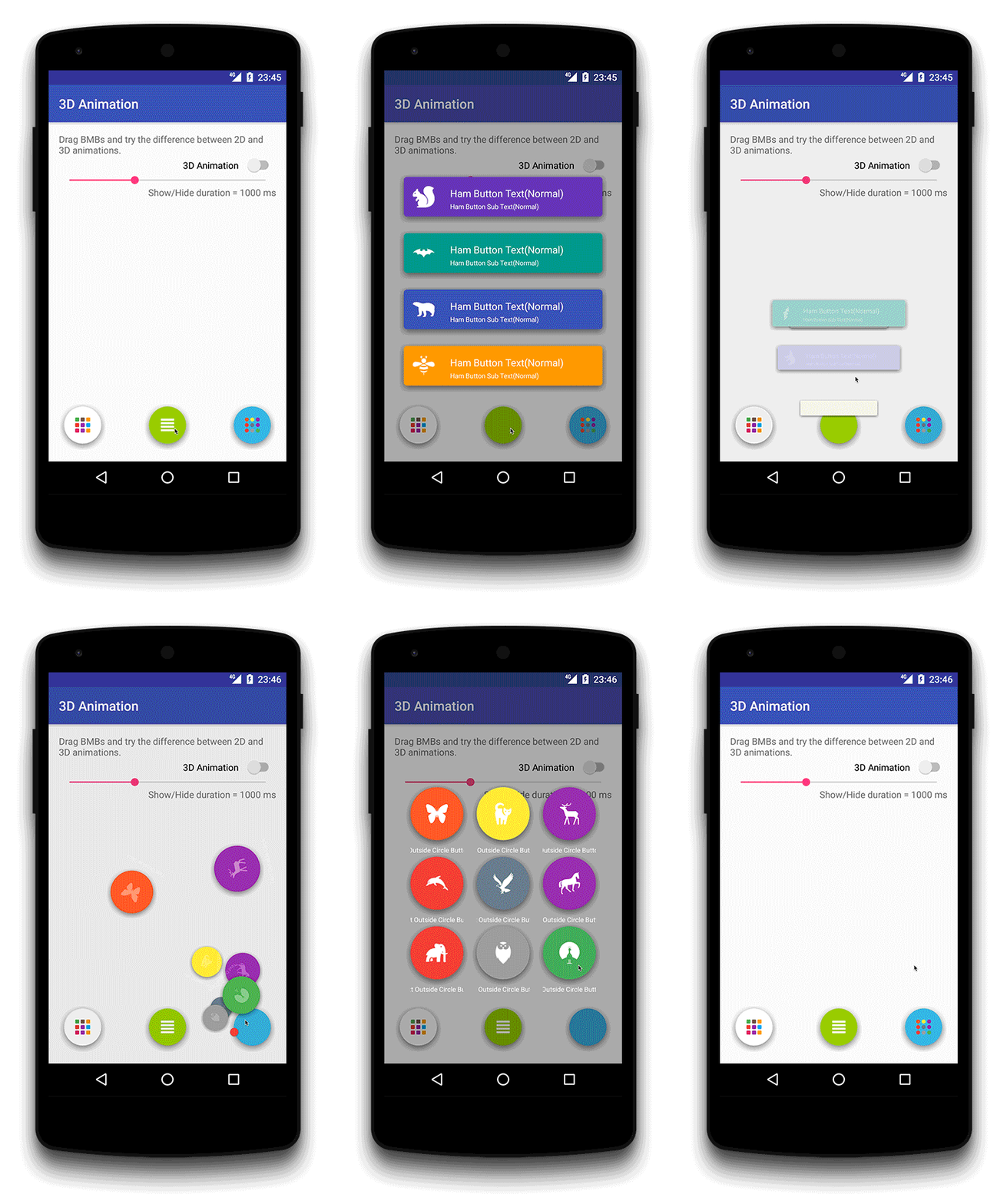
From version 2.1.0, 3D animations of boom-buttons are supported:

bmb.setUse3DTransformAnimation(true);  // Whether use a 3D transform animation when booming or rebooming.

Or in .xml:

app:bmb_use3DTransformAnimation="true"

3D Animation Demo shows the difference of 3D and 2D animations.

Developer Demo Download Lisense

Chapters
  1. Basic Usage
  2. Simple Circle Button
  3. Text Inside Circle Button
  4. Text Outside Circle Button
  5. Ham Button
  6. Share Style
  7. Custom Position
  8. Button Place Alignments
  9. Different Ways to Boom
  10. Ease Animations for Buttons
  11. Different Order for Buttons
  12. Other Animations Attributes for Buttons
  13. Click Event and Listener
  14. Control BMB
  15. Use BMB in Action Bar
  16. Use BMB in Tool Bar
  17. Use BMB in List
  18. Use BMB in Fragment
  19. Attributes for BMB or Pieces on BMB
  20. Cache Optimization & Boom Area
  21. Change Boom Buttons Dynamically
  22. Fade Views
  23. Version History
  24. Structure for BMB

Clone this wiki locally

You are visitor 01402792 — GeezerVison does not store the pages you look up.
Best viewed with Netscape Navigator 4.7 or Internet Explorer 6 at 800×600. No cookies required.