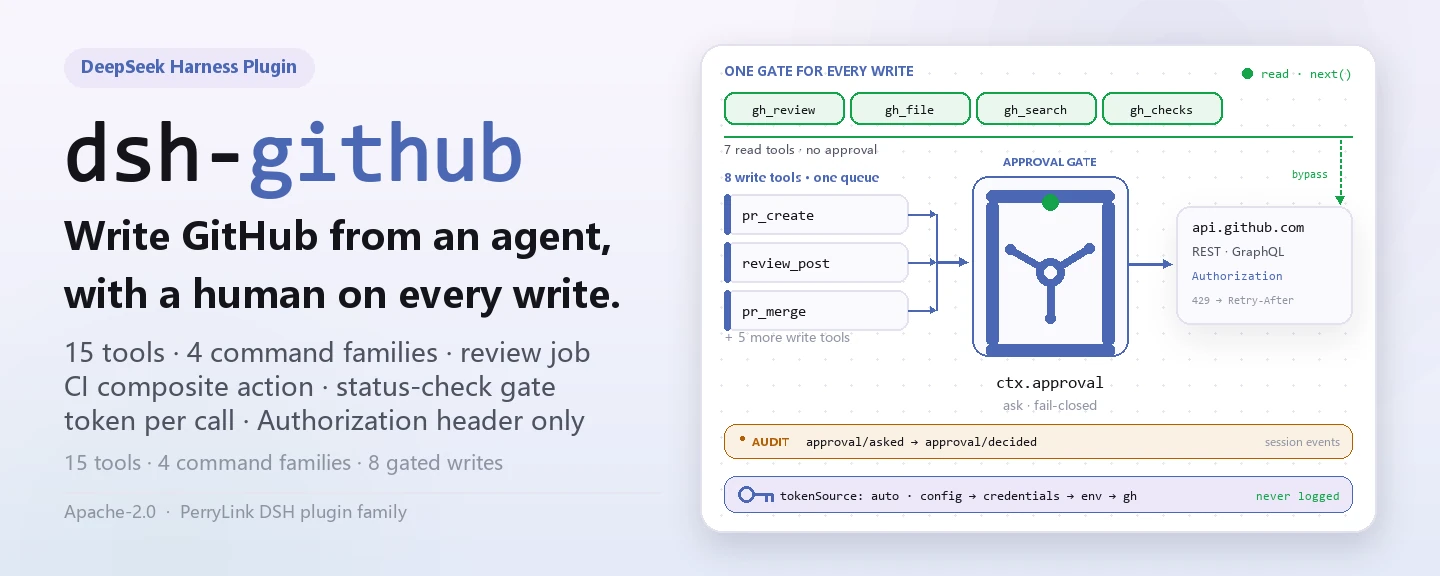
एजेंट से GitHub पर सुरक्षित रूप से लिखें — हर write पहले मानवीय approval से गुज़रता है और token कभी log में नहीं जाता।
DeepSeek Harness के लिए होस्ट-साइड प्लगइन: PR, समीक्षा, issue और CI — 15 टूल, 4 कमांड परिवार, बैकग्राउंड review job, CI composite action और status-check gate।
इंस्टॉल · कॉन्फ़िगरेशन · FAQ · 简体中文 · English · Español · Português · हिन्दी
dsh plugin --profile <name> add @perrylink/dsh-github
समुदाय प्लगइन, DeepSeek से संबद्ध नहीं। एकमात्र रेपो: https://github.com/PerryLink/dsh-github (Gitee मिरर है)। यह npm पर @perrylink/dsh-github के रूप में प्रकाशित होता है; सादा नाम dsh-github किसी असंबंधित प्रोजेक्ट का है। प्रोजेक्ट dsh-github-bot पर स्थानांतरित: यह रेपो इंडेक्स/बैकअप रहेगा, पुराना npm पैकेज @perrylink/dsh-github अप्रचलित है — नए काम के लिए dsh-github-bot इंस्टॉल करें।
dsh-github GitHub को एजेंट के turn में लाता है और हर write को approval से बाँधता है: pr_create, pr_merge, review_post, issue_close जैसे टूल ctx.approval से स्पष्ट हाँ मिलने के बाद ही GitHub तक पहुँचते हैं। पढ़ने वाली सतहें — PR metadata, सीमित diff, फ़ाइलें, खोज और status checks — बिना पूछे लौटती हैं। /review ctx.jobs पर deterministic multi-file analyzer को background job के रूप में चलाता है; CI पक्ष में composite action, polling review bot और status-check gate हैं। token हर operation पर credentials seam, environment या gh CLI से resolve होता है, केवल Authorization header में जाता है, और logs, events, cards, command output या errors में कभी नहीं दिखता।

-
इंस्टॉल करें (कोई एक channel चुनें):
# git channel (नवीनतम main; git+https://github.com/PerryLink/dsh-github.git के बराबर)
dsh plugin --profile web add github:PerryLink/dsh-github
# npm channel (प्रकाशित रिलीज़)
dsh plugin --profile web add @perrylink/dsh-github
# tarball channel: इस repo में pnpm pack, फिर
dsh plugin --profile web add ./perrylink-dsh-github-<version>.tgz
prepareस्क्रिप्ट केवल production dependencies के साथ build करता है, इसलिए git channel को अतिरिक्त तैयारी नहीं चाहिए। -
न्यूनतम कॉन्फ़िग (defaults काम करते हैं; ज़रूरत हो तो token स्रोत तय करें):
- insert:
    - id: dsh-github
      name: '@perrylink/dsh-github'
      config:
        tokenSource: auto
        autoCommit: false
tokenSource: autoक्रम से Plugins पेज field → credentials फ़ाइल → environment →ghCLI आज़माता है; token खुद इस YAML में कभी नहीं जाता। -
माउंट होने की पुष्टि करें:
dsh --profile web --dump-config | grep -A3 'id: dsh-github'
id: dsh-githubवाली पंक्ति दिखे तो प्लगइन माउंट हो गया; पहला write approval से गुज़रेगा।
अनइंस्टॉल: dsh plugin --profile web remove @perrylink/dsh-github (या profile patch से पंक्ति हटाएँ)।
DSH Desktop बाज़ार से इंस्टॉल
हर PerryLink प्लगइन DSH Desktop के अंतर्निहित बाज़ार में सूचीबद्ध है: Market → Sources → add source → चिपकाएँ https://perrylink-dsh-catalog.perrylink.workers.dev/catalog-source.json → चुनें। इंस्टॉल अब भी बाज़ार के npm identity check और आपकी पुष्टि से गुज़रता है।
ये प्लगइन के वास्तविक प्रवेश बिंदु हैं; इंस्टॉल के बाद एक चलाएँ।
विस्तृत उदाहरण — कमांड pr_create, इनपुट:
{
  "title": "feat: shiny",
  "body": "desc"
}
आउटपुट:
created pull request #7: https://github.com/o/r/pull/7 (main ← feat/shiny)
Observed from plugins/dsh-github/test/tools.test.ts:69-74 (fixture + assertions); renderer at plugins/dsh-github/src/tools.ts:189
विफलता शाखा — कोई भी उपयोगी token न होने पर, इनपुट:
{"title":"x"} (credentials seam empty; GITHUB_TOKEN unset; gh not logged in)
आउटपुट:
{
  "status": "error",
  "code": "no-token",
  "message": "no GitHub token found (source: credentials/env/gh)",
  "guidance": "Configure one of: 1) a dsh credential for this reference (recommended; $DSH_HOME/.credentials.yaml), 2) the same-named environment variable, or 3) `gh auth login` for the gh CLI. Set `tokenSource` in cordis.yml to pin one source."
}
Observed from plugins/dsh-github/src/credential.ts:96-104; plugins/dsh-github/test/tools.test.ts:88-93
संक्षिप्त उदाहरण: pr_merge · gh_review
dsh-github dsh और Claude Code व Codex जैसे टूल्स के बीच की GitHub कमी को पूरा करता है: एजेंट pull requests पढ़, समीक्षा, खोल, update और merge कर सकता है, repository metadata और files पढ़ सकता है, issues पर comment और close कर सकता है, और खोज सकता है — जबकि हर write को एक मानव approve करता है और token गुप्त रहता है।
- 15 टूल —
pr_create,pr_merge,pr_update,gh_review,review_post,gh_issue,issue_open,issue_comment,issue_close,gh_search,gh_repo,gh_file,gh_repo_search,gh_checks, सभीdefineToolके ज़रिए canonical JSON, औरci.enabledचालू होने पर one-shotci_run। - 4 कमांड परिवार —
/pr create,/review(start/stop/post),/issue open, औरci.enabledके अंतर्गत/ci(scan/status/start/stop/run)। - पूरा PR lifecycle — बनाएँ → समीक्षा करें → update करें (title/body/state/base) → merge करें (merge/squash/rebase, वैकल्पिक head-branch deletion)।
- Inline reviews —
review_postPR head commit के विरुद्ध एक summary comment या line-anchored review comments प्रकाशित करता है। - Approval-नियंत्रित writes — हर GitHub write
ctx.approvalसे होकर गुजरता है (डिफ़ॉल्टask, fail-closed); approval reasons titles, body sizes और comment overrides की पूर्व-झलक देते हैं। - Token गोपनीयता — credentials seam → environment →
ghCLI, प्रति operation resolved, कभी logs, events, renders या errors में नहीं। - Background review jobs —
/reviewctx.jobsपर host के अपनेjob_list/job_output/job_killsurface के साथ चलता है। - लचीलापन —
Retry-After/x-ratelimit-resetbackoff के साथ 429 retry; read tools concurrency-safe हैं; सभी calls cancellation का सम्मान करते हैं। - CI surface — one-shot
ci_runtool, एक polling review bot और एक status-check gate (composite actionaction.yml)।
| सतह | प्रकार | नोट्स |
|---|---|---|
pr_create |
tool | एक pull request बनाता है (write; approval-नियंत्रित) |
pr_merge |
tool | एक PR merge करता है (merge/squash/rebase, वैकल्पिक head-branch deletion) |
pr_update |
tool | एक PR update करता है (title/body/state/base) |
gh_review |
tool | एक PR पढ़ता है: metadata, capped diff, comments, CI, static findings |
review_post |
tool | एक review comment प्रकाशित करता है (summary या line-anchored inline) |
gh_issue |
tool | issues को list / get / comment करता है (PRs kind: "pr" marked) |
issue_open |
tool | एक issue बनाता है |
issue_comment |
tool | किसी issue या PR पर comment करता है |
issue_close |
tool | एक issue close करता है (वैकल्पिक state reason) |
gh_search |
tool | issues और PRs खोजता है (अलग search quota) |
gh_repo |
tool | repository metadata पढ़ता है |
gh_file |
tool | किसी branch/tag/commit पर एक file पढ़ता है |
gh_repo_search |
tool | GraphQL repository खोज (अलग search quota) |
gh_checks |
tool | GraphQL PR status checks (check runs + commit statuses) |
/pr create |
command | git स्थिति पढ़ता है और एक pr_create instruction queue करता है |
/review |
command | एक background review job start / stop / post करता है |
/issue open |
command | एक issue_open instruction queue करता है |
/ci |
command | CI driver: scan / status / start / stop / run (ci.enabled) |
ci_run |
tool | composite action / CI driver द्वारा चलाई गई one-shot CI review |
| review bot | surface | idempotent inline comments वाला polling review bot (ci.*) |
| status-check gate | surface | PR head commit के हिसाब से success / needs-changes verdict प्रकाशित करता है (action.yml) |
- Credential seam.
tokenSource: autoप्रति operation क्रम में resolve करता है: credentials seam (GITHUB_TOKENreference) → environment variable →ghCLI token। यह मान एक local variable है जो REST client को दिया जाता है; यह कभी canonical values, renders, cards, command outputs, injected notices, job output, approval reasons या error messages में नहीं जाता। - Approval gate. सभी writes model tools से होकर गुजरते हैं। एक
tools/pre-executewaterfall listener write tools के लिएaskलौटाता है, इसलिए registryctx.approvalके ज़रिए मानव से पूछता है (hostapproval/asked+approval/decidedaudit pair log करता है) और बिना answerer के fail closed हो जाता है। Commands कभी सीधे write नहीं करते: एक write command read-only context इकट्ठा करता है, फिर एजेंट को जगाता है ताकि model gated tool को एक turn के भीतर चलाए। - Background review job.
/review <pr>ctx.jobsपर एकgithub-reviewjob शुरू करता है; job metadata fetch करता है (inline posting के लिए head-commit SHA कैप्चर करते हुए), capped diff, CI checks और existing comments, फिर deterministic multi-file analyzer चलाता है (src/review.ts)। यह job कॉल करने वाले agent के नंगेSessionIdका है —0.1.7-alpha.1registry कोSessionIdपर fence करता है,Agentunion के बिना — इसलिएdsh-tool-jobscomposed होना चाहिए, वरनाstartमना कर देगा।reviewMode: "model"होने पर, job capped diff को host केsubagentsseam के ज़रिए एक one-shot subagent को सौंपता है। Completion host केdsh-tool-jobsconsumer के ज़रिए session तक पहुँचती है; model उसेjob_outputसे पढ़ता है औरreview_postसे प्रकाशित करता है। - CI composite action / review bot / status-check gate. Repo में एक composite action (
action.yml) शामिल है जो PRs की समीक्षा करती है, CI ठीक करती है और report लिखती है; एक polling review bot idempotent inline comments प्रकाशित करता है; और एक status-check gate PR head commit के हिसाब से verdict प्रकाशित करता है। One-shotci_runtool headless run चलाता है। हर write approval-gated रहता है।
सभी tunables Schemastery Config fields हैं (cordis.yml से बदले जा सकते हैं)। एक id-लक्षित override पूरी row को बदल देता है — जो key आपको चाहिए उसे दोबारा लिखें। cordis.patch.yml हर key को inline दस्तावेज़ित करता है। GUI में, Plugins पेज settings card (Official समूह) tokenRef उस entry के अपने configuration form से पढ़ता है — 0.1.7-alpha.1 host ने ctx.settingsScope binding और उसके पीछे का namespace-registration seam हटा दिया, इसलिए कार्ड अब कोई settings namespace नहीं रखता। token स्वयं उस entry का githubToken field है: कार्ड उसे वहीं लिखता है, और host half उसे credentials फ़ाइल, environment और gh CLI से पहले resolve करता है।
सबसे अधिक इस्तेमाल होने वाली keys:
| कुंजी | डिफ़ॉल्ट | अर्थ |
|---|---|---|
tokenSource |
auto |
auto (पेज field → credentials → env → gh) या config / credentials / env / gh में से कोई एक |
tokenRef |
GITHUB_TOKEN |
Credential-seam reference / environment-variable नाम |
githubToken |
— | Plugins पेज से सहेजा गया token; profile configuration में plain text, खाली न होने पर पहले इस्तेमाल होता है |
defaultOwnerRepo |
— | जब कोई call कोई नाम न दे और git के पास कोई origin न हो तो Fallback owner/repo |
autoCommit |
false |
क्या /pr create model को पहले commit + push करने का निर्देश दे सकता है |
maxDiffChars |
8000 |
reviews में पढ़े जाने वाले PR diffs की character सीमा |
reviewMode |
static |
Review engine: static (deterministic analyzer) या model (host के subagents seam के ज़रिए one-shot subagent; seam अनुपस्थित होने पर fail loud) |
ci |
{ enabled: false, … } |
CI integration section: polling review bot, status-check gate और one-shot ci_run tool (सभी ci.* keys इसी में हैं) |
पूरी कॉन्फ़िगरेशन तालिका (23 कुंजियाँ)
| कुंजी | डिफ़ॉल्ट | अर्थ |
|---|---|---|
tokenSource |
auto |
auto (पेज field → credentials → env → gh) या config / credentials / env / gh में से कोई एक |
tokenRef |
GITHUB_TOKEN |
Credential-seam reference / environment-variable नाम |
githubToken |
— | Plugins पेज से सहेजा गया token; profile configuration में plain text, खाली न होने पर पहले इस्तेमाल होता है |
defaultOwnerRepo |
— | जब कोई call कोई नाम न दे और git के पास कोई origin न हो तो Fallback owner/repo |
autoCommit |
false |
क्या /pr create model को पहले commit + push करने का निर्देश दे सकता है |
maxDiffChars |
8000 |
reviews में पढ़े जाने वाले PR diffs की character सीमा |
renderExcerptChars |
2000 |
tool output में render किए जाने वाले diff excerpt की character सीमा |
maxComments |
20 |
gh_review द्वारा सूचीबद्ध PR comments की सीमा |
reviewJobTimeoutMs |
600000 |
एक background review job की समय-सीमा (timeout के साथ fail होता है) |
maxReviewRecords |
50 |
in-memory review-job records की सीमा; सबसे पुराने settled records पहले evict होते हैं |
maxFileChars |
12000 |
gh_file द्वारा पढ़े गए file contents की character सीमा |
maxFindings |
50 |
प्रति review analyzer findings की सीमा |
maxLineLength |
300 |
line length जिसके पार analyzer long-line finding flag करता है |
reviewMode |
static |
Review engine: static (deterministic analyzer) या model (host के subagents seam के ज़रिए one-shot subagent; seam अनुपस्थित होने पर fail loud) |
modelReviewProvider |
— | reviewMode: "model" के लिए subagent provider नाम; डिफ़ॉल्ट रूप से पहले registered provider का उपयोग |
maxRetries |
3 |
प्रति request 429 retry प्रयास |
retryBaseMs |
500 |
Retry backoff आधार (प्रति प्रयास दोगुना) |
retryMaxWaitMs |
60000 |
Retry backoff की अधिकतम सीमा |
requestTimeoutMs |
30000 |
प्रति request का hard timeout; exceed होने पर fetch abort |
apiBaseUrl |
https://api.github.com |
GitHub REST base URL (GitHub Enterprise) |
allowedActions |
['pr.create','pr.merge','pr.update','review.post','issue.create','issue.comment','issue.close','ci.run'] |
Write-action whitelist; बाकी सब approval से पहले अस्वीकार |
workspaceDir |
process cwd | read-only git inspection के लिए working directory |
ci |
{ enabled: false, … } |
CI integration section: polling review bot, status-check gate और one-shot ci_run tool (सभी ci.* keys इसी में हैं) |
profile patch में override का उदाहरण:
- insert:
    - id: dsh-github
      name: '@perrylink/dsh-github'
      config:
        tokenSource: auto
        tokenRef: GITHUB_TOKEN
        autoCommit: false
        reviewMode: static
        allowedActions: [pr.create, review.post, issue.create, issue.comment, issue.close, pr.merge, pr.update, ci.run]
क्या प्लगइन token सहेजता है? review data कहाँ रहता है?
प्लगइन token कभी persist नहीं करता: हर operation पर tokenSource के क्रम में एक resolve करता है और उसे केवल Authorization header में रखता है — logs, events, cards, command output या errors में कभी नहीं। एकमात्र अपवाद वह githubToken है जो आप स्वयं Plugins पेज पर सहेजते हैं — वह profile configuration में plain text के रूप में रहता है (credentials फ़ाइल जितना ही exposure); configuration साझा होने पर उसे खाली छोड़ें और credential reference, environment या gh auth login इस्तेमाल करें। Review reports job id के आधार पर process memory में रहती हैं; disk पर कुछ durable नहीं लिखा जाता।
token न हो या approval answerer न हो तो क्या चुपचाप fail होगा?
token न होने पर tool structured error लौटाता है जिसका code: "no-token" होता है और तीन configuration रास्ते दिए जाते हैं। approval service या answerer न होने पर write fail-closed होता है, चुपचाप पास नहीं होता। दोनों दृश्य errors हैं, नकली सफलता नहीं।
क्या यह दूसरे plugins से tool names, events या slots पर टकराता है?
नहीं। सभी tools namespaced हैं, यह कोई service key नहीं देता, कोई client slot या webServer prefix register नहीं करता; साझा tools/pre-execute event ctx.on() के broadcast semantics से देखा जाता है और हर listener next() से delegate करता है, इसलिए chain कभी short-circuit नहीं होती। बिंदु-दर-बिंदु तर्क «अन्य DSH प्लगइनों के साथ अंतर-संचालनीयता» में है।
Static review या model review?
डिफ़ॉल्ट reviewMode: "static" deterministic, zero-token और reproducible है — अधिकांश PRs के लिए सही। reviewMode: "model" capped diff को one-shot subagent को सौंपता है, tokens खर्च करता है और subagents seam व registered provider चाहता है; न मिलने पर load पर fail loud होता है।
GitHub rate limits या अस्थिर network पर क्या होता है?
429s Retry-After / x-ratelimit-reset से backoff के साथ retry होते हैं (maxRetries, retryBaseMs और retryMaxWaitMs tunable हैं), और हर request का hard requestTimeoutMs है। बची हुई quota हर result पर दिखती है, failures पर भी।
- Approval, enforcement नहीं। Writes official seam पर केवल
ask/deny decisions उत्पन्न करते हैं; sandbox और approval systems ही enforcement authorities रहते हैं। - Fail closed। Approval answerer अनुपस्थित होने पर सबसे सख्त decision पर degrade होता है — कभी silent pass-through नहीं।
- Token कभी process से बाहर नहीं जाता। यह प्रति operation पढ़ा जाता है और केवल Authorization header में भेजा जाता है; कभी logged, rendered, injected या errors में नहीं आता।
- Approval से बाहर कोई write नहीं।
/pr createकभी खुद commit या push नहीं करता;autoCommit: trueके साथ model वे writes bash tool के अपने approval gate से करता है। Review job कोई write नहीं करता; केवलreview_postapproval के बाद प्रकाशित करता है। - Untrusted content escaped और marked होता है।
formatPostBodydiff से लिए गए file names को backtick- और HTML-escape करता है, और external GitHub content (files, bodies, comments, search results) renders में external के रूप में marked होता है। - Bounded work और rate limits। 429s को backoff के साथ retry किया जाता है; शेष quota हर result पर (failures सहित) दिखाया जाता है।
- अनुमतियाँ: writes official approval seam पर चलते हैं; कुछ भी re-implement या bypass नहीं किया जाता। Plugin अपने workshop manifest में
network:outboundऔरfilesystem:writeघोषित करता है। - डेटा: review report process memory में job id के आधार पर रहता है; disk पर कुछ भी durable नहीं लिखा जाता।
- Session log: plugin कोई custom session event types नहीं जोड़ता; सारा model-visible content host-logged surfaces से होकर बहता है (
tool/result,user/message,command/run,approval/asked…)। Commands जो notices queue करते हैं वे plugin का अपना source kind ले जाते हैं,{ kind: 'dsh-github', form: 'notice', summary }— host में कोई catch-allpluginkind नहीं है, और उसका session-format admission path उसे सीधे अस्वीकार करता है।
- कोई custom session events नहीं — जानबूझकर (Architecture देखें); audit trails host के अपने event vocabulary पर निर्भर करते हैं।
- Static analyzer by default — deterministic rules (
src/review.ts), शून्य tokens, reproducible।reviewMode: "model"tokens खर्च करता है और इसके लिएsubagentsseam व एक registered provider चाहिए। - Jobs और records process-local हैं — review report plugin memory में job id के आधार पर रहता है; record map
maxReviewRecordsसे capped है (सबसे पुराने settled records पहले evict होते हैं)। - npm
latestdist-tags पुराने हैं —dsh-baseद्वारा दिए गए profile closure से install करें; कभी भी barenpm i @deepseek-ai/dsh-toolsसे न करें।
DSH 0.2.0-rc.2 (वह रनटाइम जिसके लिए यह README प्रकाशित है) और 2026-10-05 को सर्वे किए गए उच्च-स्टार प्लगइन सेट के विरुद्ध सत्यापित।
यह प्लगइन अन्य प्लगइनों में हस्तक्षेप नहीं करता, उन उच्च-स्टार प्लगइनों सहित जो व्यापक रूप से इंस्टॉल हैं:
- कोई टूल-नाम टकराव नहीं। सभी टूल नेमस्पेस युक्त हैं; कोई भी ऐसा नंगा नाम नहीं लेता जो पहले से किसी अंतर्निहित टूल या अन्य प्लगइन का हो।
- कोई सर्विस-की टकराव नहीं। यह कोई सर्विस key प्रदान नहीं करता, इसलिए टकराव संभव नहीं।
- कोई स्लॉट टकराव नहीं। यह कोई क्लाइंट slot key पंजीकृत नहीं करता, इसलिए
shadows-shipped-uiसीट के लिए प्रतिस्पर्धा नहीं करता। - कोई HTTP रूट टकराव नहीं। यह कोई
webServerप्रीफ़िक्स पंजीकृत नहीं करता। - कोई patch-लेयर टकराव नहीं। बंडल patch केवल अपनी पंक्ति
insertकरता है; कभी किसी अंतर्निहित पंक्ति काconfigओवरराइड नहीं करता। - कोई वैश्विक परिवर्तन नहीं। यह प्रोटोटाइप नहीं बदलता,
process.envनहीं लिखता, और वैश्विक fetch dispatcher प्रतिस्थापित नहीं करता।
साझा ईवेंट लिसनर रचना से ही अहस्तक्षेपी हैं। यह क्रम-संवेदनशील ईवेंट tools/pre-execute को ctx.on() से देखता है — Cordis का ब्रॉडकास्ट पंजीकरण, जहाँ हर लिसनर चलता है और कोई किसी दूसरे को वंचित नहीं कर सकता। यहाँ प्रत्येक लिसनर next() से डेलिगेट करता है, इसलिए श्रृंखला कभी शॉर्ट-सर्किट नहीं होती, और mutation next() के बनाए मान पर लागू होता है, उसकी जगह लौटाए जाने के बजाय:
tools/pre-execute— also used bycc-safety-net(1576★).
स्थैतिक प्रमाण: इस रिपॉज़िटरी पर dsh-plugin-doctor के K10–K13 सभी pass हैं।
| सतह | स्थिति |
|---|---|
| हारनेस | DeepSeek Harness dsh-v0.2.1-rc.2 (2026-10-18 सत्यापित): engines.dsh >=0.2.1-0 <0.3.0; P0 संगतता पथ के रिग्रेशन परीक्षण हैं। |
| Node | ^22.19.0 || >=24.0.0 |
| Platforms | सभी (host plugin; GitHub की ओर outbound network) |
| Model | कोई भी (static review deterministic है; reviewMode: "model" वैकल्पिक है) |
- Gitee मिरर (सिंक मिरर; GitHub canonical है)
- dshfind प्लगइन पेज (इंस्टॉल और रैंकिंग)
- OpenSSF Scorecard रिपोर्ट (.github/workflows/scorecard.yml से संचालित)
- dsh-plugin-doctor सत्यापन रिपोर्ट (K10–K13 सभी
pass) - DSH Market (सूचीबद्ध)
- 1024 स्टोर चैनल: एक बार
npm i -g dsh1024, फिरdsh1024 plugin --profile web add @perrylink/dsh-github(deepseek1024.com इंस्टॉल रैंकिंग में गिना जाता है) - पारिस्थितिकी ज्ञानकोश — मापा गया डेटा, मार्केटिंग नहीं: प्लगइन विकास गाइड · चयन डेटा · रखरखाव मानदंड
pnpm install             # node ^22.19 || >=24
pnpm run build           # tsc --noEmitOnError → lib/ (fix-dts और client bundle सहित)
pnpm run prepare         # self-contained git-install build (scripts/prepare.mjs)
pnpm run prepublishOnly  # प्रकाशन से पहले build + test
pnpm test                # vitest run
pnpm run typecheck       # tsc --noEmit
pnpm run typecheck:ci    # प्रकाशित लाइन का typecheck
pnpm run check:readmes   # पाँचों README में tools और config keys की जाँच
lib/ रेपो में commit किया गया प्रकाशित artifact है; pnpm run build उसे फिर बनाता है। README की तस्वीरें scripts/gen-readme-assets.py (Python + Pillow) से प्रोग्रामेटिक रूप से बनती हैं और दोबारा चलाई जा सकती हैं; वे docs/assets/dsh-github-hero-{zh,en}-{light,dark}.webp और docs/assets/dsh-github-flow-v5-{light,dark}.svg लिखती हैं।
Topics: dsh · dsh-plugin · deepseek-harness · github · pull-request · code-review · issue-tracker
src/index.ts          plugin entry (name/inject/apply, applyWithDeps for tests)
src/config.ts         Schemastery Config
src/types.ts          local structural views of host services + Context merging
src/credential.ts     token resolution (seam → env → gh), per operation
src/github.ts         REST client: 429 retry, rate limits, diff media type
src/git.ts            read-only git inspection + origin parsing for any API host
src/review.ts         deterministic diff analyzer + sanitized comment drafting
src/jobs.ts           github-review background job producer (metadata + diff + CI + comments)
src/approval-gate.ts  tools/pre-execute ask/deny gate with write previews
src/tools.ts          the fourteen model-facing tools
src/ci/               review pipeline, polling bot, one-shot ci_run
src/commands.ts       /pr, /review, /issue
src/client.ts         browser half: the Plugins settings card
src/present.ts        pure UI-card presenters
test/                 vitest suite + mock host scaffolding + opt-in e2e smoke
cordis.patch.yml      bundle patch (one insert row)
scripts/prepare.mjs   self-contained git-install build
यह प्रोजेक्ट PerryLink के DeepSeek Harness प्लगइन परिवार का हिस्सा है (सभी Apache-2.0)। अगर यह उपयोगी हो, एक star अगले व्यक्ति को इसे खोजने में मदद करता है — इसके पीछे कुछ भी locked नहीं है।
- @JosephTian876 — un-bundled
lib/client.jsकी रिपोर्ट (#11)। - @womeimingzi11 — browser-half module-loader पंजीकरण की रिपोर्ट (#14); factory-wrapped bundle बाद के रिलीज़ में आया।
- @PerryLink — निर्माता और maintainer: GitHub tool surface, approval gate, background review jobs, CI composite action, review bot, status-check gate और पाँच-भाषा docs।
- @AraragiEro — Plugins settings पेज में GitHub token settings card (#6)।
- @alexchenzl — DSH Directory पर plugin को सूचीबद्ध करने का निमंत्रण (#5)।
सभी प्लगइन खोलें
LICENSE (Apache License 2.0) © 2026 dsh-github contributors
Apache-2.0 · समुदाय प्लगइन, DeepSeek से संबद्ध नहीं।