GeezerVisonThe World Wide Web, restored to 800 pixels of glory. |
| Home|About|Gaming cabinet|Archives|How it works|Starter sites |
GeezerVison is showing github.com — C# Server Events Client C# Server Events Client
Demis Bellot edited this page
This page has moved to docs.servicestack.netLike ServiceStack's other C# Service Clients, the new And like the Service Clients it requires the var client = new ServerEventsClient( "http://chat.servicestack.net", channels:"home"); The C# ServerEvent Client is a managed .NET client with feature parity with the ServiceStack's JavaScript client that auto-reconnects when a connection is lost, sends periodic heartbeats to maintain an active subscription as well as auto-unregistering once the client stops listening for messages, or gets disposed. Unlike other C# clients, the ServerEvents Client is mainly reactive in that it's primarily waiting for Server Events to be initiated from a remote server instead of the typical scenario in which requests are initiated by clients. To maximize utility, there are a number of different API's to receive and process messages: One way to receive messages (useful in long-running clients) is to assign handlers for each of the different events that are fired. This example shows how to capture all the different events a Client can receive: ServerEventConnect connectMsg = null; var msgs = new List<ServerEventMessage>(); var commands = new List<ServerEventMessage>(); var errors = new List<Exception>(); var client = new ServerEventsClient(baseUri) { OnConnect = e => connectMsg = e, OnCommand = commands.Add, OnMessage = msgs.Add, OnException = errors.Add, }.Start(); Once the Client is configured, calling As ServerEvents have deep integration with the rest of ServiceStack we're able to offer Typed Messages containing the users Plugins.Add(new ServerEventsFeature { // private Connect args OnConnect = (subscription,httpReq) => AppendTo(subscription.Meta), // public Join/Leave args OnCreated = (subscription,httpReq) => AppendTo(subscription.Meta), }) Depending on your use-case, if you only want to use the ServerEvent Client for a short-time to listen for predictable responses (i.e. waiting for a Server callback on a pending request) you can alternatively use the Task-based API's letting you to participate in C# async/await workflows: var client = new ServerEventsClient(baseUri, channel="Home"); // Wait to receive onConnect event ServerEventConnect connectMsg = await client.Connect(); // Wait to receive onJoin command event ServerEventCommand joinMsg = await client.WaitForNextCommand(); // Hold a future task to get notified once a msg has been received Task<ServerEventMessage> msgTask = client1.WaitForNextMessage(); // Send a Web Service Request using the built-in JsonServiceClient client.ServiceClient.Post(new PostChatToChannel { Channel = client.Channel, // The channel we're listening on From = client.SubscriptionId, // Populated after Connect() Message = "Hello, World!", }); // Wait till we receive the chat Msg event we sent earlier ServerEventMessage msg = await msgTask; The above example showcases the 3 Task-based API's available:
The After the ServerEvent Client has connected, the The above examples show generic API's for receiving any type of message, but just like in the JavaScript client, more fine-grained API's are available for handling specific message types. The client.Handlers["chat"] = (client, msg) => { //Deserialize JSON string to typed DTO var chatMsg = msg.Json.FromJson<ChatMessage>(); "Received '{0}' from '{1}'".Print(chatMsg.Message, chatMsg.FromName); }; Roughly translates to the equivalent JavaScript below: $(source).handleServerEvents({ handlers: { chat: function (msg, event) { console.log("Received " + msg.message + " from " + msg.fromName); } } }); Where both methods handle the Whilst handlers provide a light way to handle loose-typed messages, there's a more structured and typed option that works similar to ServiceStack's To be able to handle messages with your own classes, get them to implement the public interface IReceiver { void NoSuchMethod(string selector, object message); } Whilst primarily a marker interface, Named Receivers are equivalent to Receivers in the JavaScript client which can be assigned to handle all messages sent to a receiver with the selector format: A Named Receiver can be registered with the API below: client.RegisterNamedReceiver<TestNamedReceiver>("test"); Which will forward all messages with a public class TestNamedReceiver : ServerEventReceiver { public void FooMethod(CustomType request) {} // void return type public CustomType BarMethod(CustomType request) { return request; // works with any return type, which are ignored } public CustomType BazSetter { get; set; } // Auto populate properties public override void NoSuchMethod(string selector, object message) { var msg = (ServerEventMessage)message; var nonExistentMethodType = msg.Json.FromJson<CustomType>(); } } This is roughly equivalent to the following JavaScript code: $(source).handleServerEvents({ receivers: { test: { FooMethod: function (msg, event) { ... }, BarMethod: function (msg, event) { ... }, BazSetter: null, } } });
One difference in the JavaScript client is that messages with unknown targets are assigned as properties on the Once registered, an instance of public class MyEventServices : Service { public IServerEvents ServerEvents { get; set; } public void Any(CustomType request) { ServerEvents.NotifyChannel("home", "test.FooMethod", request); ServerEvents.NotifyChannel("home", "test.BarMethod", request); ServerEvents.NotifyChannel("home", "test.BazSetter", request); ServerEvents.NotifyChannel("home", "test.QuxTarget", request); } } Similar to Services in ServiceStack, each message is processed with an instance of the Receiver that's resolved from public class NewInstanceResolver : IResolver { public T TryResolve<T>() { return typeof(T).CreateInstance<T>(); } } This can be changed to re-use the same instance by assigning a SingletonInstanceResolver instead: public class SingletonInstanceResolver : IResolver { ConcurrentDictionary<Type, object> Cache = new ConcurrentDictionary<Type, object>(); public T TryResolve<T>() { return (T)Cache.GetOrAdd(typeof(T), type => type.CreateInstance<T>()); } } client.Resolver = new SingletonInstanceResolver(); We can also have it resolve instances from your preferred IOC. Here's an example showing how to register all Receiver Types, auto-wire them with any custom dependencies, and instruct the client to resolve instances from our IOC: // Register all Receivers: client.RegisterNamedReceiver<TestNamedReceiver>("test"); ... // Register all dependencies used in a new Funq.Container: var container = new Container(); container.RegisterAs<Dependency, IDependency>(); // Go through an auto-wire all Registered Receiver Types with Funq: container.RegisterAutoWiredTypes(client.ReceiverTypes); // Change the client to resolve receivers from the new Funq Container: client.Resolver = container; We can assign Whilst Named Receivers are used to handle messages sent to a specific namespaced selector, the client also supports registering a Global Receiver for handling messages sent with the special All These events can be handled with a Global Receiver based on Message type, e.g: public class GlobalReceiver : ServerEventReceiver { public SetterType AnyNamedProperty { get; set; } public void AnyNamedMethod(CustomType request) { ... } } client.RegisterReceiver<GlobalReceiver>(); Which will be called when messages are sent without a selector, e.g: public class MyServices : Service { public IServerEvents ServerEvents { get; set; } public void Any(Request request) { ServerEvents.NotifyChannel("home", new CustomType { ... }); ServerEvents.NotifyChannel("home", new SetterType { ... }); } } As Global Receivers handle other messages sent with the The above messages can all be handled with the Receiver below: public class JavaScriptReceiver : ServerEventReceiver { public void Chat(ChatMessage message) { ... } public void Announce(string message) { ... } public void Toggle(string message) { ... } public void BackgroundImage(string cssRule) { ... } } client.RegisterReceiver<JavaScriptReceiver>(); client.RegisterNamedReceiver<JavaScriptReceiver>("css"); As seen above the target names are case-insensitive and The explicit client.Authenticate(new Authenticate { provider = CredentialsAuthProvider.Name, UserName = "user", Password = "pass", RememberMe = true, }); client.Start(); This is equivalent to: client.ServiceClient.Post(new Authenticate { provider = CredentialsAuthProvider.Name, UserName = "user", Password = "pass", RememberMe = true, }); The sync/async APIs below built into the C# client.UpdateSubscriber(new UpdateEventSubscriber { SubscribeChannels = new[]{ "chan1", "chan2" }, UnsubscribeChannels = new[]{ "chan3", "chan4" }, }); client.SubscribeToChannels("chan1", "chan2"); client.UnsubscribeFromChannels("chan3", "chan4"); await client.SubscribeToChannelsAsync("chan1", "chan2"); await client.UnsubscribeFromChannelsAsync("chan3", "chan4"); As this modifies the active subscription it also publishes a new onUpdate notification to all channel
subscribers so they're able to maintain up-to-date info on each subscriber.
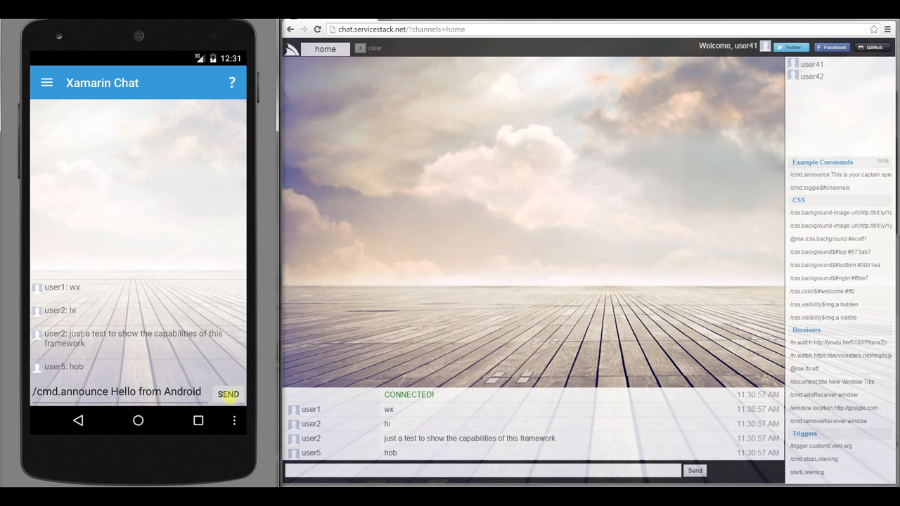
This can be handled together with onJoin and onLeave events using client.OnCommand = msg => ...; //= ServerEventJoin, ServerEventLeave or ServerEventUpdate Xamarin.Android Chat utilizes the .NET PCL Server Events Client to create an Android Chat App connecting to the existing chat.servicestack.net Server Events back-end where it's able to communicate with existing Ajax clients and other connected Android Chat Apps.
Clone this wiki locally |
| You are visitor 01402792 — GeezerVison does not store the pages you look up. Best viewed with Netscape Navigator 4.7 or Internet Explorer 6 at 800×600. No cookies required. |