GV

GeezerVison

The World Wide Web, restored to 800 pixels of glory.

Home|About|Gaming cabinet|Archives|How it works|Starter sites

On this site

  • Sign in
  • ActionsCI/CD and automation
  • CodespacesCloud development environments
  • All Features
  • Documentation
  • Training
  • Certifications
  • Build with Copilot
  • Customize Copilot
  • Integrations
  • Trending repos
  • GitHub Sponsors
  • Developer articles
  • Enterprises

This view

  • Original page
  • New address

GeezerVison is showing github.com — GitHub - kresil/project-documentation: Outlines the founding proposal and technical documentation of the project

BranchesTags
Open more actions menu

Latest commit


History

141 Commits
141 Commits

Folders and files

NameName
Last commit message
Last commit date
.github/workflows
.github/workflows
 
 
.gradle
.gradle
 
 
docs
docs
 
 
gradle/wrapper
gradle/wrapper
 
 
poster
poster
 
 
presentations
presentations
 
 
project-org
project-org
 
 
project-proposal
project-proposal
 
 
project-report
project-report
 
 
.gitignore
.gitignore
 
 
README.md
README.md
 
 
build.gradle.kts
build.gradle.kts
 
 
gradlew
gradlew
 
 
gradlew.bat
gradlew.bat
 
 
settings.gradle.kts
settings.gradle.kts


Repository files navigation

Project Documentation

Table of Contents

  • Documents
  • Instructions
    • Configure LaTeX environment in Intellij IDEA
    • Add a new subproject
    • Compile and build all subprojects
      • Manually
      • Automatically

Documents

  • project-report
  • project-proposal
  • project-org
  • presentations
  • poster

Instructions

Configure LaTeX environment in Intellij IDEA

  • Install MikTeX;
    • Update MikTeX packages: MikTeX Console -> Updates -> Check for updates;
  • Install SumatraPDF viewer;
  • Install TeXiFy IDEA plugin;
  • Configure inverse-search in Intellij IDEA for SumatraPDF: Tools -> LaTeX -> Configure Inverse Search, which enables the user to jump from the pdf to the corresponding tex file source.

Add a new subproject

  1. Create in root folder a new folder with the name of the subproject;

  2. Go to settings.gradle.kts and add the new subproject with:

    include(":subproject-name")
  3. Compile and build pdf, resolving any bibliographic references, with the Gradle task buildPdf using the Gradle Panel or the following command in the terminal:

    ./gradlew :subproject-name:buildPdf
  4. [Optional] Configure alternative names for the subproject directories and the main tex file in the build.gradle.kts file:

    • Create a build.gradle.kts file in the subproject directory;

    • Add the following code:

      ext.set("variable", "value")
      Variable Default value Description
      srcDirName src name of the tex source file's directory
      outDirName out name of the output directory, where the pdf file will be generated to
      auxDirName auxil name of the auxiliary directory, where the auxiliary files will be generated to
      mainTexFileName main name of the main tex file
      useBibtex true use bibtex to resolve bibliography references
  5. [Optional] If no changes are made to the bibliography references in development, it is possible to speed up the compilation process by using IDEA's run configuration in the <main>.tex file instead of the Gradle task buildPdf, as the latter has more compile iterations to resolve the bibliography references.

    • In the run configuration panel, edit the paths to the corresponding subproject directories:
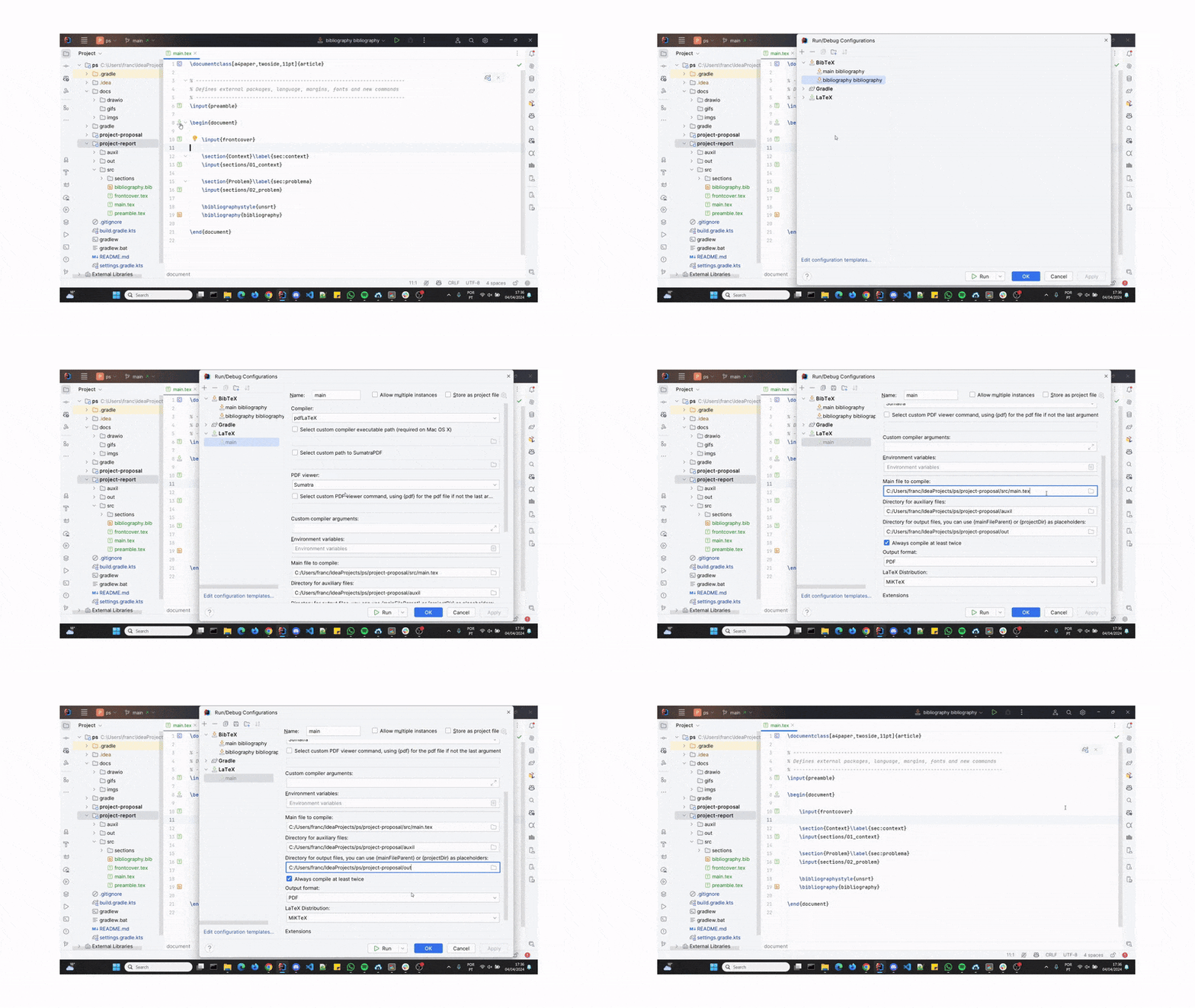
    Run Configuration
    Edit Run Configuration
    • To compile the document use the shortcut Shift + F10 or the gutter icon Run.

Important

It is advised to not delete the generated auxiliary files as they can be used in subsequent compilations to speed up the process.

Compile and build all subprojects

Manually

To compile and build all pdfs in all subprojects, use the Gradle task buildAllPdfs which can be found in the Gradle Panel or by running the following command in the terminal:

./gradlew buildAllPdfs

Automatically

A workflow using github actions is set up to automatically compile and build all pdfs in all subprojects when a pushis made to the repository in the main branch or from a pull request.

About

Outlines the founding proposal and technical documentation of the project

Topics

latexlatex-documentpresentation-slidesproject-proposalproposal

Resources

Readme
Activity
Custom properties

Stars

0 stars

Watchers

0 watching

Forks

0 forks
Report repository

Releases

Packages

Contributors

Languages

You are visitor 01402775 — GeezerVison does not store the pages you look up.
Best viewed with Netscape Navigator 4.7 or Internet Explorer 6 at 800×600. No cookies required.