GV

GeezerVison

The World Wide Web, restored to 800 pixels of glory.

Home|About|Gaming cabinet|Archives|How it works|Starter sites

On this site

  • Initial Commit
  • EXPLORE
  • Visual Git command reference
  • Git command demos
  • LEARN
  • Git commands
  • Git articles
  • Git basics
  • Working with a team
  • Getting unstuck
  • All Git topics
  • Python
  • Java
  • Amazon Web Services (AWS)

This view

  • Original page
  • New address

GeezerVison is showing initialcommit.com — Git basics | Learn Git

Explore

Look it up and watch it run

From the Animated Git Cheat Sheet

61 commands on this topic, each drawn by git-sim on a small sample repository.

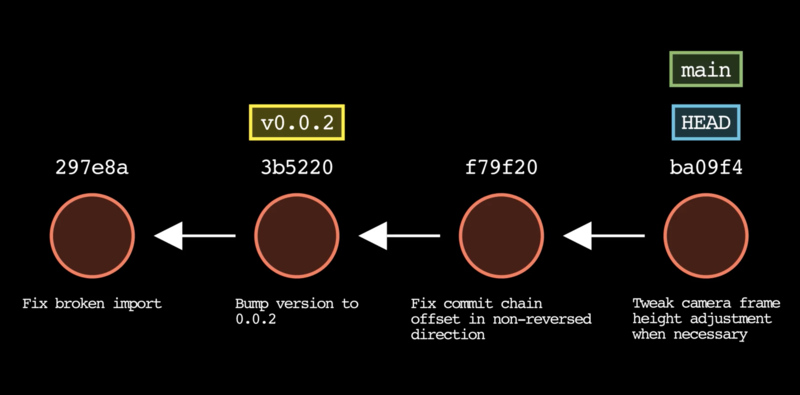
Create a new repository git-sim drawing of git initgit-sim drawing of git init git init Clone a repository git-sim drawing of git clone <url>git-sim drawing of git clone <url> git clone <url> Clone only the N latest commits git-sim drawing of git clone --depth <N> <url>git-sim drawing of git clone --depth <N> <url> git clone --depth <N> <url> Clone a repository and check out a specific branch git-sim drawing of git clone -b <branch> <url>git-sim drawing of git clone -b <branch> <url> git clone -b <branch> <url> Set your author name git-sim drawing of git config --global user.name "<name>"git-sim drawing of git config --global user.name "<name>" git config --global user.name "<name>" Set your email address git-sim drawing of git config --global user.email "<email>"git-sim drawing of git config --global user.email "<email>" git config --global user.email "<email>" Set your default branch name git-sim drawing of git config --global init.defaultBranch <name>git-sim drawing of git config --global init.defaultBranch <name> git config --global init.defaultBranch <name> Set your text editor git-sim drawing of git config --global core.editor "<editor>"git-sim drawing of git config --global core.editor "<editor>" git config --global core.editor "<editor>"

Open the cheat sheet Print a cheat sheet of all 61

The commands, played on a real repository

Pick a command to watch it happen. Each one shows its risk rating; the ones with a full page link to the before and after, whether it is safe, and how to undo it.

Pick a command to watch it happen on a small sample repository.

git

safe

Sample repository: . Drag the slider or press play; hover a commit for its details.

Read the full page Practice it in Level 1 Try it on your own repository: git-sim

Every command plays on the same repository, so they are easy to compare.

No command matches that. Try a shorter word, or another danger level.

  • Safe reads or only adds; nothing is lost
  • Caution moves or rewrites things; recoverable from the reflog
  • Destructive can lose work for good

Watch them in the git-sim viewer

Each demo plays step by step, with the before and after side by side.

git initgit config user.name <name>git clone <url>git statusgit add <file>git commit -m <message>git log --allgit rm <file>git mv <file> <new-name>git stashgit stash popgit tag <tag>

Every command in one place: the Visual Git command reference.

Learn

Learn how it works

Levels on this topic

Watch each command happen, step by step, then pick the right one yourself.

  1. 🌱 1 ✓ Level 1 Git overview What a coding project is, how people work on one together, and why they need a system to control the versions. 4 steps · about 8 min
  2. 🛠️ 2 ✓ Level 2 Init & config What a Git repository is, how Git commands work, and how to create and configure your first repository. 8 steps · about 10 min
  3. 📦 3 ✓ Level 3 Add & commit Create and edit code files, add their changes to Git's staging area, and commit them onto pages of the scrapbook. 15 steps · about 22 min
  4. 🔍 4 ✓ Level 4 Log & status Use Git's log to see your commit history, and check the status of your working directory. 3 steps · about 6 min
  5. 🏷️ 9 ✓ Level 9 Tag Tag commits to mark important points in your history, and remove a tag you no longer need. 4 steps · about 7 min
  6. 🎒 10 ✓ Level 10 Stash Stash uncommitted changes to clear your table, then bring them back when you are ready. 6 steps · about 9 min
  7. ⏪ 11 ✓ Level 11 Restore Move a staged change back to the working directory, and discard changes you no longer want. 5 steps · about 8 min
  8. ✂️ 16 ✓ Level 16 Remove & rename Remove a file Git tracks, rename another, and commit both so the history records them. 7 steps · about 10 min

Workflow demos

A few commands in a row, the way you'd use them on a real project.

From an edit to a commit A new file and an edit move from the working directory to the staging area and into a commit. 5 steps Stash, fix something else, come back Put unfinished work aside, fix a bug on its own branch, merge it, and pick the work back up. 6 steps

Related articles

Read more about it: the articles, guides and cheat sheets on this topic.

  • Image of What is git citool? | Interactive commits in Git What is git citool? | Interactive commits in Git Learn about the powerful git citool command that simplifies the process of code review and integration with an easy-to-understand graphical interface. 5 min read · Jan 2023
  • Image of git notes | Enhance Git Commit Messages with Notes git notes | Enhance Git Commit Messages with Notes In this article, we will discuss what Git notes are and how to use them in your Git workflow. 5 min read · Oct 2022
  • Image of What is an Annotated Tag in Git? What is an Annotated Tag in Git? 4 min read · Sep 2022
  • Image of What is a commit in Git? What is a commit in Git? In this article, we'll explain everything you need to know about Git commits. 9 min read · Sep 2022
  • Image of git-story: Create mp4 Video Animations of Your Git Commit History with 1 Command git-story: Create mp4 Video Animations of Your Git Commit History with 1 Command Git Story is a tool that enables developers to create .mp4 video animations of their Git repository commit history, branches, and tags. 6 min read · Jul 2022
  • Image of A Guide to Git Stash: Save Changes for Later A Guide to Git Stash: Save Changes for Later Want to shelve a feature and work on something else? Learn how to use Git Stash to save changes for later. 8 min read · Jun 2022
  • Image of Git Tag | Git Tagging Explained Git Tag | Git Tagging Explained A guide for learning the git tag command and how it fits into the Git workflow. 9 min read · Apr 2022
  • Image of Git Add | Adding Changes to Git’s Staging Area Git Add | Adding Changes to Git’s Staging Area Using git add to stage changes in a git workflow. 10 min read · Apr 2022
  • Image of Git Status Command | Uses, Applications & Related Commands Git Status Command | Uses, Applications & Related Commands A straightforward how-to tutorial for those looking to learn the git status command. 8 min read · Apr 2022
  • Image of Git Commit Messages: Best Practices & Guidelines Git Commit Messages: Best Practices & Guidelines The practical guide to everything you've ever wanted to know about working with Git commit messages. 13 min read · Mar 2022
  • Image of What % of Git commit messages use the imperative mood? What % of Git commit messages use the imperative mood? In this article, we'll estimate the percentage of commit messages that use the imperative mood. 5 min read · Jun 2020
  • Image of What is the most popular initial commit message in Git? What is the most popular initial commit message in Git? This article analyzes different initial commit messages in the Git version control system using a GitHub dataset from Google BigQuery. 5 min read · Apr 2020
  • Image of What is an initial commit in Git? What is an initial commit in Git? This article describes what an initial commit is in the Git version control system. 3 min read · Apr 2020
  • Image of Git Cheat Sheet: 12 Essential Git Commands for Intermediate Users Git Cheat Sheet: 12 Essential Git Commands for Intermediate Users In this article, we’ll discuss 12 essential Git commands for intermediate users. 7 min read · Jan 2021
  • Image of Git cheat sheet: 12 essential Git commands for beginners Git cheat sheet: 12 essential Git commands for beginners In this article, I will explain 12 essential Git commands that are especially important for a beginner. 6 min read · Jul 2020

Every Git article, by topic: Git Articles.

Develop

Try it in your own repos

git-sim

See what a command will do to your repo before you run it. It reads the repository and draws the result without changing anything.

git-sim statusgit-sim add <file>git-sim commit -m "message"git-sim stash

It can also pre-flight a risky command as you type it, and follow your repo live while you or an AI agent work in it.

git-dummy

Make a throwaway repo shaped for this topic, then practice on it without risking real work.

git-dummy --scenario messy-worktree --name practicegit-dummy --scenario history --name practice

Then cd practice and run any of the git-sim commands here.

Want to see your repo a whole new way? Devlands turns it into a 3D world you can walk through.

You are visitor 01402503 — GeezerVison does not store the pages you look up.
Best viewed with Netscape Navigator 4.7 or Internet Explorer 6 at 800×600. No cookies required.