GV

GeezerVison

The World Wide Web, restored to 800 pixels of glory.

Home|About|Gaming cabinet|Archives|How it works|Starter sites

On this site

  • MCPProxy
  • Connect & discover ↗
  • Profiles & agent tokens ↗
  • Tool security ↗
  • Secrets & isolation ↗
  • Activity & interfaces ↗
  • CLI & automation ↗
  • Connect clients
  • Guides
  • Docs
  • Blog
  • GitHub ↗

This view

  • Original page
  • New address

GeezerVison is showing mcpproxy.app — Connect Claude Code, Codex, OpenCode & Cursor — MCPProxy

Connect your AI client

One setup.
Your choice of client.

Keep upstream MCP servers in MCPProxy. Connect each client to the same local endpoint with its own credential, then verify a real tool call.

Claude Code →

Share MCP servers across Claude Code sessions with one local proxy.

Open setup guide →

Codex →

Use the same MCP server configuration from Codex and your other clients.

Open setup guide →

OpenCode →

Connect OpenCode to shared upstream servers through MCPProxy.

Open setup guide →

Cursor →

Manage upstream MCP servers once and use them from Cursor Agent.

Open setup guide →

New to MCPProxy? Install it first →

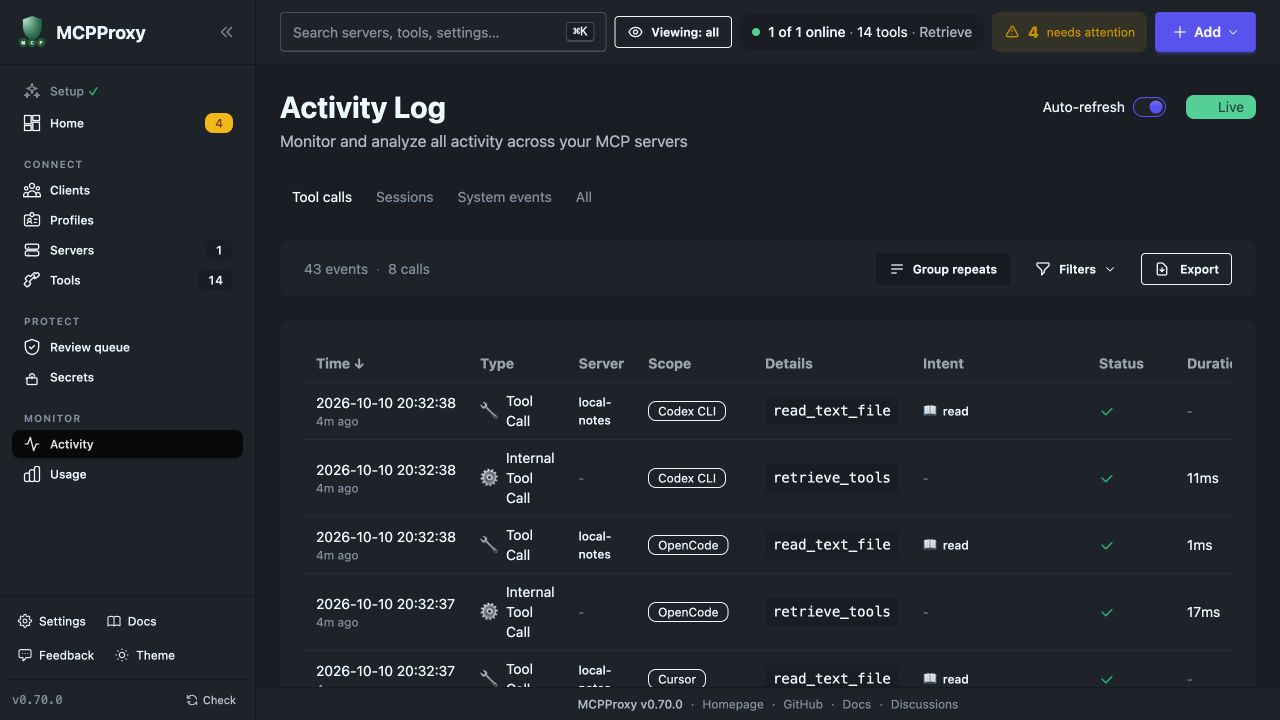
MCPProxy Web UI activity log showing successful read_text_file calls for client credentials
Real Web UI, MCPProxy v0.70.0. An isolated protocol test verified a successful read through each of the four client credentials.
You are visitor 01402503 — GeezerVison does not store the pages you look up.
Best viewed with Netscape Navigator 4.7 or Internet Explorer 6 at 800×600. No cookies required.