GeezerVison is showing monny.moduix.dev — Monny · Native macOS System Monitor & AI Quota Tracker v1.8.5 · macOS 15+ · Open SourceSee what slows your Mac.Keep every AI limit in sight.A lightweight Swift menu bar monitor for Apple Silicon. Track CPU, memory, SMC temperatures, listening ports, native battery charge limit, and 22 AI coding tools without Electron bloat. Free & open source · Apple Silicon · ~5 MB · No telemetry · No root helpers Click any section in the sidebar or toggle the theme to browse actual Monny screens BUILT FOR APPLE SILICONOne menu bar monitor for every Mac workflow.Built natively in Swift 6 for Apple silicon: system telemetry, rootless battery limits, local ports, and AI coding quotas without background bloat. DEVELOPERS & VIBE CODERS Track 22 AI quotas & open ports in one glanceCheck remaining Claude Code, Codex, Cursor, and Copilot limits from the menu bar and find which process holds port 3002 without lsof. - Live quotas & reset timers for 22 AI tools
- Search ports & PIDs with working folder
- Opt-in AI tracking, 100% local readings
Read AI quotas guideMACBOOK BATTERY CARE Cap battery charging without a root helperSet an 80-100% charge limit on macOS 26.4+ as a normal user. macOS enforces the limit natively even after Monny quits. - Zero privileged root daemons or kexts
- Survives app quit and reboots natively
- Alerts for charge limit & low battery
Compare with AlDenteAPPLE SILICON POWER USERS Watch thermals, P/E cores & 7-day historyInspect per-core load, memory pressure, disk I/O, and SMC thermal/fan sensors with 1m to 7d charts that preserve sleep gaps. - Instant menu bar popover (⌥⌘M)
- Apple silicon P/E core & SMC sensors
- Alerts for high temp & runaway CPU
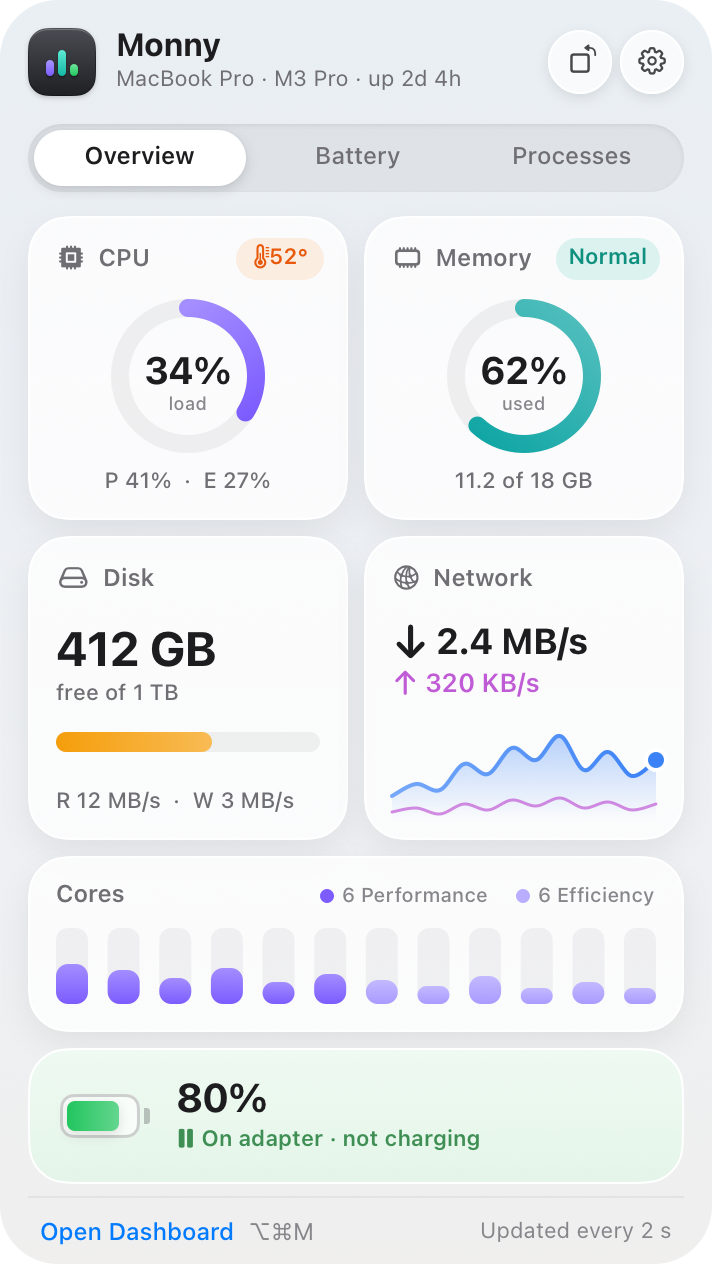
Compare with iStat MenusBUILT FOR DAILY WORKSix views that answer the question in a secondFrom a quick menu bar popover to 7-day hardware history, native charge limits, local port lookup, and AI quota reset timers. MENU BAR POPOVERYour Mac at a glance from the menu barOptionally show CPU load, temperature, or battery percentage right next to the menu bar icon. Click once for a SwiftUI popover with live stats, battery controls, process search, and AI limits. - Optional CPU load, temperature, and battery readouts right in the menu bar
- Popover tabs for Overview, Battery, Processes, plus AI when enabled
- Stays out of the Dock, opening the full dashboard window only when you want it
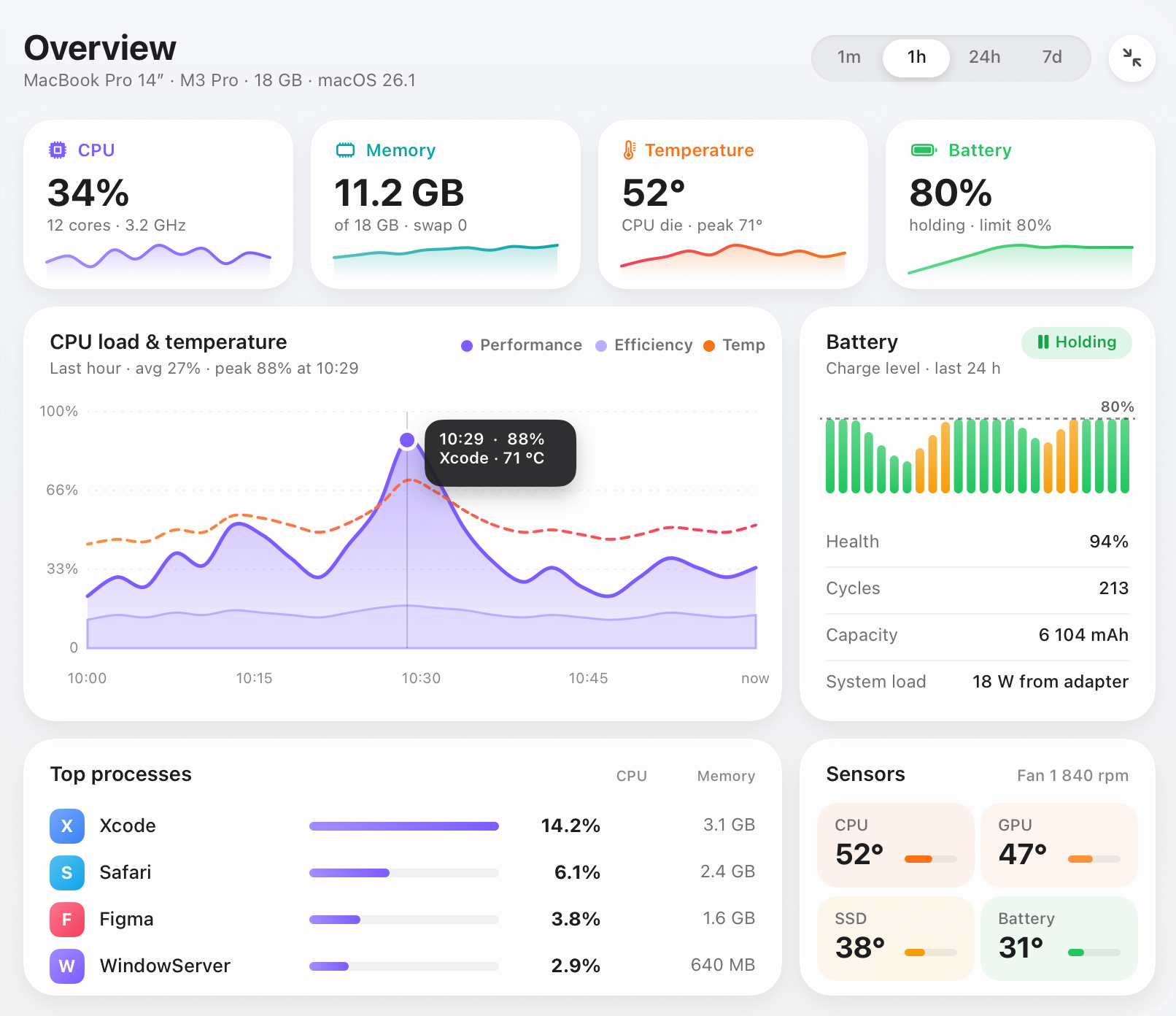
APPLE SILICON CPUE-cores, P-cores, and 7-day historySee at a glance whether a build is saturating Performance cores or idling on Efficiency cores, with interactive 1m to 7d charts, preserved sleep gaps, and top processes. - Separate live load bars for Efficiency and Performance clusters
- 1m, 1h, 24h, and 7d local history that survives restarts and keeps sleep gaps clear
- Top CPU processes with quick inspection and one-click Quit or Force Quit
NATIVE BATTERY PROTECTIONCap your MacBook at 80% with zero root helpersProtect battery longevity when plugged in all day. On macOS 26.4+, Monny adjusts Apple’s built-in system charge limit directly, and macOS keeps enforcing it even after Monny quits. - Drag the 80–100% slider anytime, or slide to 100% when you need a full charge
- Battery health, cycle count, adapter and system wattage, temperature, and sleep drain
- Zero privileged helpers, kernel extensions, or sudo prompts
Charge limit Uses macOS’s native charge cap to reduce battery wear while plugged in 80%Capped at 80% · USB-C 96 W Health 96% · 118 cycles · 29.4 °C PROCESS & PORT FINDERFind what holds :3002 and stop it in one clickNo more digging up lsof flags when a dev server fails to bind. Search Processes by port, PID, or name to see its working folder, parent process, and listening address. - Search by port number, localhost URL, PID, or app name
- Shows localhost vs 0.0.0.0 scope, working directory, and parent process
- Copy PID or path, reveal in Finder, or stop stuck servers right from the row
⌘F :3002vite (web-app) #48219127.0.0.1 :5432postgres #19204127.0.0.1 :6379redis-server #19311127.0.0.1 :8080go-api-server #510920.0.0.0 22 AI CODING TOOLSEvery session cap and reset timer in one placeOptionally track Claude Code, Codex, Cursor, Antigravity, GitHub Copilot, JetBrains AI, Gemini CLI, Windsurf, and 14 more tools side by side. Off by default until you turn it on. - Remaining quota bars with pace markers, reset timers, and 24h / 7d history
- Reuses each tool’s existing local sign-in directly from your Mac, with no cloud proxy
- Optional alerts when a window runs low or recovers after reset
 Claude CodeResets in 2h 14m68%  Codex CLIResets in 3d 6h42%  Cursor ProResets in 9d81%  GitHub CopilotResets in 18d24% SMC THERMAL SENSORSDie temperatures, fan RPM, and thermal stateRead Apple Silicon SMC sensors directly via IOKit: CPU and GPU die temperatures, SSD and battery thermals, fan RPM, and macOS thermal state under sustained load. - Live CPU die, GPU, SSD, and battery readings with 1m to 7d history
- Real-time fan speed in RPM (or clear fanless status on MacBook Air)
- Tracks Nominal, Fair, Serious, and Critical thermal states before throttling hits
DASHBOARD SCREENSEvery subsystem in one native windowClick any screen to open the full Retina screenshot in your current theme. CPU & CORES Per-core load & 7d historyEfficiency and Performance clusters, 1m–7d charts, and top processes at a glance. 22 AI TOOLS Remaining quotas & reset timersClaude Code, Codex, Cursor, Copilot, Antigravity, JetBrains AI, and 16 more tools. MEMORY Memory pressure & swap watchApp, Wired, Compressed, Cached, Purgeable, and swap usage with top RAM consumers. SMC SENSORS Die temps, fans & thermal stateDirect IOKit readings for CPU/GPU dies, SSD, battery, fan RPM, and thermal state. NETWORK Live traffic & 7-day totalsUpload/download charts, Wi-Fi signal and local IP, per-app speeds, and daily totals. DISK & SSD APFS volumes & SMART healthLive read/write throughput, mounted APFS free space, and NVMe SMART wear tracking. CONSOLIDATE YOUR MENU BAROne native Swift app instead of four utilities.Replace paid menu-bar monitors, root-privileged battery limiters, and scattered port or AI quota widgets with one free, open-source Swift app. | WORKFLOW | TOOLS YOU CAN RETIRE | HOW MONNY HANDLES IT | DETAILS |
|---|
| Menu Bar Monitor | iStat Menus · MenuMeters · Stats | Instant ⌥⌘M popover + 7-day history dashboard for CPU, memory, disk & network. | Compare iStat |
|---|
| Battery Charge Limit | AlDente · BatFi · root helpers | Native macOS 26.4+ 80-100% charge limit without root helpers; persists after quit. | Compare AlDente |
|---|
| AI Coding Quotas | CodexBar · separate AI usage bars | Optional menu bar quota bars & reset timers for 22 AI coding tools, read locally. | AI quotas guide |
|---|
| Ports & Processes | lsof -i :port · KillPort · Activity Monitor | Search by port or PID (localhost:3002), inspect working dir & quit runaway tasks. | Ports guide |
|---|
| Thermal & Sensors | TG Pro (monitoring) · hot-Mac widgets | Apple silicon SMC die temperatures, fan RPM readouts & smart high-temp alerts. | View sensors |
|---|
Honest scope: SMC fan sensors are read-only (no manual fan overrides), and native charge limit requires macOS 26.4+. Swift 6 · Apple Silicon · MITNATIVE & PRIVATEBuilt like macOS. Zero root helpers. Zero cloud.Monny is written in pure Swift and SwiftUI on top of Mach, IOKit, and native Apple frameworks. No root daemons, no analytics SDKs, and no server sitting between your Mac and your tools. No privileged helpers Runs as an ordinary user app: never asks for sudo or installs LaunchDaemons. Native macOS charge limit Changes Apple’s built-in macOS 26.4+ charge limit instead of writing raw SMC keys. Local-first AI quota checks Off by default. When enabled, reads existing local sign-ins directly from your Mac. Ed25519 Sparkle updates Every release ships with SHA-256 checksums and cryptographically signed updates.
Overview popover · live hardware & status Processes popover · find & stop ports or runaway apps ~5 MB App bundle Pure Swift & SwiftUI, no Electron 22 AI tools supported Optional quotas & reset timers 0 Root helpers No sudo, no kexts, no telemetry 6 Languages English, RU, DE, FR, ES, 中文 GET MONNYInstall in seconds. Stay up to date automatically.Free, MIT-licensed, and built for Apple Silicon Macs running macOS 15 Sequoia or later. Direct macOS DownloadSigned DMG with built-in Sparkle updates. Drag Monny.app into Applications and open it. macOS 15+ · Apple Silicon · SHA-256 verified Homebrew CaskInstall and update via Homebrew Cask with a single command. brew install --cask blinks44/tap/monny
Upgrade anytime with brew upgrade --cask monny or in-app Sparkle updates. Transparent open-source buildsEvery GitHub release includes SHA256SUMS.txt and a signed Sparkle appcast. FREQUENTLY ASKED QUESTIONSStraight answers before you installEverything about code signing, battery limits, AI provider privacy, and desktop Macs. For everyday Apple silicon monitoring, yes. Monny combines a menu bar popover, 7-day history charts, rootless macOS 26.4+ battery charge limiting, a port/PID finder, and opt-in local quotas for 22 AI coding tools in one free MIT Swift app. On macOS 26.4 and newer, Monny adjusts Apple’s built-in charge-limit setting directly as a standard user (no root helper, kernel extension, or raw SMC writes), and macOS keeps enforcing the limit even after Monny quits. On macOS 15 through 26.3, battery health, cycles, power draw, and temperature monitoring still work read-only. AI quota tracking is off by default. When you turn it on, Monny reuses each tool’s existing local sign-in and queries provider usage endpoints directly from your Mac (local-only tools like JetBrains AI and Windsurf make no network requests at all). Nothing goes through a third-party proxy, and you can toggle individual tools anytime in Settings. No. Monny is a ~5 MB native Swift 6 app with zero Electron or WebView overhead. Sampling pauses cleanly during sleep, preserves sleep gaps in 7-day charts, and keeps idle CPU impact near zero. Monny is free, open-source software signed with a stable certificate (so macOS preserves permissions across updates), but it is not yet notarized by Apple. On first launch, allow it once in System Settings → Privacy & Security → Open Anyway, or remove the quarantine flag with xattr -dr com.apple.quarantine /Applications/Monny.app after verifying SHA256SUMS.txt. Yes. On desktop Macs without a battery, Monny replaces battery-only controls with thermal and fan status while keeping full CPU, memory, disk, network, port search, SMC sensor, and AI quota monitoring. Monny uses Ed25519-signed Sparkle updates so you can review release notes and update in one click (no silent installs), or upgrade through Homebrew with brew upgrade --cask monny.  See what your Mac is really doing.Free, native Swift, and open source. Keep your hardware and AI quotas calm without getting in your way. MORE NATIVE APPS FROM MODUIX |