GeezerVisonThe World Wide Web, restored to 800 pixels of glory. | |||||||||||||||||||||||||||||||||||||||||||||||||||||||||
| Home|About|Gaming cabinet|Archives|How it works|Starter sites | |||||||||||||||||||||||||||||||||||||||||||||||||||||||||
GeezerVison is showing redhat-documentation.github.io — Modular documentation reference guide Modular documentation reference guideTable of Contents
1. Introduction to modular documentationThis manual provides instructions on how to author modularly structured documentation based on user stories. The manual defines used terminology, describes components that form modular documentation, and instructs writers on how to use provided templates to turn user stories into modular documentation.
2. What’s newThe following list summarizes significant changes to the modular documentation standard over time. For a complete list of changes, see the merged pull requests. 2026: February
2025: October
2025: September
2025: April
2024: January
2023: December
2023: September
2023: August
2023: May
2022: September
2022: August2022: April2022: March2021: August
2021: June
2021: April2021: January
3. Understanding modular documentationThis chapter explains what modular documentation is and what it is not. 3.1. What modular documentation isModular documentation is documentation based on modules, which the writer combines into assemblies. An assembly can also include other assemblies. A module should not contain another module.
At Red Hat, we write modular documentation that is based on user stories. This means that each assembly documents a user story. 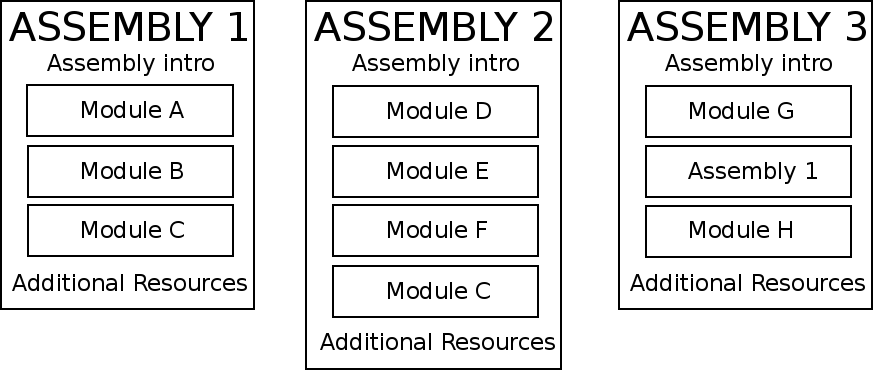
Figure 1. Schema of a module and an assembly
Additional resources
3.2. What modular documentation is not
3.3. Modular documentation repositoriesDue to many factors that determine repository design for individual products, these modular documentation guidelines do not provide a strict documentation repository template. For a general repository structure used by documentation teams at Red Hat, see the example documentation repository and 4. Writing modular documentationAssemblies can include various types of modules. Use the instructions in the following sections to create modules and combine them into assemblies. 4.1. Creating modulesFollow these guidelines to create different types of modules: A module should not contain another module. However a module can contain a text snippet. For information about text snippets, see Using Text Snippets. See Module and assembly examples for real-world examples of assemblies, modules, and their individual parts. 4.1.1. Concept modulesThis section explains what a concept module is and provides recommended practices for writing concept modules. Concept module definitionA concept module is an "understand" module. Concept modules give the user descriptions and explanations needed to understand and use a product. Concept module guidelinesThe core requirement for a concept module is explaining the idea, or concept. A concept module requires a short introduction and optionally, can also include additional resources. When planning a concept module, look at nouns in related procedure modules and assemblies to find the concepts to explain to users. Explain only things that are visible to users. Even if a concept is interesting, it probably does not require an explanation if it is not visible to users. 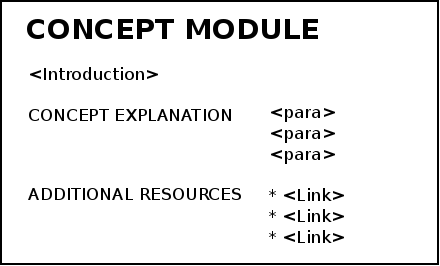
Concept introductionThe introduction to a concept module is a single, concise paragraph that provides a short overview of the module. A short description makes the module more usable because users can quickly determine whether the concept is useful without having to read the entire module. The introduction typically answers the following questions:
For details and examples, see the Short descriptions section in the Red Hat supplementary style guide. Concept bodyThe concept body describes the subject of the concept module. Apart from paragraphs, you can use other AsciiDoc elements, such as lists, tables, or examples. Consider including graphics or diagrams to speed up the understanding of the concept. Avoid including instructions to perform an action. Action items belong in procedure modules. However, in some cases a concept or reference module can include suggested actions when those actions are simple, are highly dependent on the context of the module, and have no place in any procedure module. In such cases, ensure that the heading of the concept or reference remains a noun phrase and not a gerund. For example, see "Bound variables in patterns and constraints" and the sections that follow it. These concept and reference modules contain actions that are not suitable for standalone procedure modules but are relevant actions to understand in the context of the concept or reference being described. See also The DITA Topic Types at _informationmapping.com for more information about different types of conceptual information: principle, concept, structure, process, and fact. If the concept module is large and complex, consider splitting the concept module into multiple standalone concept modules. If you cannot split the module into meaningful standalone modules, consider using subheadings in the module to structure the content for improved reader navigation. In many cases, subheadings are helpful to include in the table of contents to improve content searchability. Example subheading
Concept additional resourcesThe optional additional resources list links to other material closely related to the contents of the concept module, for example, other documentation resources. Focus on relevant resources that might interest the user. Do not list resources for completeness. Additional resources
4.1.2. Procedure modulesProcedure modules explain how to do something. A procedure module contains numbered, step-by-step instructions to help users accomplish a single task. Sometimes those tasks include substeps. Procedure modules must include a title, a brief introduction, and one or more steps in the form of imperative statements. Procedure modules can also contain the following sections: Do not change or embellish these subheadings. Do not create additional subheadings. 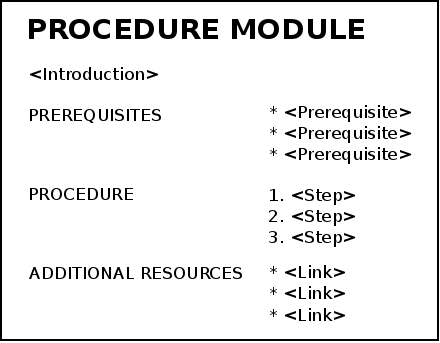
Figure 2. Schema of a procedure module
Procedure title
The title of a procedure module is a gerund phrase, such as Deploying OpenShift Container Platform. Procedure introduction
The procedure introduction is a short paragraph that provides an overview of the module. The introduction includes what the module will help the user do and why it will be beneficial to the user. It includes key words that relate to the module to maximize search engine optimization. The introduction typically provides context for the procedure, such as:
For details and examples, see the Short descriptions section in the Red Hat supplementary style guide. Prerequisites
This section is optional. Prerequisites are a bulleted list of conditions that must be satisfied before the user starts the procedure. Use a bulleted list for prerequisites and the plural heading Prerequisites, even if your procedure only has a single prerequisite. Prerequisites can be full sentences or sentence fragments; however, prerequisite list items must be parallel. Focus on relevant prerequisites that users might not otherwise be aware of. Do not list obvious prerequisites. If a prerequisite applies to all of the procedures in a user story, consider listing the prerequisite in the assembly file. If you do this, consider including the prerequisite in the procedure module as a comment. Procedure
This section is required. The procedure consists of one or more steps required to complete the procedure. Each step describes one action written in the imperative form, for example, 'Do this action'. For single-step procedures, use an unnumbered bullet instead of a numbered list.
Verification, Results, or Result
This section is optional. It provides the user with one or more steps to verify that the procedure provided the intended outcome, for example:
Troubleshooting, Troubleshooting steps, or Troubleshooting step
This section is optional and not used often. List any actions that can help with troubleshooting the procedure. This subsection should be short. Consider whether the information might be better in a separate troubleshooting procedure or as part of a reference module that contains other troubleshooting sections. Next steps or Next step
This section is optional. Provide links to resources that contain instructions that might be useful to the user after they complete this procedure.
Additional resources
This section is optional. The listed resources link to other material closely related to the contents of the module, such as other documentation resources, instructional videos, or labs. Focus on relevant resources that might interest the user. Do not list resources for completeness. If a resource applies to all of the modules in a user story, consider listing the resource in the Additional resources section of the assembly file. If you do this, consider including the resource in the procedure module as a comment. Additional resources
4.1.3. Reference modulesThis section explains what a reference module is and provides recommended practices for writing reference modules. Reference module definitionReference modules provide data that users might want to look up, but do not need to remember. Example 1. Common documentation examples of reference modules
Example 2. Reference modules explained using a real-life example
For documentation on how to cross the road, you could create these modules:
Reference module guidelinesThe required part of a reference module is the reference data. A reference module requires a short introduction. Reference introductionThe introduction to a reference module is a single, concise paragraph that provides a short overview of the module. A short description makes the module more usable because users can quickly determine whether the reference is useful without having to read the entire module. For details and examples, see the Short descriptions section in the Red Hat supplementary style guide. Reference bodyA reference module has a very strict structure, often in the form of a list or a table. A well-organized reference module enables users to scan it quickly to find the details they want. To make the reference data easier to scan, organize it in a logical order (such as alphabetically) or as a table. AsciiDoc markup to consider for reference data: If you have a large volume of the same type of information to document, use a structure into which the information details can fit, and then document each logical unit of information as one reference module. For example, think of man pages, which document very different information details, but which still use consistent titles and formats to present those details in a uniform information structure. If the reference module is large and complex, consider splitting the reference module into multiple standalone reference modules. If you cannot split the module into meaningful standalone modules, consider using subheadings in the module to structure the content for improved reader navigation. In many cases, subheadings are helpful to include in the table of contents to improve content searchability. Example subheading
Additional resources
4.1.4. Text snippetsA text snippet is a section of text that is stored in an AsciiDoc file. Text snippets contain content that is reused in multiple modules or assemblies.
Examples of snippets:
Procedure
4.1.5. File names and anchorsTo optimize modular documentation, follow these guidelines for naming files and creating anchors: File names
Create assembly and module file names that accurately and closely reflect the title of the assembly or module. Create file names with the format
Examples
These file naming guidelines are optional but highly recommended. However, if your team does not include the module prefixes in file names followed by either a hyphen (-) or an underscore (_), include one of the following variables in each file before the anchor ID: Anchors
At the top of every module, provide an anchor in the format Example 1. Concept module
Example 2. Procedure module
Additional resources
4.2. Forming assembliesThis section explains what an assembly is and provides recommended practices for forming assemblies. 4.2.1. Assembly definitionAn assembly is a collection of modules that describes how to accomplish a user story. See also Understanding modular documentation. 4.2.2. Assembly guidelinesThe required parts of an assembly are the introduction and modules. Optionally, an assembly can also include prerequisites and additional resources. Assembly titleIf the assembly describes a task and includes one or more procedure modules, start the title with a verb in the gerund form, such as Creating or Configuring, for example Encrypting block devices using LUKS. If the assembly does not include any procedure modules, use a noun phrase, for example Red Hat Process Automation Manager API reference. Assembly introductionThe introduction explains what the user accomplishes by working through the assembled modules. It typically provides context for the assembly. Consider rewording the user story to write the assembly introduction, for example:
For details and examples, see the Short descriptions section in the Red Hat supplementary style guide. Assembly prerequisitesPrerequisites are conditions that must be satisfied before the user can start following the assembly and are applicable to all the modules in the assembly. Use the second level heading syntax for the Prerequisites section in the assembly so that it is displayed in the table of contents and is consistent with the Additional resources or Next steps sections in the assembly. Assembly modulesTo include modules in an assembly, use the Asciidoc include directive. Use any combination of concept, procedure, and reference modules that fulfills the purpose of the assembly. Use the Level offset for module files
file1.adoc[leveloffset=+1]
file2.adoc[leveloffset=+2]
file3.adoc[leveloffset=+3]
All module and assembly titles must use the H1 heading designation, such as Additional resourcesThis section is optional. The listed resources link to other material closely related to the contents of the module, such as other documentation resources, instructional videos, or labs. To ensure the content is DITA-compatible, do not use any non-link text in this section. Focus on relevant resources that might interest the user. Do not list resources for completeness. If a resource applies to all of the modules in a user story, consider listing the resource in the Additional resources section of the assembly file. If you do this, consider including the resource in the procedure module as a comment.
4.2.3. Additional resources
4.2.4. Reusing modules in assembliesWhen you create content in modules, you can use the same module multiple times in an assembly without having to replicate information in multiple source files. However, in order to facilitate module reuse, you must embed a document attribute variable in the anchor name for the module and then define that variable in the assembly each time the reused module appears. If the variable is not embedded and assigned, an error appears at build time reporting the duplicated anchor ID.
Example 3. Error at build time when anchor has no variable
This error is resolved by adding and defining a document variable. Procedure
Additional resources
Practical example 1: reusing modules in multiple assembliesYou want to reuse the "Creating Assets" procedure module and the "Projects" concept module in two assemblies: an "Asset Definitions" assembly and a "Business Rules" assembly. The module files contain the following content: projects.adoc
creating-assets.adoc
The assembly files contain the following content: asset-definitions.adoc
business-rules.adoc
For all cross-references to the reused modules, specify which context (assembly) you want to link to. For example, you can link to the "Creating Assets" procedure module as it appears either in the "Asset Definitions" assembly or in the "Business Rules" assembly. Create cross-references in the or Practical example 2: reusing a module in a single assemblyYou want to reuse the "Projects" concept module twice in the "Business Rules" assembly. The module file contains the following content: projects.adoc
The assembly file contains the following content: business-rules.adoc
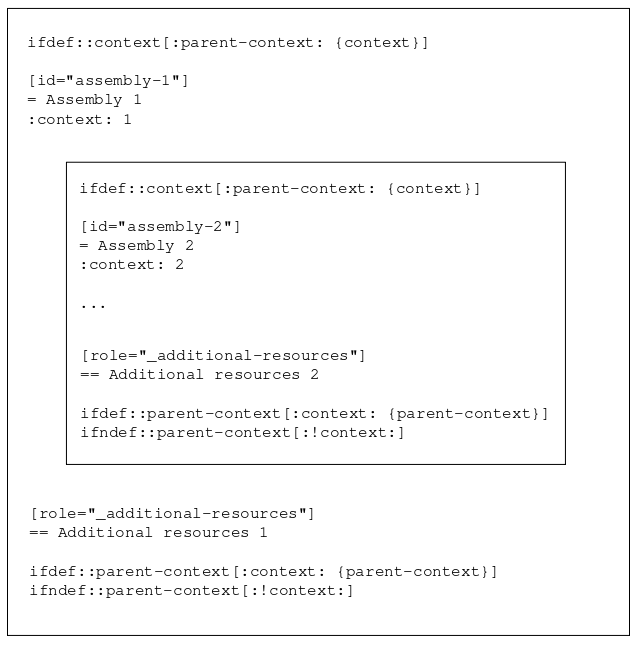
For all cross-references to the reused module, specify which context (section) you want to link to. For example, you can link to the "Projects" module as it appears either in the "Introduction" or in the "Asset Types" section. You create cross-references in the format or 4.2.5. Nesting assemblies in assembliesWhen you set the If there is, for example, an Additional Resources section in the inner, included assembly as well as in the outer, including assembly after the include statements, the ID of the second one gets overwritten with the asciidoctor: WARNING: 1.adoc: line 19: id assigned to section already in use: additional-resources-2 Example 4. Nested assemblies with a duplicate ID
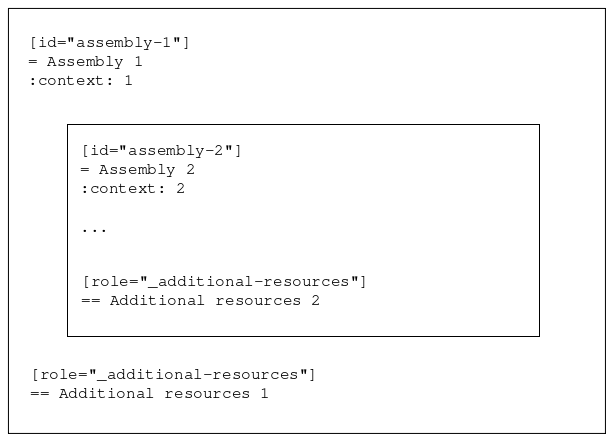
To solve this problem, restore the
Example 5. Correctly nested assemblies
See also the assembly template for an example. Appendix A: Modular documentation terms and definitions
Appendix B: Module and assembly examplesAppendix C: Converting to modular documentationIf you have a monolithic, feature-based manual, you can convert it to a set of modular content based on user stories. This conversion workflow involves using the customer product lifecycle to define user stories for your product, and creating the assemblies and modules necessary to fit each user story. The result is documentation that is more relevant for your readers, because it is based on real-world user stories (it tells them how to accomplish their goals), and modular (it can be assembled into whatever sets and formats they might need). Prerequisites
C.1. Overview of the customer product lifecycleUser stories are the basis of modular documentation. The modular documentation conversion workflow uses the customer product lifecycle to help you discover and develop the user stories that your documentation should include. While all products are different, everyone tends to use them in a similar workflow that starts with the initial research to determine which product to use, includes implementing and managing the product, and ends when the product is no longer needed. This customer product lifecycle can be broken down into phases, each of which presents unique user information requirements (that is, the user needs different types of information at each phase of the lifecycle):
C.2. Defining user stories for your productUser stories provide the context and structure from which you can determine which assemblies and modules to create. For more information about user stories, see Modular Documentation Terms and Definitions. Ideally, well-defined user stories would already exist for the product you are documenting. For most writers, however, this ideal is not a reality. If you do not have any user stories from which to work, and you — as a writer — do not have all of the user information you would need to create the user stories yourself, how do you get started? This procedure provides a general approach that you can take. Of course, every product differs in terms of tools, processes, team dynamics, and access to SMEs. Since you are most familiar with these aspects for your own team, you will need to adapt this general approach for your own team. Depending on your team structure, each step can be completed by either a writer or a collaboration between a writer and Content Strategist. Procedure
C.3. Creating assembliesAn assembly is a representation of a user story, so you need to create an assembly for each user story that you defined. An assembly could represent an article, "chapter" in a book, or even an entire book. However, one of the benefits of modular documentation is that you do not need to worry about how the assembly will ultimately be used — each assembly represents a user goal, and once you create it, it can be "included" anywhere it is needed (a publication, within another assembly, and so on). Procedure
C.4. Creating modulesAfter identifying and creating the assemblies, each assembly should identify the modules that you need to create. Procedure
C.5. Auditing your feature-based manualIn the process of adding content to the modules from your existing feature-based manual, it is likely that there is some existing content that did not fit into any of the user stories that you identified and thus was not pulled out. It is important to identify this content to ensure that it is no longer needed. Procedure
| |||||||||||||||||||||||||||||||||||||||||||||||||||||||||
| You are visitor 01402503 — GeezerVison does not store the pages you look up. Best viewed with Netscape Navigator 4.7 or Internet Explorer 6 at 800×600. No cookies required. |
