GeezerVison is showing scikit-learn.org — Categorical Feature Support in Gradient Boosting
Note
Go to the end
to download the full example code or to run this example in your browser via JupyterLite or Binder.
Categorical Feature Support in Gradient Boosting#
In this example, we compare the training times and prediction performances of
HistGradientBoostingRegressor with different encoding
strategies for categorical features. In particular, we evaluate:
For such purpose we use the Ames Iowa Housing dataset, which consists of
numerical and categorical features, where the target is the house sale price.
See Features in Histogram Gradient Boosting Trees for an
example showcasing some other features of
HistGradientBoostingRegressor.
See Comparing Target Encoder with Other Encoders for a
comparison of encoding strategies in the presence of high cardinality
categorical features.
# Authors: The scikit-learn developers
# SPDX-License-Identifier: BSD-3-Clause
Load Ames Housing dataset#
First, we load the Ames Housing data as a pandas dataframe. The features
are either categorical or numerical:
from sklearn.datasets import fetch_openml

X, y = fetch_openml(data_id=42165, as_frame=True, return_X_y=True)

# Select only a subset of features of X to make the example faster to run
categorical_columns_subset = [
    "BldgType",
    "GarageFinish",
    "LotConfig",
    "Functional",
    "MasVnrType",
    "HouseStyle",
    "FireplaceQu",
    "ExterCond",
    "ExterQual",
    "PoolQC",
]

numerical_columns_subset = [
    "3SsnPorch",
    "Fireplaces",
    "BsmtHalfBath",
    "HalfBath",
    "GarageCars",
    "TotRmsAbvGrd",
    "BsmtFinSF1",
    "BsmtFinSF2",
    "GrLivArea",
    "ScreenPorch",
]

X = X[categorical_columns_subset + numerical_columns_subset]
X[categorical_columns_subset] = X[categorical_columns_subset].astype("category")

categorical_columns = X.select_dtypes(include="category").columns
n_categorical_features = len(categorical_columns)
n_numerical_features = X.select_dtypes(include="number").shape[1]

print(f"Number of samples: {X.shape[0]}")
print(f"Number of features: {X.shape[1]}")
print(f"Number of categorical features: {n_categorical_features}")
print(f"Number of numerical features: {n_numerical_features}")
Number of samples: 1460
Number of features: 20
Number of categorical features: 10
Number of numerical features: 10
Gradient boosting estimator with dropped categorical features#
As a baseline, we create an estimator where the categorical features are
dropped:
Pipeline(steps=[('columntransformer',
                 ColumnTransformer(remainder='passthrough',
                                   transformers=[('drop', 'drop',
                                                  <sklearn.compose._column_transformer.make_column_selector object at 0x7e1de65930e0>)])),
                ('histgradientboostingregressor',
                 HistGradientBoostingRegressor(random_state=42))])
In a Jupyter environment, please rerun this cell to show the HTML representation or trust the notebook.
On GitHub, the HTML representation is unable to render, please try loading this page with nbviewer.org.
Parameters
|
steps
steps: list of tuples
List of (name of step, estimator) tuples that are to be chained in
sequential order. To be compatible with the scikit-learn API, all steps
must define `fit`. All non-last steps must also define `transform`. See
:ref:`Combining Estimators <combining_estimators>` for more details.
|
[('columntransformer', ...), ('histgradientboostingregressor', ...)] |
|
transform_input
transform_input: list of str, default=None
The names of the :term:`metadata` parameters that should be transformed by the
pipeline before passing it to the step consuming it.
This enables transforming some input arguments to ``fit`` (other than ``X``)
to be transformed by the steps of the pipeline up to the step which requires
them. Requirement is defined via :ref:`metadata routing <metadata_routing>`.
For instance, this can be used to pass a validation set through the pipeline.
You can only set this if metadata routing is enabled, which you
can enable using ``sklearn.set_config(enable_metadata_routing=True)``.
.. versionadded:: 1.6
|
None |
|
memory
memory: str or object with the joblib.Memory interface, default=None
Used to cache the fitted transformers of the pipeline. The last step
will never be cached, even if it is a transformer. By default, no
caching is performed. If a string is given, it is the path to the
caching directory. Enabling caching triggers a clone of the transformers
before fitting. Therefore, the transformer instance given to the
pipeline cannot be inspected directly. Use the attribute ``named_steps``
or ``steps`` to inspect estimators within the pipeline. Caching the
transformers is advantageous when fitting is time consuming. See
:ref:`sphx_glr_auto_examples_neighbors_plot_caching_nearest_neighbors.py`
for an example on how to enable caching.
|
None |
|
verbose
verbose: bool, default=False
If True, the time elapsed while fitting each step will be printed as it
is completed.
|
False |
columntransformer: ColumnTransformer
Parameters
|
transformers
transformers: list of tuples
List of (name, transformer, columns) tuples specifying the
transformer objects to be applied to subsets of the data.
name : str
Like in Pipeline and FeatureUnion, this allows the transformer and
its parameters to be set using ``set_params`` and searched in grid
search.
transformer : {'drop', 'passthrough'} or estimator
Estimator must support :term:`fit` and :term:`transform`.
Special-cased strings 'drop' and 'passthrough' are accepted as
well, to indicate to drop the columns or to pass them through
untransformed, respectively.
columns : str, array-like of str, int, array-like of int, array-like of bool, slice or callable
Indexes the data on its second axis. Integers are interpreted as
positional columns, while strings can reference DataFrame columns
by name. A scalar string or int should be used where
``transformer`` expects X to be a 1d array-like (vector),
otherwise a 2d array will be passed to the transformer.
A callable is passed the input data `X` and can return any of the
above. To select multiple columns by name or dtype, you can use
:obj:`make_column_selector`.
|
[('drop', ...)] |
|
remainder
remainder: {'drop', 'passthrough'} or estimator, default='drop'
By default, only the specified columns in `transformers` are
transformed and combined in the output, and the non-specified
columns are dropped. (default of ``'drop'``).
By specifying ``remainder='passthrough'``, all remaining columns that
were not specified in `transformers`, but present in the data passed
to `fit` will be automatically passed through. This subset of columns
is concatenated with the output of the transformers. For dataframes,
extra columns not seen during `fit` will be excluded from the output
of `transform`.
By setting ``remainder`` to be an estimator, the remaining
non-specified columns will use the ``remainder`` estimator. The
estimator must support :term:`fit` and :term:`transform`.
Note that using this feature requires that the DataFrame columns
input at :term:`fit` and :term:`transform` have identical order.
|
'passthrough' |
|
sparse_threshold
sparse_threshold: float, default=0.3
If the output of the different transformers contains sparse matrices,
these will be stacked as a sparse matrix if the overall density is
lower than this value. Use ``sparse_threshold=0`` to always return
dense. When the transformed output consists of all dense data, the
stacked result will be dense, and this keyword will be ignored.
|
0.3 |
|
n_jobs
n_jobs: int, default=None
Number of jobs to run in parallel.
``None`` means 1 unless in a :obj:`joblib.parallel_backend` context.
``-1`` means using all processors. See :term:`Glossary <n_jobs>`
for more details.
|
None |
|
transformer_weights
transformer_weights: dict, default=None
Multiplicative weights for features per transformer. The output of the
transformer is multiplied by these weights. Keys are transformer names,
values the weights.
|
None |
|
verbose
verbose: bool, default=False
If True, the time elapsed while fitting each transformer will be
printed as it is completed.
|
False |
|
verbose_feature_names_out
verbose_feature_names_out: bool, str or Callable[[str, str], str], default=True
- If True, :meth:`ColumnTransformer.get_feature_names_out` will prefix
all feature names with the name of the transformer that generated that
feature. It is equivalent to setting
`verbose_feature_names_out="{transformer_name}__{feature_name}"`.
- If False, :meth:`ColumnTransformer.get_feature_names_out` will not
prefix any feature names and will error if feature names are not
unique.
- If ``Callable[[str, str], str]``,
:meth:`ColumnTransformer.get_feature_names_out` will rename all the features
using the name of the transformer. The first argument of the callable is the
transformer name and the second argument is the feature name. The returned
string will be the new feature name.
- If ``str``, it must be a string ready for formatting. The given string will
be formatted using two field names: ``transformer_name`` and ``feature_name``.
e.g. ``"{feature_name}__{transformer_name}"``. See :meth:`str.format` method
from the standard library for more info.
.. versionadded:: 1.0
.. versionchanged:: 1.6
`verbose_feature_names_out` can be a callable or a string to be formatted.
|
True |
<sklearn.compose._column_transformer.make_column_selector object at 0x7e1de65930e0> HistGradientBoostingRegressor
Parameters
|
random_state
random_state: int, RandomState instance or None, default=None
Pseudo-random number generator to control the subsampling in the
binning process, and the train/validation data split if early stopping
is enabled.
Pass an int for reproducible output across multiple function calls.
See :term:`Glossary <random_state>`.
|
42 |
|
loss
loss: {'squared_error', 'absolute_error', 'gamma', 'poisson', 'quantile'}, default='squared_error'
The loss function to use in the boosting process. Note that the
"squared error", "gamma" and "poisson" losses actually implement
"half least squares loss", "half gamma deviance" and "half poisson
deviance" to simplify the computation of the gradient. Furthermore,
"gamma" and "poisson" losses internally use a log-link, "gamma"
requires ``y > 0`` and "poisson" requires ``y >= 0``.
"quantile" uses the pinball loss.
.. versionchanged:: 0.23
Added option 'poisson'.
.. versionchanged:: 1.1
Added option 'quantile'.
.. versionchanged:: 1.3
Added option 'gamma'.
|
'squared_error' |
|
quantile
quantile: float, default=None
If loss is "quantile", this parameter specifies which quantile to be estimated
and must be between 0 and 1.
|
None |
|
learning_rate
learning_rate: float, default=0.1
The learning rate, also known as *shrinkage*. This is used as a
multiplicative factor for the leaves values. Use ``1`` for no
shrinkage.
|
0.1 |
|
max_iter
max_iter: int, default=100
The maximum number of iterations of the boosting process, i.e. the
maximum number of trees.
|
100 |
|
max_leaf_nodes
max_leaf_nodes: int or None, default=31
The maximum number of leaves for each tree. Must be strictly greater
than 1. If None, there is no maximum limit.
|
31 |
|
max_depth
max_depth: int or None, default=None
The maximum depth of each tree. The depth of a tree is the number of
edges to go from the root to the deepest leaf.
Depth isn't constrained by default.
|
None |
|
min_samples_leaf
min_samples_leaf: int, default=20
The minimum number of samples per leaf. For small datasets with less
than a few hundred samples, it is recommended to lower this value
since only very shallow trees would be built.
|
20 |
|
l2_regularization
l2_regularization: float, default=0
The L2 regularization parameter penalizing leaves with small hessians.
Use ``0`` for no regularization (default).
|
0.0 |
|
max_features
max_features: float, default=1.0
Proportion of randomly chosen features in each and every node split.
This is a form of regularization, smaller values make the trees weaker
learners and might prevent overfitting.
If interaction constraints from `interaction_cst` are present, only allowed
features are taken into account for the subsampling.
.. versionadded:: 1.4
|
1.0 |
|
max_bins
max_bins: int, default=255
The maximum number of bins to use for non-missing values. Before
training, each feature of the input array `X` is binned into
integer-valued bins, which allows for a much faster training stage.
Features with a small number of unique values may use less than
``max_bins`` bins. In addition to the ``max_bins`` bins, one more bin
is always reserved for missing values. Must be no larger than 255.
|
255 |
|
categorical_features
categorical_features: array-like of {bool, int, str} of shape (n_features) or shape (n_categorical_features,), default='from_dtype'
Indicates the categorical features.
- None : no feature will be considered categorical.
- boolean array-like : boolean mask indicating categorical features.
- integer array-like : integer indices indicating categorical
features.
- str array-like: names of categorical features (assuming the training
data has feature names).
- `"from_dtype"`: dataframe columns with dtype "Categorical" and "Enum" are
considered to be categorical features. The input must be a dataframe that
is supported by narwhals (or supports it): :func:`narwhals.from_native` must
work. This is the case, for instance, for pandas and polars DataFrames.
For each categorical feature, there must be at most `max_bins` unique
categories. Negative values for categorical features encoded as numeric
dtypes are treated as missing values. All categorical values are
converted to floating point numbers. This means that categorical values
of 1.0 and 1 are treated as the same category.
Read more in the :ref:`User Guide <categorical_support_gbdt>` and
:ref:`sphx_glr_auto_examples_ensemble_plot_gradient_boosting_categorical.py`.
.. versionadded:: 0.24
.. versionchanged:: 1.2
Added support for feature names.
.. versionchanged:: 1.4
Added `"from_dtype"` option.
.. versionchanged:: 1.6
The default value changed from `None` to `"from_dtype"`.
|
'from_dtype' |
|
monotonic_cst
monotonic_cst: array-like of int of shape (n_features) or dict, default=None
Monotonic constraint to enforce on each feature are specified using the
following integer values:
- 1: monotonic increase
- 0: no constraint
- -1: monotonic decrease
If a dict with str keys, map feature to monotonic constraints by name.
If an array, the features are mapped to constraints by position. See
:ref:`monotonic_cst_features_names` for a usage example.
Read more in the :ref:`User Guide <monotonic_cst_gbdt>`.
.. versionadded:: 0.23
.. versionchanged:: 1.2
Accept dict of constraints with feature names as keys.
|
None |
|
interaction_cst
interaction_cst: {"pairwise", "no_interactions"} or sequence of lists/tuples/sets of int, default=None
Specify interaction constraints, the sets of features which can
interact with each other in child node splits.
Each item specifies the set of feature indices that are allowed
to interact with each other. If there are more features than
specified in these constraints, they are treated as if they were
specified as an additional set.
The strings "pairwise" and "no_interactions" are shorthands for
allowing only pairwise or no interactions, respectively.
For instance, with 5 features in total, `interaction_cst=[{0, 1}]`
is equivalent to `interaction_cst=[{0, 1}, {2, 3, 4}]`,
and specifies that each branch of a tree will either only split
on features 0 and 1 or only split on features 2, 3 and 4.
See :ref:`this example<ice-vs-pdp>` on how to use `interaction_cst`.
.. versionadded:: 1.2
|
None |
|
warm_start
warm_start: bool, default=False
When set to ``True``, reuse the solution of the previous call to fit
and add more estimators to the ensemble. For results to be valid, the
estimator should be re-trained on the same data only.
See :term:`the Glossary <warm_start>`.
|
False |
|
early_stopping
early_stopping: 'auto' or bool, default='auto'
If 'auto', early stopping is enabled if the sample size is larger than
10000 or if `X_val` and `y_val` are passed to `fit`. If True, early stopping
is enabled, otherwise early stopping is disabled.
.. versionadded:: 0.23
|
'auto' |
|
scoring
scoring: str or callable or None, default='loss'
Scoring method to use for early stopping. Only used if `early_stopping`
is enabled. Options:
- str: see :ref:`scoring_string_names` for options.
- callable: a scorer callable object (e.g., function) with signature
``scorer(estimator, X, y)``. See :ref:`scoring_callable` for details.
- `None`: the :ref:`coefficient of determination <r2_score>`
(:math:`R^2`) is used.
- 'loss': early stopping is checked w.r.t the loss value.
|
'loss' |
|
validation_fraction
validation_fraction: int or float or None, default=0.1
Proportion (or absolute size) of training data to set aside as
validation data for early stopping. If None, early stopping is done on
the training data.
The value is ignored if either early stopping is not performed, e.g.
`early_stopping=False`, or if `X_val` and `y_val` are passed to fit.
|
0.1 |
|
n_iter_no_change
n_iter_no_change: int, default=10
Used to determine when to "early stop". The fitting process is
stopped when none of the last ``n_iter_no_change`` scores are better
than the ``n_iter_no_change - 1`` -th-to-last one, up to some
tolerance. Only used if early stopping is performed.
|
10 |
|
tol
tol: float, default=1e-7
The absolute tolerance to use when comparing scores during early
stopping. The higher the tolerance, the more likely we are to early
stop: higher tolerance means that it will be harder for subsequent
iterations to be considered an improvement upon the reference score.
|
1e-07 |
|
verbose
verbose: int, default=0
The verbosity level. If not zero, print some information about the
fitting process. ``1`` prints only summary info, ``2`` prints info per
iteration.
|
0 |
Gradient boosting estimator with one-hot encoding#
Next, we create a pipeline to one-hot encode the categorical features,
while letting the remaining features "passthrough" unchanged:
Pipeline(steps=[('columntransformer',
                 ColumnTransformer(remainder='passthrough',
                                   transformers=[('onehotencoder',
                                                  OneHotEncoder(handle_unknown='ignore',
                                                                sparse_output=False),
                                                  <sklearn.compose._column_transformer.make_column_selector object at 0x7e1d94dbcf50>)])),
                ('histgradientboostingregressor',
                 HistGradientBoostingRegressor(random_state=42))])
In a Jupyter environment, please rerun this cell to show the HTML representation or trust the notebook.
On GitHub, the HTML representation is unable to render, please try loading this page with nbviewer.org.
Parameters
|
steps
steps: list of tuples
List of (name of step, estimator) tuples that are to be chained in
sequential order. To be compatible with the scikit-learn API, all steps
must define `fit`. All non-last steps must also define `transform`. See
:ref:`Combining Estimators <combining_estimators>` for more details.
|
[('columntransformer', ...), ('histgradientboostingregressor', ...)] |
|
transform_input
transform_input: list of str, default=None
The names of the :term:`metadata` parameters that should be transformed by the
pipeline before passing it to the step consuming it.
This enables transforming some input arguments to ``fit`` (other than ``X``)
to be transformed by the steps of the pipeline up to the step which requires
them. Requirement is defined via :ref:`metadata routing <metadata_routing>`.
For instance, this can be used to pass a validation set through the pipeline.
You can only set this if metadata routing is enabled, which you
can enable using ``sklearn.set_config(enable_metadata_routing=True)``.
.. versionadded:: 1.6
|
None |
|
memory
memory: str or object with the joblib.Memory interface, default=None
Used to cache the fitted transformers of the pipeline. The last step
will never be cached, even if it is a transformer. By default, no
caching is performed. If a string is given, it is the path to the
caching directory. Enabling caching triggers a clone of the transformers
before fitting. Therefore, the transformer instance given to the
pipeline cannot be inspected directly. Use the attribute ``named_steps``
or ``steps`` to inspect estimators within the pipeline. Caching the
transformers is advantageous when fitting is time consuming. See
:ref:`sphx_glr_auto_examples_neighbors_plot_caching_nearest_neighbors.py`
for an example on how to enable caching.
|
None |
|
verbose
verbose: bool, default=False
If True, the time elapsed while fitting each step will be printed as it
is completed.
|
False |
columntransformer: ColumnTransformer
Parameters
|
transformers
transformers: list of tuples
List of (name, transformer, columns) tuples specifying the
transformer objects to be applied to subsets of the data.
name : str
Like in Pipeline and FeatureUnion, this allows the transformer and
its parameters to be set using ``set_params`` and searched in grid
search.
transformer : {'drop', 'passthrough'} or estimator
Estimator must support :term:`fit` and :term:`transform`.
Special-cased strings 'drop' and 'passthrough' are accepted as
well, to indicate to drop the columns or to pass them through
untransformed, respectively.
columns : str, array-like of str, int, array-like of int, array-like of bool, slice or callable
Indexes the data on its second axis. Integers are interpreted as
positional columns, while strings can reference DataFrame columns
by name. A scalar string or int should be used where
``transformer`` expects X to be a 1d array-like (vector),
otherwise a 2d array will be passed to the transformer.
A callable is passed the input data `X` and can return any of the
above. To select multiple columns by name or dtype, you can use
:obj:`make_column_selector`.
|
[('onehotencoder', ...)] |
|
remainder
remainder: {'drop', 'passthrough'} or estimator, default='drop'
By default, only the specified columns in `transformers` are
transformed and combined in the output, and the non-specified
columns are dropped. (default of ``'drop'``).
By specifying ``remainder='passthrough'``, all remaining columns that
were not specified in `transformers`, but present in the data passed
to `fit` will be automatically passed through. This subset of columns
is concatenated with the output of the transformers. For dataframes,
extra columns not seen during `fit` will be excluded from the output
of `transform`.
By setting ``remainder`` to be an estimator, the remaining
non-specified columns will use the ``remainder`` estimator. The
estimator must support :term:`fit` and :term:`transform`.
Note that using this feature requires that the DataFrame columns
input at :term:`fit` and :term:`transform` have identical order.
|
'passthrough' |
|
sparse_threshold
sparse_threshold: float, default=0.3
If the output of the different transformers contains sparse matrices,
these will be stacked as a sparse matrix if the overall density is
lower than this value. Use ``sparse_threshold=0`` to always return
dense. When the transformed output consists of all dense data, the
stacked result will be dense, and this keyword will be ignored.
|
0.3 |
|
n_jobs
n_jobs: int, default=None
Number of jobs to run in parallel.
``None`` means 1 unless in a :obj:`joblib.parallel_backend` context.
``-1`` means using all processors. See :term:`Glossary <n_jobs>`
for more details.
|
None |
|
transformer_weights
transformer_weights: dict, default=None
Multiplicative weights for features per transformer. The output of the
transformer is multiplied by these weights. Keys are transformer names,
values the weights.
|
None |
|
verbose
verbose: bool, default=False
If True, the time elapsed while fitting each transformer will be
printed as it is completed.
|
False |
|
verbose_feature_names_out
verbose_feature_names_out: bool, str or Callable[[str, str], str], default=True
- If True, :meth:`ColumnTransformer.get_feature_names_out` will prefix
all feature names with the name of the transformer that generated that
feature. It is equivalent to setting
`verbose_feature_names_out="{transformer_name}__{feature_name}"`.
- If False, :meth:`ColumnTransformer.get_feature_names_out` will not
prefix any feature names and will error if feature names are not
unique.
- If ``Callable[[str, str], str]``,
:meth:`ColumnTransformer.get_feature_names_out` will rename all the features
using the name of the transformer. The first argument of the callable is the
transformer name and the second argument is the feature name. The returned
string will be the new feature name.
- If ``str``, it must be a string ready for formatting. The given string will
be formatted using two field names: ``transformer_name`` and ``feature_name``.
e.g. ``"{feature_name}__{transformer_name}"``. See :meth:`str.format` method
from the standard library for more info.
.. versionadded:: 1.0
.. versionchanged:: 1.6
`verbose_feature_names_out` can be a callable or a string to be formatted.
|
True |
<sklearn.compose._column_transformer.make_column_selector object at 0x7e1d94dbcf50>
Parameters
|
sparse_output
sparse_output: bool, default=True
When ``True``, it returns a SciPy sparse matrix/array
in "Compressed Sparse Row" (CSR) format.
.. versionadded:: 1.2
`sparse` was renamed to `sparse_output`
|
False |
|
handle_unknown
handle_unknown: {'error', 'ignore', 'infrequent_if_exist', 'warn'}, default='error'
Specifies the way unknown categories are handled during :meth:`transform`.
- 'error' : Raise an error if an unknown category is present during transform.
- 'ignore' : When an unknown category is encountered during
transform, the resulting one-hot encoded columns for this feature
will be all zeros. In the inverse transform, an unknown category
will be denoted as None.
- 'infrequent_if_exist' : When an unknown category is encountered
during transform, the resulting one-hot encoded columns for this
feature will map to the infrequent category if it exists. The
infrequent category will be mapped to the last position in the
encoding. During inverse transform, an unknown category will be
mapped to the category denoted `'infrequent'` if it exists. If the
`'infrequent'` category does not exist, then :meth:`transform` and
:meth:`inverse_transform` will handle an unknown category as with
`handle_unknown='ignore'`. Infrequent categories exist based on
`min_frequency` and `max_categories`. Read more in the
:ref:`User Guide <encoder_infrequent_categories>`.
- 'warn' : When an unknown category is encountered during transform
a warning is issued, and the encoding then proceeds as described for
`handle_unknown="infrequent_if_exist"`.
.. versionchanged:: 1.1
`'infrequent_if_exist'` was added to automatically handle unknown
categories and infrequent categories.
.. versionadded:: 1.6
The option `"warn"` was added in 1.6.
|
'ignore' |
|
categories
categories: 'auto' or a list of array-like, default='auto'
Categories (unique values) per feature:
- 'auto' : Determine categories automatically from the training data.
- list : ``categories[i]`` holds the categories expected in the ith
column. The passed categories should not mix strings and numeric
values within a single feature, and should be sorted in case of
numeric values.
The used categories can be found in the ``categories_`` attribute.
.. versionadded:: 0.20
|
'auto' |
|
drop
drop: {'first', 'if_binary'} or an array-like of shape (n_features,), default=None
Specifies a methodology to use to drop one of the categories per
feature. This is useful in situations where perfectly collinear
features cause problems, such as when feeding the resulting data
into an unregularized linear regression model.
However, dropping one category breaks the symmetry of the original
representation and can therefore induce a bias in downstream models,
for instance for penalized linear classification or regression models.
- None : retain all features (the default).
- 'first' : drop the first category in each feature. If only one
category is present, the feature will be dropped entirely.
- 'if_binary' : drop the first category in each feature with two
categories. Features with 1 or more than 2 categories are
left intact.
- array : ``drop[i]`` is the category in feature ``X[:, i]`` that
should be dropped.
When `max_categories` or `min_frequency` is configured to group
infrequent categories, the dropping behavior is handled after the
grouping.
.. versionadded:: 0.21
The parameter `drop` was added in 0.21.
.. versionchanged:: 0.23
The option `drop='if_binary'` was added in 0.23.
.. versionchanged:: 1.1
Support for dropping infrequent categories.
|
None |
|
dtype
dtype: number type, default=np.float64
Desired dtype of output.
|
<class 'numpy.float64'> |
|
min_frequency
min_frequency: int or float, default=None
Specifies the minimum frequency below which a category will be
considered infrequent.
- If `int`, categories with a smaller cardinality will be considered
infrequent.
- If `float`, categories with a smaller cardinality than
`min_frequency * n_samples` will be considered infrequent.
.. versionadded:: 1.1
Read more in the :ref:`User Guide <encoder_infrequent_categories>`.
|
None |
|
max_categories
max_categories: int, default=None
Specifies an upper limit to the number of output features for each input
feature when considering infrequent categories. If there are infrequent
categories, `max_categories` includes the category representing the
infrequent categories along with the frequent categories. If `None`,
there is no limit to the number of output features.
.. versionadded:: 1.1
Read more in the :ref:`User Guide <encoder_infrequent_categories>`.
|
None |
|
feature_name_combiner
feature_name_combiner: "concat" or callable, default="concat"
Callable with signature `def callable(input_feature, category)` that returns a
string. This is used to create feature names to be returned by
:meth:`get_feature_names_out`.
`"concat"` concatenates encoded feature name and category with
`feature + "_" + str(category)`.E.g. feature X with values 1, 6, 7 create
feature names `X_1, X_6, X_7`.
.. versionadded:: 1.3
|
'concat' |
HistGradientBoostingRegressor
Parameters
|
random_state
random_state: int, RandomState instance or None, default=None
Pseudo-random number generator to control the subsampling in the
binning process, and the train/validation data split if early stopping
is enabled.
Pass an int for reproducible output across multiple function calls.
See :term:`Glossary <random_state>`.
|
42 |
|
loss
loss: {'squared_error', 'absolute_error', 'gamma', 'poisson', 'quantile'}, default='squared_error'
The loss function to use in the boosting process. Note that the
"squared error", "gamma" and "poisson" losses actually implement
"half least squares loss", "half gamma deviance" and "half poisson
deviance" to simplify the computation of the gradient. Furthermore,
"gamma" and "poisson" losses internally use a log-link, "gamma"
requires ``y > 0`` and "poisson" requires ``y >= 0``.
"quantile" uses the pinball loss.
.. versionchanged:: 0.23
Added option 'poisson'.
.. versionchanged:: 1.1
Added option 'quantile'.
.. versionchanged:: 1.3
Added option 'gamma'.
|
'squared_error' |
|
quantile
quantile: float, default=None
If loss is "quantile", this parameter specifies which quantile to be estimated
and must be between 0 and 1.
|
None |
|
learning_rate
learning_rate: float, default=0.1
The learning rate, also known as *shrinkage*. This is used as a
multiplicative factor for the leaves values. Use ``1`` for no
shrinkage.
|
0.1 |
|
max_iter
max_iter: int, default=100
The maximum number of iterations of the boosting process, i.e. the
maximum number of trees.
|
100 |
|
max_leaf_nodes
max_leaf_nodes: int or None, default=31
The maximum number of leaves for each tree. Must be strictly greater
than 1. If None, there is no maximum limit.
|
31 |
|
max_depth
max_depth: int or None, default=None
The maximum depth of each tree. The depth of a tree is the number of
edges to go from the root to the deepest leaf.
Depth isn't constrained by default.
|
None |
|
min_samples_leaf
min_samples_leaf: int, default=20
The minimum number of samples per leaf. For small datasets with less
than a few hundred samples, it is recommended to lower this value
since only very shallow trees would be built.
|
20 |
|
l2_regularization
l2_regularization: float, default=0
The L2 regularization parameter penalizing leaves with small hessians.
Use ``0`` for no regularization (default).
|
0.0 |
|
max_features
max_features: float, default=1.0
Proportion of randomly chosen features in each and every node split.
This is a form of regularization, smaller values make the trees weaker
learners and might prevent overfitting.
If interaction constraints from `interaction_cst` are present, only allowed
features are taken into account for the subsampling.
.. versionadded:: 1.4
|
1.0 |
|
max_bins
max_bins: int, default=255
The maximum number of bins to use for non-missing values. Before
training, each feature of the input array `X` is binned into
integer-valued bins, which allows for a much faster training stage.
Features with a small number of unique values may use less than
``max_bins`` bins. In addition to the ``max_bins`` bins, one more bin
is always reserved for missing values. Must be no larger than 255.
|
255 |
|
categorical_features
categorical_features: array-like of {bool, int, str} of shape (n_features) or shape (n_categorical_features,), default='from_dtype'
Indicates the categorical features.
- None : no feature will be considered categorical.
- boolean array-like : boolean mask indicating categorical features.
- integer array-like : integer indices indicating categorical
features.
- str array-like: names of categorical features (assuming the training
data has feature names).
- `"from_dtype"`: dataframe columns with dtype "Categorical" and "Enum" are
considered to be categorical features. The input must be a dataframe that
is supported by narwhals (or supports it): :func:`narwhals.from_native` must
work. This is the case, for instance, for pandas and polars DataFrames.
For each categorical feature, there must be at most `max_bins` unique
categories. Negative values for categorical features encoded as numeric
dtypes are treated as missing values. All categorical values are
converted to floating point numbers. This means that categorical values
of 1.0 and 1 are treated as the same category.
Read more in the :ref:`User Guide <categorical_support_gbdt>` and
:ref:`sphx_glr_auto_examples_ensemble_plot_gradient_boosting_categorical.py`.
.. versionadded:: 0.24
.. versionchanged:: 1.2
Added support for feature names.
.. versionchanged:: 1.4
Added `"from_dtype"` option.
.. versionchanged:: 1.6
The default value changed from `None` to `"from_dtype"`.
|
'from_dtype' |
|
monotonic_cst
monotonic_cst: array-like of int of shape (n_features) or dict, default=None
Monotonic constraint to enforce on each feature are specified using the
following integer values:
- 1: monotonic increase
- 0: no constraint
- -1: monotonic decrease
If a dict with str keys, map feature to monotonic constraints by name.
If an array, the features are mapped to constraints by position. See
:ref:`monotonic_cst_features_names` for a usage example.
Read more in the :ref:`User Guide <monotonic_cst_gbdt>`.
.. versionadded:: 0.23
.. versionchanged:: 1.2
Accept dict of constraints with feature names as keys.
|
None |
|
interaction_cst
interaction_cst: {"pairwise", "no_interactions"} or sequence of lists/tuples/sets of int, default=None
Specify interaction constraints, the sets of features which can
interact with each other in child node splits.
Each item specifies the set of feature indices that are allowed
to interact with each other. If there are more features than
specified in these constraints, they are treated as if they were
specified as an additional set.
The strings "pairwise" and "no_interactions" are shorthands for
allowing only pairwise or no interactions, respectively.
For instance, with 5 features in total, `interaction_cst=[{0, 1}]`
is equivalent to `interaction_cst=[{0, 1}, {2, 3, 4}]`,
and specifies that each branch of a tree will either only split
on features 0 and 1 or only split on features 2, 3 and 4.
See :ref:`this example<ice-vs-pdp>` on how to use `interaction_cst`.
.. versionadded:: 1.2
|
None |
|
warm_start
warm_start: bool, default=False
When set to ``True``, reuse the solution of the previous call to fit
and add more estimators to the ensemble. For results to be valid, the
estimator should be re-trained on the same data only.
See :term:`the Glossary <warm_start>`.
|
False |
|
early_stopping
early_stopping: 'auto' or bool, default='auto'
If 'auto', early stopping is enabled if the sample size is larger than
10000 or if `X_val` and `y_val` are passed to `fit`. If True, early stopping
is enabled, otherwise early stopping is disabled.
.. versionadded:: 0.23
|
'auto' |
|
scoring
scoring: str or callable or None, default='loss'
Scoring method to use for early stopping. Only used if `early_stopping`
is enabled. Options:
- str: see :ref:`scoring_string_names` for options.
- callable: a scorer callable object (e.g., function) with signature
``scorer(estimator, X, y)``. See :ref:`scoring_callable` for details.
- `None`: the :ref:`coefficient of determination <r2_score>`
(:math:`R^2`) is used.
- 'loss': early stopping is checked w.r.t the loss value.
|
'loss' |
|
validation_fraction
validation_fraction: int or float or None, default=0.1
Proportion (or absolute size) of training data to set aside as
validation data for early stopping. If None, early stopping is done on
the training data.
The value is ignored if either early stopping is not performed, e.g.
`early_stopping=False`, or if `X_val` and `y_val` are passed to fit.
|
0.1 |
|
n_iter_no_change
n_iter_no_change: int, default=10
Used to determine when to "early stop". The fitting process is
stopped when none of the last ``n_iter_no_change`` scores are better
than the ``n_iter_no_change - 1`` -th-to-last one, up to some
tolerance. Only used if early stopping is performed.
|
10 |
|
tol
tol: float, default=1e-7
The absolute tolerance to use when comparing scores during early
stopping. The higher the tolerance, the more likely we are to early
stop: higher tolerance means that it will be harder for subsequent
iterations to be considered an improvement upon the reference score.
|
1e-07 |
|
verbose
verbose: int, default=0
The verbosity level. If not zero, print some information about the
fitting process. ``1`` prints only summary info, ``2`` prints info per
iteration.
|
0 |
Gradient boosting estimator with ordinal encoding#
Next, we create a pipeline that treats categorical features as ordered
quantities, i.e. the categories are encoded as 0, 1, 2, etc., and treated as
continuous features.
Pipeline(steps=[('columntransformer',
                 ColumnTransformer(remainder='passthrough',
                                   transformers=[('ordinalencoder',
                                                  OrdinalEncoder(handle_unknown='use_encoded_value',
                                                                 unknown_value=nan),
                                                  <sklearn.compose._column_transformer.make_column_selector object at 0x7e1d94dbed50>)])),
                ('histgradientboostingregressor',
                 HistGradientBoostingRegressor(random_state=42))])
In a Jupyter environment, please rerun this cell to show the HTML representation or trust the notebook.
On GitHub, the HTML representation is unable to render, please try loading this page with nbviewer.org.
Parameters
|
steps
steps: list of tuples
List of (name of step, estimator) tuples that are to be chained in
sequential order. To be compatible with the scikit-learn API, all steps
must define `fit`. All non-last steps must also define `transform`. See
:ref:`Combining Estimators <combining_estimators>` for more details.
|
[('columntransformer', ...), ('histgradientboostingregressor', ...)] |
|
transform_input
transform_input: list of str, default=None
The names of the :term:`metadata` parameters that should be transformed by the
pipeline before passing it to the step consuming it.
This enables transforming some input arguments to ``fit`` (other than ``X``)
to be transformed by the steps of the pipeline up to the step which requires
them. Requirement is defined via :ref:`metadata routing <metadata_routing>`.
For instance, this can be used to pass a validation set through the pipeline.
You can only set this if metadata routing is enabled, which you
can enable using ``sklearn.set_config(enable_metadata_routing=True)``.
.. versionadded:: 1.6
|
None |
|
memory
memory: str or object with the joblib.Memory interface, default=None
Used to cache the fitted transformers of the pipeline. The last step
will never be cached, even if it is a transformer. By default, no
caching is performed. If a string is given, it is the path to the
caching directory. Enabling caching triggers a clone of the transformers
before fitting. Therefore, the transformer instance given to the
pipeline cannot be inspected directly. Use the attribute ``named_steps``
or ``steps`` to inspect estimators within the pipeline. Caching the
transformers is advantageous when fitting is time consuming. See
:ref:`sphx_glr_auto_examples_neighbors_plot_caching_nearest_neighbors.py`
for an example on how to enable caching.
|
None |
|
verbose
verbose: bool, default=False
If True, the time elapsed while fitting each step will be printed as it
is completed.
|
False |
columntransformer: ColumnTransformer
Parameters
|
transformers
transformers: list of tuples
List of (name, transformer, columns) tuples specifying the
transformer objects to be applied to subsets of the data.
name : str
Like in Pipeline and FeatureUnion, this allows the transformer and
its parameters to be set using ``set_params`` and searched in grid
search.
transformer : {'drop', 'passthrough'} or estimator
Estimator must support :term:`fit` and :term:`transform`.
Special-cased strings 'drop' and 'passthrough' are accepted as
well, to indicate to drop the columns or to pass them through
untransformed, respectively.
columns : str, array-like of str, int, array-like of int, array-like of bool, slice or callable
Indexes the data on its second axis. Integers are interpreted as
positional columns, while strings can reference DataFrame columns
by name. A scalar string or int should be used where
``transformer`` expects X to be a 1d array-like (vector),
otherwise a 2d array will be passed to the transformer.
A callable is passed the input data `X` and can return any of the
above. To select multiple columns by name or dtype, you can use
:obj:`make_column_selector`.
|
[('ordinalencoder', ...)] |
|
remainder
remainder: {'drop', 'passthrough'} or estimator, default='drop'
By default, only the specified columns in `transformers` are
transformed and combined in the output, and the non-specified
columns are dropped. (default of ``'drop'``).
By specifying ``remainder='passthrough'``, all remaining columns that
were not specified in `transformers`, but present in the data passed
to `fit` will be automatically passed through. This subset of columns
is concatenated with the output of the transformers. For dataframes,
extra columns not seen during `fit` will be excluded from the output
of `transform`.
By setting ``remainder`` to be an estimator, the remaining
non-specified columns will use the ``remainder`` estimator. The
estimator must support :term:`fit` and :term:`transform`.
Note that using this feature requires that the DataFrame columns
input at :term:`fit` and :term:`transform` have identical order.
|
'passthrough' |
|
sparse_threshold
sparse_threshold: float, default=0.3
If the output of the different transformers contains sparse matrices,
these will be stacked as a sparse matrix if the overall density is
lower than this value. Use ``sparse_threshold=0`` to always return
dense. When the transformed output consists of all dense data, the
stacked result will be dense, and this keyword will be ignored.
|
0.3 |
|
n_jobs
n_jobs: int, default=None
Number of jobs to run in parallel.
``None`` means 1 unless in a :obj:`joblib.parallel_backend` context.
``-1`` means using all processors. See :term:`Glossary <n_jobs>`
for more details.
|
None |
|
transformer_weights
transformer_weights: dict, default=None
Multiplicative weights for features per transformer. The output of the
transformer is multiplied by these weights. Keys are transformer names,
values the weights.
|
None |
|
verbose
verbose: bool, default=False
If True, the time elapsed while fitting each transformer will be
printed as it is completed.
|
False |
|
verbose_feature_names_out
verbose_feature_names_out: bool, str or Callable[[str, str], str], default=True
- If True, :meth:`ColumnTransformer.get_feature_names_out` will prefix
all feature names with the name of the transformer that generated that
feature. It is equivalent to setting
`verbose_feature_names_out="{transformer_name}__{feature_name}"`.
- If False, :meth:`ColumnTransformer.get_feature_names_out` will not
prefix any feature names and will error if feature names are not
unique.
- If ``Callable[[str, str], str]``,
:meth:`ColumnTransformer.get_feature_names_out` will rename all the features
using the name of the transformer. The first argument of the callable is the
transformer name and the second argument is the feature name. The returned
string will be the new feature name.
- If ``str``, it must be a string ready for formatting. The given string will
be formatted using two field names: ``transformer_name`` and ``feature_name``.
e.g. ``"{feature_name}__{transformer_name}"``. See :meth:`str.format` method
from the standard library for more info.
.. versionadded:: 1.0
.. versionchanged:: 1.6
`verbose_feature_names_out` can be a callable or a string to be formatted.
|
True |
<sklearn.compose._column_transformer.make_column_selector object at 0x7e1d94dbed50>
Parameters
|
handle_unknown
handle_unknown: {'error', 'use_encoded_value'}, default='error'
When set to 'error' an error will be raised in case an unknown
categorical feature is present during transform. When set to
'use_encoded_value', the encoded value of unknown categories will be
set to the value given for the parameter `unknown_value`. In
:meth:`inverse_transform`, an unknown category will be denoted as None.
.. versionadded:: 0.24
|
'use_encoded_value' |
|
unknown_value
unknown_value: int or np.nan, default=None
When the parameter handle_unknown is set to 'use_encoded_value', this
parameter is required and will set the encoded value of unknown
categories. It has to be distinct from the values used to encode any of
the categories in `fit`. If set to np.nan, the `dtype` parameter must
be a float dtype.
.. versionadded:: 0.24
|
nan |
|
categories
categories: 'auto' or a list of array-like, default='auto'
Categories (unique values) per feature:
- 'auto' : Determine categories automatically from the training data.
- list : ``categories[i]`` holds the categories expected in the ith
column. The passed categories should not mix strings and numeric
values, and should be sorted in case of numeric values.
The used categories can be found in the ``categories_`` attribute.
|
'auto' |
|
dtype
dtype: number type, default=np.float64
Desired dtype of output.
|
<class 'numpy.float64'> |
|
encoded_missing_value
encoded_missing_value: int or np.nan, default=np.nan
Encoded value of missing categories. If set to `np.nan`, then the `dtype`
parameter must be a float dtype.
.. versionadded:: 1.1
|
nan |
|
min_frequency
min_frequency: int or float, default=None
Specifies the minimum frequency below which a category will be
considered infrequent.
- If `int`, categories with a smaller cardinality will be considered
infrequent.
- If `float`, categories with a smaller cardinality than
`min_frequency * n_samples` will be considered infrequent.
.. versionadded:: 1.3
Read more in the :ref:`User Guide <encoder_infrequent_categories>`.
|
None |
|
max_categories
max_categories: int, default=None
Specifies an upper limit to the number of output categories for each input
feature when considering infrequent categories. If there are infrequent
categories, `max_categories` includes the category representing the
infrequent categories along with the frequent categories. If `None`,
there is no limit to the number of output features.
`max_categories` do **not** take into account missing or unknown
categories. Setting `unknown_value` or `encoded_missing_value` to an
integer will increase the number of unique integer codes by one each.
This can result in up to `max_categories + 2` integer codes.
.. versionadded:: 1.3
Read more in the :ref:`User Guide <encoder_infrequent_categories>`.
|
None |
HistGradientBoostingRegressor
Parameters
|
random_state
random_state: int, RandomState instance or None, default=None
Pseudo-random number generator to control the subsampling in the
binning process, and the train/validation data split if early stopping
is enabled.
Pass an int for reproducible output across multiple function calls.
See :term:`Glossary <random_state>`.
|
42 |
|
loss
loss: {'squared_error', 'absolute_error', 'gamma', 'poisson', 'quantile'}, default='squared_error'
The loss function to use in the boosting process. Note that the
"squared error", "gamma" and "poisson" losses actually implement
"half least squares loss", "half gamma deviance" and "half poisson
deviance" to simplify the computation of the gradient. Furthermore,
"gamma" and "poisson" losses internally use a log-link, "gamma"
requires ``y > 0`` and "poisson" requires ``y >= 0``.
"quantile" uses the pinball loss.
.. versionchanged:: 0.23
Added option 'poisson'.
.. versionchanged:: 1.1
Added option 'quantile'.
.. versionchanged:: 1.3
Added option 'gamma'.
|
'squared_error' |
|
quantile
quantile: float, default=None
If loss is "quantile", this parameter specifies which quantile to be estimated
and must be between 0 and 1.
|
None |
|
learning_rate
learning_rate: float, default=0.1
The learning rate, also known as *shrinkage*. This is used as a
multiplicative factor for the leaves values. Use ``1`` for no
shrinkage.
|
0.1 |
|
max_iter
max_iter: int, default=100
The maximum number of iterations of the boosting process, i.e. the
maximum number of trees.
|
100 |
|
max_leaf_nodes
max_leaf_nodes: int or None, default=31
The maximum number of leaves for each tree. Must be strictly greater
than 1. If None, there is no maximum limit.
|
31 |
|
max_depth
max_depth: int or None, default=None
The maximum depth of each tree. The depth of a tree is the number of
edges to go from the root to the deepest leaf.
Depth isn't constrained by default.
|
None |
|
min_samples_leaf
min_samples_leaf: int, default=20
The minimum number of samples per leaf. For small datasets with less
than a few hundred samples, it is recommended to lower this value
since only very shallow trees would be built.
|
20 |
|
l2_regularization
l2_regularization: float, default=0
The L2 regularization parameter penalizing leaves with small hessians.
Use ``0`` for no regularization (default).
|
0.0 |
|
max_features
max_features: float, default=1.0
Proportion of randomly chosen features in each and every node split.
This is a form of regularization, smaller values make the trees weaker
learners and might prevent overfitting.
If interaction constraints from `interaction_cst` are present, only allowed
features are taken into account for the subsampling.
.. versionadded:: 1.4
|
1.0 |
|
max_bins
max_bins: int, default=255
The maximum number of bins to use for non-missing values. Before
training, each feature of the input array `X` is binned into
integer-valued bins, which allows for a much faster training stage.
Features with a small number of unique values may use less than
``max_bins`` bins. In addition to the ``max_bins`` bins, one more bin
is always reserved for missing values. Must be no larger than 255.
|
255 |
|
categorical_features
categorical_features: array-like of {bool, int, str} of shape (n_features) or shape (n_categorical_features,), default='from_dtype'
Indicates the categorical features.
- None : no feature will be considered categorical.
- boolean array-like : boolean mask indicating categorical features.
- integer array-like : integer indices indicating categorical
features.
- str array-like: names of categorical features (assuming the training
data has feature names).
- `"from_dtype"`: dataframe columns with dtype "Categorical" and "Enum" are
considered to be categorical features. The input must be a dataframe that
is supported by narwhals (or supports it): :func:`narwhals.from_native` must
work. This is the case, for instance, for pandas and polars DataFrames.
For each categorical feature, there must be at most `max_bins` unique
categories. Negative values for categorical features encoded as numeric
dtypes are treated as missing values. All categorical values are
converted to floating point numbers. This means that categorical values
of 1.0 and 1 are treated as the same category.
Read more in the :ref:`User Guide <categorical_support_gbdt>` and
:ref:`sphx_glr_auto_examples_ensemble_plot_gradient_boosting_categorical.py`.
.. versionadded:: 0.24
.. versionchanged:: 1.2
Added support for feature names.
.. versionchanged:: 1.4
Added `"from_dtype"` option.
.. versionchanged:: 1.6
The default value changed from `None` to `"from_dtype"`.
|
'from_dtype' |
|
monotonic_cst
monotonic_cst: array-like of int of shape (n_features) or dict, default=None
Monotonic constraint to enforce on each feature are specified using the
following integer values:
- 1: monotonic increase
- 0: no constraint
- -1: monotonic decrease
If a dict with str keys, map feature to monotonic constraints by name.
If an array, the features are mapped to constraints by position. See
:ref:`monotonic_cst_features_names` for a usage example.
Read more in the :ref:`User Guide <monotonic_cst_gbdt>`.
.. versionadded:: 0.23
.. versionchanged:: 1.2
Accept dict of constraints with feature names as keys.
|
None |
|
interaction_cst
interaction_cst: {"pairwise", "no_interactions"} or sequence of lists/tuples/sets of int, default=None
Specify interaction constraints, the sets of features which can
interact with each other in child node splits.
Each item specifies the set of feature indices that are allowed
to interact with each other. If there are more features than
specified in these constraints, they are treated as if they were
specified as an additional set.
The strings "pairwise" and "no_interactions" are shorthands for
allowing only pairwise or no interactions, respectively.
For instance, with 5 features in total, `interaction_cst=[{0, 1}]`
is equivalent to `interaction_cst=[{0, 1}, {2, 3, 4}]`,
and specifies that each branch of a tree will either only split
on features 0 and 1 or only split on features 2, 3 and 4.
See :ref:`this example<ice-vs-pdp>` on how to use `interaction_cst`.
.. versionadded:: 1.2
|
None |
|
warm_start
warm_start: bool, default=False
When set to ``True``, reuse the solution of the previous call to fit
and add more estimators to the ensemble. For results to be valid, the
estimator should be re-trained on the same data only.
See :term:`the Glossary <warm_start>`.
|
False |
|
early_stopping
early_stopping: 'auto' or bool, default='auto'
If 'auto', early stopping is enabled if the sample size is larger than
10000 or if `X_val` and `y_val` are passed to `fit`. If True, early stopping
is enabled, otherwise early stopping is disabled.
.. versionadded:: 0.23
|
'auto' |
|
scoring
scoring: str or callable or None, default='loss'
Scoring method to use for early stopping. Only used if `early_stopping`
is enabled. Options:
- str: see :ref:`scoring_string_names` for options.
- callable: a scorer callable object (e.g., function) with signature
``scorer(estimator, X, y)``. See :ref:`scoring_callable` for details.
- `None`: the :ref:`coefficient of determination <r2_score>`
(:math:`R^2`) is used.
- 'loss': early stopping is checked w.r.t the loss value.
|
'loss' |
|
validation_fraction
validation_fraction: int or float or None, default=0.1
Proportion (or absolute size) of training data to set aside as
validation data for early stopping. If None, early stopping is done on
the training data.
The value is ignored if either early stopping is not performed, e.g.
`early_stopping=False`, or if `X_val` and `y_val` are passed to fit.
|
0.1 |
|
n_iter_no_change
n_iter_no_change: int, default=10
Used to determine when to "early stop". The fitting process is
stopped when none of the last ``n_iter_no_change`` scores are better
than the ``n_iter_no_change - 1`` -th-to-last one, up to some
tolerance. Only used if early stopping is performed.
|
10 |
|
tol
tol: float, default=1e-7
The absolute tolerance to use when comparing scores during early
stopping. The higher the tolerance, the more likely we are to early
stop: higher tolerance means that it will be harder for subsequent
iterations to be considered an improvement upon the reference score.
|
1e-07 |
|
verbose
verbose: int, default=0
The verbosity level. If not zero, print some information about the
fitting process. ``1`` prints only summary info, ``2`` prints info per
iteration.
|
0 |
Gradient boosting estimator with target encoding#
Another possibility is to use the TargetEncoder, which
encodes the categories computed from the mean of the (training) target
variable, as computed using a smoothed np.mean(y, axis=0) i.e.:
in regression it uses the mean of y; in binary classification, the positive-class rate; in multiclass, a vector of class rates (one per class).
For each category, it computes these target averages using cross
fitting, meaning that the training data are split into folds: in each fold
the averages are calculated only on a subset of data and then applied to the
held-out part. This way, each sample is encoded using statistics from data it
was not part of, preventing information leakage from the target.
Pipeline(steps=[('columntransformer',
                 ColumnTransformer(remainder='passthrough',
                                   transformers=[('targetencoder',
                                                  TargetEncoder(cv=KFold(n_splits=5, random_state=42, shuffle=True),
                                                                target_type='continuous'),
                                                  <sklearn.compose._column_transformer.make_column_selector object at 0x7e1dbd94b820>)])),
                ('histgradientboostingregressor',
                 HistGradientBoostingRegressor(random_state=42))])
In a Jupyter environment, please rerun this cell to show the HTML representation or trust the notebook.
On GitHub, the HTML representation is unable to render, please try loading this page with nbviewer.org.
Parameters
|
steps
steps: list of tuples
List of (name of step, estimator) tuples that are to be chained in
sequential order. To be compatible with the scikit-learn API, all steps
must define `fit`. All non-last steps must also define `transform`. See
:ref:`Combining Estimators <combining_estimators>` for more details.
|
[('columntransformer', ...), ('histgradientboostingregressor', ...)] |
|
transform_input
transform_input: list of str, default=None
The names of the :term:`metadata` parameters that should be transformed by the
pipeline before passing it to the step consuming it.
This enables transforming some input arguments to ``fit`` (other than ``X``)
to be transformed by the steps of the pipeline up to the step which requires
them. Requirement is defined via :ref:`metadata routing <metadata_routing>`.
For instance, this can be used to pass a validation set through the pipeline.
You can only set this if metadata routing is enabled, which you
can enable using ``sklearn.set_config(enable_metadata_routing=True)``.
.. versionadded:: 1.6
|
None |
|
memory
memory: str or object with the joblib.Memory interface, default=None
Used to cache the fitted transformers of the pipeline. The last step
will never be cached, even if it is a transformer. By default, no
caching is performed. If a string is given, it is the path to the
caching directory. Enabling caching triggers a clone of the transformers
before fitting. Therefore, the transformer instance given to the
pipeline cannot be inspected directly. Use the attribute ``named_steps``
or ``steps`` to inspect estimators within the pipeline. Caching the
transformers is advantageous when fitting is time consuming. See
:ref:`sphx_glr_auto_examples_neighbors_plot_caching_nearest_neighbors.py`
for an example on how to enable caching.
|
None |
|
verbose
verbose: bool, default=False
If True, the time elapsed while fitting each step will be printed as it
is completed.
|
False |
columntransformer: ColumnTransformer
Parameters
|
transformers
transformers: list of tuples
List of (name, transformer, columns) tuples specifying the
transformer objects to be applied to subsets of the data.
name : str
Like in Pipeline and FeatureUnion, this allows the transformer and
its parameters to be set using ``set_params`` and searched in grid
search.
transformer : {'drop', 'passthrough'} or estimator
Estimator must support :term:`fit` and :term:`transform`.
Special-cased strings 'drop' and 'passthrough' are accepted as
well, to indicate to drop the columns or to pass them through
untransformed, respectively.
columns : str, array-like of str, int, array-like of int, array-like of bool, slice or callable
Indexes the data on its second axis. Integers are interpreted as
positional columns, while strings can reference DataFrame columns
by name. A scalar string or int should be used where
``transformer`` expects X to be a 1d array-like (vector),
otherwise a 2d array will be passed to the transformer.
A callable is passed the input data `X` and can return any of the
above. To select multiple columns by name or dtype, you can use
:obj:`make_column_selector`.
|
[('targetencoder', ...)] |
|
remainder
remainder: {'drop', 'passthrough'} or estimator, default='drop'
By default, only the specified columns in `transformers` are
transformed and combined in the output, and the non-specified
columns are dropped. (default of ``'drop'``).
By specifying ``remainder='passthrough'``, all remaining columns that
were not specified in `transformers`, but present in the data passed
to `fit` will be automatically passed through. This subset of columns
is concatenated with the output of the transformers. For dataframes,
extra columns not seen during `fit` will be excluded from the output
of `transform`.
By setting ``remainder`` to be an estimator, the remaining
non-specified columns will use the ``remainder`` estimator. The
estimator must support :term:`fit` and :term:`transform`.
Note that using this feature requires that the DataFrame columns
input at :term:`fit` and :term:`transform` have identical order.
|
'passthrough' |
|
sparse_threshold
sparse_threshold: float, default=0.3
If the output of the different transformers contains sparse matrices,
these will be stacked as a sparse matrix if the overall density is
lower than this value. Use ``sparse_threshold=0`` to always return
dense. When the transformed output consists of all dense data, the
stacked result will be dense, and this keyword will be ignored.
|
0.3 |
|
n_jobs
n_jobs: int, default=None
Number of jobs to run in parallel.
``None`` means 1 unless in a :obj:`joblib.parallel_backend` context.
``-1`` means using all processors. See :term:`Glossary <n_jobs>`
for more details.
|
None |
|
transformer_weights
transformer_weights: dict, default=None
Multiplicative weights for features per transformer. The output of the
transformer is multiplied by these weights. Keys are transformer names,
values the weights.
|
None |
|
verbose
verbose: bool, default=False
If True, the time elapsed while fitting each transformer will be
printed as it is completed.
|
False |
|
verbose_feature_names_out
verbose_feature_names_out: bool, str or Callable[[str, str], str], default=True
- If True, :meth:`ColumnTransformer.get_feature_names_out` will prefix
all feature names with the name of the transformer that generated that
feature. It is equivalent to setting
`verbose_feature_names_out="{transformer_name}__{feature_name}"`.
- If False, :meth:`ColumnTransformer.get_feature_names_out` will not
prefix any feature names and will error if feature names are not
unique.
- If ``Callable[[str, str], str]``,
:meth:`ColumnTransformer.get_feature_names_out` will rename all the features
using the name of the transformer. The first argument of the callable is the
transformer name and the second argument is the feature name. The returned
string will be the new feature name.
- If ``str``, it must be a string ready for formatting. The given string will
be formatted using two field names: ``transformer_name`` and ``feature_name``.
e.g. ``"{feature_name}__{transformer_name}"``. See :meth:`str.format` method
from the standard library for more info.
.. versionadded:: 1.0
.. versionchanged:: 1.6
`verbose_feature_names_out` can be a callable or a string to be formatted.
|
True |
<sklearn.compose._column_transformer.make_column_selector object at 0x7e1dbd94b820>
Parameters
|
target_type
target_type: {"auto", "continuous", "binary", "multiclass"}, default="auto"
Type of target.
- `"auto"` : Type of target is inferred with
:func:`~sklearn.utils.multiclass.type_of_target`.
- `"continuous"` : Continuous target
- `"binary"` : Binary target
- `"multiclass"` : Multiclass target
.. note::
The type of target inferred with `"auto"` may not be the desired target
type used for modeling. For example, if the target consisted of integers
between 0 and 100, then :func:`~sklearn.utils.multiclass.type_of_target`
will infer the target as `"multiclass"`. In this case, setting
`target_type="continuous"` will specify the target as a regression
problem. The `target_type_` attribute gives the target type used by the
encoder.
.. versionchanged:: 1.4
Added the option 'multiclass'.
|
'continuous' |
|
cv
cv: int, cross-validation generator or an iterable, default=5
Determines the splitting strategy used in the internal :term:`cross fitting`
during :meth:`fit_transform`. Splitters where each sample index doesn't appear
in the validation fold exactly once, raise a `ValueError`.
Possible inputs for cv are:
- `None`, to use a 5-fold cross-validation chosen internally based on
`target_type`,
- integer, to specify the number of folds for the cross-validation chosen
internally based on `target_type`,
- :term:`CV splitter` that does not repeat samples across validation folds,
- an iterable yielding (train, test) splits as arrays of indices.
For integer/None inputs, if `target_type` is `"continuous"`, :class:`KFold` is
used, otherwise :class:`StratifiedKFold` is used.
Refer :ref:`User Guide <cross_validation>` for more information on
cross-validation strategies.
.. versionchanged:: 1.9
Cross-validation generators and iterables can also be passed as `cv`.
|
KFold(n_split... shuffle=True) |
|
categories
categories: "auto" or list of shape (n_features,) of array-like, default="auto"
Categories (unique values) per feature:
- `"auto"` : Determine categories automatically from the training data.
- list : `categories[i]` holds the categories expected in the i-th column. The
passed categories should not mix strings and numeric values within a single
feature, and should be sorted in case of numeric values.
The used categories are stored in the `categories_` fitted attribute.
|
'auto' |
|
smooth
smooth: "auto" or float, default="auto"
The amount of mixing of the target mean conditioned on the value of the
category with the global target mean. A larger `smooth` value will put
more weight on the global target mean.
If `"auto"`, then `smooth` is set to an empirical Bayes estimate.
|
'auto' |
|
shuffle
shuffle: bool, default=True
Whether to shuffle the data in :meth:`fit_transform` before splitting into
folds. Note that the samples within each split will not be shuffled. Only
applies if `cv` is an int or `None`. If `cv` is a cross-validation generator or
an iterable, `shuffle` is ignored.
.. deprecated:: 1.9
`shuffle` is deprecated and will be removed in 1.11. Pass a cross-validation
generator as `cv` argument to specify the shuffling instead.
|
'deprecated' |
|
random_state
random_state: int, RandomState instance or None, default=None
When `shuffle` is True, `random_state` affects the ordering of the
indices, which controls the randomness of each fold. Otherwise, this
parameter has no effect.
Pass an int for reproducible output across multiple function calls.
See :term:`Glossary <random_state>`.
.. deprecated:: 1.9
`random_state` is deprecated and will be removed in 1.11. Pass a
cross-validation generator as `cv` argument to specify the random state of
the shuffling instead.
|
'deprecated' |
HistGradientBoostingRegressor
Parameters
|
random_state
random_state: int, RandomState instance or None, default=None
Pseudo-random number generator to control the subsampling in the
binning process, and the train/validation data split if early stopping
is enabled.
Pass an int for reproducible output across multiple function calls.
See :term:`Glossary <random_state>`.
|
42 |
|
loss
loss: {'squared_error', 'absolute_error', 'gamma', 'poisson', 'quantile'}, default='squared_error'
The loss function to use in the boosting process. Note that the
"squared error", "gamma" and "poisson" losses actually implement
"half least squares loss", "half gamma deviance" and "half poisson
deviance" to simplify the computation of the gradient. Furthermore,
"gamma" and "poisson" losses internally use a log-link, "gamma"
requires ``y > 0`` and "poisson" requires ``y >= 0``.
"quantile" uses the pinball loss.
.. versionchanged:: 0.23
Added option 'poisson'.
.. versionchanged:: 1.1
Added option 'quantile'.
.. versionchanged:: 1.3
Added option 'gamma'.
|
'squared_error' |
|
quantile
quantile: float, default=None
If loss is "quantile", this parameter specifies which quantile to be estimated
and must be between 0 and 1.
|
None |
|
learning_rate
learning_rate: float, default=0.1
The learning rate, also known as *shrinkage*. This is used as a
multiplicative factor for the leaves values. Use ``1`` for no
shrinkage.
|
0.1 |
|
max_iter
max_iter: int, default=100
The maximum number of iterations of the boosting process, i.e. the
maximum number of trees.
|
100 |
|
max_leaf_nodes
max_leaf_nodes: int or None, default=31
The maximum number of leaves for each tree. Must be strictly greater
than 1. If None, there is no maximum limit.
|
31 |
|
max_depth
max_depth: int or None, default=None
The maximum depth of each tree. The depth of a tree is the number of
edges to go from the root to the deepest leaf.
Depth isn't constrained by default.
|
None |
|
min_samples_leaf
min_samples_leaf: int, default=20
The minimum number of samples per leaf. For small datasets with less
than a few hundred samples, it is recommended to lower this value
since only very shallow trees would be built.
|
20 |
|
l2_regularization
l2_regularization: float, default=0
The L2 regularization parameter penalizing leaves with small hessians.
Use ``0`` for no regularization (default).
|
0.0 |
|
max_features
max_features: float, default=1.0
Proportion of randomly chosen features in each and every node split.
This is a form of regularization, smaller values make the trees weaker
learners and might prevent overfitting.
If interaction constraints from `interaction_cst` are present, only allowed
features are taken into account for the subsampling.
.. versionadded:: 1.4
|
1.0 |
|
max_bins
max_bins: int, default=255
The maximum number of bins to use for non-missing values. Before
training, each feature of the input array `X` is binned into
integer-valued bins, which allows for a much faster training stage.
Features with a small number of unique values may use less than
``max_bins`` bins. In addition to the ``max_bins`` bins, one more bin
is always reserved for missing values. Must be no larger than 255.
|
255 |
|
categorical_features
categorical_features: array-like of {bool, int, str} of shape (n_features) or shape (n_categorical_features,), default='from_dtype'
Indicates the categorical features.
- None : no feature will be considered categorical.
- boolean array-like : boolean mask indicating categorical features.
- integer array-like : integer indices indicating categorical
features.
- str array-like: names of categorical features (assuming the training
data has feature names).
- `"from_dtype"`: dataframe columns with dtype "Categorical" and "Enum" are
considered to be categorical features. The input must be a dataframe that
is supported by narwhals (or supports it): :func:`narwhals.from_native` must
work. This is the case, for instance, for pandas and polars DataFrames.
For each categorical feature, there must be at most `max_bins` unique
categories. Negative values for categorical features encoded as numeric
dtypes are treated as missing values. All categorical values are
converted to floating point numbers. This means that categorical values
of 1.0 and 1 are treated as the same category.
Read more in the :ref:`User Guide <categorical_support_gbdt>` and
:ref:`sphx_glr_auto_examples_ensemble_plot_gradient_boosting_categorical.py`.
.. versionadded:: 0.24
.. versionchanged:: 1.2
Added support for feature names.
.. versionchanged:: 1.4
Added `"from_dtype"` option.
.. versionchanged:: 1.6
The default value changed from `None` to `"from_dtype"`.
|
'from_dtype' |
|
monotonic_cst
monotonic_cst: array-like of int of shape (n_features) or dict, default=None
Monotonic constraint to enforce on each feature are specified using the
following integer values:
- 1: monotonic increase
- 0: no constraint
- -1: monotonic decrease
If a dict with str keys, map feature to monotonic constraints by name.
If an array, the features are mapped to constraints by position. See
:ref:`monotonic_cst_features_names` for a usage example.
Read more in the :ref:`User Guide <monotonic_cst_gbdt>`.
.. versionadded:: 0.23
.. versionchanged:: 1.2
Accept dict of constraints with feature names as keys.
|
None |
|
interaction_cst
interaction_cst: {"pairwise", "no_interactions"} or sequence of lists/tuples/sets of int, default=None
Specify interaction constraints, the sets of features which can
interact with each other in child node splits.
Each item specifies the set of feature indices that are allowed
to interact with each other. If there are more features than
specified in these constraints, they are treated as if they were
specified as an additional set.
The strings "pairwise" and "no_interactions" are shorthands for
allowing only pairwise or no interactions, respectively.
For instance, with 5 features in total, `interaction_cst=[{0, 1}]`
is equivalent to `interaction_cst=[{0, 1}, {2, 3, 4}]`,
and specifies that each branch of a tree will either only split
on features 0 and 1 or only split on features 2, 3 and 4.
See :ref:`this example<ice-vs-pdp>` on how to use `interaction_cst`.
.. versionadded:: 1.2
|
None |
|
warm_start
warm_start: bool, default=False
When set to ``True``, reuse the solution of the previous call to fit
and add more estimators to the ensemble. For results to be valid, the
estimator should be re-trained on the same data only.
See :term:`the Glossary <warm_start>`.
|
False |
|
early_stopping
early_stopping: 'auto' or bool, default='auto'
If 'auto', early stopping is enabled if the sample size is larger than
10000 or if `X_val` and `y_val` are passed to `fit`. If True, early stopping
is enabled, otherwise early stopping is disabled.
.. versionadded:: 0.23
|
'auto' |
|
scoring
scoring: str or callable or None, default='loss'
Scoring method to use for early stopping. Only used if `early_stopping`
is enabled. Options:
- str: see :ref:`scoring_string_names` for options.
- callable: a scorer callable object (e.g., function) with signature
``scorer(estimator, X, y)``. See :ref:`scoring_callable` for details.
- `None`: the :ref:`coefficient of determination <r2_score>`
(:math:`R^2`) is used.
- 'loss': early stopping is checked w.r.t the loss value.
|
'loss' |
|
validation_fraction
validation_fraction: int or float or None, default=0.1
Proportion (or absolute size) of training data to set aside as
validation data for early stopping. If None, early stopping is done on
the training data.
The value is ignored if either early stopping is not performed, e.g.
`early_stopping=False`, or if `X_val` and `y_val` are passed to fit.
|
0.1 |
|
n_iter_no_change
n_iter_no_change: int, default=10
Used to determine when to "early stop". The fitting process is
stopped when none of the last ``n_iter_no_change`` scores are better
than the ``n_iter_no_change - 1`` -th-to-last one, up to some
tolerance. Only used if early stopping is performed.
|
10 |
|
tol
tol: float, default=1e-7
The absolute tolerance to use when comparing scores during early
stopping. The higher the tolerance, the more likely we are to early
stop: higher tolerance means that it will be harder for subsequent
iterations to be considered an improvement upon the reference score.
|
1e-07 |
|
verbose
verbose: int, default=0
The verbosity level. If not zero, print some information about the
fitting process. ``1`` prints only summary info, ``2`` prints info per
iteration.
|
0 |
Gradient boosting estimator with native categorical support#
We now create a HistGradientBoostingRegressor estimator
that can natively handle categorical features without explicit encoding. Such
functionality can be enabled by setting categorical_features="from_dtype",
which automatically detects features with categorical dtypes, or more explicitly
by categorical_features=categorical_columns_subset.
Unlike previous encoding approaches, the estimator natively deals with the
categorical features. At each split, it partitions the categories of such a
feature into disjoint sets using a heuristic that sorts them by their effect
on the target variable, see Split finding with categorical features
for details.
While ordinal encoding may work well for low-cardinality features even if
categories have no natural order, reaching meaningful splits requires deeper
trees as the cardinality increases. The native categorical support avoids this
by directly working with unordered categories. The advantage over one-hot
encoding is the omitted preprocessing and faster fit and predict time.
HistGradientBoostingRegressor(random_state=42) In a Jupyter environment, please rerun this cell to show the HTML representation or trust the notebook.
On GitHub, the HTML representation is unable to render, please try loading this page with nbviewer.org.HistGradientBoostingRegressor
Parameters
|
random_state
random_state: int, RandomState instance or None, default=None
Pseudo-random number generator to control the subsampling in the
binning process, and the train/validation data split if early stopping
is enabled.
Pass an int for reproducible output across multiple function calls.
See :term:`Glossary <random_state>`.
|
42 |
|
loss
loss: {'squared_error', 'absolute_error', 'gamma', 'poisson', 'quantile'}, default='squared_error'
The loss function to use in the boosting process. Note that the
"squared error", "gamma" and "poisson" losses actually implement
"half least squares loss", "half gamma deviance" and "half poisson
deviance" to simplify the computation of the gradient. Furthermore,
"gamma" and "poisson" losses internally use a log-link, "gamma"
requires ``y > 0`` and "poisson" requires ``y >= 0``.
"quantile" uses the pinball loss.
.. versionchanged:: 0.23
Added option 'poisson'.
.. versionchanged:: 1.1
Added option 'quantile'.
.. versionchanged:: 1.3
Added option 'gamma'.
|
'squared_error' |
|
quantile
quantile: float, default=None
If loss is "quantile", this parameter specifies which quantile to be estimated
and must be between 0 and 1.
|
None |
|
learning_rate
learning_rate: float, default=0.1
The learning rate, also known as *shrinkage*. This is used as a
multiplicative factor for the leaves values. Use ``1`` for no
shrinkage.
|
0.1 |
|
max_iter
max_iter: int, default=100
The maximum number of iterations of the boosting process, i.e. the
maximum number of trees.
|
100 |
|
max_leaf_nodes
max_leaf_nodes: int or None, default=31
The maximum number of leaves for each tree. Must be strictly greater
than 1. If None, there is no maximum limit.
|
31 |
|
max_depth
max_depth: int or None, default=None
The maximum depth of each tree. The depth of a tree is the number of
edges to go from the root to the deepest leaf.
Depth isn't constrained by default.
|
None |
|
min_samples_leaf
min_samples_leaf: int, default=20
The minimum number of samples per leaf. For small datasets with less
than a few hundred samples, it is recommended to lower this value
since only very shallow trees would be built.
|
20 |
|
l2_regularization
l2_regularization: float, default=0
The L2 regularization parameter penalizing leaves with small hessians.
Use ``0`` for no regularization (default).
|
0.0 |
|
max_features
max_features: float, default=1.0
Proportion of randomly chosen features in each and every node split.
This is a form of regularization, smaller values make the trees weaker
learners and might prevent overfitting.
If interaction constraints from `interaction_cst` are present, only allowed
features are taken into account for the subsampling.
.. versionadded:: 1.4
|
1.0 |
|
max_bins
max_bins: int, default=255
The maximum number of bins to use for non-missing values. Before
training, each feature of the input array `X` is binned into
integer-valued bins, which allows for a much faster training stage.
Features with a small number of unique values may use less than
``max_bins`` bins. In addition to the ``max_bins`` bins, one more bin
is always reserved for missing values. Must be no larger than 255.
|
255 |
|
categorical_features
categorical_features: array-like of {bool, int, str} of shape (n_features) or shape (n_categorical_features,), default='from_dtype'
Indicates the categorical features.
- None : no feature will be considered categorical.
- boolean array-like : boolean mask indicating categorical features.
- integer array-like : integer indices indicating categorical
features.
- str array-like: names of categorical features (assuming the training
data has feature names).
- `"from_dtype"`: dataframe columns with dtype "Categorical" and "Enum" are
considered to be categorical features. The input must be a dataframe that
is supported by narwhals (or supports it): :func:`narwhals.from_native` must
work. This is the case, for instance, for pandas and polars DataFrames.
For each categorical feature, there must be at most `max_bins` unique
categories. Negative values for categorical features encoded as numeric
dtypes are treated as missing values. All categorical values are
converted to floating point numbers. This means that categorical values
of 1.0 and 1 are treated as the same category.
Read more in the :ref:`User Guide <categorical_support_gbdt>` and
:ref:`sphx_glr_auto_examples_ensemble_plot_gradient_boosting_categorical.py`.
.. versionadded:: 0.24
.. versionchanged:: 1.2
Added support for feature names.
.. versionchanged:: 1.4
Added `"from_dtype"` option.
.. versionchanged:: 1.6
The default value changed from `None` to `"from_dtype"`.
|
'from_dtype' |
|
monotonic_cst
monotonic_cst: array-like of int of shape (n_features) or dict, default=None
Monotonic constraint to enforce on each feature are specified using the
following integer values:
- 1: monotonic increase
- 0: no constraint
- -1: monotonic decrease
If a dict with str keys, map feature to monotonic constraints by name.
If an array, the features are mapped to constraints by position. See
:ref:`monotonic_cst_features_names` for a usage example.
Read more in the :ref:`User Guide <monotonic_cst_gbdt>`.
.. versionadded:: 0.23
.. versionchanged:: 1.2
Accept dict of constraints with feature names as keys.
|
None |
|
interaction_cst
interaction_cst: {"pairwise", "no_interactions"} or sequence of lists/tuples/sets of int, default=None
Specify interaction constraints, the sets of features which can
interact with each other in child node splits.
Each item specifies the set of feature indices that are allowed
to interact with each other. If there are more features than
specified in these constraints, they are treated as if they were
specified as an additional set.
The strings "pairwise" and "no_interactions" are shorthands for
allowing only pairwise or no interactions, respectively.
For instance, with 5 features in total, `interaction_cst=[{0, 1}]`
is equivalent to `interaction_cst=[{0, 1}, {2, 3, 4}]`,
and specifies that each branch of a tree will either only split
on features 0 and 1 or only split on features 2, 3 and 4.
See :ref:`this example<ice-vs-pdp>` on how to use `interaction_cst`.
.. versionadded:: 1.2
|
None |
|
warm_start
warm_start: bool, default=False
When set to ``True``, reuse the solution of the previous call to fit
and add more estimators to the ensemble. For results to be valid, the
estimator should be re-trained on the same data only.
See :term:`the Glossary <warm_start>`.
|
False |
|
early_stopping
early_stopping: 'auto' or bool, default='auto'
If 'auto', early stopping is enabled if the sample size is larger than
10000 or if `X_val` and `y_val` are passed to `fit`. If True, early stopping
is enabled, otherwise early stopping is disabled.
.. versionadded:: 0.23
|
'auto' |
|
scoring
scoring: str or callable or None, default='loss'
Scoring method to use for early stopping. Only used if `early_stopping`
is enabled. Options:
- str: see :ref:`scoring_string_names` for options.
- callable: a scorer callable object (e.g., function) with signature
``scorer(estimator, X, y)``. See :ref:`scoring_callable` for details.
- `None`: the :ref:`coefficient of determination <r2_score>`
(:math:`R^2`) is used.
- 'loss': early stopping is checked w.r.t the loss value.
|
'loss' |
|
validation_fraction
validation_fraction: int or float or None, default=0.1
Proportion (or absolute size) of training data to set aside as
validation data for early stopping. If None, early stopping is done on
the training data.
The value is ignored if either early stopping is not performed, e.g.
`early_stopping=False`, or if `X_val` and `y_val` are passed to fit.
|
0.1 |
|
n_iter_no_change
n_iter_no_change: int, default=10
Used to determine when to "early stop". The fitting process is
stopped when none of the last ``n_iter_no_change`` scores are better
than the ``n_iter_no_change - 1`` -th-to-last one, up to some
tolerance. Only used if early stopping is performed.
|
10 |
|
tol
tol: float, default=1e-7
The absolute tolerance to use when comparing scores during early
stopping. The higher the tolerance, the more likely we are to early
stop: higher tolerance means that it will be harder for subsequent
iterations to be considered an improvement upon the reference score.
|
1e-07 |
|
verbose
verbose: int, default=0
The verbosity level. If not zero, print some information about the
fitting process. ``1`` prints only summary info, ``2`` prints info per
iteration.
|
0 |
Model comparison#
Here we use cross validation to compare the models performance in
terms of mean_absolute_percentage_error and fit times. In the
upcoming plots, error bars represent 1 standard deviation as computed across
cross-validation splits.
from sklearn.model_selection import cross_validate

common_params = {"cv": 5, "scoring": "neg_mean_absolute_percentage_error", "n_jobs": -1}

dropped_result = cross_validate(hist_dropped, X, y, **common_params)
one_hot_result = cross_validate(hist_one_hot, X, y, **common_params)
ordinal_result = cross_validate(hist_ordinal, X, y, **common_params)
target_result = cross_validate(hist_target, X, y, **common_params)
native_result = cross_validate(hist_native, X, y, **common_params)
results = [
    ("Dropped", dropped_result),
    ("One Hot", one_hot_result),
    ("Ordinal", ordinal_result),
    ("Target", target_result),
    ("Native", native_result),
]
import matplotlib.pyplot as plt
import matplotlib.ticker as ticker


def plot_performance_tradeoff(results, title):
    fig, ax = plt.subplots()
    markers = ["s", "o", "^", "x", "D"]

    for idx, (name, result) in enumerate(results):
        test_error = -result["test_score"]
        mean_fit_time = np.mean(result["fit_time"])
        mean_score = np.mean(test_error)
        std_fit_time = np.std(result["fit_time"])
        std_score = np.std(test_error)

        ax.scatter(
            result["fit_time"],
            test_error,
            label=name,
            marker=markers[idx],
        )
        ax.scatter(
            mean_fit_time,
            mean_score,
            color="k",
            marker=markers[idx],
        )
        ax.errorbar(
            x=mean_fit_time,
            y=mean_score,
            yerr=std_score,
            c="k",
            capsize=2,
        )
        ax.errorbar(
            x=mean_fit_time,
            y=mean_score,
            xerr=std_fit_time,
            c="k",
            capsize=2,
        )

    ax.set_xscale("log")

    nticks = 7
    x0, x1 = np.log10(ax.get_xlim())
    ticks = np.logspace(x0, x1, nticks)
    ax.set_xticks(ticks)
    ax.xaxis.set_major_formatter(ticker.FormatStrFormatter("%1.1e"))
    ax.minorticks_off()

    ax.annotate(
        "  best\nmodels",
        xy=(0.04, 0.04),
        xycoords="axes fraction",
        xytext=(0.09, 0.14),
        textcoords="axes fraction",
        arrowprops=dict(arrowstyle="->", lw=1.5),
    )
    ax.set_xlabel("Time to fit (seconds)")
    ax.set_ylabel("Mean Absolute Percentage Error")
    ax.set_title(title)
    ax.legend()
    plt.show()


plot_performance_tradeoff(results, "Gradient Boosting on Ames Housing")
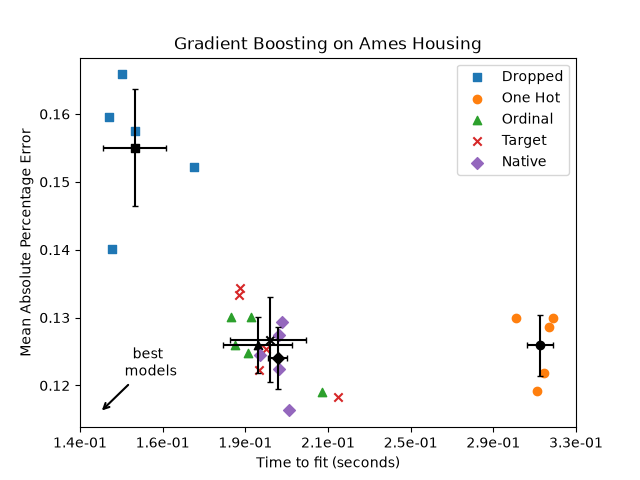 In the plot above, the “best models” are those that are closer to the
down-left corner, as indicated by the arrow. Those models would indeed
correspond to faster fitting and lower error.
The model using one-hot encoded data is the slowest. This is to be expected,
as one-hot encoding creates an additional feature for each category value of
every categorical feature, greatly increasing the number of split candidates
during training. In theory, we expect the native handling of categorical
features to be slightly slower than treating categories as ordered quantities
(‘Ordinal’), since native handling requires sorting categories. Fitting times should however be close when the
number of categories is small, and this may not always be reflected in
practice.
The time required to fit when using the TargetEncoder depends on the
cross fitting parameter cv, as adding splits come at a computational cost.
In terms of prediction performance, dropping the categorical features leads to
the worst performance. The four models that make use of the categorical
features have comparable error rates, with a slight edge for the native
handling.
Limiting the number of splits#
In general, one can expect poorer predictions from one-hot-encoded data,
especially when the tree depths or the number of nodes are limited: with
one-hot-encoded data, one needs more split points, i.e. more depth, in order
to recover an equivalent split that could be obtained in one single split
point with native handling.
This is also true when categories are treated as ordinal quantities: if
categories are A..F and the best split is ACF - BDE the one-hot-encoder
model would need 3 split points (one per category in the left node), and the
ordinal non-native model would need 4 splits: 1 split to isolate A, 1 split
to isolate F, and 2 splits to isolate C from BCDE.
How strongly the models’ performances differ in practice depends on the
dataset and on the flexibility of the trees.
To see this, let us re-run the same analysis with under-fitting models where
we artificially limit the total number of splits by both limiting the number
of trees and the depth of each tree.
for pipe in (hist_dropped, hist_one_hot, hist_ordinal, hist_target, hist_native):
    if pipe is hist_native:
        # The native model does not use a pipeline so, we can set the parameters
        # directly.
        pipe.set_params(max_depth=3, max_iter=15)
    else:
        pipe.set_params(
            histgradientboostingregressor__max_depth=3,
            histgradientboostingregressor__max_iter=15,
        )

dropped_result = cross_validate(hist_dropped, X, y, **common_params)
one_hot_result = cross_validate(hist_one_hot, X, y, **common_params)
ordinal_result = cross_validate(hist_ordinal, X, y, **common_params)
target_result = cross_validate(hist_target, X, y, **common_params)
native_result = cross_validate(hist_native, X, y, **common_params)
results_underfit = [
    ("Dropped", dropped_result),
    ("One Hot", one_hot_result),
    ("Ordinal", ordinal_result),
    ("Target", target_result),
    ("Native", native_result),
]
plot_performance_tradeoff(
    results_underfit, "Gradient Boosting on Ames Housing (few and shallow trees)"
)
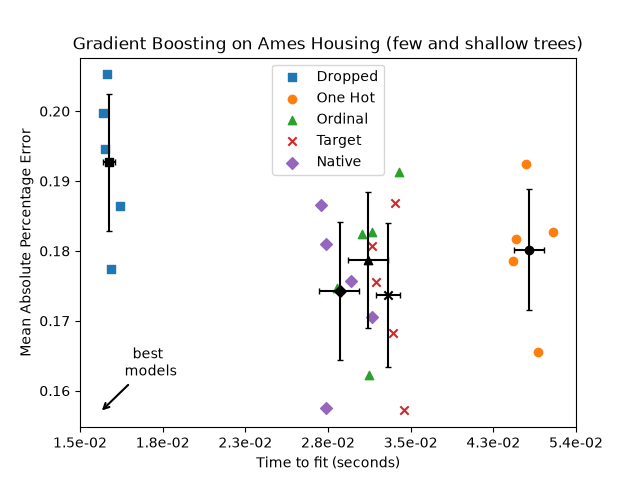 The results for these underfitting models confirm our previous intuition: the
native category handling strategy performs the best when the splitting budget
is constrained. The three explicit encoding strategies (one-hot, ordinal and
target encoding) lead to slightly larger errors than the estimator’s native
handling, but still perform better than the baseline model that just dropped
the categorical features altogether.
Total running time of the script: (0 minutes 4.792 seconds)
Related examples
Gallery generated by Sphinx-Gallery
|