GeezerVisonThe World Wide Web, restored to 800 pixels of glory. |
| Home|About|Gaming cabinet|Archives|How it works|Starter sites |
GeezerVison is showing thepythoncode.com — How to Make an Image Classifier in Python using Tensorflow 2 and Keras - The Python Code Juggling between coding languages? Let our Code Converter help. Your one-stop solution for language conversion. Start now! Image classification refers to a process in computer vision that can classify an image according to its visual content. For example, an image classification algorithm can be designed to tell if an image contains a cat or a dog. While detecting an object is trivial for humans, robust image classification is still a challenge in computer vision applications. In this tutorial, you will learn how to successfully classify images in the Note that there is a difference between image classification and object detection, image classification is about classifying an image into some category, like in this example, the input is an image and the output is a single class label (10 classes). Object detection is about detecting, classifying, and localizing objects in real-world images, one of the main algorithms is YOLO object detection. It is also important to note that you need to be aware of image captioning, which is generating a text description of an image instead of a single class. Check this tutorial if you're interested in that. We will preprocess the images and labels, then train a convolutional neural network on all the training samples. The images will need to be normalized and the labels need to be one-hot encoded. Learn also: How to Perform Image Segmentation using Transformers in Python. First, let's install the requirements for this project: For instance, open up an empty python file and call it train.py and follow along. Importing Tensorflow: As you may expect, we'll be using tf.data API to load CIFAR-10 dataset. Hyper ParametersI have experimented with various parameters, and found this as optimal ones: num_classes just refers to the number of categories to classify, in this case, CIFAR-10 has only 10 categories of images. Related: Mastering YOLO: Build an Automatic Number Plate Recognition System with OpenCV in Python. Understanding and Loading CIFAR-10 Dataset
Let's load this: This function loads the dataset using Tensorflow Datasets module, we set After that, we:
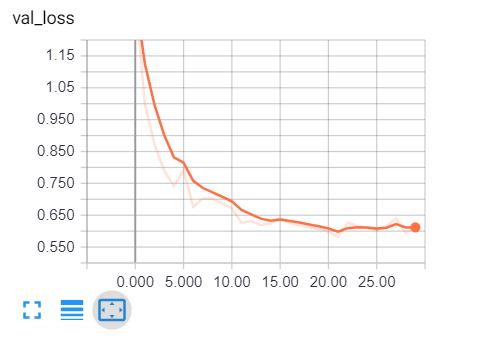
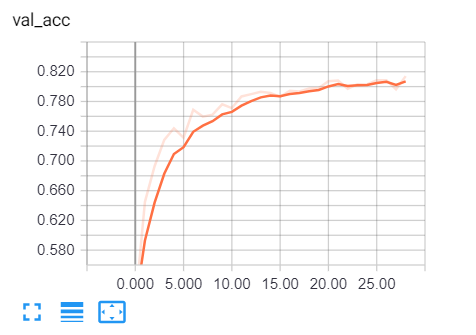
Mastering YOLO: Build an Automatic Number Plate Recognition SystemBuilding a real-time automatic number plate recognition system using YOLO and OpenCV library in Python Download EBookConstructing the ModelThe following model will be used: That's 3 layers of 2 ConvNets with a max-pooling and ReLU activation function and then a fully connected with 1024 units. This is relatively a small model comparing to ResNet50 or Xception which are state-of-the-art. If you feel to use models made by deep learning experts, you need to use transfer learning. Related: Image Captioning using PyTorch and Transformers in Python. Training the ModelNow, let's train the model: After loading the data and creating the model, I used Tensorboard that will be tracking the accuracy and loss in each epoch and providing us with nice visualization. We will be using the "results" folder to save our models, if you're not sure how you can handle files and directories in Python, check this tutorial. Since Run this, it will take several minutes to complete training, depending on your CPU/GPU. You'll get a similar result to this: All the way to the final epoch: Now to open tensorboard, all you need to do is to type this command in the terminal or the command prompt in the current directory: Open up a browser tab and type localhost:6006, you'll be redirected to tensorboard, here is my result:
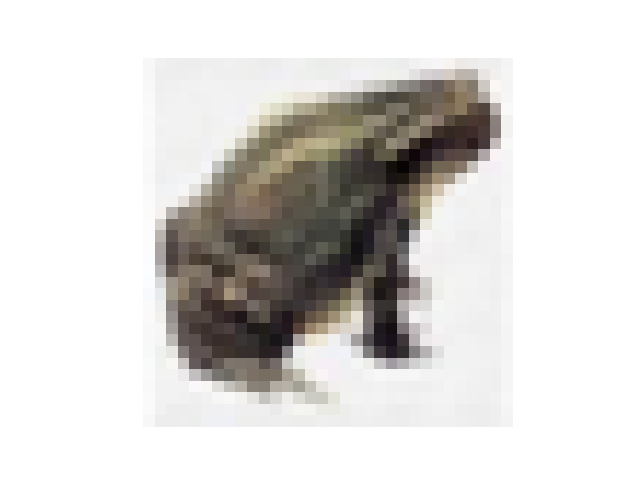
Clearly, we are on the right track, validation loss is decreasing, and the accuracy is increasing all the way to about 81%. That's great! Testing the ModelOnce training is completed, it'll save the final model and weights in the results folder, in that way, we can train only once and make predictions whenever we desire. Open up a new Python file called test.py and follow along. Importing necessary utilities: Let's make a Python dictionary that maps each integer value to its corresponding label in the dataset: Loading the test data and the model: Evaluation: Let's take a random image and make a prediction: We've used The model says it's a frog, let's check it: Result: ConclusionAlright, we are done with this tutorial, 81% isn't bad for this little CNN, I highly encourage you to tweak the model or check ResNet50, Xception, or other state-of-the-art models to get higher performance! If you're not sure how to use these models, I have a tutorial on this: How to Use Transfer Learning for Image Classification using Keras in Python. You may notice that these images are so simple, 32x32 grid isn't how the real world is, images aren't simple like that, they often contain many objects, complex patterns, and so on. As a result, it is often a common practice to use image segmentation methods such as contour detection, K-Means clustering segmentation, or using transformers before passing to any classification techniques. Happy Training ♥ Save time and energy with our Python Code Generator. Why start from scratch when you can generate? Give it a try!
Sharing is caring!
Read also
How to Use Transfer Learning for Image Classification using TensorFlow in PythonLearn what is transfer learning and how to use pre trained MobileNet model for better performance to classify flowers using TensorFlow in Python. 
Skin Cancer Detection using TensorFlow in PythonLearn how to use transfer learning to build a model that is able to classify benign and malignant (melanoma) skin diseases in Python using TensorFlow 2. 
How to Perform Malaria Classification using TensorFlow 2 and Keras in PythonLearn how to build a deep learning malaria detection model to classify cell images to either infected or not infected with Malaria Tensorflow 2 and Keras API in Python. CommentsGot a coding query or need some guidance before you comment? Check out this Python Code Assistant for expert advice and handy tips. It's like having a coding tutor right in your fingertips! |
| You are visitor 01402503 — GeezerVison does not store the pages you look up. Best viewed with Netscape Navigator 4.7 or Internet Explorer 6 at 800×600. No cookies required. |