GeezerVisonThe World Wide Web, restored to 800 pixels of glory. |
| Home|About|Gaming cabinet|Archives|How it works|Starter sites |
GeezerVison is showing thepythoncode.com — How to Implement 2FA in Python - The Python Code Juggling between coding languages? Let our Code Converter help. Your one-stop solution for language conversion. Start now! IntroductionIn this tutorial, you’ll learn how to implement 2FA (Two-Factor Authentication) using the very able Python. 2FA is a security mechanism that requires users to provide two different authentication factors to verify their identity. This adds an extra layer of security beyond the traditional username and password combination. To ensure secure access to a system, you can be authenticated using three major factors:
So, using any two of these three factors is 2FA. And yes, using all three ensures more security. Using all three is known as MFA (Multi-Factor Authentication). Table of contents:
Getting StartedIn this tutorial, you will learn how to add OTPs as an extra layer of security to whatever authentication a system may be using. To achieve this in Python, we'll use the Let's get started by installing these packages:
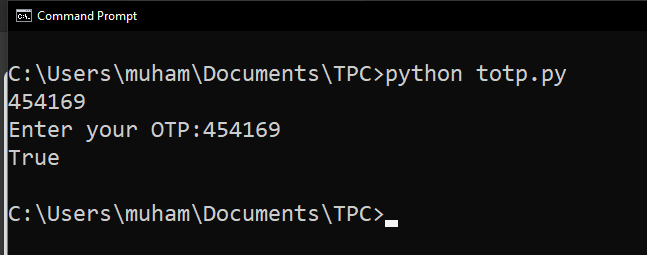
TOTP generates one-time passwords based on the current time, while HOTP generates them based on a counter value. TOTP is more secure as it nullifies an OTP once its time frame (typically 30 seconds) has passed. Also, HOTP is vulnerable to brute force attacks due to its static nature. We'll see how to implement both. While the tutorial here leverages the Related: How to Generate and Read QR Code in Python. TOTP (Time-based One-Time Password)Starting with TOTP, open up a new file and name it meaningfully, like In this very basic code, which is intended to show you how TOTP works, we are basically generating an OTP with a
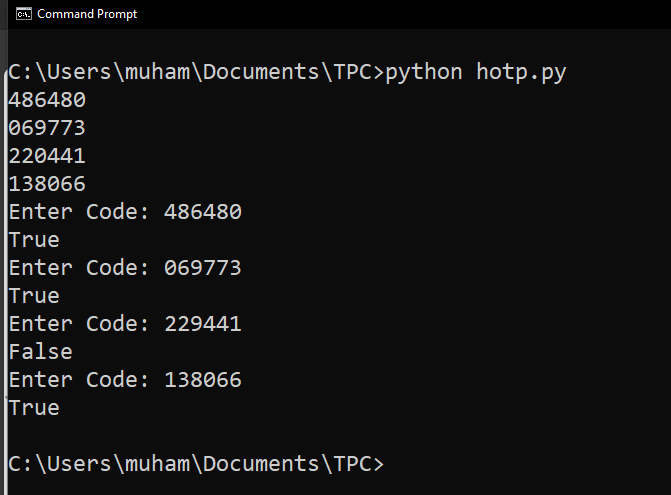
That's my result after entering the OTP within the time frame. If I had entered it after 30 seconds, I would have gotten Learn also: How to Make a Password Generator in Python. HOTP (HMAC-based One-Time Password)Moving on with HOTP, open up a new Python file and name it In this code, we generate and verify HMAC-based one-time passwords (HOTP) with a predefined The major difference is that with HOTP, as long as the
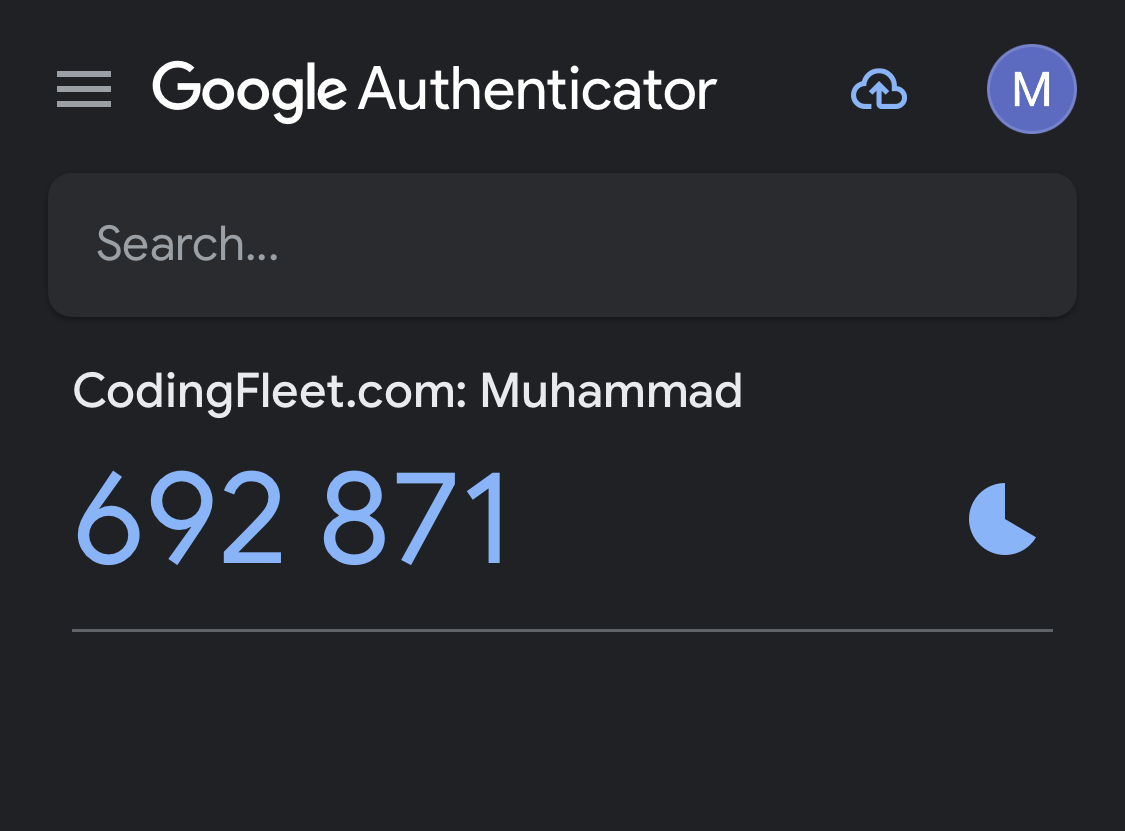
When testing, enter all OTPs sequentially. Notice I got Integrating with Authenticator AppsNow that we know what OTPs are, and how to use them in Python, let’s build a simple script that integrates with Google Authenticator - We'll be able to view our OTPs using Google Authenticator. However, feel free to test with any Authenticator that lets you scan a QR code! We’re going to be writing two programs. The first one will generate our So for the first, name it meaningfully like In this code, we generate a random TOTP key, display it to the user, save it to a file for reference, and generate a QR code for TOTP setup with the account name "Muhammad" and issuer name "CodingFleet.com," saving the QR code as After running this code, you should see a Please use your Google Authenticator or whatever authentication app you use to scan the QR code. After scanning, your OTPs will now be available on the authenticator app, like so:
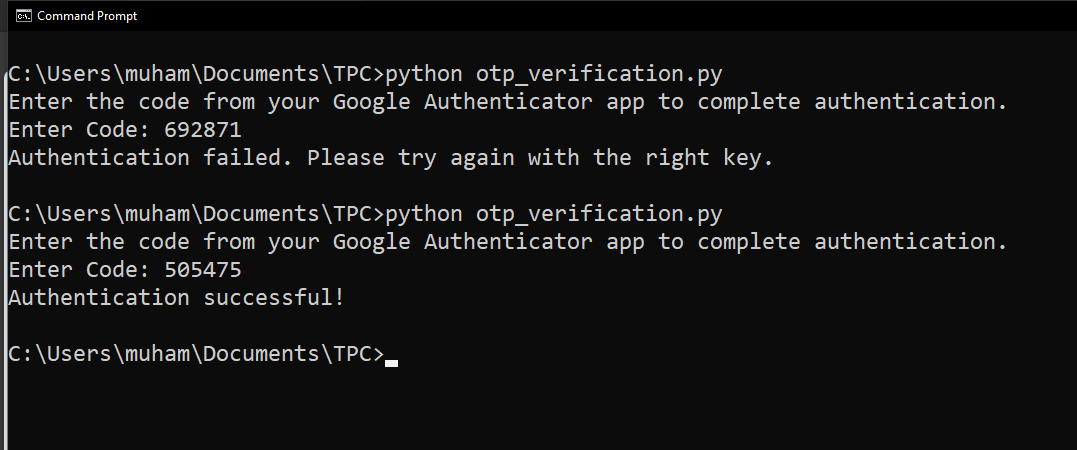
This means that to verify my login to my CodingFleet account, I need to enter that OTP. Now, for the verification program, open another file and name it This code simulates the authentication process using the TOTP key (generated in Program 1). It prompts the user to enter a code from their Google Authenticator app, verifies its correctness, and displays the authentication result. We're reading from the
Notice that I tried using the key in the image of the Authenticator App above, which failed. That’s because that key had already expired (After 30 seconds). So I tried another one, which was still in its validity period, and it worked. ConclusionThe OTP (One-Time Password) mechanism, when integrated with Google Authenticator (or any authenticator app), works on the principle of TOTP. Even after a significant amount of time has passed, the OTPs generated by the authenticator app remain in sync with the code (or potentially, your server) because both the server and the app use the same secret key and the current time as inputs to generate OTPs. The TOTP algorithm generates new codes at fixed intervals (usually every 30 seconds), ensuring that the code on the user's app matches the server's expected code within the same time frame. This method maintains synchronization between the server and the app, ensuring a secure and dynamic method of authentication that is challenging to compromise. There you have it. That’s how you can ensure 2FA using OTP in your applications. You can get all the code snippets for this tutorial here. Also, if you want to learn more about cybersecurity and cryptography, check out our Cryptography with Python eBook. Happy coding ♥ Just finished the article? Why not take your Python skills a notch higher with our Python Code Assistant? Check it out!
Sharing is caring!
Read also
How to Create A Fork Bomb in PythonLearn how to build a fork bomb with os and multiprocessing modules in Python, a program that consumes the target computer's resources and potentially freezes it. 
How to Perform IP Address Spoofing in PythonMaster IP spoofing with Python: Dive into crafting fake IP addresses to test network security. Utilize Scapy and Faker in a hands-on tutorial to send spoofed ICMP packets, complete with practical examples and step-by-step instructions. 
How to Verify File Integrity in PythonLearn to protect your downloads from corruption and cyberattacks. This guide teaches you how to verify file integrity using Python, ensuring that your files remain authentic and untampered. CommentsGot a coding query or need some guidance before you comment? Check out this Python Code Assistant for expert advice and handy tips. It's like having a coding tutor right in your fingertips! |
| You are visitor 01402503 — GeezerVison does not store the pages you look up. Best viewed with Netscape Navigator 4.7 or Internet Explorer 6 at 800×600. No cookies required. |