GeezerVisonThe World Wide Web, restored to 800 pixels of glory. |
| Home|About|Gaming cabinet|Archives|How it works|Starter sites |
GeezerVison is showing thepythoncode.com — How to Make a Barcode Reader in Python - The Python Code Confused by complex code? Let our AI-powered Code Explainer demystify it for you. Try it out! A barcode is a method of representing data in a visual and machine-readable form; it consists of bars and spaces. Today, we see barcodes everywhere, especially in supermarket products. Barcodes can be read by an optical barcode scanner, but in this tutorial, we will make a script in Python that is able to read and decode barcodes, as well as a drawing where they're located in a given image. Related: How to Extract Frames from Video in Python. To get started, we need to install a few libraries: Once you have these installed, open up a new Python file and import them: I have few images to test with, you can use any image you want from the internet or your own disk, but you can get my test images in this directory. I have wrapped every functionality into a function; the first function we gonna discuss is the following:
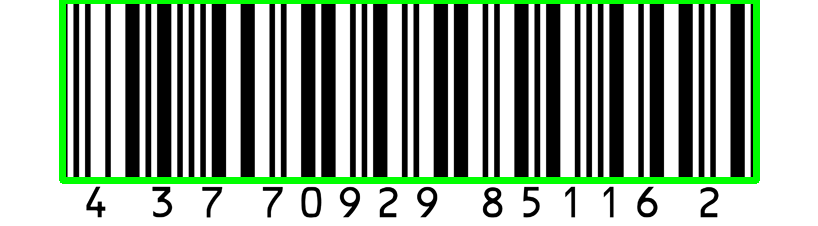
We then iterate over all detected barcodes, draw a rectangle around the barcode, and print the type and the data of the barcode. To make things clear, the following is how each So This brings us to the next function that we used, This function takes the decoded object we just saw and the image itself; it draws a rectangle around the barcode using Finally, it returns the image that contains the drawn barcodes. Now, let's use these functions for our example images: In my current directory, I have barcode1.png, barcode2.png, and barcode3.png, which are all example images of a scanned barcode, I used glob so I can get all these images as a list and iterate over them. On each file, we load it using Note that this will also detect QR codes, and that's fine, but for more accurate results, I suggest you check the dedicated tutorial for detecting and generating qr codes in Python. When I run the script, it shows each image and prints the type and the data contained in it. Press any key, and you'll get the next image. Here is my output: Here is the last image that is shown:
ConclusionThat is awesome; now you have a great tool to make your own barcode scanner in Python. I know you all want to read directly from the camera, as a result, I have prepared the code that reads from the camera and detects barcodes in a live manner, check it here! You can also add some sort of a beep when each barcode is detected, just like in supermarkets; check the tutorial for playing sounds that may help you accomplish that. For more detailed information, I invite you to check pyzbar documentation. Learn also: How to Generate and Read QR Code in Python. Happy Coding ♥ Just finished the article? Why not take your Python skills a notch higher with our Python Code Assistant? Check it out!
Sharing is caring!
Read also
How to Generate and Read QR Code in PythonLearning how you can generate and read QR Code in Python using qrcode and OpenCV libraries. 
How to Extract Frames from Video in PythonMaking two different methods to extract frames from videos with the timestamp with OpenCV or MoviePy libraries in Python. 
Steganography: How to Hide Data in Images in PythonLearning how to hide secret data in images using Steganography least significant bit technique in Python using OpenCV and Numpy. CommentsGot a coding query or need some guidance before you comment? Check out this Python Code Assistant for expert advice and handy tips. It's like having a coding tutor right in your fingertips! |
| You are visitor 01402503 — GeezerVison does not store the pages you look up. Best viewed with Netscape Navigator 4.7 or Internet Explorer 6 at 800×600. No cookies required. |