GeezerVison is showing worktrunk.dev — Agent Integration
Agent Integration
Worktrunk ships a plugin for each supported agent CLI. What a plugin provides depends on the hooks that CLI exposes:
Capability
Claude Code
Codex
OpenCode
Pi
oh-my-pi
Gemini CLI
Configuration skill
✓
✓
✓
Activity tracking (🤖/💬 in wt list)
✓
✓
✓
✓
✓
✓
Worktree isolation
✓
✓
/wt-switch-create skill
✓
/wt-diff pane
✓
The configuration skill is documentation the agent reads to help set up LLM commits, hooks, and troubleshooting. Activity tracking shows which worktrees have running sessions. Worktree isolation needs worktree-lifecycle hooks, which only Claude Code and OpenCode 2 expose, so Codex, Pi, oh-my-pi, and Gemini users invoke wt switch --create and wt remove directly.
worktrunk carries the skills; worktrunk-markers carries only the activity-marker hooks, so skill updates don’t make Codex ask to approve the hooks again. An install that predates the split has only worktrunk, whose markers stop once it updates; add the markers with codex plugin add worktrunk-markers@worktrunk.
wt config plugins codex uninstall removes both plugins and their marketplace entry.
This writes the plugin to OpenCode’s global plugins directory, ~/.config/opencode/plugins/worktrunk.ts (honoring $OPENCODE_CONFIG_DIR and $XDG_CONFIG_HOME). wt config plugins opencode uninstall removes it.
This writes the activity extension to ~/.pi/agent/extensions/worktrunk.ts, where Pi discovers it on startup; $PI_CODING_AGENT_DIR replaces the agent directory. wt config plugins pi uninstall removes the extension.
oh-my-pi (omp) is a Pi-derived agent with its own config root and hook API, so it takes a separate command. This writes the activity hook to ~/.omp/agent/hooks/pre/worktrunk.ts. Named $OMP_PROFILE or $PI_PROFILE profiles use ~/.omp/profiles/<profile>/agent, $PI_CONFIG_DIR changes the .omp config root, and $PI_CODING_AGENT_DIR overrides the agent directory for the default profile. wt config plugins omp uninstall removes the hook.
○Showing 4 worktrees, 2 with changes, 2 ahead, hidden: Path (^ main worktree ⇡ ahead of remote)
🤖 — agent is working
💬 — agent is waiting or idle
Every plugin clears the marker when a session ends. A stale marker can remain if the agent process is killed before its session-end hook runs. In every case, wt config state marker clear removes a marker manually.
Claude Code agents can run in isolated worktrees (isolation: "worktree"). By default, Claude Code creates these with git worktree add. The plugin’s WorktreeCreate and WorktreeRemove hooks route this through wt switch --create and wt remove instead, so worktrees created by agents get worktrunk’s naming conventions, hooks, and lifecycle management. If the branch already exists, the hook runs wt switch without --create, which returns the branch’s worktree, creating one if it has none. New branches start from the default branch: Claude Code’s hook input names the worktree but no base, so its worktree.baseRef setting has no effect.
The Claude desktop app creates worktree sessions itself and doesn’t run plugin WorktreeCreate or WorktreeRemove hooks, so those worktrees bypass wt (anthropics/claude-code#29716).
Under OpenCode 2, the plugin registers a worktrunk worktree strategy, so worktrees OpenCode creates and removes go through the same commands. Each gets a branch named after the worktree name OpenCode chooses, at the path from worktree-path; OpenCode’s worktree.directory setting is ignored. New branches start from the default branch (or the starting ref OpenCode passes), not the current checkout’s HEAD. A dirty worktree fails removal with worktrunk’s message rather than an offer to force.
/wt-switch-create [<branch>] [<repo>] [-- <task>] starts a task in a fresh worktree without leaving the session: it creates the worktree, switches into it, and runs the task (all arguments optional). The worktree shows up in wt list; merge or remove it with wt merge / wt remove.
Claude Code asks for confirmation before a session enters an existing worktree by path outside .claude/worktrees/, which in worktrunk’s default layout is every worktree. The plugin’s PermissionRequest hook answers yes for a worktree of the repository the session is working in that sits where worktree-path puts its branch, so a background session doesn’t stop at that prompt. Entering any other worktree still asks.
/wt-diff opens a pane beside the conversation that lists the worktrees the session has worked in, with the selected one’s wt step diff below: everything since the branch left the default branch, committed, uncommitted, and untracked. /wt-diff <branch> selects another worktree.
A worktree joins the list when the session starts or moves into it, or when the session or one of its subagents edits a file there or runs a command there that isn’t read-only. Until the pane first opens, the pane only notes those directories, without running git or wt.
Key
Action
1–9
Select a worktree
j / k
Next or previous file
ctrl+↓ / ctrl+↑
Next or previous file, from the prompt
r
Refresh
↑ ↓, PageUp, PageDown
Scroll
The other keys work while the pane has the keyboard, which it takes when it opens. Running /wt-diff again gives it back, as does ctrl+x tab, which moves focus from the prompt to the line above it when another plugin draws one, then to the pane. esc returns to the prompt.
The pane needs a Claude Code release that loads plugin hooks modules; earlier releases load the rest of the plugin without it.
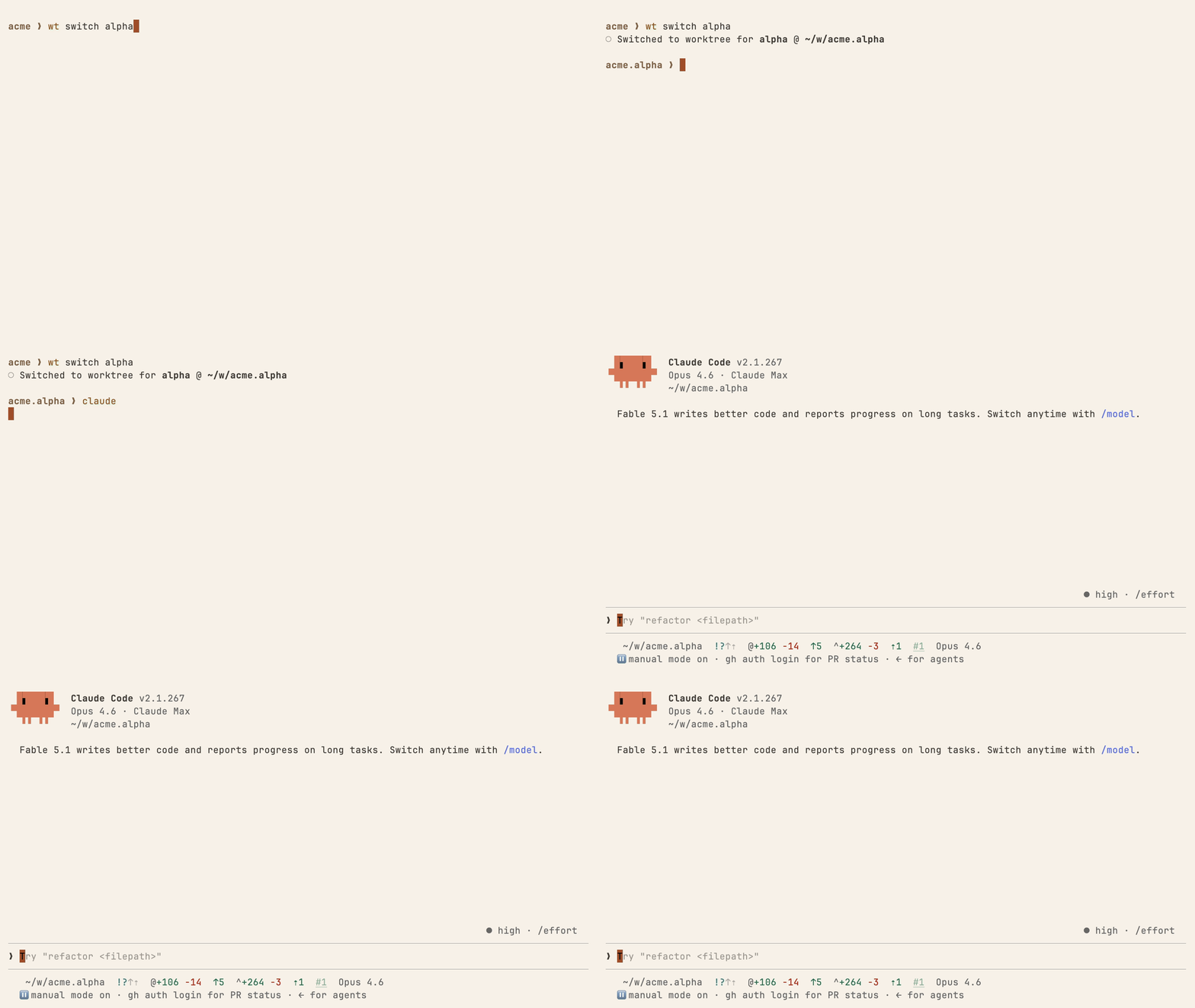
wt list statusline --format=claude-code outputs a single-line status for the Claude Code statusline. Claude Code runs it in the background, which is what makes the occasional 1–2 second CI fetch invisible.
~/w/myproject.feature-auth !🤖 @+42-8↑3⇡1#3035 Opus 🌔 65% 1.4×(10am–3pm)
The statusline shows worktree status, model, context usage, and rate-limit pace. See wt list statusline for details.
Switching to a worktree, then launching Claude Code with the statusline configured
Add to ~/.claude/settings.json:
~/.claude/settings.json
{
"statusLine": {
"type": "command",
"command": "wt list statusline --format=claude-code"
}
}
You are visitor 01402775 — GeezerVison does not store the pages you look up. Best viewed with Netscape Navigator 4.7 or Internet Explorer 6 at 800×600. No cookies required.