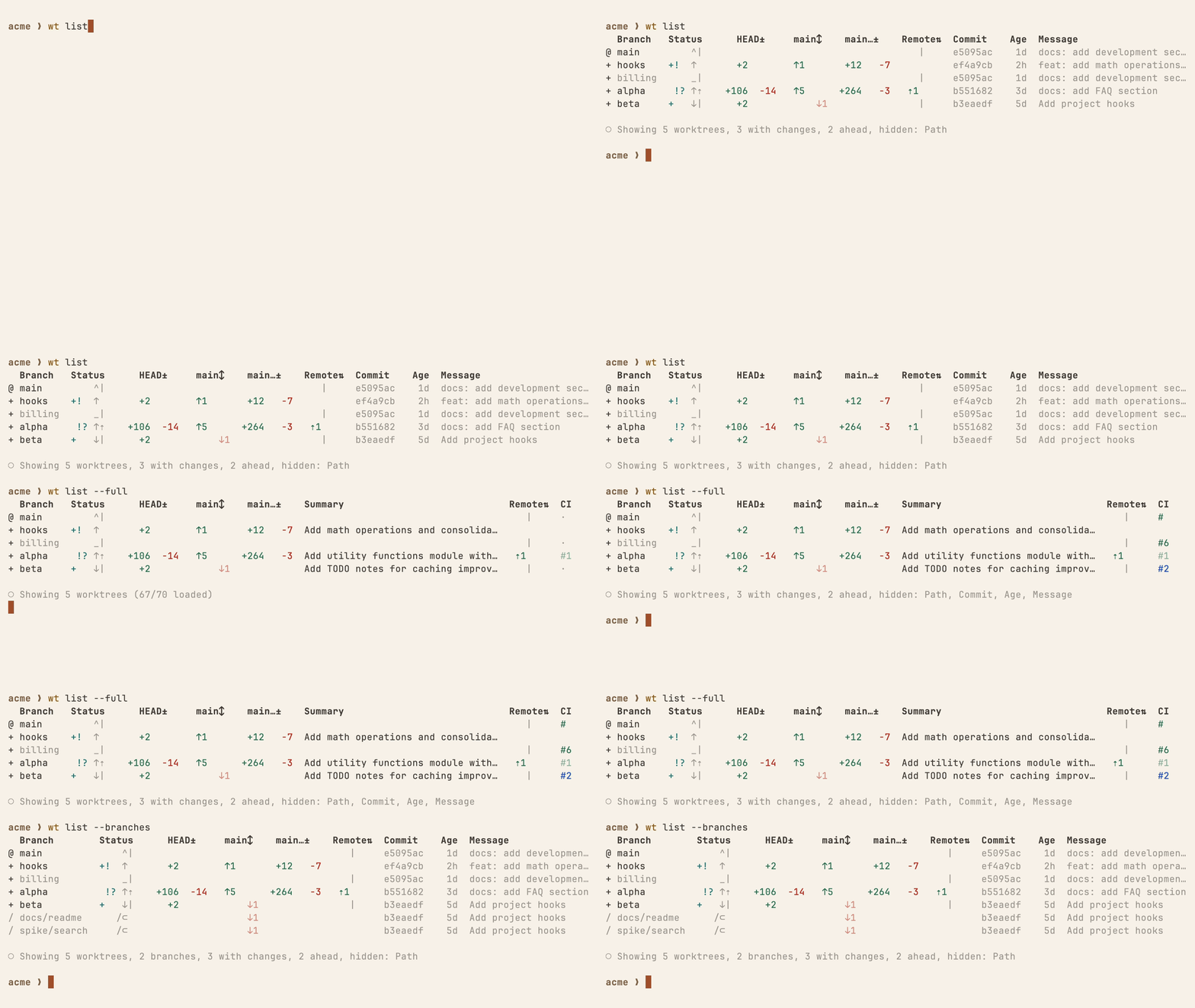
Shows uncommitted changes, divergence from the default branch and remote, and optional CI status and LLM summaries.
Progressive rendering, then --full and --branches
The table renders progressively: branch names, paths, and commit hashes appear immediately, then status, divergence, and other columns fill in as background git operations complete.
--full adds the two columns that reach off-machine: CI status (forge pipeline pass/fail, over the network) and LLM-generated summaries of each branch’s changes.
Branch name, elided with … past 32 characters; a detached worktree shows its short hash
Status
Compact symbols (see below)
@±
Uncommitted changes, including untracked files: +added -deleted lines
^↕
Commits ahead/behind default branch
^…±
Line diffs since the merge-base (three-dot) with the default branch
Summary
LLM-generated branch summary; requires --full, summary = true, and commit.generation
Remote⇅
Commits ahead/behind tracking branch
CI
PR/MR number colored by pipeline status; --full only
Path
Worktree directory
URL
Dev server URL from project config; dimmed if port is not listening
(custom)
User-defined custom columns from [list.custom-columns] user config
Commit
Short hash, abbreviated per core.abbrev
Age
Time since last commit
Message
Last commit message (truncated)
In the headers, @ stands for the worktree’s own HEAD and ^ for the default branch, whatever it is named — the same shortcuts wt switch accepts.
Counts too large for their column are shortened, rounded down, and drawn brighter: C is hundreds and K thousands (↑3C is 300–399 commits, +2K is 2,000–2,999 lines), and ∞ means 10,000 or more. Line counts stay exact up to 999; commit counts up to 99. --format=json carries the exact counts.
The table sizes itself to the terminal. When the columns don’t all fit, the least important go first — roughly right to left, since the order above runs from identity to nice-to-have — and the summary footer names them (hidden: Commit, Age, Message). A wider terminal brings them back. To pin a set rather than leave it to the width, name the columns in [list] columns; --format=json carries every field at any width.
The CI column shows the branch’s open PR/MR — #3035 on GitHub, Gitea, and Azure DevOps, !3035 on GitLab — colored by pipeline status, or a bare # when no number is available (e.g. branch workflows without a PR/MR). Green, blue, red, yellow, and gray show the pipeline state; magenta and cyan show the review state. checks object and review states give the JSON form of each value:
Indicator
Value
Meaning
# green
"passed"
All checks passed
# blue
"running"
Checks in progress
# red
"failed"
One or more checks failed
# yellow
"conflicts"
Merge conflicts with the target branch
# gray
"no-ci"
No PR/MR, or no checks configured
⚠ yellow
"error"
CI status could not be fetched (expired login, rate limit, network, etc.)
# magenta
"changes_requested"
A reviewer requested changes
# cyan
"pending"
A review is required (e.g. branch protection) but not yet given
(blank)
pr and checks absent
Branch never pushed, forge CLI not logged in to the host, or no PR/MR and no branch workflow
The two remaining review states have no indicator of their own: "draft" only dims the cell and "approved" leaves the color unchanged.
Changes requested (magenta) outranks running checks, while a required review (cyan) only recolors an otherwise green or gray branch. GitLab reports only the "pending" and "draft" review states.
CI cells are clickable links to the PR or pipeline page, and appear dimmed for a draft PR/MR ("draft") or when unpushed local changes make the status stale (checks.stale). Results are cached for 30-60 seconds; use wt config state cache to view or clear.
Reuses the commit.generation command — the same LLM that generates commit messages. Enable with summary = true in [list] config; requires --full. Results are cached until the branch’s diff changes.
Each [list.custom-columns] entry in user config adds a column. Its key sets the header; its template renders each row’s cell. Templates read {{ vars.* }}, set with wt config state vars set, and {{ git.branch.* }}, from branch.<name>.* in Git config:
The Status column packs several subcolumns, left to right, each mapping to a schema-2 field in --format=json (schema 1 spells several of them differently — see Schema 1). Working-tree flags are independent and co-occur — any combination shows at once. The other subcolumns are mutually exclusive: each shows a single symbol, the highest-priority state in top-to-bottom table order, and is blank when nothing applies.
When space permits, the footer rotates through visible status explanations.
An in-progress git operation, a worktree-location attribute, or a branch with no worktree. One symbol shows, highest priority first (✘ > ↻ > ⊟ > ⊞ > ⊘ > ⚐ > /):
The single highest-priority state describing the branch’s relation to the default branch; blank when none applies (a normal up-to-date branch). Each symbol is one display.state value:
Symbol
display.state
Meaning
^
"is_main"
The primary worktree (the repo’s home worktree)
∅
"orphan"
No common ancestor with the default branch
_
"empty"
Same commit as the default branch, working tree clean — safe to remove; row dimmed
⊂
"integrated"
Content integrated into the default branch or merge target via different history; the matching check is in default_branch.integration.reason; row dimmed
✗
"would_conflict"
Merging into the default branch would conflict (simulated with git merge-tree) and the branch isn’t already integrated; with --full, the check includes tracked uncommitted changes
–
"same_commit"
Same commit as the default branch, but with uncommitted changes
↕
"diverged"
Both ahead of and behind the default branch
↑
"ahead"
Has commits the default branch doesn’t
↓
"behind"
Missing commits the default branch has
Rows are dimmed when safe to delete — _ ("empty") or ⊂ ("integrated").
The last subcolumn shows the branch’s marker, set with
wt config state marker set — usually an
emoji saying what the branch is for. It reads back as the item’s marker
field.
Absent — nothing to report: not applicable (worktree on a branch-only
row), not requested this run (the envelope’s collected records what was),
or determined-empty (no PR, no lock, not integrated).
null — requested but not determined: a task timed out, a check was
skipped, or a forge fetch failed. This is the JSON form of the table’s ·
placeholder.
jq treats absent and null identically in path expressions, so filters need
no null checks; has() distinguishes the two when it matters.
Envelope fields:
Field
Type
Description
schema
number
Format version; always 2
repo
object
{default_branch, forge} — the branch every default_branch object measures against (absent when detection failed), and forge metadata derived from the primary remote (absent when no remote URL parses; see repo object)
collected
object
{ci, summary} — which gated fact families this run requested, so an absent pr/checks/summary reads as “not requested” rather than “none”
items
array
One object per row: a worktree, a local branch, or a remote-only branch
Item fields:
Field
Type
Description
branch
string/null
Branch name; null for a detached-HEAD worktree. Remote rows carry the bare name with the remote in remote
remote
string
Remote name, present only on remote-only branch rows
head
object/null
HEAD commit (see head object); null for unborn branches
worktree
object
Worktree facts (see worktree object); absent on branch-only rows
default_branch
object
Relation to the default branch (see default_branch object); absent on the default branch itself
upstream
object
Tracking branch (see upstream object); absent when none is configured
Independent facts; the table’s priority-collapsed symbol is display.state.
Field
Type
Description
ahead
number/null
Commits ahead of the default branch (null for orphans)
behind
number/null
Commits behind the default branch (null for orphans)
diff
object/null
Lines changed vs the default branch: {added, deleted}
orphan
boolean/null
No common ancestor with the default branch
integration
object/null
{reason} — which check found the content integrated (see integration reasons); absent when determined not-integrated, null when undetermined (a check timed out or was skipped)
merge_conflicts
boolean/null
Merging into the default branch would conflict, simulated locally with git merge-tree
Description"passed", "running", or "failed"; null when a conflicts report masks it
Fieldsource
Typestring
Description"pr" (PR/MR) or "branch" (branch workflow)
Fieldstale
Typeboolean
DescriptionLocal HEAD differs from remote (unpushed changes)
Three CI status values have no checks.status of their own, because the shape of pr and checks reports them: a fetch error (⚠) makes both null, no CI leaves checks absent, and merge conflicts leave checks.status null with pr.mergeable false.
repo.forge describes the local checkout’s repository as derived from the primary remote. pr.repo describes the repository targeted by the PR/MR (for fork PRs, the upstream target).
Field
Type
Description
url
string
Repository web URL
provider
string
"github", "gitlab", "gitea", "azure-devops", or "unknown"
host
string
Repository web host
api_host
string
API host from forge.hostname, only on repo.forge when set
owner
string
Owner, organization, or namespace path
name
string
Repository name
project
string
Azure DevOps project name; absent for other providers
remote
string
Local remote name; present on repo.forge, absent from pr.repo
The single highest-priority state describing the branch’s relation to the default branch; absent when none applies (a normal up-to-date branch). Each value is one Default-branch symbol — see Default branch for the symbol and the full meaning of each value ("is_main", "orphan", "empty", "integrated", "would_conflict", "same_commit", "diverged", "ahead", "behind").
pr.review is one of "changes_requested", "pending", "draft", "approved", absent when the forge reports no review signal. CI status shows how each renders. The vocabulary matches Claude Code’s statusline pr.review_state field.
The envelope’s repo.default_branch and collected have no schema-1 equivalent, and schema 2 separates “nothing to report” from “not determined” — see How “no value” reads.
Missing a field that would be generally useful? Open an issue.
The line carries the same cells as the worktree’s row in wt list. A stale CI status cache makes it reach the network for a second or two, so it fits a statusline the host renders in the background — Claude Code’s, a tmux status bar — better than a prompt the shell blocks on. Want it fast enough for a synchronous prompt? Open an issue.
table (default): branch status @± ^↕ ^…± Remote⇅ CI URL
json: the current wt list --format=json schema — a one-item envelope by default, or a one-item array with [list] json-schema = 1
claude-code: the table cells, preceded by dir and followed by model context pace
A cell with nothing to show is left out, so most lines are shorter than that. A line that overruns the terminal drops whole cells, least important first.
The CI reference links to its PR/MR, and a dev server URL carrying a port shows as :3000 linking to the URL in full, dim until something answers on that port. Both are underlined terminal links.
.rate_limits.{five_hour,seven_day}.resets_at — window reset time (Unix epoch seconds)
The pace segment appears only when usage is likely to hit a rate limit before its window resets, and shows the higher-risk window: 2.9×(Tue–Tue 5pm) reads as 2.9× the pace that would exactly fill that window. Above 90% used it shows usage instead of pace — 93%(Tue–Tue 5pm). Its color deepens from dim to yellow as more of the window would be spent capped.
wt list statusline - Single-line status for the current worktree
Usage:wt list statusline[OPTIONS]
Options:
--format<FORMAT>
Output format
Possible values:
- table
- json
- claude-code: Claude Code statusline mode (reads context from stdin)
[default: table]
-h, --help
Print help (see a summary with '-h')
You are visitor 01402775 — GeezerVison does not store the pages you look up. Best viewed with Netscape Navigator 4.7 or Internet Explorer 6 at 800×600. No cookies required.