GeezerVisonThe World Wide Web, restored to 800 pixels of glory. | ||||||||||||||||||||||||||||||
| Home|About|Gaming cabinet|Archives|How it works|Starter sites | ||||||||||||||||||||||||||||||
GeezerVison is showing www.easefilter.com — Windows File System Minifilter Driver Framework: Build Commercial Products in Days, Not Years Building a basic "Hello World" Windows file system minifilter driver from a Microsoft WDK sample can take a weekend. Turning that sample into a stable, production-ready commercial product—one that handles antivirus interoperability, memory-mapped I/O, network shares, transparent encryption, and every Windows patch release without causing a Blue Screen of Death (BSOD)—typically takes 6 to 18+ months of specialized kernel engineering. The EaseFilter Windows File System Filter Driver Framework eliminates that bottleneck. You can integrate the pre-signed SDK directly into your commercial software with an OEM License, or purchase the Source Code License to modify and extend the kernel driver for your own proprietary products—cutting development time from years down to days at a fraction of the cost. Commercial Products You Can Build with EaseFilterWhether you are building an endpoint security suite, an enterprise compliance tool, or a custom storage platform, the EaseFilter minifilter framework gives you the kernel foundation to ship a wide range of commercial products:
Flexible Licensing: OEM License vs. Source Code LicenseEaseFilter adapts to how your engineering team builds and ships software. Choose the licensing model that best fits your roadmap:
The Real Cost of Building a Minifilter from ScratchEven for experienced C/C++ developers, Windows kernel-mode file system development is famously unforgiving. Beyond basic IRP interception, engineering teams must solve cache manager conflicts, memory-mapped I/O, antivirus interoperability across Filter Manager altitudes, EV/WHQL driver signing, and ongoing Windows OS update regressions.
How the EaseFilter Minifilter Framework WorksWindows provides file system filtering services through the Filter Manager ( 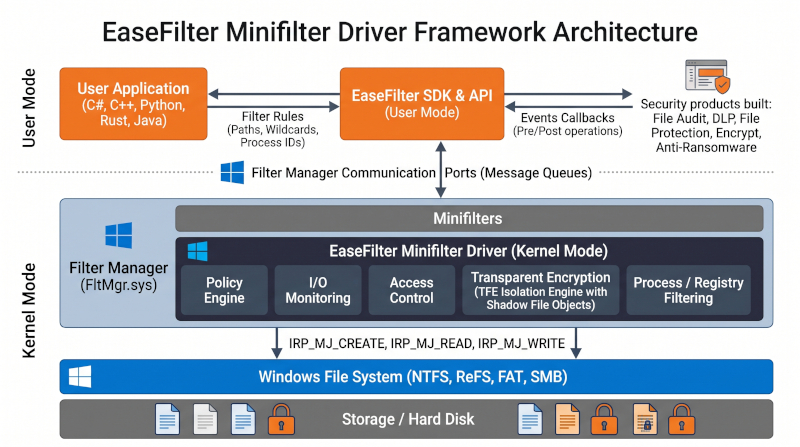
Detailed architecture of the EaseFilter Minifilter Driver Framework connecting User Mode applications to Kernel Mode file operations. Your application simply registers Filter Rules and Event Callbacks. When a file, process, or registry operation matches your policy, EaseFilter enforces the rule directly in kernel mode—or forwards the event to your user-mode service for real-time logging, inspection, or dynamic policy decisions. Core Production-Ready Modules Included in the SDKEaseFilter is a complete, modular framework designed for commercial security, DLP, DRM, backup, and compliance products. It bundles five specialized kernel filter engines and all the supporting infrastructure you need out of the box: 1. Context Management & Volume AttachmentAutomatically manages volume attachment, instance contexts, stream contexts, and stream handle contexts across local and network volumes, preserving state across I/O operations and freeing memory cleanly with zero leaks. 2. High-Performance User/Kernel CommunicationBuilt on Filter Manager Communication Ports with optimized multi-threaded message queues, enabling low-latency bidirectional communication between the kernel driver and your user-mode service. 3. Policy-Driven Filter RulesDefine granular rules by file path, wildcard mask, process name, digital signature, or user SID. Combine monitoring, access control, file hiding, and encryption rules simultaneously without writing kernel logic. 4. File I/O Monitoring & AuditingCapture post-operation I/O telemetry across the entire file lifecycle—open, create, overwrite, read, write, rename, delete, security changes, directory browsing, and close—recording exactly who accessed what file, when, and from which process. 5. Real-Time File Access ControlIntercept pre-operation I/O before it reaches the file system. Block unauthorized file creation, reads, writes, renames, or deletions; hide sensitive files from directory listings; or reparse file opens to alternate locations. 6. Transparent File Encryption (TFE) Isolation EngineImplementing transparent encryption in kernel mode requires an Isolation Minifilter that separates the application's view (upper file object) from the file system's view (shadow file object). EaseFilter includes a battle-tested isolation engine so authorized processes see plaintext in memory while unauthorized processes only see AES-encrypted ciphertext on disk. 7. Process Filtering & Registry FilteringReceive real-time callbacks for process/thread creation and termination (with parent PID, executable path, and command line), block untrusted binaries from launching, and protect critical Windows Registry keys and values from tampering. Example: Build a File Protection & Audit Filter in MinutesInstead of writing hundreds of lines of kernel C, configuring INF files, and debugging IRQL crashes, here is how quickly you can protect a sensitive folder against ransomware or unauthorized deletion and audit file activity using the EaseFilter C# SDK: Production-Ready in Minutes: With just a few additional lines of code, you can enable AES-256 Transparent File Encryption, process signature verification, or registry protection on the exact same driver instance. Focus on Your Product, Not Kernel PlumbingYour customers don't buy your software because you wrote a custom IRP dispatcher—they buy it for your security policies, DLP rules, encryption workflows, ransomware defense, and user experience. Whether you deploy directly with an OEM License or customize the kernel with a Source Code License, the EaseFilter Windows File System Filter Driver Framework helps you slash R&D costs and ship a reliable commercial product in a fraction of the time. Ready to Ship Faster?Download the EaseFilter SDK 30-day free trial and run your first file audit, DLP, file protection, transparent encryption, or ransomware protection prototype today. | ||||||||||||||||||||||||||||||
| You are visitor 01402792 — GeezerVison does not store the pages you look up. Best viewed with Netscape Navigator 4.7 or Internet Explorer 6 at 800×600. No cookies required. |