Web design is the creation of a web application's style and user interaction
using CSS and JavaScript.
Why is web design important?
You wouldn’t use a web application that looked like the following screenshot,
would you?
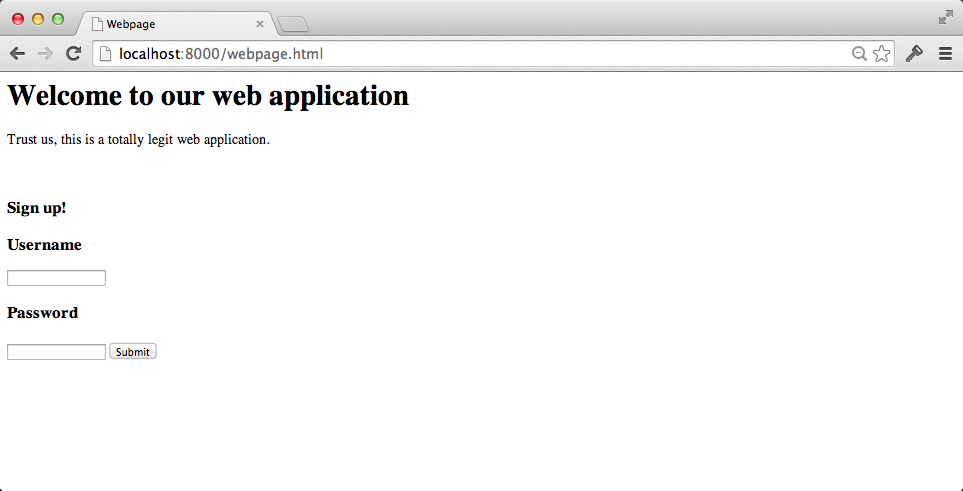
Creating web pages with their own style and interactivity so users can easily
accomplish their tasks is a major part of building modern web applications.
Getting started if you have no "eye" for design
Design can feel like something "creative" people understand intuitively,
but like all skills design is something that can be learned. Some people
are faster learners in design just like some folks are quicker in
picking up programming. But anyone can learn how to be a better designer
by learning the basic principles and practicing them.
One of the best mental models for basic design is C.R.A.P., which helped me
grasp why some designs look good while others do not. CRAP is an acronym
for:
* Contrast: noticeable differences from one element to another
* Repetition: elements' consistency
* Alignment: order among all elements
* Proximity: placement between elements and how they are organized
These basic principles all you to start breaking down the problem into
digestible pieces that you can work on rather than feeling like you
"just don't have an eye for design".
Designing for various screen sizes
Separating the content from the rules for how to display the content allows
devices to render the output differently based on factors such as screen size
and device type. Displaying content differently based on varying screen
attributes is often called responsive design. The responsiveness is
accomplished by implementing
media queries
in the CSS.
For example, a mobile device does not have as much space to display a
navigation bar on the side of a page so it is often pushed down
below the main content. The
Bootstrap Blog example
shows that navigation bar relocation scenario when you resize the browser
width.
Fantastic design resources
There are way too many design resources on the web, so I picked out
this short list as my absolute favorites that help developers become
(hopefully much) better with design.
-
Clean up your mess: A Guide to Visual Design for Everyone
walks through the basic principles for clean and effective design. You
can make a website go from terrible to well-designed often by following
a few principles on spacing, alignment, contrast and repetition of
page elements.
-
Resilient web design is an incredible
online book that teaches how to create websites that are accessible to
every reader and look great while doing it.
-
Design 101 for Developers
gives away the "secrets" to good design that designers follow but that
can be similarly accessible to developers who understand what they want
their design to accomplish.
-
Laws of UX provides a beautiful overview of
design principles for building user experiences. Highly recommended even
if just to see how the information is presented.
-
Building your color palette
explains why color pickers are not useful for most user interfaces
and how you should actually go about selecting your color palette
for a real world application.
-
How I Work with Color
is a fantastic article from a professional designer on how he thinks
about color and uses it for certain effects in his designs.
-
Building dark mode on Stack Overflow
explains the thought process and work that the team at Stack Overflow
had to do with colors, styling and the code implementation so they
could offer a dark mode design to their users.
-
A short history of body copy sizes on the Web
provides a useful examination of how originally the web's typography
mirrored what was in traditional print. Eventually, the designs shifted
upwards in font size because screen resolutions changed. However, even
in 2020 there is no consensus for what font size to use in various
situations so designers simply have to do what they've always done and
try their sites on various devices and screen sizes.
-
Web bloat is the story of traveling
and using the web with low bandwidth, high latency internet connections
that often drop packets. The author explains how many websites are
barely usable and that if you truly want your site to work well you need
to ensure it works for connections much worse than the fiber connection
you may have at the home or office.
-
Fundamental design principles for non-designers
summarizes numerous design tips into four principles that those without
prior design knowledge can follow. The author gives a bunch of great
examples and further details for the four principles, which are contrast,
consistency, Occam's Razor and space.
-
Gallery of web design history is
a collection of websites from between 1991 and 2006 that show the evolution
of what the web looked like before the modern
CSS era. This is a great resource to see
how websites evolved, such as
Microsoft in 1996
and YouTube in 2005.
-
The Average Web Page (Data from Analyzing 8 Million Websites)
shows the most frequently used HTML elements, metadata, text
content and other statistics from a large scale analysis of the web.
-
How to design delightful dark themes
explains some subtle tactics to make dark themes work well for users.
-
Setting height and width on images is important again
describes how browser layout and resizing settings could affect your
images so manually setting the size is more useful than it has
been in the past few years.
-
Kuler is a complementary
color picker by Adobe that helps choose colors for your designs.
-
If you want to learn more about how browsers work behind the scenes
to render a webpage's design,
here is a
blog post series on building a browser engine
that will show you how to build a simple rendering engine.
-
How to Use C.R.A.P. Design Principles for Better UX
has a good summary of what contrast, repetition, alignment and
proximity means for designing user interfaces.
-
Defining Colors in CSS
presents how to define color in your
Cascading Style Sheets (CSS) and breaks
down the differences between specifying predefined color values,
hexadecimal values, red-green-blue (RGB) and
Hue-Saturation-Lightness (HSL).
-
Easy to Remember Color Guide for Non-Designers
gives guidance to less aesthetically-inclined folks like myself who
need rules for picking groups of colors to use together in your designs.
-
Styling HTML checkboxes is hard - here's why
explains why form elements like checkboxes are more difficult to style
than other HTML elements,
The post shows how to perform the styling in various ways such as
CSS-only and then with
JavaScript plus CSS.
-
13 Terrible Web Trends From the 90s, and How to Recreate Them
revisits a simpler and perhaps more... ugly time on the web where designs
were a bit out of control. Learn more about the history of web design and
styling techniques with this hilarious but useful blog post.
Checklists and design guidelines
-
Frontend Guidelines is
an amazing write up of good practices for HTML, CSS and JS.
-
Learn Design Principles is a well
thought out clear explanation for how to think about design according to
specific rules such as axis, symmetry, hierarchy and rhythm.
-
Front-end performance checklist
is a comprehensive checklist useful when you are implementing a
web application's client side code.
-
Front-end Developer Handbook 2018
provides a high-level overview of many of the tools developers use
in the browser and some other useful information on average salaries
and where to search for front-end development jobs.
-
Who Can Use shows how color contrast can affect different
people with visual impairments and can help you improve your site's accessibility
to these groups.
Do you want to learn about CSS, JavaScript or static files next?
My app runs but looks awful. How do I style the user interface?
How should I host and serve static content files?
How do I use JavaScript with my Python web application?