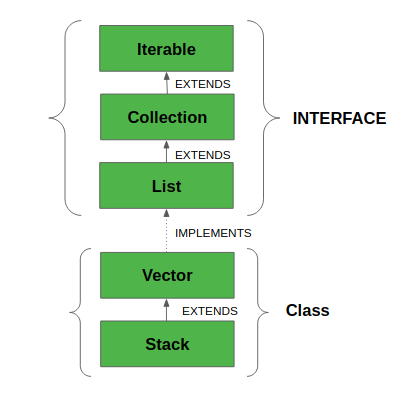
In Java, a Stack is a linear data structure that follows the Last In First Out (LIFO) principle and is defined in the java.util package. Internally, it extends the Vector class.
- Stack class maintains insertion order and allows duplicates and null values.
- Grows dynamically when its capacity is exceeded.
- Stack class implements List, RandomAccess, Cloneable, and Serializable interfaces.
Java
import java.util.Stack;

public class Geeks {
    public static void main(String[] args)
    {
        // Create a new stack
        Stack<Integer> s = new Stack<>();

        // Push elements onto the stack
        s.push(1);
        s.push(2);
        s.push(3);
        s.push(4);

        // Pop elements from the stack
        while (!s.isEmpty()) {
            System.out.println(s.pop());
        }
    }
}
Explanation:
- Elements are added to the stack using the push() method, placing each item on top.
- A loop runs while the stack is not empty, checked using the isEmpty() method.
- Elements are removed and printed using the pop() method in LIFO order.
Note: The Stack class is a legacy class; in modern Java development, use ArrayDeque or LinkedList instead.
Hierarchy of Stack class
Stack class extends Vector, which extends Object
Constructors of Stack Class
To create a Stack, create an object of the Stack class. The Stack class provides only one constructor. The Stack class inherits constructors from the Vector class.
1. Stack()
This constructor is used to create an empty stack.
Stack<Integer> stack = new Stack<>();
Note: Although Stack extends Vector, it does not inherit Vector constructors such as Vector(int initialCapacity). Therefore, constructors like Stack(int initialCapacity) do not exist and cannot be used.
Performing Different Operations on Stack Class
1. Adding Elements
With the help of push() method we can add element to the stack. The push() method place the element at the top of the stack.
Java
import java.io.*;
import java.util.*;

class Geeks {

    public static void main(String[] args)
    {
        // Default initialization of Stack
        Stack stack1 = new Stack();

        // Initialization of Stack using Generics
        Stack<String> stack2 = new Stack<String>();

        // pushing the elements
        stack1.push("4");
        stack1.push("All");
        stack1.push("Geeks");

        stack2.push("Geeks");
        stack2.push("For");
        stack2.push("Geeks");

        // Printing the Stack Elements
        System.out.println(stack1);
        System.out.println(stack2);
    }
}
Output[4, All, Geeks]
[Geeks, For, Geeks]
2. Accessing the Element
With the help of peek() method we can fetch the top element of the stack.
Java
import java.io.*;
import java.util.*;

public class Geeks {

    public static void main(String args[])
    {
        // Creating an empty Stack
        Stack<String> stack = new Stack<String>();

        // Use push() to add elements into the Stack
        stack.push("Welcome");
        stack.push("To");
        stack.push("Geeks");
        stack.push("For");
        stack.push("Geeks");

        // Displaying the Stack
        System.out.println("Initial Stack: " + stack);

        // Fetching the element at the head of the Stack
        System.out.println("The element at the top of the"
                           + " stack is: " + stack.peek());

        System.out.println("Final Stack: " + stack);
    }
}
OutputInitial Stack: [Welcome, To, Geeks, For, Geeks]
The element at the top of the stack is: Geeks
Final Stack: [Welcome, To, Geeks, For, Geeks]
3. Removing Elements
With the help of pop() method we can delete and return the top element from the stack.
Java
import java.io.*;
import java.util.*;

public class Geeks {
    public static void main(String args[])
    {
        // Creating an empty Stack
        Stack<Integer> stack = new Stack<Integer>();

        stack.push(10);
        stack.push(15);
        stack.push(30);
        stack.push(20);
        stack.push(5);

        System.out.println("Initial Stack: " + stack);

        // Removing elements using pop() method
        System.out.println("Popped element: "
                           + stack.pop());
        System.out.println("Popped element: "
                           + stack.pop());

        // Displaying the Stack after pop operation
        System.out.println("Stack after pop operation "
                           + stack);

        System.out.println("Is stack empty? "
                           + stack.isEmpty());
        // Pop remaining elements
        stack.pop();
        stack.pop();
        stack.pop();

        // Check if the stack is empty
        System.out.println("Is stack empty? "
                           + stack.empty());
    }
}
OutputInitial Stack: [10, 15, 30, 20, 5]
Popped element: 5
Popped element: 20
Stack after pop operation [10, 15, 30]
Is stack empty? false
Is stack empty? true
Prioritize Use of Deque over Stack
The Stack class in Java is inherits from Vector in Java. It is a thread-safe class. It is recommended to use ArrayDeque for stack implementation as it is more efficient in a single-threaded environment.
Java
import java.util.*;

class Geeks {
    public static void main(String[] args) {

        // Stack implementation
        Stack<Integer> stack = new Stack<>();
        stack.push(1);
        stack.push(2);
        stack.push(3);

        System.out.println("Using Stack (LIFO):");
        while (!stack.isEmpty()) {
            System.out.print(stack.pop() + " "); // pops elements in LIFO order
        }
        System.out.println();

        // ArrayDeque as stack
        Deque<Integer> deque = new ArrayDeque<>();
        deque.push(1);
        deque.push(2);
        deque.push(3);

        System.out.println("Using ArrayDeque (LIFO):");
        while (!deque.isEmpty()) {
            System.out.print(deque.pop() + " "); // pops elements in LIFO order
        }
        System.out.println();
    }
}

