Binary Tree is a non-linear and hierarchical data structure where each node has at most two children referred to as the left child and the right child. The topmost node in a binary tree is called the root, and the bottom-most nodes are called leaves.
Introduction to Binary Tree
Representation of Binary Tree
Each node in a Binary Tree has three parts:
Data
Pointer to the left child
Pointer to the right child
Binary Tree Representation
Create/Declare a Node of a Binary Tree in Python
Syntax to declare a Node of Binary Tree in Python:
Python
# A Python class that represents# an individual node in a Binary TreeclassNode:def__init__(self,key):self.left=Noneself.right=Noneself.val=key
Example for Creating a Binary Tree in Python
Here’s an example of creating a Binary Tree with four nodes (2, 3, 4, 5)
Creating a Binary Tree having three nodesPython
classNode:def__init__(self,d):self.data=dself.left=Noneself.right=None# Initialize and allocate memory for tree nodesfirstNode=Node(2)secondNode=Node(3)thirdNode=Node(4)fourthNode=Node(5)# Connect binary tree nodesfirstNode.left=secondNodefirstNode.right=thirdNodesecondNode.left=fourthNode
In the above code, we have created four tree nodes firstNode, secondNode, thirdNode and fourthNode having values 2, 3, 4 and 5 respectively.
After creating three nodes, we have connected these node to form the tree structure like mentioned in above image.
link secondNode to the left child of firstNode by firstNode.left = secondNode.
link thirdNode to the right child of firstNode by firstNode.right = thirdNode.
link fourthNode to the left child of secondNode by secondNode.left = fourthNode.
Types of Binary Tree
Binary Tree can be classified into multiples types based on multiple factors:
Following is a list of common operations that can be performed on a binary tree:
1. Traversal in Binary Tree
Traversal in Binary Tree involves visiting all the nodes of the binary tree. Tree Traversal algorithms can be classified broadly into two categories, DFS and BFS:
Depth-First Search (DFS) algorithms: DFS explores as far down a branch as possible before backtracking. It is implemented using recursion. The main traversal methods in DFS for binary trees are:
Preorder Traversal (current-left-right): Visits the node first, then left subtree, then right subtree.
Inorder Traversal (left-current-right): Visits left subtree, then the node, then the right subtree.
Postorder Traversal (left-right-current): Visits left subtree, then right subtree, then the node.
Breadth-First Search (BFS) algorithms: BFS explores all nodes at the present depth before moving on to nodes at the next depth level. It is typically implemented using a queue.BFS in a binary tree is commonly referred to asLevel Order Traversal.
Below is the implementation of traversals algorithm in binary tree:
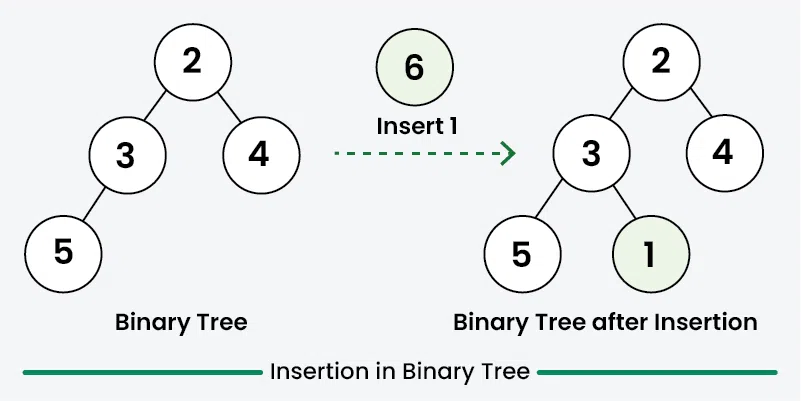
Inserting elements means add a new node into the binary tree. As we know that there is no such ordering of elements in the binary tree, So we do not have to worry about the ordering of node in the binary tree. We would first creates a root node in case of empty tree. Then subsequent insertions involve iteratively searching for an empty place at each level of the tree. When an empty left or right child is found then new node is inserted there. By convention, insertion always starts with the left child node.
Insertion in Binary TreePython
fromcollectionsimportdequeclassNode:def__init__(self,d):self.data=dself.left=Noneself.right=None# Function to insert a new node in the binary treedefinsert(root,key):ifrootisNone:returnNode(key)# Create a queue for level order traversalqueue=deque([root])whilequeue:temp=queue.popleft()# If left child is empty, insert the new node hereiftemp.leftisNone:temp.left=Node(key)breakelse:queue.append(temp.left)# If right child is empty, insert the new node hereiftemp.rightisNone:temp.right=Node(key)breakelse:queue.append(temp.right)returnroot# In-order traversaldefinorder(root):ifrootisNone:returninorder(root.left)print(root.data,end=" ")inorder(root.right)if__name__=="__main__":root=Node(2)root.left=Node(3)root.right=Node(4)root.left.left=Node(5)print("Inorder traversal before insertion: ",end="")inorder(root)print()key=6root=insert(root,key)print("Inorder traversal after insertion: ",end="")inorder(root)print()
Output
Inorder traversal before insertion: 5 3 2 4
Inorder traversal after insertion: 5 3 6 2 4
3. Searching in Binary Tree
Searching for a value in a binary tree means looking through the tree to find a node that has that value. Since binary trees do not have a specific order like binary search trees, we typically use any traversal method to search. The most common methods are depth-first search (DFS) and breadth-first search (BFS). In DFS, we start from the root and explore the depth nodes first. In BFS, we explore all the nodes at the present depth level before moving on to the nodes at the next level. We continue this process until we either find the node with the desired value or reach the end of the tree. If the tree is empty or the value isn’t found after exploring all possibilities, we conclude that the value does not exist in the tree.
Here is the implementation of searching in a binary tree using Depth-First Search (DFS):
Python
classNode:def__init__(self,d):self.data=dself.left=Noneself.right=None# Function to search for a value in the binary tree using DFSdefsearchDFS(root,value):# Base case: If the tree is empty or we've reached a leaf nodeifrootisNone:returnFalse# If the node's data is equal to the value we are searching forifroot.data==value:returnTrue# Recursively search in the left and right subtreesleft_res=searchDFS(root.left,value)right_res=searchDFS(root.right,value)returnleft_resorright_resif__name__=="__main__":root=Node(2)root.left=Node(3)root.right=Node(4)root.left.left=Node(5)root.left.right=Node(6)value=6ifsearchDFS(root,value):print(f"{value} is found in the binary tree")else:print(f"{value} is not found in the binary tree")
Output
6 is found in the binary tree
4. Deletion in Binary Tree
Deleting a node from a binary tree means removing a specific node while keeping the tree’s structure. First, we need to find the node that want to delete by traversing through the tree using any traversal method. Then replace the node’s value with the value of the last node in the tree (found by traversing to the rightmost leaf), and then delete that last node. This way, the tree structure won’t be effected. And remember to check for special cases, like trying to delete from an empty tree, to avoid any issues.
Note: There is no specific rule of deletion but we always make sure that during deletion the binary tree proper should be preserved.
Deletion in Binary TreePython
fromcollectionsimportdequeclassNode:def__init__(self,d):self.data=dself.left=Noneself.right=None# Function to delete a node from the binary treedefdeleteNode(root,val):ifrootisNone:returnNone# Use a queue to perform BFSqueue=deque([root])target=None# Find the target nodewhilequeue:curr=queue.popleft()ifcurr.data==val:target=currbreakifcurr.left:queue.append(curr.left)ifcurr.right:queue.append(curr.right)iftargetisNone:returnroot# Find the deepest rightmost node and its parentlast_node=Nonelast_parent=Nonequeue=deque([(root,None)])whilequeue:curr,parent=queue.popleft()last_node=currlast_parent=parentifcurr.left:queue.append((curr.left,curr))ifcurr.right:queue.append((curr.right,curr))# Replace target's value with the last node's valuetarget.data=last_node.data# Remove the last nodeiflast_parent:iflast_parent.left==last_node:last_parent.left=Noneelse:last_parent.right=Noneelse:returnNonereturnroot# In-order traversaldefinorder(root):ifrootisNone:returninorder(root.left)print(root.data,end=" ")inorder(root.right)if__name__=="__main__":root=Node(2)root.left=Node(3)root.right=Node(4)root.left.left=Node(5)root.left.right=Node(6)print("Original tree (in-order): ",end="")inorder(root)print()val_to_del=3root=deleteNode(root,val_to_del)print(f"Tree after deleting {val_to_del} (in-order): ",end="")inorder(root)print()
Output
Original tree (in-order): 5 3 6 2 4
Tree after deleting 3 (in-order): 5 6 2 4
You are visitor 01402503 — GeezerVison does not store the pages you look up. Best viewed with Netscape Navigator 4.7 or Internet Explorer 6 at 800×600. No cookies required.