GV

GeezerVison

The World Wide Web, restored to 800 pixels of glory.

Home|About|Gaming cabinet|Archives|How it works|Starter sites

On this site

  • Python Tutorial
  • Data Types
  • Interview Questions
  • Examples
  • Quizzes
  • DSA Python
  • Data Science
  • NumPy
  • Pandas
  • Practice
  • Django
  • Flask
  • Introduction1 min read
  • Input & Output2 min read

This view

  • Original page
  • New address

GeezerVison is showing www.geeksforgeeks.org — Python Variables - GeeksforGeeks

geeksforgeeks
search icon
  • Courses
  • Tutorials
  • Interview Prep
  • Python Tutorial
  • Data Types
  • Interview Questions
  • Examples
  • Quizzes
  • DSA Python
  • Data Science
  • NumPy
  • Pandas
  • Practice
  • Django
  • Flask

Python Variables

Last Updated : 3 Nov, 2026

Variables are used to store data that can be referenced and manipulated during program execution. A variable is essentially a name that is assigned to a value.

  • Unlike Java and many other languages, Python variables do not require explicit declaration of type.
  • Type of the variable is inferred based on the value assigned.
Python
x = 5
name = "Alex"  
print(x)
print(name)

Output
5
Alex

Rules for Naming Variables

To use variables correctly, the following naming rules should be followed:

  1. Names can contain letters, digits and underscores (_).
  2. The first character cannot be a digit.
  3. Names are case-sensitive, so myVar and myvar are treated differently.
  4. Keywords such as if, else and for cannot be used as variable names.

Below listed variable names are valid:

Python
age = 21
_colour = "lilac"
total_score = 90

Below listed variables names are invalid:

Python
1name = "Error"  # Starts with a digit
class = 10       # class is a reserved keyword
user-name = "Doe"  # Contains a hyphen

Assigning Values to Variables

1. Basic Assignment: Variables are assigned values using the = operator.

Python
x = 5
y = 3.14
z = "Hi"

2. Dynamic Typing: Python is dynamically typed, so the same variable can store different data types during execution.

Python
x = 10
x = "Now a string"

3. Assigning Same Value: Same value can be assigned to multiple variables in a single line.

Python
a = b = c = 100
print(a, b, c) 

Output
100 100 100

4. Assigning Different Values: Multiple variables can also be assigned different values in a single line.

Python
x, y, z = 1, 2.5, "Python"
print(x, y, z) 

Output
1 2.5 Python

Concept of Object Reference

Let us assign a variable x to value 5.

x = 5

When x = 5 is executed, Python creates an object to represent the value 5 and makes x reference this object.

1
object reference

Now, let's assign another variable y to the variable x.

y = x

This statement creates y and references the same object as x, not x itself. This is called a Shared Reference, where multiple variables reference the same object.

2
shared reference

Now, if we write

x = 'Geeks'

Python creates a new object for the value "Geeks" and makes x reference this new object.
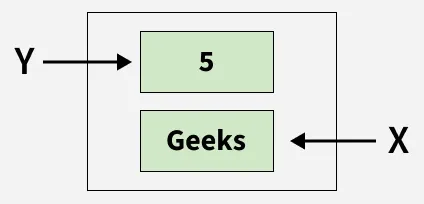
3
value of variable x is changed to 'Geeks'

The variable y remains unchanged, still referencing the original object 5. Now, If we assign a new value to y:

y = "Computer"

4
new value is assigned to variable y and previous object becomes eligible for garbage collection

Python variables store references to objects, not the actual values themselves. When a variable is reassigned, it starts referencing a new object while the old unreferenced object becomes eligible for garbage collection.

The scope of the variable determines where it can be accessed in Python program, such as within a function or throughout the program.

For detailed information, on variable scope, please refer to our article, Python Scope of Variables.

Understanding Variable Reassignment

In this example, we check whether modifying one variable affects another when both initially reference the same object.

Python
x = 1
y = x
y = y + 1

print(x)
print(y)

Output
1
2

Explanation:

  • Initially, both x and y reference the object 1.
  • After y = y + 1, y references a new object 2 while x still references 1, so changing y does not affect x.


Deleting a Variable

del keyword is used to delete a variable from memory. After deletion, the variable can no longer be accessed.

Python
x = 10
del x
print(x) 

Output

ERROR!
Traceback (most recent call last):
File "<main.py>", line 3, in <module>
NameError: name 'x' is not defined

Explanation: del x deletes the variable x. Accessing x after deletion raises a NameError because the variable no longer exists.

Practical Examples

1. Swapping Two Variables: Using multiple assignments, we can swap the values of two variables without needing a temporary variable.

Python
a, b = 5, 10
a, b = b, a
print(a, b)  

Output
10 5

2. Counting Characters in a String: Assign the results of multiple operations on a string to variables in one line.

Python
word = "Python"
length = len(word)
print("Length of the word:", length) 

Output
Length of the word: 6
Comment

Explore

    Python Fundamentals
    • Introduction1 min read
    • Input & Output2 min read
    • Variables4 min read
    • Operators4 min read
    • Keywords2 min read
    • Data Types4 min read
    • Conditional Statements3 min read
    • Loops3 min read
    • Functions4 min read
    Python Data Structures
    • String4 min read
    • List3 min read
    • Tuples3 min read
    • Dictionary3 min read
    • Set2 min read
    • Arrays5 min read
    Advanced Python
    • OOP Concepts3 min read
    • Exception Handling5 min read
    • File Handling4 min read
    • Python Database2 min read
    • MongoDB3 min read
    • MySQL7 min read
    • Packages4 min read
    • Modules3 min read
    • DSA Libraries5 min read
    • Python GUI2 min read
    Data Science with Python
    • Numpy3 min read
    • Pandas4 min read
    • Matplotlib3 min read
    • Seaborn3 min read
    • StatsModel2 min read
    • Model Building6 min read
    • TensorFlow2 min read
    • PyTorch5 min read
    Web Development with Python
    • Flask3 min read
    • Django5 min read
    • Django ORM4 min read
    • Jinja2 Templating5 min read
    • Django Templates5 min read
    • REST API3 min read
    • Build API with DRF4 min read
    Python Practice
    • Quiz1 min read
    • Practice Problems2 min read
    • Interview Q & A15+ min read
    Courses
    • Placement 360 Course2 min read
    • Data Science 360 Course2 min read
    • AI Engg Course2 min read
You are visitor 01402503 — GeezerVison does not store the pages you look up.
Best viewed with Netscape Navigator 4.7 or Internet Explorer 6 at 800×600. No cookies required.