GV

GeezerVison

The World Wide Web, restored to 800 pixels of glory.

Home|About|Gaming cabinet|Archives|How it works|Starter sites

On this site

  • Python Tutorial
  • Data Types
  • Interview Questions
  • Examples
  • Quizzes
  • DSA Python
  • Data Science
  • NumPy
  • Pandas
  • Practice
  • Django
  • Flask
  • Introduction1 min read
  • Input & Output2 min read

This view

  • Original page
  • New address

GeezerVison is showing www.geeksforgeeks.org — Python Arrays - GeeksforGeeks

geeksforgeeks
search icon
  • Courses
  • Tutorials
  • Interview Prep
  • Python Tutorial
  • Data Types
  • Interview Questions
  • Examples
  • Quizzes
  • DSA Python
  • Data Science
  • NumPy
  • Pandas
  • Practice
  • Django
  • Flask

Python Arrays

Last Updated : 19 Sep, 2026

Python provides multiple ways to work with linear data structures, which store elements sequentially. Although Python does not have a built-in array type like some other languages, similar functionality can be achieved using:

Lists

Lists are a flexible and commonly used data structure for storing elements in sequence. Unlike arrays in other languages, list:

  • Can store mixed data types in one list
  • Elements can be added or removed easily
  • Provide functions like append(), remove(), sort(), etc.
Python
a = [1, "Hello", [3.14, "world"]]
a.append(2)  # Add an integer to the end
print(a)  

Output
[1, 'Hello', [3.14, 'world'], 2]

NumPy Arrays

NumPy arrays are a part of NumPy library, which is a tool for numerical computing. Designed for high-performance operations on large datasets and support multi-dimensional arrays and matrices, making them suitable for complex mathematical computations.

  • Multi-dimensional support: Can handle multiple dimensions, making them suitable for matrix operations and advanced mathematical tasks.
  • Broad broadcasting capabilities: Allow operations between arrays of different shapes and sizes using broadcasting.
  • Efficient storage and processing: Uses optimized memory and provides faster performance compared to lists for numerical operations.
Python
import numpy as np
a = np.array([1, 2, 3, 4])

# Element-wise operations
print(a * 2)  

# Multi-dimensional array
res = np.array([[1, 2], [3, 4]])
print(res * 2)

Output
[2 4 6 8]
[[2 4]
 [6 8]]

Note: Use NumPy arrays for complex, multi-dimensional computations. Use Python’s array module for simple, memory-efficient storage of uniform data.

Arrays

Array is a collection of elements stored at contiguous memory locations, used to hold multiple values of the same data type. Unlike Lists, which can store mixed types, arrays are homogeneous and require a typecode during initialization to define the data type.

Python
import array as arr
a = arr.array('i', [1, 2, 3])

# accessing first array
print(a[0])

# adding element to array
a.append(5)
print(a)  

Output
1
array('i', [1, 2, 3, 5])

Explanation: parameter 'i' is the typecode, it tells Python to treat the elements as signed integers ([1, 2, 3]) of a specific byte size (usually 2 or 4 bytes).

The following table outlines standard typecodes, their mapped C types and minimum memory requirements:

TypecodeC TypePython TypeMinimum Size (Bytes)
'b'signed charint1
'i'signed intint4
'f'floatfloat4
'd'doublefloat8

Create an Array

Array can be created by importing an array module. array(data_type, value_list) is used to create array with data type and value list specified in its arguments.

Python
import array as arr
a = arr.array('i', [1, 2, 3])

for i in range(0, 3):
    print(a[i], end=" ")

Output
1 2 3 
2
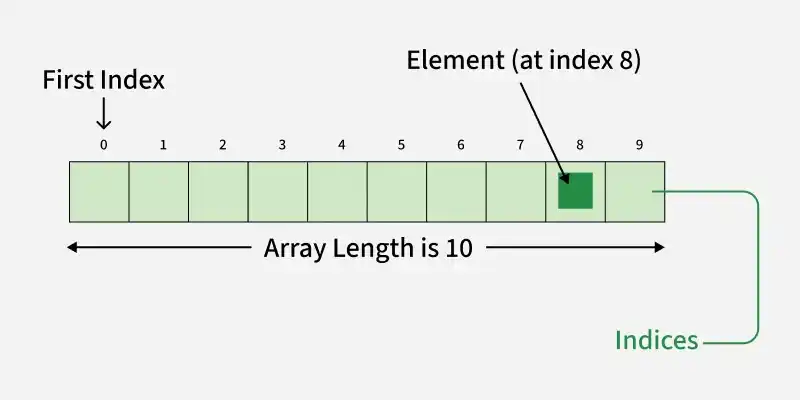
Python Array Index

Adding Elements

Elements can be added to an array using insert() to place a value at a specific index, or append() to add a value at the end.

Python
import array as arr
a = arr.array('i', [1, 2, 3])
print(*a)

a.insert(1, 4)  # Insert 4 at index 1
print(*a)

Output
1 2 3
1 4 2 3

Note: We have used *a and *b for unpacking the array elements.

Accessing Items

Array elements are accessed using their index with square brackets [ ]. Each item has a position starting from 0 and the index must be an integer.

Python
import array as arr
a = arr.array('i', [1, 2, 3, 4, 5, 6])

print(a[0])
print(a[3])

b = arr.array('d', [2.5, 3.2, 3.3])
print(b[1])
print(b[2])

Output
1
4
3.2
3.3

Removing Elements

Elements can be removed using remove(), which deletes the first occurrence of a value or pop(), which removes and returns an element (last by default or a specific index if provided).

Python
import array
a = array.array('i', [1, 2, 3, 1, 5])

# remove first occurence of 1
a.remove(1)
print(a)

# remove item at index 2
a.pop(2)
print(a)

Output
array('i', [2, 3, 1, 5])
array('i', [2, 3, 5])

Slicing

Slicing is used to access a specific range of elements from an array using index positions.

11
Python Index Slicing
  • Elements from beginning to a range use [:Index]
  • Elements from end use [:-Index]
  • Elements from specific Index till the end use [Index:]
  • Elements within a range, use [Start Index:End Index]
  • Print complete List, use [:].
  • For Reverse list, use [::-1].
Python
import array as arr
a = [1, 2, 3, 4, 5, 6, 7, 8, 9, 10]
b = arr.array('i', a)

res = b[3:8]
print(res)

res = b[5:]
print(res)

res = b[:]
print(res)

Output
array('i', [4, 5, 6, 7, 8])
array('i', [6, 7, 8, 9, 10])
array('i', [1, 2, 3, 4, 5, 6, 7, 8, 9, 10])

Searching Element

In order to search an element in the array we use index() method. This function returns the index of the first occurrence of value mentioned in arguments.

Python
import array
a = array.array('i', [1, 2, 3, 1, 2, 5])

# index of 1st occurrence of 2
print(a.index(2))

# index of 1st occurrence of 1
print(a.index(1))

Output
1
0

Updating Elements

In order to update an element in the array we simply reassign a new value to the desired index we want to update.

Python
import array
a = array.array('i', [1, 2, 3, 1, 2, 5])

# update item at index 2
a[2] = 6
print(a)

# update item at index 4
a[4] = 8
print(a)

Output
array('i', [1, 2, 6, 1, 2, 5])
array('i', [1, 2, 6, 1, 8, 5])

Operations on Array

1. Counting Elements: We can use count() method to count given item in array.

Python
import array
a = array.array('i', [1, 2, 3, 4, 2, 5, 2])
count = a.count(2)
print(count)

Output
3

2. Reversing Elements: In order to reverse elements of an array use reverse method.

Python
import array
a = array.array('i', [1, 2, 3, 4, 5])
a.reverse()
print(*a)

Output
5 4 3 2 1

3. Extend Element: extend() function is used to attach an item from iterable to the end of the array. This method is used to add an array of values to the end of a given or existing array.

Python
import array as arr 
a = arr.array('i', [1, 2, 3,4,5])
a.extend([6,7,8,9,10])
print(a)

Output
array('i', [1, 2, 3, 4, 5, 6, 7, 8, 9, 10])
Comment

Explore

    Python Fundamentals
    • Introduction1 min read
    • Input & Output2 min read
    • Variables4 min read
    • Operators4 min read
    • Keywords2 min read
    • Data Types4 min read
    • Conditional Statements3 min read
    • Loops3 min read
    • Functions4 min read
    Python Data Structures
    • String4 min read
    • List3 min read
    • Tuples3 min read
    • Dictionary3 min read
    • Set2 min read
    • Arrays5 min read
    Advanced Python
    • OOP Concepts3 min read
    • Exception Handling5 min read
    • File Handling4 min read
    • Python Database2 min read
    • MongoDB3 min read
    • MySQL7 min read
    • Packages4 min read
    • Modules3 min read
    • DSA Libraries5 min read
    • Python GUI2 min read
    Data Science with Python
    • Numpy3 min read
    • Pandas4 min read
    • Matplotlib3 min read
    • Seaborn3 min read
    • StatsModel2 min read
    • Model Building6 min read
    • TensorFlow2 min read
    • PyTorch5 min read
    Web Development with Python
    • Flask3 min read
    • Django5 min read
    • Django ORM4 min read
    • Jinja2 Templating5 min read
    • Django Templates5 min read
    • REST API3 min read
    • Build API with DRF4 min read
    Python Practice
    • Quiz1 min read
    • Practice Problems2 min read
    • Interview Q & A15+ min read
    Courses
    • Placement 360 Course2 min read
    • Data Science 360 Course2 min read
    • AI Engg Course2 min read
You are visitor 01402503 — GeezerVison does not store the pages you look up.
Best viewed with Netscape Navigator 4.7 or Internet Explorer 6 at 800×600. No cookies required.