GV

GeezerVison

The World Wide Web, restored to 800 pixels of glory.

Home|About|Gaming cabinet|Archives|How it works|Starter sites

On this site

  • Python Tutorial
  • Data Types
  • Interview Questions
  • Examples
  • Quizzes
  • DSA Python
  • Data Science
  • NumPy
  • Pandas
  • Practice
  • Django
  • Flask
  • Introduction1 min read
  • Input & Output2 min read

This view

  • Original page
  • New address

GeezerVison is showing www.geeksforgeeks.org — Byte Objects vs String in Python - GeeksforGeeks

geeksforgeeks
search icon
  • Courses
  • Tutorials
  • Interview Prep
  • Python Tutorial
  • Data Types
  • Interview Questions
  • Examples
  • Quizzes
  • DSA Python
  • Data Science
  • NumPy
  • Pandas
  • Practice
  • Django
  • Flask

Byte Objects vs String in Python

Last Updated : 23 Jul, 2025

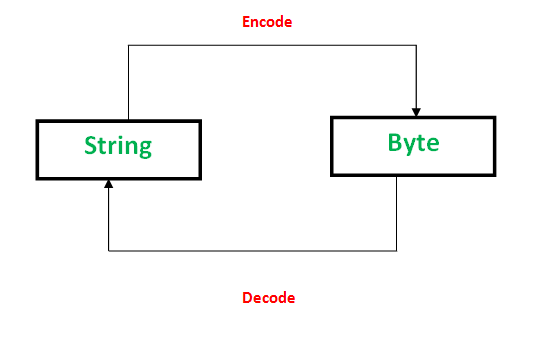
In Python 2, both str and bytes are the same typeByte objects whereas in Python 3 Byte objects, defined in Python 3 are "sequence of bytes" and similar to "unicode" objects from Python 2. In this article, we will see the difference between byte objects and strings in Python and also will look at how we can convert byte string to normal string and vice versa.

Byte Objects vs String in Python
S.NO

Byte Object

Python String

1.

Byte objects are a sequence of Bytes.

Strings are a sequence of characters.

2.

Byte objects are in machine-readable form internally.

Strings are only in human-readable form.

3.

Bytes are used to handle binary data.

Strings are used to handle textual data.

4.

They can be directly stored on the disk.

They need encoding before they are stored on disk.

string vs byte in python

Convert String to Byte Objects (Encoding)

PNG, JPEG, MP3, WAV, ASCII, UTF-8 etc are different forms of encodings. An encoding is a format to represent audio, images, text, etc in bytes. Converting Strings to byte objects is termed as encoding. This is necessary so that the text can be stored on disk using mapping using ASCII or UTF-8 encoding techniques.
This task is achieved using encode(). It take encoding technique as argument. Default technique is "UTF-8" technique.

Python3
# Python code to demonstrate String encoding
# initialising a String 
a = 'GeeksforGeeks'

# initialising a byte object
c = b'GeeksforGeeks'

# using encode() to encode the String
d = a.encode('ASCII')

# checking if a is converted to bytes or not
if (d==c):
    print ("Encoding successful")
else : print ("Encoding Unsuccessful")

Output
Encoding successful

Convert Byte Objects to String (Decoding)

Similarly, Decoding is process to convert a Byte object to String. It is implemented using decode() . A byte string can be decoded back into a character string, if you know which encoding was used to encode it. Encoding and Decoding are inverse processes. 

Python3
# Python code to demonstrate Byte Decoding
# initialising a String 
a = 'GeeksforGeeks'

# initialising a byte object
c = b'GeeksforGeeks'

# using decode() to decode the Byte object
d = c.decode('ASCII')

# checking if c is converted to String or not
if (d==a):
    print ("Decoding successful")
else : print ("Decoding Unsuccessful")

Output
Decoding successful

Concatenating a String and a Byte String

In this example, we have defined a string "Geeks" and a byte string "forGeeks". After that we used decode() method to convert byte string to normal string and then concatenate both of them.

Python3
# Define a string
string = "Geeks"

# Define a byte string
byte_str = b"forGeeks"

# Concatenate the string and byte string
ans = string + byte_str.decode()
print(ans)

Output
GeeksforGeeks
Comment

Explore

    Python Fundamentals
    • Introduction1 min read
    • Input & Output2 min read
    • Variables4 min read
    • Operators4 min read
    • Keywords2 min read
    • Data Types4 min read
    • Conditional Statements3 min read
    • Loops3 min read
    • Functions4 min read
    Python Data Structures
    • String4 min read
    • List3 min read
    • Tuples3 min read
    • Dictionary3 min read
    • Set2 min read
    • Arrays5 min read
    Advanced Python
    • OOP Concepts3 min read
    • Exception Handling5 min read
    • File Handling4 min read
    • Python Database2 min read
    • MongoDB3 min read
    • MySQL7 min read
    • Packages4 min read
    • Modules3 min read
    • DSA Libraries5 min read
    • Python GUI2 min read
    Data Science with Python
    • Numpy3 min read
    • Pandas4 min read
    • Matplotlib3 min read
    • Seaborn3 min read
    • StatsModel2 min read
    • Model Building6 min read
    • TensorFlow2 min read
    • PyTorch5 min read
    Web Development with Python
    • Flask3 min read
    • Django5 min read
    • Django ORM4 min read
    • Jinja2 Templating5 min read
    • Django Templates5 min read
    • REST API3 min read
    • Build API with DRF4 min read
    Python Practice
    • Quiz1 min read
    • Practice Problems2 min read
    • Interview Q & A15+ min read
    Courses
    • Placement 360 Course2 min read
    • Data Science 360 Course2 min read
    • AI Engg Course2 min read
You are visitor 01402503 — GeezerVison does not store the pages you look up.
Best viewed with Netscape Navigator 4.7 or Internet Explorer 6 at 800×600. No cookies required.