GV

GeezerVison

The World Wide Web, restored to 800 pixels of glory.

Home|About|Gaming cabinet|Archives|How it works|Starter sites

On this site

  • Python Tutorial
  • Data Types
  • Interview Questions
  • Examples
  • Quizzes
  • DSA Python
  • Data Science
  • NumPy
  • Pandas
  • Practice
  • Django
  • Flask
  • What is JSON?
  • Data types in JSON

This view

  • Original page
  • New address

GeezerVison is showing www.geeksforgeeks.org — Python JSON - GeeksforGeeks

geeksforgeeks
search icon
  • Courses
  • Tutorials
  • Interview Prep
  • Python Tutorial
  • Data Types
  • Interview Questions
  • Examples
  • Quizzes
  • DSA Python
  • Data Science
  • NumPy
  • Pandas
  • Practice
  • Django
  • Flask

Python JSON

Last Updated : 23 Dec, 2025

Python JSON (JavaScript Object Notation) is a data format for storing and transferring data, supported via the built-in json module for parsing, serializing and deserializing.

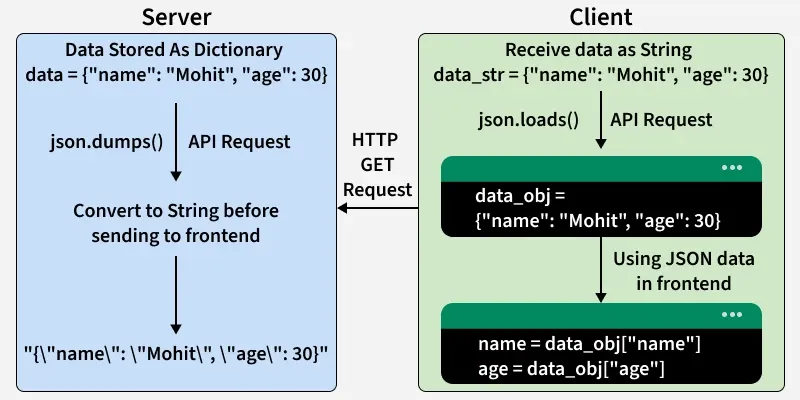
This below diagram shows JSON flows from server to client as a string via json.dumps(), then parsed back to a dictionary with json.loads() for data access.
json
Python JSON

Let's see some examples where we convert the JSON objects to Python objects and vice versa.

Convert from JSON to Python object

Let's see an example where we convert the JSON objects to Python objects. Here, json.loads() method can be used to parse a valid JSON string and convert it into a Python Dictionary.

Python
import json

emp = '{"id":"09", "name": "Nitin", "department":"Finance"}'
print("This is JSON", type(emp))

print("Now convert from JSON to Python")
d = json.loads(emp)
print("Converted to Python", type(d))
print(d)

Output
This is JSON <class 'str'>
Now convert from JSON to Python
Converted to Python <class 'dict'>
{'id': '09', 'name': 'Nitin', 'department': 'Finance'}

Convert from Python object to JSON

Let's see an example where we convert Python objects to JSON objects. Here json.dumps() function will convert a subset of Python objects into a JSON string.

Python
import json

d = {'id': '09', 'name': 'Nitin', 'department': 'Finance'}
print("This is Python", type(d))

print("Now Convert from Python to JSON")
obj = json.dumps(d, indent=4)
print("Converted to JSON", type(obj))
print(obj)

Output
This is Python <class 'dict'>
Now Convert from Python to JSON
Converted to JSON <class 'str'>
{
    "id": "09",
    "name": "Nitin",
    "department": "Finance"
}

Introduction

In this section, we will cover the basics of JSON, its data types, and how to work with, read, write, and parse JSON data in Python.

  • What is JSON?
  • Data types in JSON
  • Working With JSON Data in Python
  • Read, Write and Parse JSON using Python

Reading and Writing JSON

You can read, write, and append JSON data to files in Python using the json module. It makes handling JSON data in files simple and efficient.

  • Reading and Writing JSON to a File in Python
  • Read JSON file using Python
  • Append to JSON file using Python

Parsing JSON

You can parse JSON data in Python to access or manipulate it, convert dictionaries to JSON strings, and transform JSON strings back into Python objects. This allows easy data exchange and customization.

  • How to Parse Data From JSON into Python?
  • How To Convert Python Dictionary To JSON?
  • Python – Convert JSON to string
  • Ways to convert string to json object
  • Convert JSON data Into a Custom Python Object

Serializing and Deserializing JSON

Serializing converts Python objects to JSON, and deserializing converts JSON back to Python objects using json.dump(), json.dumps(), json.load(), and json.loads().

  • Serializing JSON in Python
  • json.dump() in Python
  • json.dumps() in Python
  • Python – Difference between json.dump() and json.dumps()
  • Deserialize JSON to Object in Python
  • json.load() in Python
  • json.loads() in Python
  • Difference Between json.load() and json.loads()
  • Encoding and Decoding Custom Objects in Python-JSON
  • Serialize and Deserialize complex JSON in Python

Conversion between JSON

Convert and transform data between JSON, XML, CSV, and text formats in Python, enabling easy storage, sharing, and interoperability across different applications.

  • Python – JSON to XML
  • Python – XML to JSON
  • Convert CSV to JSON using Python
  • Convert multiple JSON files to CSV Python
  • Convert Text file to JSON in Python
  • Saving Text, JSON and CSV to a File in Python

More operations JSON

Perform additional JSON operations in Python, including formatting, pretty-printing, flattening nested objects, validating JSON strings, and sorting JSON data by values.

  • JSON Formatting in Python
  • Pretty Print JSON in Python
  • Flattening JSON objects in Python
  • Check whether a string is valid json or not
  • Sort JSON by value
Comment

Explore

    Python Fundamentals
    • Introduction1 min read
    • Input & Output2 min read
    • Variables4 min read
    • Operators4 min read
    • Keywords2 min read
    • Data Types4 min read
    • Conditional Statements3 min read
    • Loops3 min read
    • Functions4 min read
    Python Data Structures
    • String4 min read
    • List3 min read
    • Tuples3 min read
    • Dictionary3 min read
    • Set2 min read
    • Arrays5 min read
    Advanced Python
    • OOP Concepts3 min read
    • Exception Handling5 min read
    • File Handling4 min read
    • Python Database2 min read
    • MongoDB3 min read
    • MySQL7 min read
    • Packages4 min read
    • Modules3 min read
    • DSA Libraries5 min read
    • Python GUI2 min read
    Data Science with Python
    • Numpy3 min read
    • Pandas4 min read
    • Matplotlib3 min read
    • Seaborn3 min read
    • StatsModel2 min read
    • Model Building6 min read
    • TensorFlow2 min read
    • PyTorch5 min read
    Web Development with Python
    • Flask3 min read
    • Django5 min read
    • Django ORM4 min read
    • Jinja2 Templating5 min read
    • Django Templates5 min read
    • REST API3 min read
    • Build API with DRF4 min read
    Python Practice
    • Quiz1 min read
    • Practice Problems2 min read
    • Interview Q & A15+ min read
    Courses
    • Placement 360 Course2 min read
    • Data Science 360 Course2 min read
    • AI Engg Course2 min read
You are visitor 01402503 — GeezerVison does not store the pages you look up.
Best viewed with Netscape Navigator 4.7 or Internet Explorer 6 at 800×600. No cookies required.