GeezerVisonThe World Wide Web, restored to 800 pixels of glory. |
| Home|About|Gaming cabinet|Archives|How it works|Starter sites |
GeezerVison is showing www.imore.com — QuickType keyboard in iOS 8: Explained
This content was produced prior to the launch of iMore Labs.
Find out more about Labs.
Follow us
Add us as a preferred source on Google
Subscribe to our newsletter
QuickType is the next generation of iOS virtual keyboard. Originally introduced with the first iPhone in 2007, Apple's approach was revolutionary for its time. But now it's 2014 and the state of the art of keyboards has changed. Prediction has taken the place of correction. So, with iOS 8, Apple has responded with a new, contextually predictive keyboard system. It's called QuickType. But how does it work? Virtual virtue
Virtual keyboards have many advantages over hardware keyboards. While they don't allow for touch-typing or persistent shortcuts, they can fully disappear when not in use to allow for the full surface of the phone to be used for watching videos, playing games, surfing the web, and more. They can also change configuration and optimize themselves for different languages and tasks. For example, Apple has given the iPhone's keyboard the ability to take on different layouts like AZERTY, different character sets like Arabic and Cyrillic, as well as accept both key-based and hand-drawing input methods for Asian characters.
Individual characters can also change dynamically to allow for things like accented letters, internet domain types, and even shortcuts to punctuation. Apple has also given developers the ability to customize keyboards within their own apps, including the ability to create specialized keyboards for things like spreadsheets. Using the same speech-to-text system as Siri, the Dictation feature also lets you talk instead of write. With iOS 8, text-to-speech will also be streaming, so no more talk-wait-talk-wait. What you say will just appear. But Apple hasn't forgotten about the keyboard either. Contextual prediction
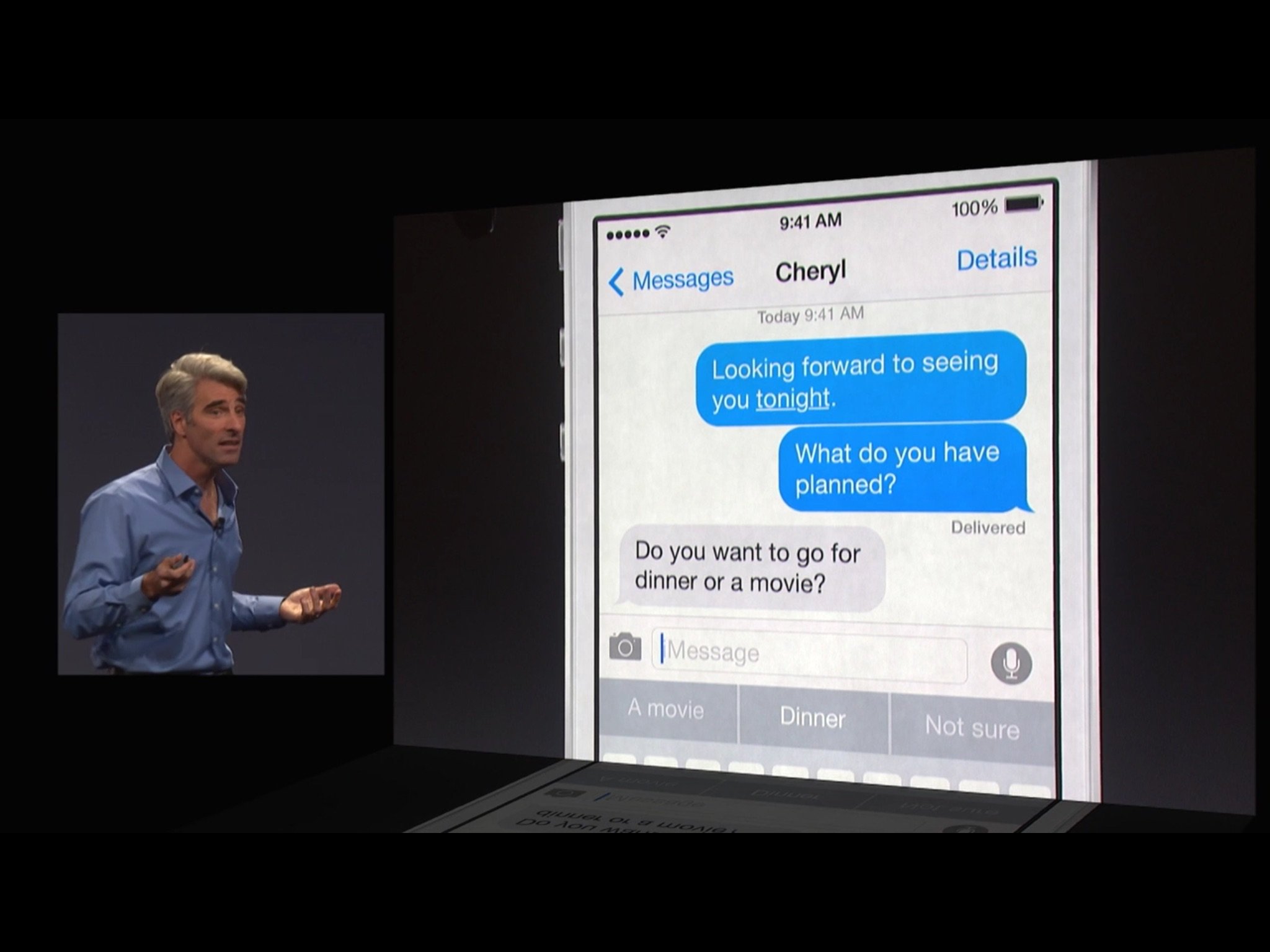
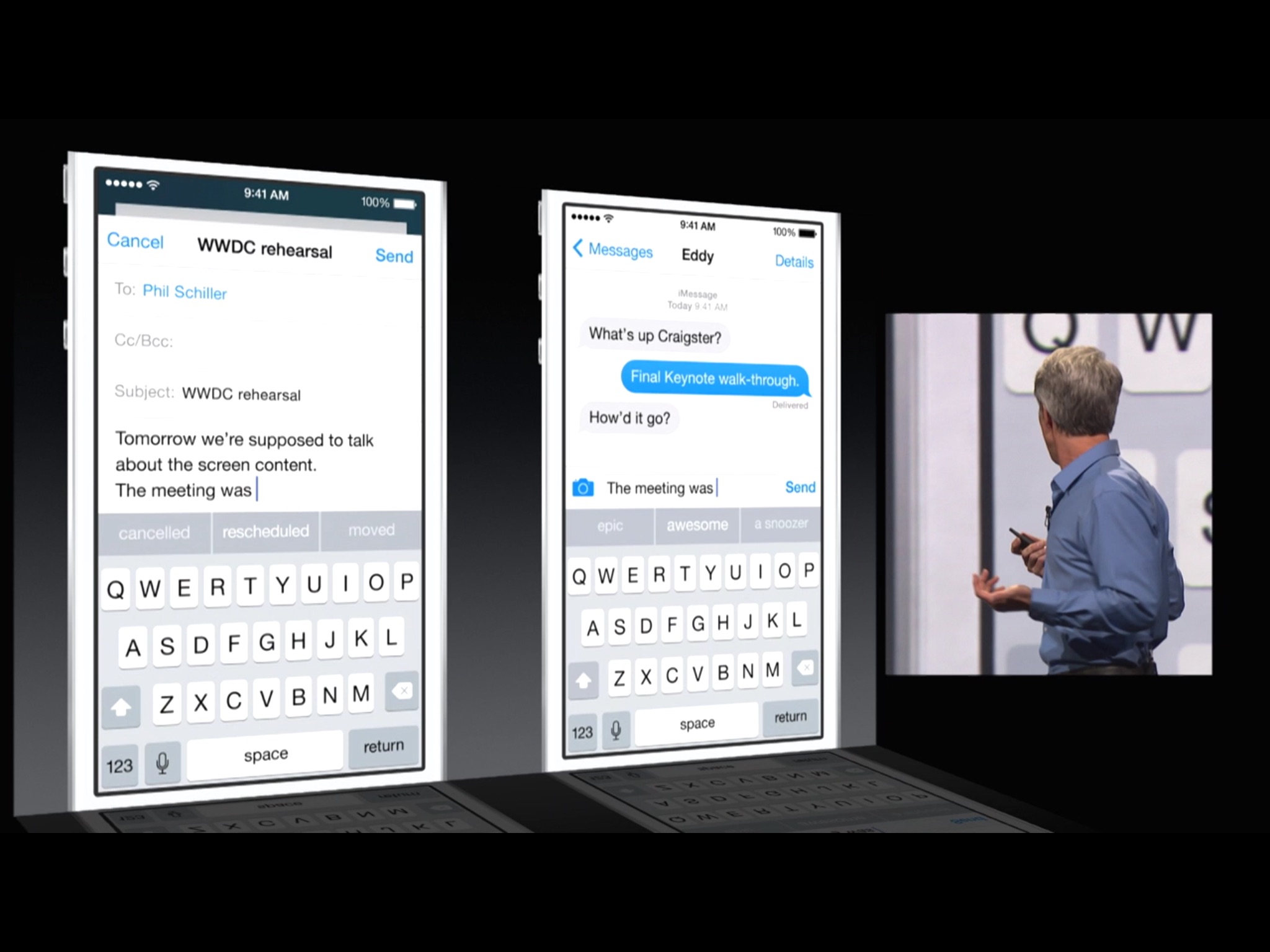
Rather than auto-correction, Apple's new QuickType keyboard in iOS 8 introduces contextual prediction. As you type, the keyboard will suggest what it thinks are the most likely words based on what you're typing. See the one you want, hit it, the word is typed and you can move on to the next one. To help up the odds Apple isn't just predicting your words in general but they're contextualizing them based on the app you're using and the person, if any, you're communicating with. For example, if you're in Messages, QuickType will predict words that are more casual than if you're in Mail. Likewise if you're conversing with a friend rather than a boss or business partner. What's more, based on the context of the message, QuickType can and will present you with obvious responses. For example, if you're asked if you want to go to dinner or a movie, QuickType can show you responses that prefer one to the other, both or neither.
How many letters (key presses) the contextual prediction actually saves you will depend on how well the system works and, frankly, how predictable you are. QuickType will learn as you use it, so odds are it'll get better over time. If you don't want to use the new prediction feature you can easily disable or — or re-enable it — on the fly. Currently you simply tap the same key you use to switch to other language, or emoji, keyboards and turn prediction off, or grab the edge and pull it down to hide it. Prediction might also be smart enough to know when you keep ignoring it and automatically turn itself off for you. International input
The new QuickType system is going to launch with support for multiple languages and variants around the world, including U.S. English, U.K. English, Canadian English, Australian English, French, German, Italian, Brazilian Portuguese, Spanish, and Thai. Simplified Chinese, Traditional Chinese, and Japanese are listed as already having predictive input. Security and privacy
iOS, being a privacy- and security-first operating system, does place some limitations on keyboards, including their own QuickType keyboard. For QuickType, all learning for the prediction system is kept on-device. Your typing patterns aren't shared with Apple or anyone else. Extensibility in general doesn't sync (yet), but that does mean you'll have to "train" every device separately. It's unclear whether or not restoring a device from backup will restore the prediction system to its last trained state, because that would require it being stored on iCloud servers, off the device. Bottom lineWith QuickType, Apple gives their iOS keyboard into the modern age. In the worst case scenario, you'll forget to use it, start typing the old fashioned auto-correct way, hit the wrong first letter off the bat, and wonder why nothing suggested makes any sense. In the best case, when and if the prediction is perfect you'll only have to tap once per word. More of iOS 8: Explained

Contributor
Rene Ritchie is one of the most respected Apple analysts in the business, reaching a combined audience of over 40 million readers a month. His YouTube channel, Vector, has over 90 thousand subscribers and 14 million views and his podcasts, including Debug, have been downloaded over 20 million times. He also regularly co-hosts MacBreak Weekly for the TWiT network and co-hosted CES Live! and Talk Mobile. Based in Montreal, Rene is a former director of product marketing, web developer, and graphic designer. He's authored several books and appeared on numerous television and radio segments to discuss Apple and the technology industry. When not working, he likes to cook, grapple, and spend time with his friends and family.
LATEST ARTICLES
|
| You are visitor 01402503 — GeezerVison does not store the pages you look up. Best viewed with Netscape Navigator 4.7 or Internet Explorer 6 at 800×600. No cookies required. |