GV

GeezerVison

The World Wide Web, restored to 800 pixels of glory.

Home|About|Gaming cabinet|Archives|How it works|Starter sites

On this site

  • pgAdmin
  • Features
  • Docs
  • Version 9.19
  • Version 9.18
  • Version 9.17
  • Development
  • Community
  • Development
  • Download
  • index
  • next
  • previous
  • Getting Started

This view

  • Original page
  • New address

GeezerVison is showing www.pgadmin.org — User Interface — pgAdmin 4 9.19 documentation

This page in other versions: Latest (9.19) | 9.18 | 9.17 | Development

Warning: this documentation is for a pre-release version of pgAdmin 4.

Contents
  • Getting Started
    • Deployment
    • Login Page
    • Enabling two-factor authentication (2FA)
    • User Management
    • Change Ownership Dialog
    • Change pgAdmin Password Dialog
    • Lock/Restore Account
    • Enabling LDAP Authentication
    • Enabling Kerberos Authentication
    • Enabling OAUTH2 and OIDC Authentication
    • Enabling Webserver Authentication
    • User Interface
    • Menu Bar
    • Toolbar
    • Object Explorer Filter
    • Tabbed Browser
    • Tree Control
    • Preferences
    • Keyboard Shortcuts
    • Search objects
  • External database for pgAdmin user settings
  • Connecting To A Server
  • Managing Cluster Objects
  • Managing Database Objects
  • Creating or Modifying a Table
  • Management Basics
  • Backup and Restore
  • Developer Tools
  • Processes
  • pgAgent
  • pgTimeTable Chains
  • pgAdmin Project Contributions
  • Release Notes
  • Licence

User Interface

pgAdmin 4 supports all PostgreSQL features, from writing simple SQL queries to developing complex databases. It is designed to query an active database (in real-time), allowing you to stay current with modifications and implementations.

Features of pgAdmin 4 include:

  • auto-detection and support for objects discovered at run-time

  • a live SQL Query Tool with direct data editing

  • support for administrative queries

  • a syntax-highlighting SQL editor

  • redesigned graphical interfaces

  • powerful management dialogs and tools for common tasks

  • responsive, context-sensitive behavior

  • supportive error messages

  • helpful hints

  • online help and information about using pgAdmin dialogs and tools.

When pgAdmin opens, the interface features a menu bar and a window divided into two panes: the Object Explorer tree control in the left pane, and a tabbed browser in the right pane.
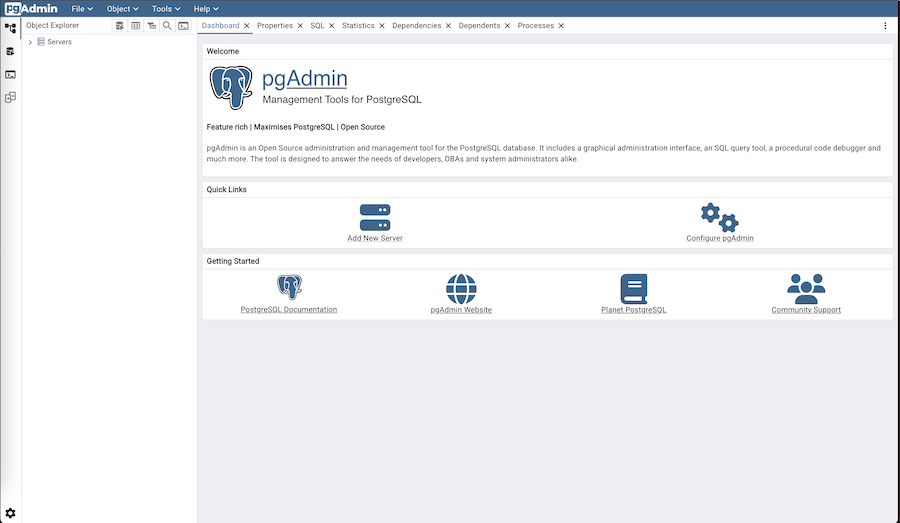
pgAdmin4 welcome page

Select an icon from the Quick Links panel on the Dashboard tab to:

  • Click the Add New Server button to open the Register - Server dialog to add a new server definition.

  • Click the Configure pgAdmin button to open the Preferences dialog to customize your pgAdmin client.

Links in the Getting Started panel open a new browser tab that provide useful information for Postgres users:

  • Click the PostgreSQL Documentation link to navigate to the Documentation page for the PostgreSQL open-source project; once at the project site, you can review the manuals for the currently supported versions of the PostgreSQL server.

  • Click the pgAdmin Website link to navigate to the pgAdmin project website. The pgAdmin site features news about recent pgAdmin releases and other project information.

  • Click the Planet PostgreSQL link to navigate to the blog aggregator for Postgres related blogs.

  • Click the Community Support link to navigate to the Community page at the PostgreSQL open-source project site; this page provides information about obtaining support for PostgreSQL features.

You are visitor 01402775 — GeezerVison does not store the pages you look up.
Best viewed with Netscape Navigator 4.7 or Internet Explorer 6 at 800×600. No cookies required.