GeezerVisonThe World Wide Web, restored to 800 pixels of glory. | ||||||||||||||||||||||||||||||||||||||
| Home|About|Gaming cabinet|Archives|How it works|Starter sites | ||||||||||||||||||||||||||||||||||||||
GeezerVison is showing www.runoob.com — Python3 字典 | 菜鸟教程
Python 3 教程
Python3 教程
Python3 简介
Python3 环境搭建
Python3 Pycharm
Python3 VScode
Python3 基础语法
Python3 基本数据类型
Python3 数据类型转换
Python3 解释器
Python3 注释
Python3 运算符
Python3 数字(Number)
Python3 字符串
Python3 列表
Python3 元组
Python3 字典
Python3 集合
Python3 条件控制
Python3 循环语句
Python3 编程第一步
Python3 推导式
Python3 迭代器与生成器
Python3 with
Python3 函数
Python3 lambda
Python3 装饰器
Python3 数据结构
Python3 模块
Python __name__
Python3 输入和输出
Python3 File
Python3 OS
Python3 错误和异常
Python3 面向对象
Python3 命名空间/作用域
Python 虚拟环境的创建
Python 类型注解
Python3 标准库概览
Python3 实例
Python 测验
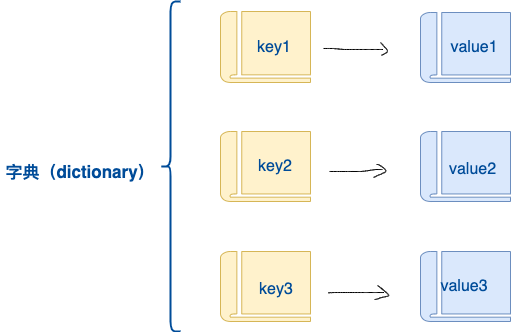
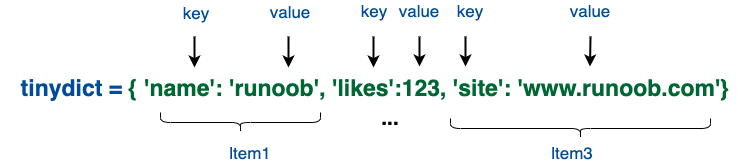
Python3 高级教程Python3 正则表达式 Python3 CGI编程 Python3 MySQL(mysql-connector) Python3 MySQL(PyMySQL) Python3 网络编程 Python3 SMTP发送邮件 Python3 多线程 Python3 XML 解析 Python3 JSON Python3 日期和时间 Python3 内置函数 Python3 MongoDB Python3 urllib Python uWSGI 安装配置 Python3 pip Python3 operator Python math Python requests Python random Python OpenAI Python 有用的资源 Python AI 绘画 Python statistics Python hashlib Python 量化 Python pyecharts Python selenium 库 Python 爬虫 Python Scrapy 库 Python Markdown Python sys 模块 Python Pickle 模块 Python subprocess 模块 Python queue 模块 Python StringIO 模块 Python logging 模块 Python datetime 模块 Python re 模块 Python csv 模块 Python threading 模块 Python asyncio 模块 Python PyQtPython3 字典字典是另一种可变容器模型,且可存储任意类型对象。 字典的每个键值 key=>value 对用冒号 : 分割,每个对之间用逗号(,)分割,整个字典包括在花括号 {} 中 ,格式如下所示: d = {key1 : value1, key2 : value2, key3 : value3 }
注意:dict 作为 Python 的关键字和内置函数,变量名不建议命名为 dict。
键必须是唯一的,但值则不必。 值可以取任何数据类型,但键必须是不可变的,如字符串,数字。 一个简单的字典实例: tinydict = {'name': 'runoob', 'likes': 123, 'url': 'www.runoob.com'}
也可如此创建字典: tinydict1 = { 'abc': 456 }
tinydict2 = { 'abc': 123, 98.6: 37 }
创建空字典使用大括号 { } 创建空字典: 实例
# 使用大括号 {} 来创建空字典 emptyDict = {} # 打印字典 print(emptyDict) # 查看字典的数量 print("Length:", len(emptyDict)) # 查看类型 print(type(emptyDict)) 以上实例输出结果: {}
Length: 0
<class 'dict'>
使用内建函数 dict() 创建字典: 实例
emptyDict = dict() # 打印字典 print(emptyDict) # 查看字典的数量 print("Length:",len(emptyDict)) # 查看类型 print(type(emptyDict)) 以上实例输出结果: {}
Length: 0
<class 'dict'>
访问字典里的值把相应的键放入到方括号中,如下实例: 实例#!/usr/bin/python3
tinydict = {'Name': 'Runoob', 'Age': 7, 'Class': 'First'}
print ("tinydict['Name']: ", tinydict['Name'])
print ("tinydict['Age']: ", tinydict['Age'])
以上实例输出结果: tinydict['Name']: Runoob tinydict['Age']: 7 如果用字典里没有的键访问数据,会输出错误如下: 实例#!/usr/bin/python3
tinydict = {'Name': 'Runoob', 'Age': 7, 'Class': 'First'}
print ("tinydict['Alice']: ", tinydict['Alice'])
以上实例输出结果: Traceback (most recent call last):
File "test.py", line 5, in <module>
print ("tinydict['Alice']: ", tinydict['Alice'])
KeyError: 'Alice'
修改字典向字典添加新内容的方法是增加新的键/值对,修改或删除已有键/值对如下实例: 实例#!/usr/bin/python3
tinydict = {'Name': 'Runoob', 'Age': 7, 'Class': 'First'}
tinydict['Age'] = 8 # 更新 Age
tinydict['School'] = "菜鸟教程" # 添加信息
print ("tinydict['Age']: ", tinydict['Age'])
print ("tinydict['School']: ", tinydict['School'])
tinydict['Age']: 8 tinydict['School']: 菜鸟教程 删除字典元素能删单一的元素也能清空字典,清空只需一项操作。 显式删除一个字典用del命令,如下实例: 实例#!/usr/bin/python3
tinydict = {'Name': 'Runoob', 'Age': 7, 'Class': 'First'}
del tinydict['Name'] # 删除键 'Name'
tinydict.clear() # 清空字典
del tinydict # 删除字典
print ("tinydict['Age']: ", tinydict['Age'])
print ("tinydict['School']: ", tinydict['School'])
但这会引发一个异常,因为用执行 del 操作后字典不再存在: Traceback (most recent call last):
File "/runoob-test/test.py", line 9, in <module>
print ("tinydict['Age']: ", tinydict['Age'])
NameError: name 'tinydict' is not defined
注:del() 方法后面也会讨论。 字典键的特性字典值可以是任何的 python 对象,既可以是标准的对象,也可以是用户定义的,但键不行。 两个重要的点需要记住:
1)不允许同一个键出现两次。创建时如果同一个键被赋值两次,后一个值会被记住,如下实例:
实例#!/usr/bin/python3
tinydict = {'Name': 'Runoob', 'Age': 7, 'Name': '小菜鸟'}
print ("tinydict['Name']: ", tinydict['Name'])
以上实例输出结果: tinydict['Name']: 小菜鸟 2)键必须不可变,所以可以用数字,字符串或元组充当,而用列表就不行,如下实例: 实例#!/usr/bin/python3
tinydict = {['Name']: 'Runoob', 'Age': 7}
print ("tinydict['Name']: ", tinydict['Name'])
以上实例输出结果: Traceback (most recent call last):
File "test.py", line 3, in <module>
tinydict = {['Name']: 'Runoob', 'Age': 7}
TypeError: unhashable type: 'list'
字典内置函数&方法Python字典包含了以下内置函数:
Python字典包含了以下内置方法:
x = True
country_counter = {}

def addone(country):
    if country in country_counter:
        country_counter[country] += 1
    else:
        country_counter[country] = 1

addone('China')
addone('Japan')
addone('china')

print(len(country_counter))
confusion = {}
confusion[1] = 1
confusion['1'] = 2
confusion[1] += 1

sum = 0
for k in confusion:
    sum += confusion[k]

print(sum)
AI 思考中...
| ||||||||||||||||||||||||||||||||||||||
| You are visitor 01402775 — GeezerVison does not store the pages you look up. Best viewed with Netscape Navigator 4.7 or Internet Explorer 6 at 800×600. No cookies required. |