GeezerVisonThe World Wide Web, restored to 800 pixels of glory. | ||||||||||||||||||
| Home|About|Gaming cabinet|Archives|How it works|Starter sites | ||||||||||||||||||
GeezerVison is showing www.tutorialspoint.com — Java EnumSet Class 
Selected Reading
Java EnumSet ClassIntroductionThe Java EnumSet class is a specialized Set implementation for use with enum types. The EnumSet is a part of java.util package that provides a highly optimized set of enumeration types. EnumSet is not synchronized, and to make it thread-safe, synchronization is needed externally. It also implements the Serializable and the Cloneable interfaces. 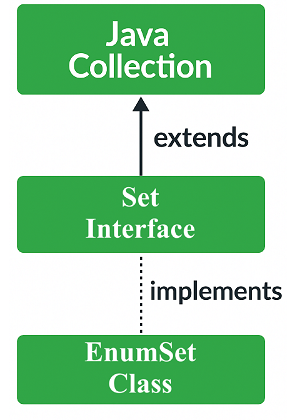
CharactersticsThe following are the important points about the EnumSet class in Java −
Class DeclarationThe following is the declaration for java.util.EnumSet class − public abstract class EnumSet<E extends Enum<E>> extends AbstractSet<E> implements Cloneable, Serializable Parameters E − This is the type of elements maintained by this set. Why use an EnumSet?The EnumSet provides a better way to store enum values as compared to other implementations like HashSet or TreeSet. An EnumSet only stores enum values of a specific enum. Hence, the JVM(Java Virtual Machine) already knows all the possible values of that set. This is why enum sets are internally implemented as a sequence of bits. Because bits specify whether elements are present in the EnumSet or not. The bit corresponding to the element is turned on if that element is present in the set. Implementing an EnumSetThe EnumSet is an abstract class, so we can not directly create an instance of it. Instead, it provides static factory methods to create instances of the EnumSet. The JDK provides 2 different implementations for the EnumSet as follows −
If the number of elements (enumValues.length) is less than or equal to 64, the RegularEnumSet is used otherwise, the JumboEnumSet is used for larger enum types. if (enumValues.length <= 64)
return new RegularEnumSet<>(elementType, enumValues);
else
return new JumboEnumSet<>(elementType, enumValues);
It takes into account only the size of the enum class, not the number of elements that will be stored in the collection. We will be using the predefined methods to create an EnumSet. The Java EnumSet of(E) method is used to populate the EnumSet instance. We've created an enum Numbers. Then an EnumSet instance is created using an enum value, and the resulting EnumSet is printed. Example of Creating an EnumSetBelow is an example of creating an EnumSet using the of() method in Java − package com.tutorialspoint;
import java.util.EnumSet;
public class EnumSetDemo {
// create an enum
public enum Numbers {
ONE, TWO, THREE, FOUR, FIVE
};
public static void main(String[] args) {
// create a set that contains an enum
EnumSet<Numbers> set = EnumSet.of(Numbers.ONE);
// print set
System.out.println("Set:" + set);
}
}
Let us compile and run the above program. This will produce the following result − Set:[ONE] Class MethodsThe following are the class methods supported by the EnumSet in Java −
Methods inheritedThe EnumSet class inherits methods from the following classes −
Creating EnumSet Instances using allOf(), noneOf(), and range() MethodsThe Java EnumSet provides other methods like allOf(), noneOf(), and range() to create instances for the EnumSet. The allOf(E) method includes all the enum values present in the EnumSet, and the noneOf(E) method creates an empty EnumSet for the given set, and the range(E1, E2) method includes values between the given range(starting from E1 and ending at E2). ExampleBelow is an example creating an EnumSet using allOf(), noneOf(), and range() methods in Java − package com.tutorialspoint;
import java.util.EnumSet;
public class EnumSetDemo {
// create an enum
public enum Numbers {
ONE, TWO, THREE, FOUR, FIVE
}
public static void main(String[] args) {
// using the allOf() method to print all enum values
EnumSet<Numbers> all_Numbers = EnumSet.allOf(Numbers.class);
System.out.println("All enum values: " + all_Numbers);
// using the noneOf() method to creates an empty set
EnumSet<Numbers> empty_Set = EnumSet.noneOf(Numbers.class);
System.out.println("Empty set: " + empty_Set);
// using the range() method to print between a given range
EnumSet<Numbers> range_Set = EnumSet.range(Numbers.TWO, Numbers.FOUR);
System.out.println("Range set: " + range_Set);
}
}
OutputLet us compile and run the above program. This will produce the following result − All enum values: [ONE, TWO, THREE, FOUR, FIVE] Empty set: [] Range set: [TWO, THREE, FOUR] Adding values to an EnumSetThe EnumSet add() method is used to add entries to the EnumSet, and the addAll() method is used to add the existing values of the EnumSet to a new EnumSet. We've created an EnumSet of "Numbers". Then few entries are added using the add() method, and then the EnumSet is printed. Then, using the addAll() method, the values were added to a new EnumSet, and the set was printed. ExampleBelow is an example of adding values to an EnumSet using the add() and addAll() methods in Java − package com.tutorialspoint;
import java.util.EnumSet;
public class EnumSetDemo {
// create an enum
public enum Numbers {
ONE, TWO, THREE, FOUR, FIVE
}
public static void main(String[] args) {
// creating EnumSet with allOf() and noneOf() methods
EnumSet<Numbers> set = EnumSet.allOf(Numbers.class);
EnumSet<Numbers> newSet = EnumSet.noneOf(Numbers.class);
// using the add() method
newSet.add(Numbers.ONE);
System.out.println("After adding the value: " + newSet);
// using the addAll() method
newSet.addAll(set);
System.out.println("After adding all the values: " + newSet);
}
}
OutputLet us compile and run the above program. This will produce the following result − After adding the value: [ONE] After adding all the values: [ONE, TWO, THREE, FOUR, FIVE] Iterating values of an EnumSetThe EnumSet provides the iterator() method for accessing the elements from an EnumSet. We've created an EnumSet of "Numbers". Then the iterator() method is used to print the set elements. ExampleBelow is an example of iterating over the values of an EnumSet using the iterator() method in Java − package com.tutorialspoint;
import java.util.EnumSet;
import java.util.Iterator;
public class EnumSetDemo {
// create an enum
public enum Numbers {
ONE, TWO, THREE, FOUR, FIVE
}
public static void main(String[] args) {
// creating an EnumSet using the of() method
EnumSet<Numbers> numbers = EnumSet.allOf(Numbers.class);
// using iterator() method to print the EnumSet
Iterator<Numbers> iterate = numbers.iterator();
while (iterate.hasNext()) {
System.out.println(iterate.next());
}
}
}
OutputLet us compile and run the above program. This will produce the following result. ONE TWO THREE FOUR FIVE Removing values from an EnumSetThe EnumSet remove() method is used to remove entries from the EnumSet, and the removeAll() method is used to remove all the existing values from the EnumSet. We've created an EnumSet of "Numbers". Then few entries are removed using the remove() method, and then the EnumSet is printed. Then, using the removeAll() method, the set is cleared and checked if the EnumSet is empty. ExampleBelow is an example of removing values from an EnumSet using the remove() and removeAll() methods in Java − package com.tutorialspoint;
import java.util.EnumSet;
public class EnumSetDemo {
// create an enum
public enum Numbers {
ONE, TWO, THREE, FOUR, FIVE
}
public static void main(String[] args) {
// Creating an EnumSet with allOf() method
EnumSet<Numbers> numbers = EnumSet.allOf(Numbers.class);
System.out.println("EnumSet: " + numbers);
// using the remove() method
numbers.remove(Numbers.TWO);
System.out.println("EnumSet after deletion: " + numbers);
// using the removeAll() method
numbers.removeAll(numbers);
System.out.println("EnumSet is empty: " + numbers.isEmpty());
}
}
OutputLet us compile and run the above program. This will produce the following result − EnumSet: [ONE, TWO, THREE, FOUR, FIVE] EnumSet after deletion: [ONE, THREE, FOUR, FIVE] EnumSet is empty: true 
Advertisements
| ||||||||||||||||||
| You are visitor 01402503 — GeezerVison does not store the pages you look up. Best viewed with Netscape Navigator 4.7 or Internet Explorer 6 at 800×600. No cookies required. |