GeezerVisonThe World Wide Web, restored to 800 pixels of glory. | ||||||||||||||||||||||||||||||||||||||||||
| Home|About|Gaming cabinet|Archives|How it works|Starter sites | ||||||||||||||||||||||||||||||||||||||||||
GeezerVison is showing www.tutorialspoint.com — Java PriorityQueue Class 
Selected Reading
Java PriorityQueue ClassIntroductionThe Java PriorityQueue class is an unbounded priority queue based on a priority heap. The elements are not based on their insertion order, but rather they are based on the priority of the elements. The PriorityQueue depends on an array of objects, and this array is auto-resized if the capacity is not enough to store the elements. The PriorityQueue class takes O(logn) time for the operations of enqueuing and dequeuing methods in the PriorityQueue. 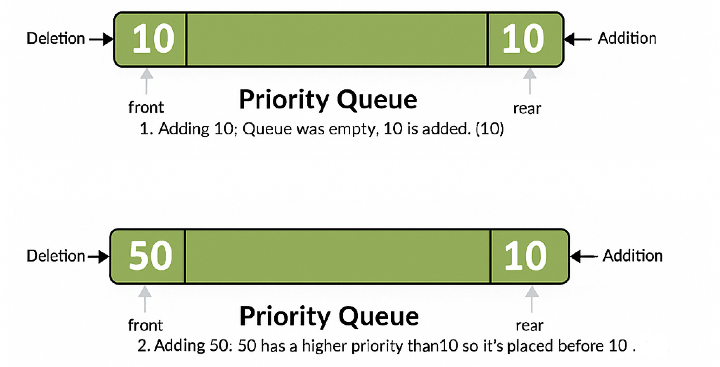
CharacteristicsThe following are the important points about PriorityQueue in Java −
Class DeclarationThe following is the declaration for java.util.PriorityQueue class − public class PriorityQueue<E> extends AbstractQueue<E> implements Serializable Parameter − E − This is the type of elements held in this collection. How to Implement the PriorityQueue Class?The following are the steps to implement a PriorityQueue class in Java − Step 1In Java, to implement or use a PriorityQueue class, we first need to import the java.util.PriorityQueue or java.util.* package to use the PriorityQueue class. import java.util.PriorityQueue //OR import java.util.* Step 2After importing the PriorityQueue class, we will instantiate the PriorityQueue and create its object named "pqueue". PriorityQueue<Datatype> pqueue = new PriorityQueue<Datatype>(); Step 3Now we operate on the PriorityQueue, above "Datatype" is the type of the object to be stored in the Queue. To add elements to the PriorityQueue class, we use either the add() or offer() methods. PriorityQueue<Integer> pqueue = new PriorityQueue<Integer> (); pqueue.add(20); pqueue.offer(35); Here, we have created a PriorityQueue of integers and, using the add() and offer() methods, we add "20" and "35" respectively to the PriorityQueue. Example of PriorityQueue ClassBelow is an example of the PriorityQueue class to show its basic operations in Java − package com.tutorialspoint;
import java.util.PriorityQueue;
public class PriorityQueueDemo {
public static void main(String[] args) {
// create an empty priority queue with no initial capacity
PriorityQueue<Integer> pqueue = new PriorityQueue<>();
// use offer() method to add elements to the queue
pqueue.offer(10);
pqueue.offer(35);
pqueue.offer(20);
System.out.println("The head of the queue is: " + pqueue.peek());
System.out.println("The removed element is: " + pqueue.poll());
System.out.println("The queue is: " + pqueue);
}
}
OutputLet us compile and run the above program. This will produce the following result − The head of the queue is: 10 The removed element is: 10 The queue is: [20, 35] Class ConstructorsThe following are the class constructors present in the PriorityQueue class −
Class MethodsThe following are the supported methods in the PriorityQueue class −
Methods inheritedThis class inherits methods from the following classes in Java −
Adding an Item to a PriorityQueue ExampleThe following example shows the usage of the Java PriorityQueue add(E) method to add Integers. We're adding a couple of Integers to the PriorityQueue object using the add() method calls per element, and then printing each element to show the elements added. package com.tutorialspoint;
import java.util.PriorityQueue;
public class PriorityQueueDemo {
public static void main(String[] args) {
// create an empty priority queue with an initial capacity
PriorityQueue<Integer> queue = new PriorityQueue<>(5);
// use add() method to add elements in the queue
queue.add(20);
queue.add(30);
queue.add(20);
queue.add(30);
queue.add(15);
queue.add(22);
queue.add(11);
// let us print all the elements available in queue
for (Integer number : queue) {
System.out.println("Number = " + number);
}
}
}
OutputLet us compile and run the above program. This will produce the following result − Number = 11 Number = 20 Number = 15 Number = 30 Number = 30 Number = 22 Number = 20 PriorityQueue using Custom ComparatorThe PriorityQueue with a custom comparator allows us to define the ordering rule for the elements instead of depending upon the default natural ordering. Using the Comparator.reverseOrder(), we can make it work like a Max-Heap, where top priority is given to the highest value. ExampleBelow is an example of the PriorityQueue class using the custom comparator in Java − package com.tutorialspoint;
import java.util.PriorityQueue;
import java.util.Comparator;
public class PriorityQueueDemo {
public static void main(String[] args) {
// create an empty priority queue with a custom comparator
PriorityQueue<Integer> queue = new PriorityQueue<>(5, Comparator.reverseOrder());
// use add() method to add elements in the queue
queue.add(20);
queue.add(30);
queue.add(20);
queue.add(30);
queue.add(15);
queue.add(22);
queue.add(11);
// let us print all the elements available in queue
for (Integer number : queue) {
System.out.println("Number = " + number);
}
}
}
OutputLet us compile and run the above program. This will produce the following result − Number = 30 Number = 30 Number = 22 Number = 20 Number = 15 Number = 20 Number = 11 
Advertisements
| ||||||||||||||||||||||||||||||||||||||||||
| You are visitor 01402503 — GeezerVison does not store the pages you look up. Best viewed with Netscape Navigator 4.7 or Internet Explorer 6 at 800×600. No cookies required. |