GeezerVisonThe World Wide Web, restored to 800 pixels of glory. |
| Home|About|Gaming cabinet|Archives|How it works|Starter sites |
GeezerVison is showing www.tutorialspoint.com — Selenium with JavaScript Tutorial 
Selected Reading
Selenium with JavaScript TutorialSelenium Webdriver can be used to execute JavaScript commands to interact with the html of the elements appearing within a browser on a web page. This is archived using the JavaScriptExecutor interface. One of the most common examples where JavaScript commands are used along with Selenium Webdriver is while performing a scrolling operation on a web page.. Methods to Run JavaScript CommandsThere are various methods in the Selenium JavaScriptExecutor interface which can be used to run the JavaScript Commands. Syntaximport org.openqa.selenium.JavascriptExecutor; JavascriptExecutor js = (JavascriptExecutor) driver; js.executeScript(script, args); Example to Execute JavaScript Commands in SeleniumLet us take an example of the below page, where we would launch an application with a URL: Selenium Automation Practice Form . Then we would obtain the text: Student Registration Form, and domain as www.tutorialspoint.com. Next we would enter the text JavaScript in the input box beside the Name: label. 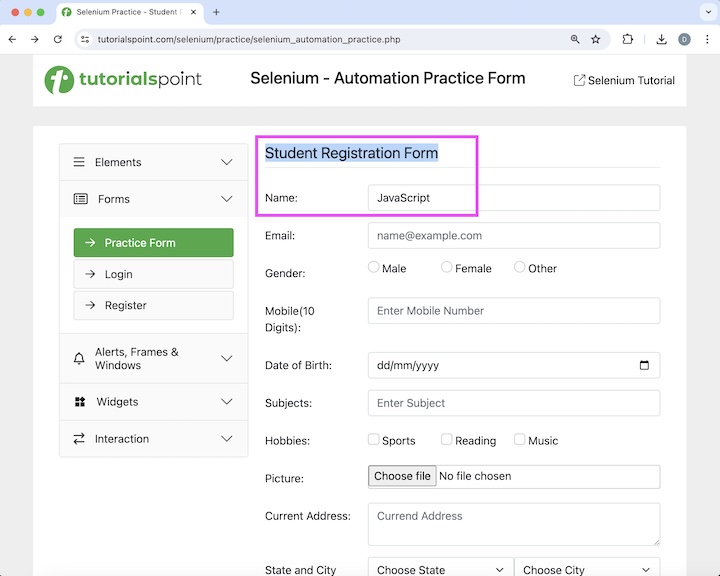
Then, we would click on the Login button, after which we would be navigated to another page having a text as Welcome, Login In. Finally, we would refresh the browser and again obtain the text, URL and domain as Welcome, Login In,, Selenium Automation Practice Form, and www.tutorialspoint.com. 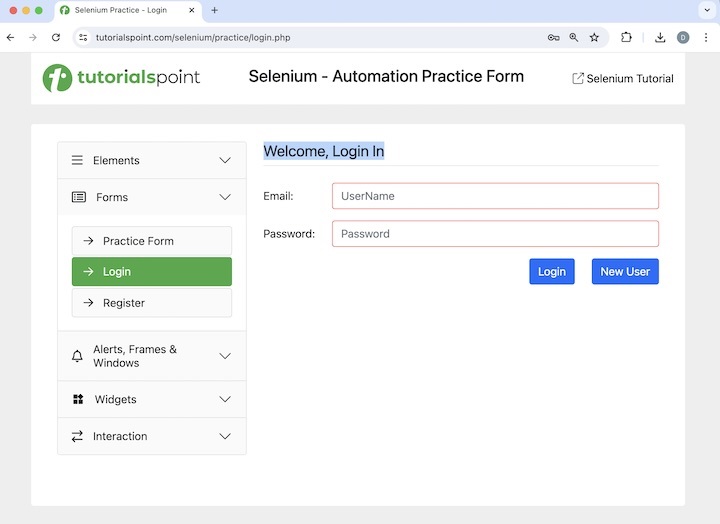
Code Implementationpackage org.example;
import org.openqa.selenium.By;
import org.openqa.selenium.JavascriptExecutor;
import org.openqa.selenium.WebDriver;
import org.openqa.selenium.WebElement;
import org.openqa.selenium.edge.EdgeDriver;
import java.util.concurrent.TimeUnit;
public class JavaScriptSelenium {
public static void main(String[] args) throws InterruptedException {
// Initiate the Webdriver
WebDriver driver = new EdgeDriver();
// adding implicit wait of 25 secs
driver.manage().timeouts().implicitlyWait(25, TimeUnit.SECONDS);
// Creating a reference variable JavaScriptExecutor interface.
JavascriptExecutor j = (JavascriptExecutor) driver;
// launching a URL
j.executeScript("window.location ='https://www.tutorialspoint.com/selenium/practice/selenium_automation_practice.php'");
// getting current URL
String url = j.executeScript("return document.URL;").toString();
System.out.println("Getting the current URL: " + url);
//identify text
WebElement t = driver.findElement(By.xpath("//*[@id='practiceForm']/h1"));
String text = (String) j.executeScript("return arguments[0].innerText", t);
System.out.println("Text is: " + text);
// getting current domain
String domain = j.executeScript("return document.domain;").toString();
System.out.println("Getting the current domain: " + domain);
// enter text in input box
WebElement e = driver.findElement(By.xpath("//*[@id='name']"));
j.executeScript("arguments[0].value='JavaScript';", e);
// get text entered
String text1 = (String) j.executeScript("return arguments[0].value", e);
System.out.println("Entered text is: " + text1);
// perform click
WebElement b = driver.findElement(By.xpath("//*[@id='collapseTwo']/div/ul/li[2]/a"));
j.executeScript("arguments[0].click();", b);
//identify text
WebElement w = driver.findElement(By.xpath("//*[@id='signInForm']/h1"));
// get text after click
String text2 = (String) j.executeScript("return arguments[0].innerText", w);
System.out.println("Text found after clicking: " + text2);
// refresh browser
j.executeScript("history.go(0)");
// getting current URL after browser refresh
String url1 = j.executeScript("return document.URL;").toString();
System.out.println("Getting the current URL after browser refresh: " + url1);
//identify text again after refresh
WebElement y = driver.findElement(By.xpath("//*[@id='signInForm']/h1"));
// get text after refresh
String text3 = (String) j.executeScript("return arguments[0].innerText", y);
System.out.println("Text found after refresh: " + text3);
// getting current domain after browser refresh
String domain1 = j.executeScript("return document.domain;").toString();
System.out.println("Getting the current domain after browser refresh: " + domain1);
// Quitting browser
driver.quit();
}
}
OutputGetting the current URL: https://www.tutorialspoint.com/selenium/practice/selenium_automation_practice.php Text is: Student Registration Form Getting the current domain: www.tutorialspoint.com Entered text is: JavaScript Text found after clicking: Welcome, Login In Getting the current URL after browser refresh: https://www.tutorialspoint.com/selenium/practice/login.php Text found after refresh: Welcome, Login In Getting the current domain after browser refresh: www.tutorialspoint.com Process finished with exit code 0 In the above example, we had launched a URL and obtained the current URL with the message in the console - Getting the current URL: Selenium Automation Practice Form. Then retrieved the text and domain with the message in the console - Text is: Student Registration Form and Getting the current domain: www.tutorialspoint.com respectively. Next, we entered the text Selenium in an input box and retrieved its value with the message in the console - Entered text is: Selenium. Then, we clicked the Login link and got the text after navigation with the message in console: Text found after clicking: Check Box. Finally, we had refreshed the page and obtained current URL, text and domain of the page with the messages in the console - Getting the current URL after browser refresh: Selenium Automation Practice Form, Text found after refresh: Check Box, and Getting the current domain after browser refresh: www.tutorialspoint.com respectively. Finally, the message Process finished with exit code 0 was received, signifying successful execution of the code In this tutorial, we had discussed how to use JavaScript using Selenium Webdriver. 
Advertisements
|
| You are visitor 01402503 — GeezerVison does not store the pages you look up. Best viewed with Netscape Navigator 4.7 or Internet Explorer 6 at 800×600. No cookies required. |