Python: user defined functions
Introduction
In all programming and scripting language, a function is a block of program statements which can be used repetitively in a program. It saves the time of a developer. In Python concept of function is same as in other languages. There are some built-in functions which are part of Python. Besides that, we can defines functions according to our need.
User defined function
- In Python, a user-defined function's declaration begins with the keyword def and followed by the function name.
- The function may take arguments(s) as input within the opening and closing parentheses, just after the function name followed by a colon.
- After defining the function name and arguments(s) a block of program statement(s) start at the next line and these statement(s) must be indented.
Here is the syntax of a user defined function.
Syntax:
 def function_name(argument1, argument2, ...) :
      statement_1
      statement_2
      ....
Inside Function Call
<function>(<positional_args>)
# f(0, 0)
<function>(<keyword_args>)
# f(x=0, y=0)
<function>(<positional_args>, <keyword_args>)
# f(0, y=0)
Inside Function Call
def f(<nondefault_args>):
# def f(x, y):
def f(<default_args>):
# def f(x=0, y=0):
def f(<nondefault_args>, <default_args>):
# def f(x, y=0):
Call a function
Calling a function in Python is similar to other programming languages, using the function name, parenthesis (opening and closing) and parameter(s). See the syntax, followed by an example.
Syntax:
function_name(arg1, arg2)
Argument combinations:
def f(a, b, c):                # f(a=1, b=2, c=3) | f(1, b=2, c=3) | f(1, 2, b=3) | f(1, 2, 3)
def f(*, a, b, c):             # f(a=1, b=2, c=3)
def f(a, *, b, c):             # f(a=1, b=2, c=3) | f(1, b=2, c=3)
def f(a, b, *, c):             # f(a=1, b=2, c=3) | f(1, b=2, c=3) | f(1, 2, c=3)

def f(*args):                  # f(1, 2, 3)
def f(a, *args):               # f(1, 2, 3)
def f(*args, c):               # f(1, 2, c=3)
def f(a, *args, c):            # f(1, 2, c=3)

def f(**kwargs):               # f(a=1, b=2, c=3)
def f(a, **kwargs):            # f(a=1, b=2, c=3) | f(1, b=2, c=3)
def f(*, a, **kwargs):         # f(a=1, b=2, c=3)

def f(*args, **kwargs):        # f(a=1, b=2, c=3) | f(1, b=2, c=3) | f(1, 2, c=3) | f(1, 2, 3)
def f(a, *args, **kwargs):     # f(a=1, b=2, c=3) | f(1, b=2, c=3) | f(1, 2, c=3) | f(1, 2, 3)
def f(*args, b, **kwargs):     # f(a=1, b=2, c=3) | f(1, b=2, c=3)
def f(a, *args, c, **kwargs):  # f(a=1, b=2, c=3) | f(1, b=2, c=3) | f(1, 2, c=3)
Example:
def avg_number(x, y):
    print("Average of ",x," and ",y, " is ",(x+y)/2)
avg_number(3, 4)
Output:
Average of 3 and 4 is 3.5
Explanation:
1. Lines 1-2 : Details (definition) of the function.
2. Line 3 : Call the function.
3. Line 1 : Pass parameters : x = 3, y = 4
4. Line 2 : Print the value of two parameters as well as their average value.
Function without arguments:
The following function has no arguments.
def function_name() :
statement_1
statement_2
....
Example:
def printt():
    print("This is Python 3.2 Tutorial")
    print("This is Python 3.2 Tutorial")
    print("This is Python 3.2 Tutorial")
printt()
Output:
This is Python 3.2 Tutorial
               This is Python 3.2 Tutorial
               This is Python 3.2 Tutorial
Explanation:
1. Lines 1-4 : Details (definition) of the function.
2. Line 5 : Call the function.
3. Line 1 : No parameter passes.
4. Line 2-4 : Execute three print statements.
The Return statement in function
In Python the return statement (the word return followed by an expression.) is used to return a value from a function, return statement without an expression argument returns none. See the syntax.
def function_name(argument1, argument2, ...) :
statement_1
statement_2
....
return expression
function_name(arg1, arg2)
Example:
The following function returns the square of the sum of two numbers.
def nsquare(x, y):
    return (x*x + 2*x*y + y*y)
print("The square of the sum of 2 and 3 is : ", nsquare(2, 3))
Output:
The square of the sum of 2 and 3 is : 25
Explanation:
1. Lines 1-2 : Details (definition) of the function.
2. Line 3 : Call the function within a print statement.
3. Line 1 : Pass the parameters x = 2, y = 3
4. Line 2 : Calculate and return the value of (x + y)2
Default Argument Values
In function's parameters list we can specify a default value(s) for one or more arguments. A default value can be written in the format "argument1 = value", therefore we will have the option to declare or not declare a value for those arguments. See the following example.
Example:
The following function returns the square of the sum of two numbers, where default value of the second argument is 2.
def nsquare(x, y = 2):
    return (x*x + 2*x*y + y*y)
print("The square of the sum of 2 and 2 is : ", nsquare(2))
print("The square of the sum of 2 and 3 is : ", nsquare(2,4))
Output:
The square of the sum of 2 and 2 is:  16
               The square of the sum of 2 and 4 is :  36
Explanation:
Lines 1-2 : Details (definition) of the function.
For first print statement [ Line no 3]
Line 3 : Call the function without a second argument, within a print statement.
Line 1 : Pass the parameters x = 2, default value.
Line 2 : Calculate and return the value of (x + y)2
For second print statement [ Line no 4]
Line 3 : Call the function with all arguments, within a print statement.
Line 1 : Pass the parameters x = 2, y = 4.
Line 2 : Calculate and return the value of (x + y)2
Keyword Arguments:
We have already learned how to use default arguments values, functions can also be called using keyword arguments. Arguments which are preceded with a variable name followed by a '=' sign (e.g. var_name=") are called keyword arguments.
All the keyword arguments passed must match one of the arguments accepted by the function. You may change the order of appearance of the keyword. See the following example.
Example:
def marks(english, math = 85, science = 80):
print('Marks in : English is - ', english,', Math - ',math, ', Science - ',science)
marks(71, 77)
marks(65, science = 74)
marks(science = 70, math = 90, english = 75)
Output:
Marks in : English is -  71 , Math -  77 , Science -  80
Marks in : English is -  65 , Math -  85 , Science -  74
Marks in : English is -  75 , Math -  90 , Science -  70
Explanation:
Line 1: The function named marks has three parameters, there is no default value in the first parameter (english) but remaining parameters have default values (math = 85, science = 80).
Line 3: The parameter english gets the value of 71, math gets the value 77 and science gets the default value of 80.
Line 4: The parameter english gets the value of 65, math gets the default value of 85 and science gets the value of 74 due to keyword arguments.
Line 5: Here we use three keyword arguments and the parameter english gets the value 75, math gets the value 90 and science gets the value 70.
Arbitrary Argument Lists:
The 'arbitrary argument' list is an another way to pass arguments to a function. In the function body, these arguments will be wrapped in a tuple and it can be defined with *args construct. Before this variable, you can define a number of arguments or no argument.
Example:
def sum(*numbers):
     s = 0
     for n in numbers:
           s += n
     return s

print(sum(1,2,3,4))
Output:
10
Lambda Forms:
In Python, small anonymous (unnamed) functions can be created with lambda keyword. Lambda forms can be used as an argument to other function where function objects are required but syntactically they are restricted to a single expression. A function like this:
def average(x, y):
    return (x + y)/2
print(average(4, 3))
may also be defined using lambda
print((lambda x, y: (x + y)/2)(4, 3))
Output:
3.5
Python Documentation Strings
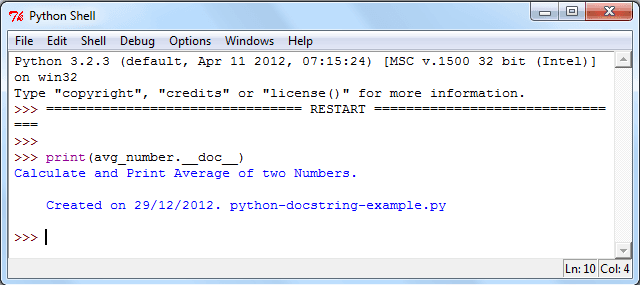
In Python, a string literal is used for documenting a module, function, class, or method. You can access string literals by __doc__ (notice the double underscores) attribute of the object (e.g. my_function.__doc__).
Docstring Conventions :
- String literal literals must be enclosed with a triple quote. Docstring should be informative
- The first line may briefly describe the object's purpose. The line should begin with a capital letter and ends with a dot.
- If a documentation string is a muti-line string then the second line should be blank followed by any detailed explanation starting from the third line.
See the following example with multi-line docstring.
def avg_number(x, y):
    """Calculate and Print Average of two Numbers.

    Created on 29/12/2012. python-docstring-example.py
    """
    print("Average of ",x," and ",y, " is ",(x+y)/2)
PREV : Python TextCalendar Module calendar()
NEXT : Python Built-in Functions
Test your Python skills with w3resource's quiz