GV

GeezerVison

The World Wide Web, restored to 800 pixels of glory.

Home|About|Gaming cabinet|Archives|How it works|Starter sites

On this site

  • w3resource
  • Front End
  • HTML
  • CSS
  • JavaScript
  • HTML5
  • Schema.org
  • php.js
  • Twitter Bootstrap
  • Responsive Web Design tutorial
  • Zurb Foundation 3 tutorials
  • Pure CSS
  • HTML5 Canvas
  • JavaScript Course

This view

  • Original page
  • New address

GeezerVison is showing www.w3resource.com — Python while loop

  • Home
  • ▼Introduction to Python
  • Python Home
  • Python 2 vs 3
  • Python Installation
  • Python IDLE
  • ▼Python Basic
  • Python Syntax
  • Python Print Statement
  • Python Variable
  • Python Data Type
  • Python Operators
  • Python If elif else
  • Python For Loop
  • Python While Loop
  • Python break, continue
  • ▼Data Handling and Structures
  • Python String
  • Python Lists
  • Python Dictionary
  • Python Tuples
  • Python Sets
  • Python Bytes, Bytearray
  • Python Advanced Data Structure
  • ▼Date and Time
  • Python Date and Time
  • Python Calendar Module
  • ▼Functions and Modules
  • Python User define function
  • Python Built-in Functions
  • Python Module
  • Python Functions Examples
  • ▼File Handling and I/O
  • Python File Handling
  • ▼Object-Oriented Programming
  • Python Classes
  • ▼Advanced Programming Constructs
  • Python Iterators
  • Python Generators
  • Python Functional Programming
  • Python Multithearding
  • ▼Regular Expressions
  • Python Regular Expressions
  • ▼Error Handling and Debugging
  • Python Exception Handling
  • Python Testing and Debugging
  • ▼Database Interaction
  • Python SQlite Database
  • Python SQLalchemy ORM
  • ▼Advanced Python Topics
  • Advanced Python Topics
  • Python Standard Library
  • ▼Web Programming
  • CGI Programming
  • ▼Python Miscellaneous
  • Python-docx: Create and Manipulate
  • Software Frameworks
  • Floor Division in Python
  • Thonny Python IDE
  • pip install mysql-connector-python
  • Astral Python in 2026
  • PyCharm 2026 The Ultimate Guide
  • Python for Data Analysis in 2026
  • Self-Driving Python Server
  • Python-Native Hypermedia UI
  • Building Dashboards with Pythons
  • Building an Educational HTTP Server
  • Python-First Rapid App Generator
  • Markdown-Native Personal Site Framework
  • pyRAP Framework
  • Hypermedia-Driven Python Framework
  • Shinylives Reactive Framework
  • ASGIMachine: HTTP Decision Graph Framework
  • Embedded Web Framework for MicroPython
  • ..More to come..

Python while loop

Last update on April 14 2026 12:43:45 (UTC/GMT +8 hours)

While loop

Loops are used to repeatedly execute a block of program statements. The basic loop structure in Python is while loop. Here is the syntax.

Syntax:

while (expression) :
    statement_1
    statement_2
    ....

The while loop runs as long as the expression (condition) evaluates to True and execute the program block. The condition is checked every time at the beginning of the loop and the first time when the expression evaluates to False, the loop stops without executing any remaining statement(s). The following example prints the digits 0 to 4 as we set the condition x < 5.

x = 0;
while (x < 5):
     print(x)
     x += 1

Output:

0
1
2
3
4

One thing we should remember that a while loop tests its condition before the body of the loop (block of program statements) is executed. If the initial test returns false, the body is not executed at all. For example the following code never prints out anything since before executing the condition evaluates to false.

x = 10;
while (x < 5):
     print(x)
     x += 1

Flowchart:

Python while loop


The following while loop is an infinite loop, using True as the condition:

x = 10;
while (True):
     print(x)
     x += 1

Flowchart:

Python while loop infinite


Python: while and else statement

There is a structural similarity between while and else statement. Both have a block of statement(s) which is only executed when the condition is true. The difference is that block belongs to if statement executes once whereas block belongs to while statement executes repeatedly.

You can attach an optional else clause with while statement, in this case, syntax will be -

while (expression) :
    statement_1
    statement_2
    ......
else :
    statement_3
    statement_4
    ......

The while loop repeatedly tests the expression (condition) and, if it is true, executes the first block of program statements. The else clause is only executed when the condition is false it may be the first time it is tested and will not execute if the loop breaks, or if an exception is raised. If a break statement executes in first program block and terminates the loop then the else clause does not execute. In the following example, while loop calculates the sum of the integers from 0 to 9 and after completing the loop, else statement executes.


x = 0;
s = 0
while (x < 10):
     s = s + x
     x = x + 1
else :
     print('The sum of first 9 integers : ',s)    

Output:

The sum of first 9 integers:  45

Flowchart:
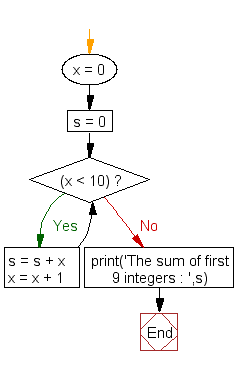
Python while else loop


Example: while loop with if-else and break statement

x = 1;
s = 0
while (x < 10):
     s = s + x
     x = x + 1
     if (x == 5):
          break
else :
     print('The sum of first 9 integers : ',s)        
print('The sum of ',x,' numbers is :',s) 

Output:

The sum of  5  numbers is : 10

In the above example the loop is terminated when x becomes 5. Here we use break statement to terminate the while loop without completing it, therefore program control goes to outside the while - else structure and execute the next print statement.

Flowchart:

Python while if else loop

PREV : Python For Loop
NEXT : Python break, continue

Test your Python skills with w3resource's quiz


Follow us on Facebook and Twitter for latest update.


  • Daily Coding Challenges & Projects
  • Weekly Trends and Language Statistics


You are visitor 01402775 — GeezerVison does not store the pages you look up.
Best viewed with Netscape Navigator 4.7 or Internet Explorer 6 at 800×600. No cookies required.