GeezerVisonThe World Wide Web, restored to 800 pixels of glory. |
| Home|About|Gaming cabinet|Archives|How it works|Starter sites |
GeezerVison is showing www.w3schools.com — Git GitHub Edit Code
❮
❯
Git TutorialGit HOME Git Intro Git Install Git Config Git Get Started Git New Files Git Staging Git Commit Git Remove and Move Git Tagging Git Stash Git History Git Diff Git Blame Git Help Git Branch Git Merge Git Workflow Git Best PracticesGit and GitHubGitHub Get Started Git What is SSH? GitHub Add SSH GitHub Set Remote GitHub Edit Code Pull from GitHub Push to GitHub GitHub Branch Pull Branch from GitHub Push Branch to GitHub GitHub Flow GitHub Pages Git GUI ClientsGit ContributeGitHub Fork Git Clone from GitHub GitHub Send Pull RequestGit UndoGit Revert Git Reset Git Clean Git Amend Git Rebase Git Reflog Git RecoveryGit AdvancedGit .gitignore Git .gitattributes Git Large File Storage (LFS) Git Signing Commits/Tags Git Cherrypick & Patch Git Bisect Git Merge Conflicts Git CI/CD Git Hooks Git Submodules Git Worktree Git Remote AdvancedGit and BitbucketBitbucket Get Started Bitbucket Add SSH Bitbucket Set Remote Bitbucket Edit Code Bitbucket Branch Bitbucket Pages Bitbucket Fork Git Clone from Bitbucket Bitbucket Send Pull RequestGit and GitLabGitLab Get Started GitLab Add SSH GitLab Set Remote GitLab Edit Code GitLab Branch GitLab Pages GitLab Fork Git Clone from GitLab GitLab Send Pull RequestGit CertGit CertificateGit ReferenceGit GlossaryGit ExercisesGit Exercises Git Challenges Git Quiz Git Syllabus Git Study PlanGit GitHub Edit Code
Share
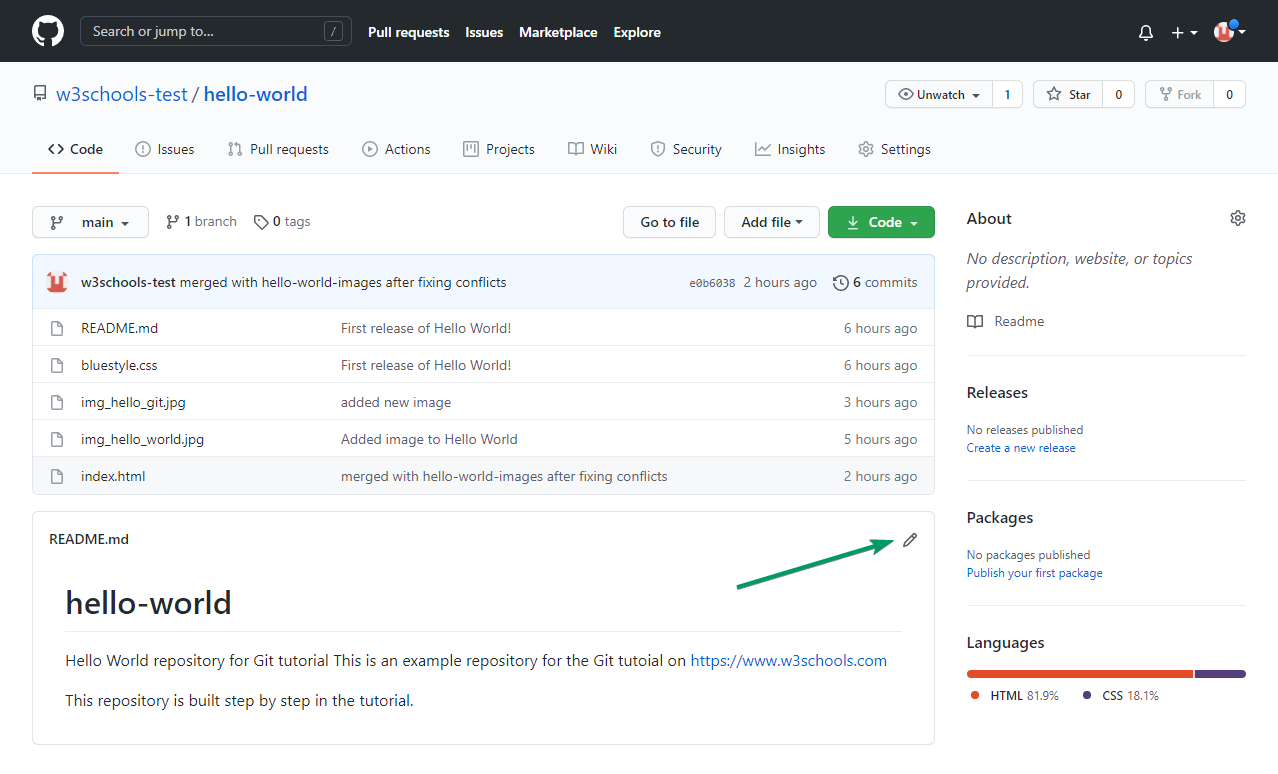
Edit Code in GitHubGitHub lets you edit files directly in your browser. This is useful for making quick changes without needing to use Git on your computer. Edit Any FileTo edit a file (like
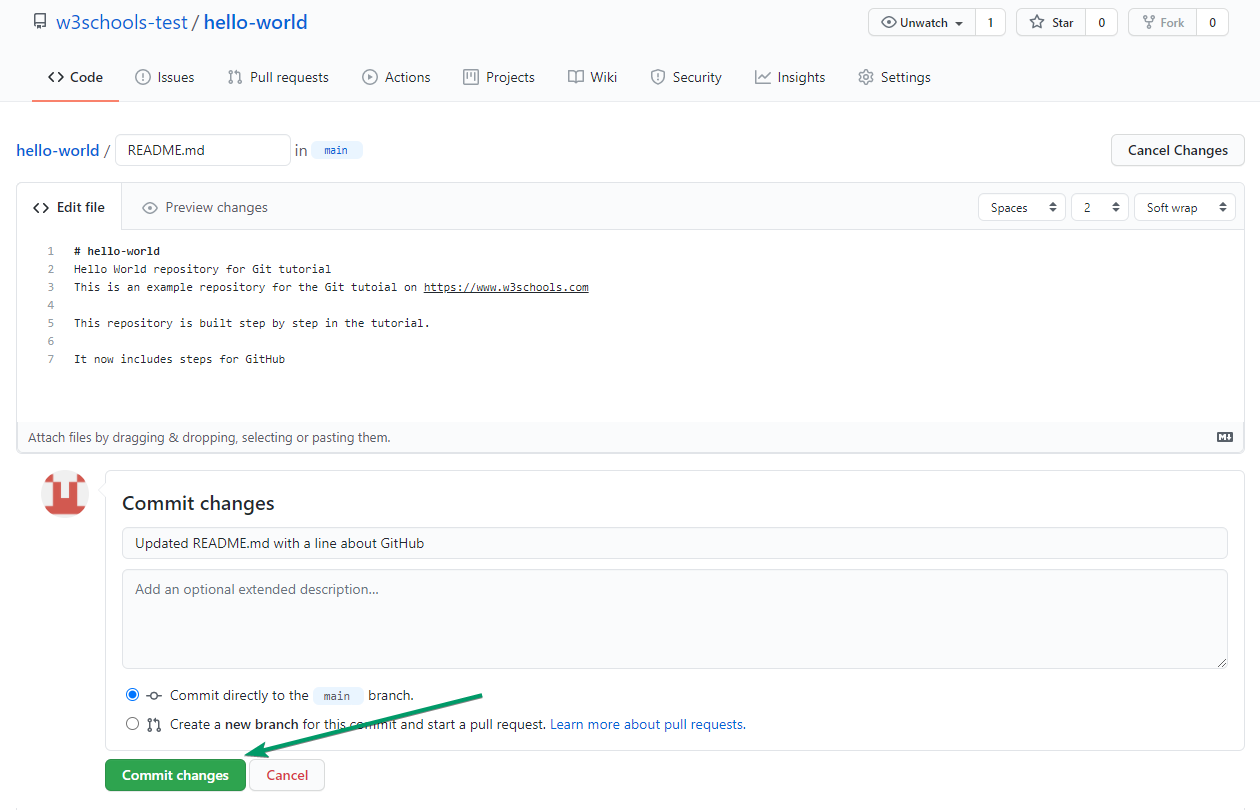
You can now make changes to the file in the editor. You can edit any file, not just README.md. Write a Commit MessageAfter editing, scroll down to the Commit changes section. Add a short, clear description of what you changed in the Commit message box. This helps others understand your update. Learn more about commits
Preview ChangesBefore saving, you can click Preview changes to see what will change in the file. This helps you check your edits before committing. Commit to a BranchBy default, you can commit directly to the For bigger changes, it's best to create a new branch. Select Create a new branch for this commit and start a pull request to work safely. Learn more about branches Create a New Branch from the EditorWhen you choose to create a new branch, GitHub will automatically suggest a branch name. After committing, you can open a pull request to propose your changes. Learn more about pull requests That is how you edit code directly in GitHub! Free account Track your progress
XP earned 0
Day streak 0
Spaces 0
League —
New Learn in Adventure Mode W3Schools Adventure AppCoding fundamentals as bite-sized lessons and challenges.
×
Contact SalesIf you want to use W3Schools services as an educational institution, team or enterprise, send us an e-mail: Report ErrorIf you want to report an error, or if you want to make a suggestion, send us an e-mail: Top TutorialsHTML TutorialCSS Tutorial JavaScript Tutorial How To Tutorial SQL Tutorial Python Tutorial W3.CSS Tutorial Bootstrap Tutorial PHP Tutorial Java Tutorial C++ Tutorial jQuery Tutorial Top ReferencesHTML ReferenceCSS Reference JavaScript Reference SQL Reference Python Reference W3.CSS Reference Bootstrap Reference PHP Reference HTML Colors Java Reference AngularJS Reference jQuery Reference
W3Schools is optimized for learning and training. Examples might be simplified to improve reading and learning.
Tutorials, references, and examples are constantly reviewed to avoid errors, but we cannot warrant full correctness of all content. While using W3Schools, you agree to have read and accepted our terms of use, cookies and privacy policy. Copyright 1999-2026 by Refsnes Data. All Rights Reserved. W3Schools is Powered by W3.CSS. |
| You are visitor 01402503 — GeezerVison does not store the pages you look up. Best viewed with Netscape Navigator 4.7 or Internet Explorer 6 at 800×600. No cookies required. |