GeezerVisonThe World Wide Web, restored to 800 pixels of glory. | ||||||||
| Home|About|Gaming cabinet|Archives|How it works|Starter sites | ||||||||
GeezerVison is showing codeception.com — Codecoverage - Codeception Docs Guides
Testomatio - Test Management for Codeception Search💡 You are reading docs for latest Codeception 5. Read for 4.x
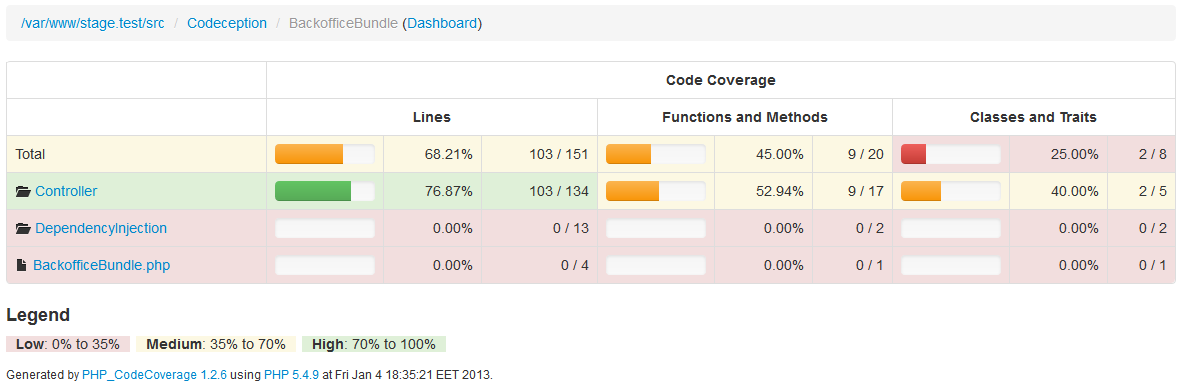
Code CoverageAt some point you want to review which parts of your application are tested well and which are not. Just for this case the CodeCoverage is used. When you execute your tests to collect coverage report, you will receive statistics of all classes, methods, and lines triggered by these tests. The ratio between all lines in script and all touched lines is a main coverage criterion. In the ideal world you should get 100% code coverage, but in reality 80% is really enough. Because even 100% code coverage rate doesn’t save you from fatal errors and crashes. The required information is provided by SebastianBergmann\CodeCoverage, and you can use any of the supported drivers.
Coverage data can be collected manually for both local and remote tests. Remote tests may be executed on different nodes, or locally but running through web server. It may look hard to collect code coverage for Selenium tests or PhpBrowser tests. But Codeception supports remote codecoverage as well as local. ConfigurationTo enable code coverage put these lines in the global configuration file That’s ok for now. But what files should be present in final coverage report?
Pass an array of files or directory to include/exclude sections. The path ending with ‘*’ matches the directory.
Also you can use ‘*’ mask in a file name, i.e. There is a shortcut if you don’t need that complex filters: Include and exclude options can be redefined for each suite in corresponding config files. By default, if coverage is reported to be < 35% it is marked as low, and >70% is high coverage.
You can also define high and low boundaries with By default, show all whitelisted files in By default, show only the coverage report summary in For further information please refer to the PHPUnit configuration docs Local CodeCoverageThe basic codecoverage can be collected for functional and unit tests.
If you performed configuration steps from above, you are ready to go.
All you need is to execute codeception with To generate a clover xml report or a tasty html report append also
XML and HTML reports are stored to the Remote CodeCoverageLocal ServerIf you run your application via Webserver (Apache, Nginx, PHP WebServer) you don’t have a direct access to tested code,
so collecting coverage becomes a non-trivial task. The same goes for scripts that are tested on different nodes.
To get access to this code you need This file is called Please, follow installation instructions described in a readme file. To connect to
After the Custom cookie domainIt’s possible to override the cookie domain set by Codeception during code coverage. Typical case for that is when you
have several subdomains that your acceptance tests are visiting, e.g. Remote ServerBut if you run tests on different server (or your webserver doesn’t use code from current directory) a single option In this case remote Code Coverage results won’t be merged with local ones, if this option is enabled. Merging is possible only in case a remote and local files have the same path. But in case of running tests on a remote server we are not sure of it. CodeCoverage results from remote server will be saved to Working Directory (Docker/Shared Mounts)If your remote server is accessed through a shared mount, or a mounted folder (IE: Docker Volumes), you can still get merged coverage details.
Use the Given a docker command similar to: Use the below configuration to allow coverage mergers. Remote Context OptionsHTML report generation can at times take a little more time than the default 30 second timeout. Or maybe you want to alter SSL settings (verify_peer, for example)
To alter the way c3 sends it’s service requests to your webserver (be it a local or a remote one), you can use the Context stream options are well documented at php.net
Don't know how to write tests on your own? We will build or improve them for you.
Request a quote for official
enterprise
support or trainings
| ||||||||
| You are visitor 01402503 — GeezerVison does not store the pages you look up. Best viewed with Netscape Navigator 4.7 or Internet Explorer 6 at 800×600. No cookies required. |