GeezerVisonThe World Wide Web, restored to 800 pixels of glory. | ||||||||||||||||||||||||||||||||||||||||
| Home|About|Gaming cabinet|Archives|How it works|Starter sites | ||||||||||||||||||||||||||||||||||||||||
GeezerVison is showing codescracker.com — C++ Program to Convert Binary to Decimal
C++ Program to Convert Binary to DecimalIn this article, you will learn and get code on binary to decimal conversion with and without using functions in C++. But before going through the program, if you are not aware of the steps, formula, or logic used behind the conversion of binary to decimal, you can refer to the section on binary to decimal conversion. You will learn everything there in a very short period of time. Binary to Decimal without a Function in C++To convert any number entered by the user (in the binary number system) to its equivalent decimal value in C++ programming, you have to ask the user to enter the binary number first. And then apply the logic and convert it into its equivalent decimal value, as shown in the program given below. Let's have a look at the program first; I will explain it later on. #include<iostream> using namespace std; int main() { int binnum, decnum=0, i=1, rem; cout<<"Enter any Binary Number: "; cin>>binnum; while(binnum!=0) { rem = binnum%10; decnum = decnum + (rem*i); i = i*2; binnum = binnum/10; } cout<<"\nEquivalent Decimal Value = "<<decnum; cout<<endl; return 0; } This program was built and runs under the Code::Blocks IDE. Here is its sample run: 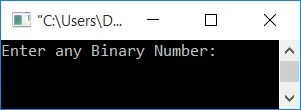
Now supply any input as a binary number, say 1111010, and press the ENTER key to see its equivalent value in decimal, as shown in the output given below: 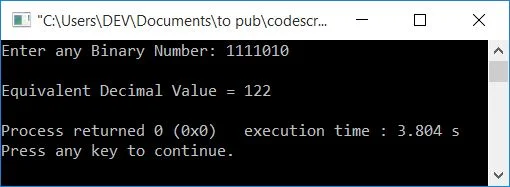
Program explained with a dry runThe dry run of the above program with user input 1111010 goes in such a way that:
Dry Run in Tubular Form
You can also print the value of all four variables, say, rem, decnum, i,, and binnum, during the execution of the while loop by placing the following statement: cout<<"\nrem\tdecnum\ti\tbinnum\n"; just before the while loop. And the following statement: cout<<rem<<"\t"<<decnum<<"\t"<<i<<"\t"<<binnum<<endl; just after the fourth statement of while loop's body. Now, with user input of 1111010, output looks like this: 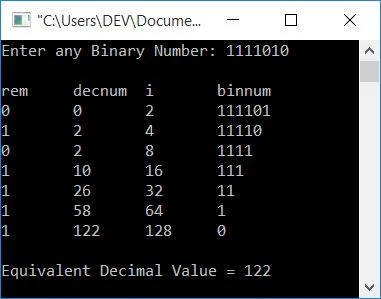
Binary to decimal conversion using a function in C++This program converts binary to decimal using a user-defined function, BinToDec(). It takes a binary number as its argument and returns its equivalent decimal value. This program uses the pow() function. It takes two arguments; the first argument is known as the base, whereas the second is known as the exponent. Therefore, pow(2, 5) means 25, which equals 32. #include<iostream> #include<math.h> using namespace std; int BinToDec(int bin); int main() { int binnum, decnum; cout<<"Enter any Binary Number: "; cin>>binnum; decnum = BinToDec(binnum); cout<<"\nEquivalent Decimal Value = "<<decnum; cout<<endl; return 0; } int BinToDec(int bin) { int dec=0, i=0, rem; while(bin!=0) { rem = bin%10; dec = dec + rem*pow(2,i); i++; bin = bin/10; } return dec; } This program produces the same output as the previous program. You can check on your own with a dry run. The same program in different languages
« Previous Program Next Program » Practice Quizzes
Test your programming and computer science knowledge with interactive MCQs and topic-based quizzes. Popular Topics
Explore the most popular programming and computer science tutorials on CodesCracker. | ||||||||||||||||||||||||||||||||||||||||
| You are visitor 01402503 — GeezerVison does not store the pages you look up. Best viewed with Netscape Navigator 4.7 or Internet Explorer 6 at 800×600. No cookies required. |