GeezerVisonThe World Wide Web, restored to 800 pixels of glory. |
| Home|About|Gaming cabinet|Archives|How it works|Starter sites |
GeezerVison is showing codescracker.com — C++ Program to Copy a File
C++ Program to Copy a FileIn this article, you will learn how to copy the content of one file to another in C++ and get code for doing so. That is, the content of the source file, say, codes.txt, gets copied into the target file, say, cracker.txt. But before going through the program, we must create these two files inside the current directory. Things to do before the programCreate two files, say, codes.txt and cracker.txt, inside the same directory where you're saving our C++ source code. That is, either:
If you choose the second option, Then it creates two files inside the directory "cpp programs" in the Documents folder on C-Drive. Here is a screenshot of the "cpp programs" folder, which contains two newly created files named codes.txt and cracker.txt: 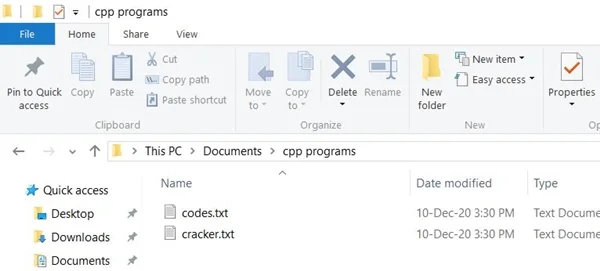
Note: You can also give yourself names, such as a folder, file, or program. Here, let's suppose the file codes.txt is a source file. So put the following content inside this file: Hello Programmer, This is codescracker.com Name of Article is:- Copy the content of one file to Another Here is a snapshot of the opened file codes.txt: 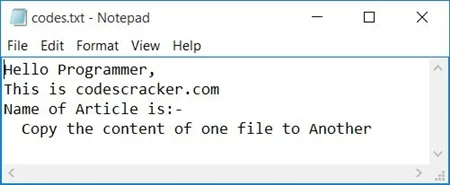
Leave the second file (the target file), cracker.txt, blank (without any content inside it). Because the program given below copies the content of the codes.txt file to the cracker.txt file, Please keep in mind that the program only works with the current directory. That is, if you enter the name of the source and target files, the program searches the files inside the current directory only. The current directory is the folder where the program is saved. Copy the Content of One File to Another in C++To copy the content of one file to another in C++ programming, you have to ask the user to enter the name of the source file (with extension) and the target file (with extension). Now process the copy file operation as shown in the program gate below. Let's have a look at the program first; its explanation will be given later on. #include<iostream> using namespace std; int main() { char ch, sourceFile[20], targetFile[20]; FILE *fs, *ft; cout<<"Enter the Name of Source File: "; cin>>sourceFile; fs = fopen(sourceFile, "r"); if(fs == NULL) { cout<<"\nError Occurred!"; return 0; } cout<<"\nEnter the Name of Target File: "; cin>>targetFile; ft = fopen(targetFile, "w"); if(ft == NULL) { cout<<"\nError Occurred!"; return 0; } ch = fgetc(fs); while(ch != EOF) { fputc(ch, ft); ch = fgetc(fs); } cout<<"\nFile copied successfully."; fclose(fs); fclose(ft); cout<<endl; return 0; } This program was built and runs under the Code::Blocks IDE. Before going to its sample run, first save this program or its source code to the folder where both files were created earlier. That is, in the Documents folder's cpp programs folder. Note: To save this source code, navigate to File→Save file as... and enter the name of the
source code, say codescracker.cpp. Now press the 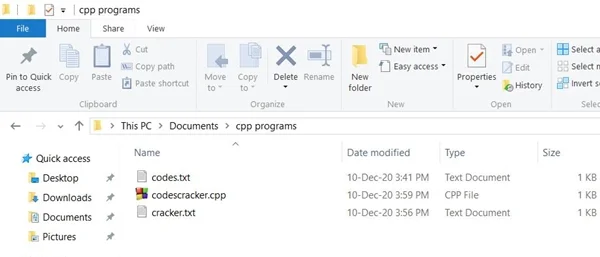
Now let's move on to its sample run. This is the first snapshot of its initial output: 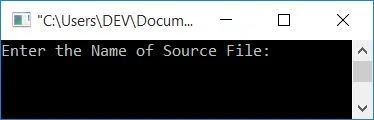
Now enter the name of the source file as codes.txt and then enter the name of the target file as cracker.txt
and press the 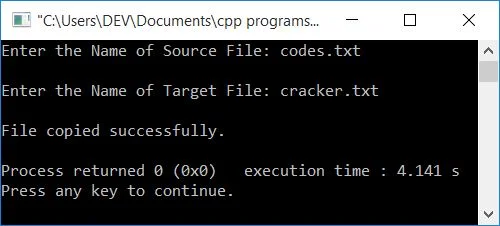
Now the content of the codes.txt file gets copied to the cracker.txt file. Here is a snapshot of the folder cpp programs after executing the above program: 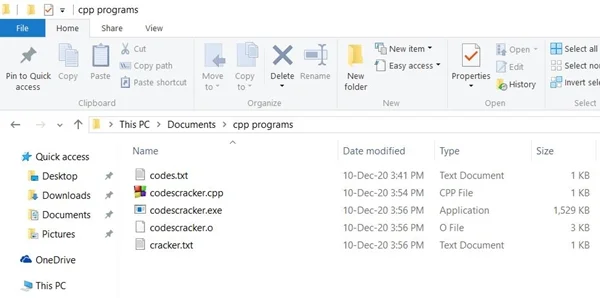
Now, if you open the file cracker.txt, it contains the same content as of the codes.txt file. Here is a snapshot of the opened cracker.txt file: 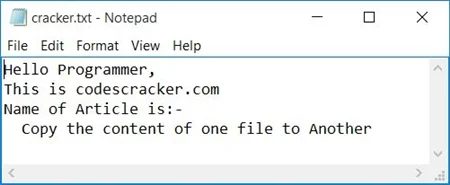
The function fopen() opens a file. It receives two arguments. The first argument is the name of the file, and the second is its mode of opening. The r is used to open the file in reading mode only, whereas the w is used to open the file in writing mode. The function fopen() returns a pointer to FILE on successful opening; otherwise it returns NULL. The function fgetc() is used to read the content of a file using its pointer in a character-by-character manner. The EOF indicates End-Of-File. And the function, fclose() is used to close the pointer to FILE. After running the above C++ program, your target file will now contain the source file's content. If you want to read the content of a target file and display it on the output, you can refer to the read and display file program. The same program in different languages« Previous Program Next Program » Practice Quizzes
Test your programming and computer science knowledge with interactive MCQs and topic-based quizzes. Popular Topics
Explore the most popular programming and computer science tutorials on CodesCracker. |
| You are visitor 01402503 — GeezerVison does not store the pages you look up. Best viewed with Netscape Navigator 4.7 or Internet Explorer 6 at 800×600. No cookies required. |