JSON stands for JavaScript Object Notation, a text format for exchanging values: objects, arrays, strings, numbers, booleans, and null. Despite the name’s origin in JavaScript, a JSON file is plain data that programs in many languages can read.
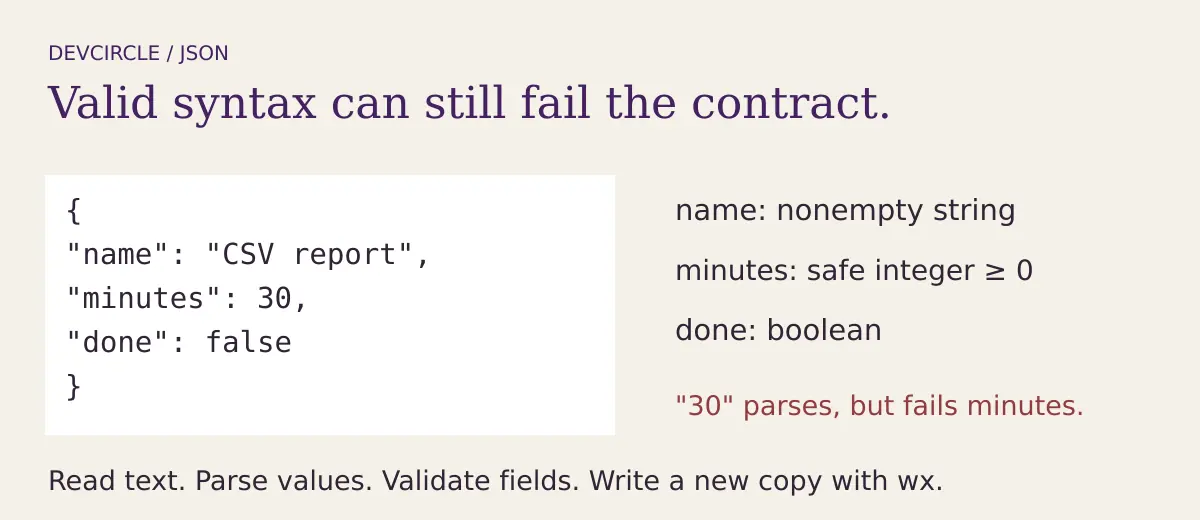
A file can contain perfectly valid JSON and still be useless to your application. {"minutes":"thirty"} parses successfully; it does not provide a numeric duration. This exercise separates reading bytes, parsing JSON, validating fields, and writing a new file. There is no HTTP request or server endpoint involved. For those boundaries, use the fetch exercise or the notes API.
Recognize JSON before writing code
Object keys and strings need double quotes. Arrays use square brackets; objects use braces. Lowercase true, false, and null are values, not quoted strings. A JSON document may also be a single value such as 42 or null; requiring a top-level object is an application rule.
Scroll sideways if the columns extend beyond the frame.
| Text | Valid JSON? | Reason |
|---|---|---|
{"name":"CSV report","done":false} |
Yes | Quoted keys, a string, and a boolean |
['CSV report'] |
No | Single quotes are not JSON string delimiters |
{"done":false,} |
No | Trailing commas are not allowed |
{"minutes":NaN} |
No | NaN and Infinity are not JSON numbers |
{"minutes":"30"} |
Yes | The value is a string; our duration contract will reject it |
null |
Yes | Valid syntax, but not the object our program requires |
Comments, functions, and undefined also fall outside JSON syntax. Never use eval() to read a file; JSON.parse() reads data without evaluating JavaScript expressions. Keep object keys unique, because JSON.parse() retains the last value for a repeated key and a successful parse will not reveal that mistake.
Create a small local file
Use Node.js 24 and an empty practice directory. Save this as projects.json with UTF-8 encoding, without a byte-order mark:
{
  "version": 1,
  "projects": [
    { "name": " CSV report ", "minutes": 30, "done": false },
    { "name": "Workshop page", "minutes": 45, "done": true }
  ]
}
The spaces around the first name are deliberate. Under the contract, version must be the number 1, projects must be an array, and each entry needs three fields: a nonempty string name, a nonnegative safe integer minutes, and a boolean done. An empty projects array is allowed. Input may carry extra fields, but the program copies only the named contract fields into the output.
You can download this fixture. It differs from the fetch guide’s array of names because this file has a version and typed fields to validate.
Parse, check the shape, and write a new copy
Put the script in json-file.mjs; the .mjs extension lets Node handle imports directly, with no manifest or build step.
import { readFile, writeFile } from 'node:fs/promises';
import assert from 'node:assert/strict';

const [input = 'projects.json', output = 'projects.checked.json'] = process.argv.slice(2);
const text = await readFile(input, 'utf8');
let data;
try { data = JSON.parse(text); }
catch { throw new Error('Invalid JSON syntax; the input file was not changed.'); }

if (data === null || typeof data !== 'object' || Array.isArray(data) ||
    data.version !== 1 || !Array.isArray(data.projects)) {
  throw new Error('Expected version 1 and a projects array.');
}
const projects = data.projects.map((project, index) => {
  if (project === null || typeof project !== 'object' || Array.isArray(project) ||
      typeof project.name !== 'string' || project.name.trim() === '' ||
      !Number.isSafeInteger(project.minutes) || project.minutes < 0 ||
      typeof project.done !== 'boolean') {
    throw new Error(`Invalid project at index ${index}.`);
  }
  return { name: project.name.trim(), minutes: project.minutes, done: project.done };
});
const normalized = { version: 1, projects };
const encoded = JSON.stringify(normalized, null, 2) + '\n';
await writeFile(output, encoded, { encoding: 'utf8', flag: 'wx' });
const restored = JSON.parse(await readFile(output, 'utf8'));
assert.deepEqual(restored, normalized);
console.log(`Saved ${projects.length} projects; round-trip check passed.`);
Run it from the practice directory:
node --version
node json-file.mjs projects.json projects.checked.json
With the supplied input, it prints Saved 2 projects; round-trip check passed. The new file contains the same two entries with the first name trimmed to CSV report. It uses two spaces for indentation and ends with a newline. The source still contains its original whitespace.
The wx write flag demands a brand-new output file, so repeating the same command raises an EEXIST error rather than replacing the checked copy. To run the exercise again, pick a different output filename. Naming the source file as the destination fails too, instead of truncating it. Remember this is a local practice script: it loads the entire file into memory and offers no atomic replacement, backups, or concurrent-editing support, all of which a production configuration service would need.
Download the complete script. Keep it alongside the fixture; no npm install is needed.
Identify which boundary failed
The first await reads UTF-8 text. A missing input yields a filesystem error such as ENOENT; the parser has not run yet. JSON.parse() then builds JavaScript values and throws on malformed syntax. Neither step proves that the required fields exist.
Before reading the version, the root check intentionally handles null and arrays. Each project is validated before .trim() is called, and a string such as "30" is rejected instead of being quietly converted. Number.isSafeInteger() turns away fractional, infinite, and unsafe numeric durations. When an identifier or exact decimal cannot be held safely as a JavaScript number, store it as a string under an explicit contract; validating after parsing cannot restore digits the parser has already rounded.
The script builds fresh objects containing known fields. It does not recursively merge arbitrary input properties into an existing configuration. It also never puts file content into HTML or executes it.
Try each failure with a separate output filename, then restore the original fixture:
Scroll sideways if the columns extend beyond the frame.
| Change to the input or command | Expected result |
|---|---|
| Add a comma after the final object in the array | Invalid JSON syntax; no output is written |
Replace the document with null |
Root-contract error, despite valid JSON |
Change the first minutes to "30" or -1 |
Invalid project at index 0 |
Change done to "false" |
Field error; a string is not a boolean |
Set projects to [] |
Saves zero projects and passes the round-trip check |
| Use an output path that already exists | Filesystem EEXIST; the existing file is preserved |
Understand what a round trip preserves
In this exercise the assertion compares the parsed output against the normalized object rather than the original file’s bytes, since whitespace and extra fields were removed on purpose. A JSON round trip is therefore a check on the data contract. It will not preserve comments, formatting, or arbitrary JavaScript objects.
JSON.stringify() can change or reject values that JavaScript permits:
Scroll sideways if the columns extend beyond the frame.
| JavaScript input | Serialization behavior |
|---|---|
{label: undefined} |
The property is omitted, producing {} |
[undefined] |
The array position becomes null |
NaN or Infinity |
Each serializes as null |
A BigInt, without a custom conversion |
Throws TypeError |
| A circular reference | Throws TypeError |
A Date with its normal toJSON() |
Becomes a string; parsing does not recreate a Date |
Our normalized fields avoid these cases: strings, safe integers, and booleans survive the comparison. The .mjs file uses assert.deepEqual to verify that assumption after reading the output back. For browser persistence, the localStorage exercise applies parsing and validation to a small list of lesson IDs instead.
Sources: the syntax and interoperability limits of JSON are defined in RFC 8259; conversion behavior is documented under JSON.parse and JSON.stringify; UTF-8 reads and exclusive writes are described by the Node.js file-system APIs.
Keep building
- Node version manager: install nvm and pin a project runtime
Install nvm on macOS, Linux, or WSL, select Node.js 24 for a project, and diagnose a terminal that keeps running the wrong version.
- Dockerize a Node.js application and check the running container
Package a tiny server, run it as an unprivileged user, and check the deployed process before opening traffic.
- REST API tutorial: validation before persistence
Design a small notes endpoint with a bounded request body, explicit errors, and predictable status codes.