GV

GeezerVison

The World Wide Web, restored to 800 pixels of glory.

Home|About|Gaming cabinet|Archives|How it works|Starter sites

On this site

  • Documentation
  • Privacy Statement
  • License Agreement
  • Contact Us

This view

  • Original page
  • New address

GeezerVison is showing docs.voltdb.com — Chapter 11. Understanding Memory Usage

  • Volt Active Data
  • Developer Hub
  • Books
    • VoltDB Tutorial
    • Using VoltDB
    • VoltDB Guide to Performance and Customization
    • VoltDB Administrator's Guide
    • Volt Kubernetes Administrator's Guide
    • VoltDB Quick Reference
  • VoltDB V16
    • VoltDB V16
    • VoltDB V15.3 LTS
    • VoltDB V14.3 LTS
    • VoltDB V13.3 LTS
    • VoltDB V12.3 LTS
    • VoltDB V11.4
    • VoltDB V10.2
    • VoltDB V9.3
Chapter 11. Understanding Memory Usage

Guide to Performance and Customization

  • Preface▶
    • 1. Organization of this Manual
    • 2. Other Resources
  • 1. Introduction▶
    • 1.1. What Affects Performance?
    • 1.2. How to Use This Book
  • 2. Hello, World! Revisited▶
    • 2.1. Optimizing your Application for VoltDB
    • 2.2. Applying Hello World to a Practical Problem
    • 2.3. Partitioned vs. Replicated Tables
      • 2.3.1. Defining the Partitioning Column
      • 2.3.2. Creating the Stored Procedures
    • 2.4. Using Asynchronous Stored Procedure Calls
      • 2.4.1. Understanding Asynchronous Programming
      • 2.4.2. The Callback Procedure
      • 2.4.3. Making an Asynchronous Procedure Call
    • 2.5. Connecting to all Servers
    • 2.6. Putting it All Together
    • 2.7. Next Steps
  • 3. Understanding VoltDB Execution Plans▶
    • 3.1. How VoltDB Selects Execution Plans for Individual SQL Statements
    • 3.2. Understanding VoltDB Execution Plans
    • 3.3. Reading the Execution Plan and Optimizing Your SQL Statements
      • 3.3.1. Evaluating the Use of Indexes
      • 3.3.2. Evaluating the Table Order for Joins
  • 4. Using Indexes Effectively▶
    • 4.1. Basic Principles for Effective Indexing
    • 4.2. Defining Indexes
    • 4.3. The Goals for Effective Indexing
    • 4.4. How Indexes Work
    • 4.5. Summary
  • 5. Client2, A Modern Java Client Programming Interface (API)▶
    • 5.1. Configuring the Client
    • 5.2. Connecting to the Database
    • 5.3. Calling Procedures
      • 5.3.1. Handling Backpressure
      • 5.3.2. Handling Request Timeouts
      • 5.3.3. Defining Options on a Per-Call Basis
  • 6. Creating Flexible Schemas With JSON▶
    • 6.1. Using JSON Data Structures as VoltDB Content
    • 6.2. Querying JSON Data
    • 6.3. Updating JSON Data
    • 6.4. Indexing JSON Fields
    • 6.5. Summary: Using JSON in VoltDB
  • 7. Creating Geospatial Applications▶
    • 7.1. The Geospatial Datatypes
      • 7.1.1. The GEOGRAPHY_POINT Datatype
      • 7.1.2. The GEOGRAPHY Datatype
      • 7.1.3. Sizing GEOGRAPHY Columns
      • 7.1.4. How Geospatial Values are Interpreted
    • 7.2. Entering Geospatial Data
    • 7.3. Working With Geospatial Data
      • 7.3.1. Working With Locations
      • 7.3.2. Working With Regions
  • 8. Creating Custom Importers, Exporters, and Formatters▶
    • 8.1. Writing a Custom Exporter
      • 8.1.1. The Structure and Workflow of the Export Client
      • 8.1.2. How to Use Custom Properties to Configure the Client
      • 8.1.3. How to Compile and Install the Client
      • 8.1.4. How to Configure the Export Client
    • 8.2. Writing a Custom Importer
      • 8.2.1. Designing and Coding a Custom Importer
      • 8.2.2. Packaging and Installing a Custom Importer
      • 8.2.3. Configuring and Running a Custom Importer
    • 8.3. Writing a Custom Formatter
      • 8.3.1. The Structure of the Custom Formatter
      • 8.3.2. Compiling and Packaging Custom Formatter Bundles
      • 8.3.3. Installing and Invoking Custom Formatters
      • 8.3.4. Using Custom Formatters With the kafkaloader Utility
  • 9. Creating Custom Tasks▶
    • 9.1. Overview of How Custom Tasks Work
    • 9.2. Modifying the Procedure Call and Arguments
      • 9.2.1. Designing a Java Class That Implements ActionGenerator
      • 9.2.2. Compiling and Loading the Class into VoltDB
      • 9.2.3. Declaring the Task
    • 9.3. Modifying the Interval Between Invocations
      • 9.3.1. Designing a Java Class That Implements IntervalGenerator
      • 9.3.2. Compiling and Loading the Class into VoltDB
      • 9.3.3. Declaring the Task
    • 9.4. Modifying Both the Procedure and Interval
      • 9.4.1. Designing a Java Class That Implements ActionScheduler
      • 9.4.2. Compiling and Loading the Class into VoltDB
      • 9.4.3. Declaring the Task
  • 10. Using Compound Procedures▶
    • 10.1. How Compound Procedures Work
    • 10.2. Defining the Compound Procedure
    • 10.3. Compiling and Loading the Compound Procedure
    • 10.4. Declaring the Compound Procedure
    • 10.5. Invoking the Compound Procedure
    • 10.6. Handling Errors
    • 10.7. Managing Compound Procedures and System Resources
  • 11. Understanding Memory Usage▶
    • 11.1. How the Database Uses Memory
    • 11.2. Actions that Impact Memory Usage
    • 11.3. How the Database Manages Memory
    • 11.4. How Memory is Allocated and Deallocated
    • 11.5. Controlling How Memory is Allocated and Used
      • 11.5.1. Managing the Java Heap
      • 11.5.2. Controlling the Compaction Process for Table Data
    • 11.6. Understanding Memory Usage for Specific Applications
  • 12. Managing Time▶
    • 12.1. The Importance of Time
    • 12.2. Using NTP to Manage Time
      • 12.2.1. Basic Configuration
      • 12.2.2. Troubleshooting Issues with Time
      • 12.2.3. Correcting Common Problems with Time
      • 12.2.4. Example NTP Configuration
    • 12.3. Configuring NTP in a Hosted, Virtual, or Cloud Environment
      • 12.3.1. Considerations for Hosted Environments
      • 12.3.2. Considerations for Virtual and Cloud Environments

Chapter 11. Understanding Memory Usage

VoltDB is an in-memory database. Storing data in memory has the advantage of eliminating the performance penalty of disk accesses (among other things). However, with the complex interaction of VoltDB memory usage and how operating systems allocate and deallocate memory, it can be tricky understanding exactly how much memory is being used at any given time. For example, deleting rows of data can result in a temporary increase in memory usage, which seems counterintuitive at first.

This chapter explains how VoltDB uses memory, the impact of system memory allocation and deallocation functions on your database's memory utilization, and variables available to you to help control memory usage.

11.1. How the Database Uses Memory

The memory that the database uses can be grouped, loosely, into three buckets:

  • Persistent

  • Semi-persistent

  • Temporary

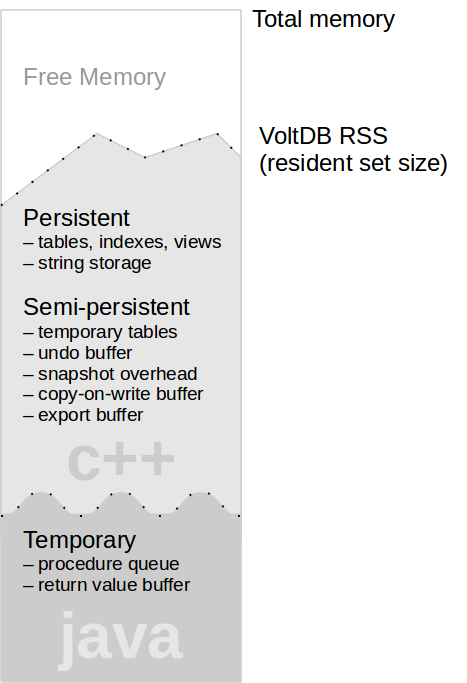
Persistent memory is, as you might expect, the memory used for storing actual database records, including tables, indexes, and views. The larger the volume of data in the database, the more memory required to store it. String and varbinary columns longer than 63 bytes are not stored in line. Instead they are stored as pointers to the content in a separate string storage area, which is also part of persistent memory.

Semi-persistent memory is used for temporary storage while processing SQL statements and certain system procedures. In particular, semi-persistent memory includes temporary tables and the undo buffer.

  • Temporary tables are where data is processed as part of an SQL statement. For example, if you execute an SQL statement like SELECT * FROM flight WHERE DESTINATION='LAX', all of the tuples meeting the selection criteria are copied into temporary tables before being returned to the initiator. If the stored procedure is multi-partitioned, each partition creates a copy of its tuples and the initiator merges the multiple copies.

  • The undo buffer is also associated with the execution of SQL statements. Any tuples that are modified or deleted as part of an SQL statement are recorded in the undo buffer until the transaction is committed or rolled back.

Semi-persistent memory is also used for buffers related to system activities such as snapshots and export. While a snapshot is occurring, a certain amount of memory is required for overhead, as well as copy-on-write buffers. Normally, snapshots are written directly from the tables in memory, thus requiring no additional overhead. However, if snapshots are non-blocking (performed asynchronously while other transactions are executing), any tuples that need to be modified before they are written to the snapshot get copied into semi-persistent memory. This technique is known as "copy-on-write". The consequence is that mixing asynchronous snapshots with frequent deletes and updates will increase the memory usage.

Similarly, when export is enabled, any insertions into export streams are written to an export buffer in semi-persistent memory until the export connector sends the data to the export target.

Temporary memory is used by VoltDB to manage the queueing and distribution of procedures to the individual partitions. Temporary memory includes the queue of pending procedure invocations as well as buffers for the return values for the completed procedures (until the client application retrieves them).

Figure 11.1, “The Three Types of Memory in VoltDB” illustrates how the three types of memory are allocated in VoltDB.

Figure 11.1. The Three Types of Memory in VoltDB
The Three Types of Memory in VoltDB

The sum of the persistent, semi-persistent, and temporary memory is what makes up the total memory (what is referred to as resident set size, or RSS) used by VoltDB on the server.

You are visitor 01402775 — GeezerVison does not store the pages you look up.
Best viewed with Netscape Navigator 4.7 or Internet Explorer 6 at 800×600. No cookies required.