GeezerVisonThe World Wide Web, restored to 800 pixels of glory. |
| Home|About|Gaming cabinet|Archives|How it works|Starter sites |
GeezerVison is showing docs.voltdb.com — 11.5. Controlling How Memory is Allocated and Used Guide to Performance and Customization11.5. Controlling How Memory is Allocated and UsedThe database memory management schemes described in the previous sections are designed to relieve you as database developer or administrator from having to manage the memory consumption yourself. However, there may be times when you want to optimize the system for your specific application's needs. The following sections explain what controls are available to help you adjust:
11.5.1. Managing the Java HeapDespite the fact that you as a developer or database administrator cannot control when
temporary storage is allocated and freed, you can control how much memory is used. Java provides a
way to specify the size of the heap, the portion of memory the JVM uses to store runtime data such as class instances,
arrays, etc. The By setting both the Figure 11.3. Controlling the Java Heap Size 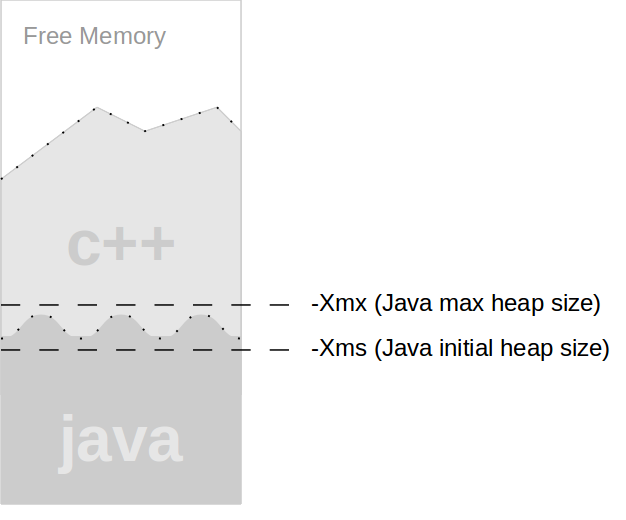 However, you must be careful when setting the values for the Java heap size, since the JVM will not exceed the value you set as a maximum. It is possible, under some conditions, to force a Java out-of-memory error if the maximum heap size is not large enough for the temporary storage VoltDB requires. See the VoltDB Planning Guide for recommendations on calculating the appropriate heap size for your specific application. Remember, temporary storage is used to queue the procedure requests and responses. If you are using synchronous procedures calls (and therefore little or no queuing on the server) a small heap size is acceptable. Also, if the size of the procedure invocations (in terms of the arguments passed into the procedures) and the return values are small, a lower heap size is acceptable. But if you are invoking procedures asynchronously with large argument lists or return values, be very careful when setting a low maximum heap size. 11.5.2. Controlling the Compaction Process for Table DataThe compaction process is designed to run in parallel with the database workload, constantly managing the memory incrementally in the background. Under normal operations the process is transparent to the users. However, if your application has an unusual workload or requires special attention regarding memory reclamation, there are database configuration options you can use to modify the compaction process. There are two key triggers you can adjust regarding compaction:
By default, the compaction process runs every 60 seconds. You can modify this setting to check for defragmentation
more or less frequently by setting the You can also change the maximum number of tuples that will be moved in a single compaction transaction by setting
the For example, if you specify the maxcount as 2 and one table (A) can fit 200 tuples in a block and another table (B) can fit 1,000 tuples in a block this means compaction can move at most 400 tuples in table A or 2,000 tuples in table B at one time. You can specify maxcount as 1, 2, or 3 block's worth of tuples. The default maximum count is 1. The following configuration sets the interval to 120 seconds and the maximum count to 2 blocks' worth of tuples. deployment:
systemsettings:
compaction:
interval: 120
maxcount: 2You can modify the compaction settings at any time — when initializing the database with the voltdb init command or while it is running using the voltadmin set or update command. If, for any reason, compaction is not keeping up with the number of delete operations and the amount of fragmentation is growing, you can force the system to run compaction using the voltadmin defrag command. The voltadmin defrag command begins an iteration of the compaction process, regardless of the currently configured schedule, and triggers any appropriate compaction transactions that are required. When running compaction manually, you have three additional controls available.
For example, the following command performs a full compaction of the orders and shipments tables: $ voltadmin defrag --tables=orders,shipments --full WarningDepending on how much data exists in the table and the amount of fragmentation, a full compaction can take a significant amount of time to execute and could result in increased latency for other transactions. A full compaction should not be done without due consideration for potential impact to the current workload or, preferably, be scheduled for off hours. Finally, as part of operational planning, it is possible to set resource limits related to memory usage, using the
deployment:
  systemsettings:
    resourcemonitor:
      memorylimit:
        size: 80%
compact: true |
| You are visitor 01402775 — GeezerVison does not store the pages you look up. Best viewed with Netscape Navigator 4.7 or Internet Explorer 6 at 800×600. No cookies required. |