GV

GeezerVison

The World Wide Web, restored to 800 pixels of glory.

Home|About|Gaming cabinet|Archives|How it works|Starter sites

On this site

  • Documentation
  • Privacy Statement
  • License Agreement
  • Contact Us

This view

  • Original page
  • New address

GeezerVison is showing docs.voltdb.com — 11.2. Actions that Impact Memory Usage

  • Volt Active Data
  • Developer Hub
  • Books
    • VoltDB Tutorial
    • Using VoltDB
    • VoltDB Guide to Performance and Customization
    • VoltDB Administrator's Guide
    • Volt Kubernetes Administrator's Guide
    • VoltDB Quick Reference
  • VoltDB V16
    • VoltDB V16
    • VoltDB V15.3 LTS
    • VoltDB V14.3 LTS
    • VoltDB V13.3 LTS
    • VoltDB V12.3 LTS
    • VoltDB V11.4
    • VoltDB V10.2
    • VoltDB V9.3
11.2. Actions that Impact Memory Usage

Guide to Performance and Customization

  • Preface▶
    • 1. Organization of this Manual
    • 2. Other Resources
  • 1. Introduction▶
    • 1.1. What Affects Performance?
    • 1.2. How to Use This Book
  • 2. Hello, World! Revisited▶
    • 2.1. Optimizing your Application for VoltDB
    • 2.2. Applying Hello World to a Practical Problem
    • 2.3. Partitioned vs. Replicated Tables
      • 2.3.1. Defining the Partitioning Column
      • 2.3.2. Creating the Stored Procedures
    • 2.4. Using Asynchronous Stored Procedure Calls
      • 2.4.1. Understanding Asynchronous Programming
      • 2.4.2. The Callback Procedure
      • 2.4.3. Making an Asynchronous Procedure Call
    • 2.5. Connecting to all Servers
    • 2.6. Putting it All Together
    • 2.7. Next Steps
  • 3. Understanding VoltDB Execution Plans▶
    • 3.1. How VoltDB Selects Execution Plans for Individual SQL Statements
    • 3.2. Understanding VoltDB Execution Plans
    • 3.3. Reading the Execution Plan and Optimizing Your SQL Statements
      • 3.3.1. Evaluating the Use of Indexes
      • 3.3.2. Evaluating the Table Order for Joins
  • 4. Using Indexes Effectively▶
    • 4.1. Basic Principles for Effective Indexing
    • 4.2. Defining Indexes
    • 4.3. The Goals for Effective Indexing
    • 4.4. How Indexes Work
    • 4.5. Summary
  • 5. Client2, A Modern Java Client Programming Interface (API)▶
    • 5.1. Configuring the Client
    • 5.2. Connecting to the Database
    • 5.3. Calling Procedures
      • 5.3.1. Handling Backpressure
      • 5.3.2. Handling Request Timeouts
      • 5.3.3. Defining Options on a Per-Call Basis
  • 6. Creating Flexible Schemas With JSON▶
    • 6.1. Using JSON Data Structures as VoltDB Content
    • 6.2. Querying JSON Data
    • 6.3. Updating JSON Data
    • 6.4. Indexing JSON Fields
    • 6.5. Summary: Using JSON in VoltDB
  • 7. Creating Geospatial Applications▶
    • 7.1. The Geospatial Datatypes
      • 7.1.1. The GEOGRAPHY_POINT Datatype
      • 7.1.2. The GEOGRAPHY Datatype
      • 7.1.3. Sizing GEOGRAPHY Columns
      • 7.1.4. How Geospatial Values are Interpreted
    • 7.2. Entering Geospatial Data
    • 7.3. Working With Geospatial Data
      • 7.3.1. Working With Locations
      • 7.3.2. Working With Regions
  • 8. Creating Custom Importers, Exporters, and Formatters▶
    • 8.1. Writing a Custom Exporter
      • 8.1.1. The Structure and Workflow of the Export Client
      • 8.1.2. How to Use Custom Properties to Configure the Client
      • 8.1.3. How to Compile and Install the Client
      • 8.1.4. How to Configure the Export Client
    • 8.2. Writing a Custom Importer
      • 8.2.1. Designing and Coding a Custom Importer
      • 8.2.2. Packaging and Installing a Custom Importer
      • 8.2.3. Configuring and Running a Custom Importer
    • 8.3. Writing a Custom Formatter
      • 8.3.1. The Structure of the Custom Formatter
      • 8.3.2. Compiling and Packaging Custom Formatter Bundles
      • 8.3.3. Installing and Invoking Custom Formatters
      • 8.3.4. Using Custom Formatters With the kafkaloader Utility
  • 9. Creating Custom Tasks▶
    • 9.1. Overview of How Custom Tasks Work
    • 9.2. Modifying the Procedure Call and Arguments
      • 9.2.1. Designing a Java Class That Implements ActionGenerator
      • 9.2.2. Compiling and Loading the Class into VoltDB
      • 9.2.3. Declaring the Task
    • 9.3. Modifying the Interval Between Invocations
      • 9.3.1. Designing a Java Class That Implements IntervalGenerator
      • 9.3.2. Compiling and Loading the Class into VoltDB
      • 9.3.3. Declaring the Task
    • 9.4. Modifying Both the Procedure and Interval
      • 9.4.1. Designing a Java Class That Implements ActionScheduler
      • 9.4.2. Compiling and Loading the Class into VoltDB
      • 9.4.3. Declaring the Task
  • 10. Using Compound Procedures▶
    • 10.1. How Compound Procedures Work
    • 10.2. Defining the Compound Procedure
    • 10.3. Compiling and Loading the Compound Procedure
    • 10.4. Declaring the Compound Procedure
    • 10.5. Invoking the Compound Procedure
    • 10.6. Handling Errors
    • 10.7. Managing Compound Procedures and System Resources
  • 11. Understanding Memory Usage▶
    • 11.1. How the Database Uses Memory
    • 11.2. Actions that Impact Memory Usage
    • 11.3. How the Database Manages Memory
    • 11.4. How Memory is Allocated and Deallocated
    • 11.5. Controlling How Memory is Allocated and Used
      • 11.5.1. Managing the Java Heap
      • 11.5.2. Controlling the Compaction Process for Table Data
    • 11.6. Understanding Memory Usage for Specific Applications
  • 12. Managing Time▶
    • 12.1. The Importance of Time
    • 12.2. Using NTP to Manage Time
      • 12.2.1. Basic Configuration
      • 12.2.2. Troubleshooting Issues with Time
      • 12.2.3. Correcting Common Problems with Time
      • 12.2.4. Example NTP Configuration
    • 12.3. Configuring NTP in a Hosted, Virtual, or Cloud Environment
      • 12.3.1. Considerations for Hosted Environments
      • 12.3.2. Considerations for Virtual and Cloud Environments

11.2. Actions that Impact Memory Usage

There are a number of actions that impact the amount of memory VoltDB uses during operation. Obviously, the more data that is stored within the partition (including all tables, indexes, and views), the more memory is required for persistent storage. Similarly for snapshotting and export, when these functions are enabled, they require some amount of semi-persistent storage. However, under normal conditions, the memory requirements for snapshotting and export should be relatively consistent over time.

Temporary storage, on the other hand, fluctuates depending on the workload and type of transactions being executed. If the client applications are "firehosing" (sending stored procedure requests faster than the servers can process them), the temporary storage required for pending procedure invocations will grow. Similarly, if the parameters being submitted to the procedures or the data being returned is large in size (up to 100 megabytes per procedure), the buffer for return values can grow significantly.

The nature of the workload also has an impact on the amount of semi-persistent storage. Read-only queries do not require space in the undo buffer. However, complex queries and queries that return large data sets require space for temporary tables. On the other hand, update and delete queries can take up significant space in the undo buffer, especially when a single transaction (or stored procedure) performs multiple queries, each requiring undo support.

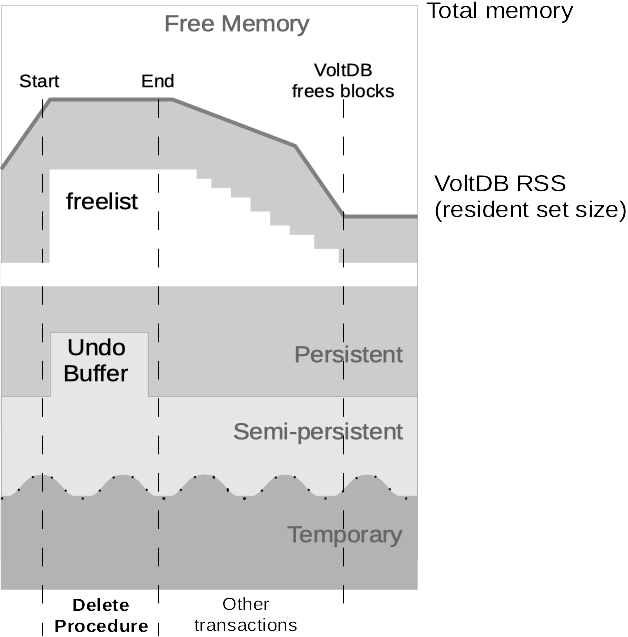
The use of the temporary and semi-persistent storage explains fluctuations that can be seen in overall memory utilization of servers running VoltDB. Although delete operations do eventually release memory used by the persistent storage, they initially require more memory in the undo buffer and for any temporary table operations. Once the entire transaction is complete and committed, the space in persistent storage and undo buffer is freed up. Note, however, that the unused space may not immediately be visible in the system RSS reports. The amount of memory in use and the amount of memory allocated can vary as a result of the interaction of several different memory management schemes that all come into play.

When VoltDB frees up space in persistent storage, it does not immediately return that memory to the operating system. Instead, it keeps track of unused space, which is then reused the next time a tuple is stored. Over time, memory can become fragmented. To avoid excessive fragmentation, a separate process runs periodically checking the tables in each partition. If the fragmentation for a table within a partition is large enough, the compaction process incrementally rearranges the tuples to "fill the holes" and then deallocates and returns the unused memory to the operating system.

Figure 11.2. Details of Memory Usage During and After an SQL Statement
Details of Memory Usage During and After an SQL Statement

Figure 11.2, “Details of Memory Usage During and After an SQL Statement” illustrates how a delete operation can have a delayed effect on overall memory allocation.

  1. At the beginning of the transaction, the deleted tuples are recorded in the semi-persistent undo buffer, increasing memory usage. Any freed persistent storage is returned to the VoltDB list of free space.

  2. At the end of the transaction, the undo buffer is freed. However, the storage for the deleted tuples in persistent storage is managed and may not be released immediately.

  3. Over time, free memory is used for new tuples, or...

  4. If fragmentation reaches a noticeable level, the compaction process starts incrementally defragmenting the table and releasing the unused blocks to the system.

How and when memory is actually deallocated depends on what that memory is being used for and how it is managed. The following section Section 11.3, “How the Database Manages Memory” describes how VoltDB manages memory in more detail.

Finally, there are some combinations of factors that can aggravate the fluctuations in memory usage. The memory required for snapshotting is usually not significant. However, if non-blocking snapshots are intermixed with update-heavy transactions, the snapshot copy-on-write buffer can grow rapidly.

Similarly, the memory used for export can grow if export is enabled but the connector cannot reach the target destination to clear the export buffer. However, the export buffer size is constrained; after a certain point any additional export data that is not acknowledged by the connector is written out as export overflow to disk. So memory used for export queues does not grow indefinitely.

You are visitor 01402775 — GeezerVison does not store the pages you look up.
Best viewed with Netscape Navigator 4.7 or Internet Explorer 6 at 800×600. No cookies required.