GV

GeezerVison

The World Wide Web, restored to 800 pixels of glory.

Home|About|Gaming cabinet|Archives|How it works|Starter sites

On this site

  • GitComet
  • Features
  • Videos
  • Merge tool
  • Compare
  • Changelog
  • GitCometPRO
  • Docs
  • Download

This view

  • Original page
  • New address

GeezerVison is showing gitcomet.dev — Git GUI for Linux, macOS, and Windows teams | GitComet

Fastest Open Source Git GUI

GitComet is built for teams that want fast Git operations with local-first privacy, familiar workflows, and open source freedom.

Download View on GitHub

Available for Linux, Windows and macOS. See GitComet Pro in action

What GitComet gives you

Fast

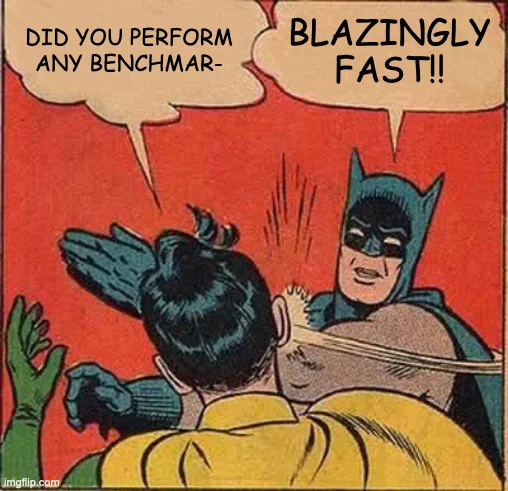
Built end-to-end in Rust for speed and efficiency using smol, gix, and gpui for blazingly fast Blazingly fast meme used to highlight GitComet performance operations.
Precise

Stage by file, by hunk, or by single line, straight from the diff gutter. Commit the one idea you meant to.

Local-first

Your repositories stay on your machine. No account, no sync, no upload. Free for personal and commercial use, under the AGPL-3.0.

Watch with the written walkthrough

GitComet Pro

Review and approve pull requests from your desktop

Open a pull request, read the diff, leave comments, approve and merge in GitComet Pro. Keep your review beside your local changes, with your code and tokens on your machine.

Works with GitHub, GitLab, Azure DevOps, Bitbucket, Gitea and Forgejo.

Get GitComet Pro Explore all Pro features

After buying a licence, download the separate GitComet Pro client from your account. See the setup steps.

Review Pull Requests Without a Browser

53 seconds
Pick up a pull request in GitComet Pro, read it in GitComet’s diff, comment on a line, approve and merge it without opening a browser. Then see your coding agents in History and write a commit message with your own AI.

Watch with the written walkthrough

Steps shown in the video
  1. Open Explore and select Pull requests. The queue lists the pull requests waiting for your review. Select one to read its description and conversation, then choose Review.
  2. The pull request’s changed files open in GitComet’s diff. Press R to mark each file reviewed as you read it; the file list shows how many are done.
  3. Select a line and press C to comment on it. Choose Save as draft to keep the comment on your device until you finish the review, or Comment to post it now.
  4. Choose Finish review. With every file reviewed and one draft waiting, select Approve and finish. The verdict and the draft go to the forge together; finishing never merges.
  5. Open the pull request’s Checks tab to confirm the checks passed, then merge it straight from GitComet.
  6. In History, coding agent sessions appear next to the commits they touch, with their status. Right-click a session to bring it to the front, copy its resume command or open a terminal there.
  7. Stage a change and use the spark in the commit message box. Its tooltip says what it sends and which provider answers; AI stays off until you switch it on.

Difftastic · New in 0.3.1

Diff the code, not the lines

A new wrapper or reformatted function can bury a small edit in a wall of red and green. GitComet’s built-in Difftastic engine compares code structure and highlights the tokens that changed. Review in split or inline view, with nothing extra to install.

Watch on YouTube ↗

Diff the Code, Not the Lines

37 seconds
Compare code structure with Difftastic, built into GitComet 0.3.1. See the changed tokens in a wrapped component, spot an edit in reformatted HTML and recognize formatting-only changes. Available in split and inline views, with no extra installation.

Watch with the written walkthrough

Steps shown in the video
  1. Open the changed TSX component in the line-by-line diff. A new wrapper and indentation changes mark much of the component as changed.
  2. Open the diff viewer’s cog and choose Difftastic under Diff engine. The highlights now focus on changed tokens while unchanged code stays readable.
  3. Open the reformatted HTML file. Difftastic highlights the minimum password length changing from 8 to 12 amid the line wrapping.
  4. Open the reformatted price-formatting function. GitComet reports No syntactic changes; text differs, with Show line changes available to inspect the text edits.
  5. Press Ctrl+, to open Settings, select Diff and choose Difftastic under Diff engine to make it your default. It works in both split and inline views.

Interactive rebase

Rewrite history by dragging it

Right-click a commit to start an interactive rebase. Reorder commits by dragging them, then pick, reword, squash, fixup, or drop. Squash a range and preview the resulting message before you commit to it.

See how rebase works

Rewrite History, Cleanly

38 seconds
Clean up a branch with GitComet’s interactive rebase editor. Fold fixup commits into their targets, reorder the remaining commits and replace an unclear commit message before completing the rebase.

Watch with the written walkthrough

Steps shown in the video
  1. Open an interactive rebase for the feature branch from the commit actions menu.
  2. Use autosquash to fold fixup commits into the commits they amend. Review the resulting sequence in the editor.
  3. Drag commits into the order you want them to appear in the branch history.
  4. Choose Reword for the vague commit message and continue the rebase. Enter a descriptive message when prompted and save it.
  5. Review the completed branch history to confirm that the commits are ordered and named as intended.

Line staging

Keep each commit focused

A fix and a refactor can share a file without sharing a commit. Right-click a changed line or a selection to stage exactly what belongs together, and leave the rest for later.

See how staging works

Stage Only What Matters

48 seconds
Turn several edits in one file into focused commits. Select and stage just the fix, discard a debug line, and edit a remaining typo directly in GitComet before committing the rest.

Watch with the written walkthrough

Steps shown in the video
  1. Select the changed lines belonging to the fix in the diff and stage only those lines.
  2. Discard the leftover debug line while keeping the other intended edits.
  3. Write a message for the staged fix and press Ctrl+Enter to commit it on its own.
  4. Press Alt+E to edit the remaining typo in place. Press Ctrl+S to save the file and return to the diff.
  5. Press Space to stage the remaining change, then commit it separately. The history now contains two focused commits.

Packages

Installing GitComet

Start with the operating system you are using. GitComet will hint the right tab automatically, and you can still switch between Windows, macOS, and Linux install paths at any time.

Get it from Microsoft Store Download on GitHub

Homebrew

brew install --cask gitcomet
Download on GitHub
  1. Open the disk image.
  2. Drag GitComet to your Applications folder.
  3. Launch GitComet from Applications.

For more information and troubleshooting see our macOS installation docs.

Ubuntu and Debian with apt

curl -fsSL https://apt.gitcomet.dev/gitcomet-archive-keyring.gpg | sudo tee /usr/share/keyrings/gitcomet-archive-keyring.gpg >/dev/null
  curl -fsSL https://apt.gitcomet.dev/gitcomet.sources | sudo tee /etc/apt/sources.list.d/gitcomet.sources >/dev/null
  sudo apt update
  sudo apt install gitcomet

Download the .rpm for your processor from GitHub releases. In the download directory, replace the filename below with the package you downloaded.

Fedora 42 or newer

sudo dnf install ./name-of-downloaded-file.rpm

Available for x86-64 and ARM64. Requires glibc 2.35 or newer; RHEL 9 and its rebuilds use glibc 2.34 and cannot install this RPM. See the Linux installation docs.

Arch Linux via AUR

git clone https://aur.archlinux.org/gitcomet-bin.git
  cd gitcomet-bin && makepkg -si

View the GitComet AUR package page

GURU (Gentoo Linux)

emerge --ask dev-vcs/gitcomet

Nix: run it without installing

nix run nixpkgs#gitcomet

Nix: install it for your user

nix profile install nixpkgs#gitcomet

NixOS: configuration.nix

environment.systemPackages = with pkgs; [
    gitcomet
  ];
  1. Add that to /etc/nixos/configuration.nix.
  2. Apply it with sudo nixos-rebuild switch.

View the GitComet package on search.nixos.org

Download on GitHub

AppImage

chmod +x gitcomet-v*-linux-*.AppImage
  ./gitcomet-v*-linux-*.AppImage

Run these commands in the download directory with only the AppImage you intend to launch matching the pattern. For desktop requirements and troubleshooting, see the Linux installation docs.

Homebrew on Linux

brew tap auto-explore/gitcomet
  brew install --cask gitcomet

The Linux cask installs the AppImage and provides the gitcomet command. If AppImages cannot run on your system, use apt, the Fedora RPM, a .deb package or the release tarball instead.

Community goal

1,000 stars and counting. Thank you!

If you like the product, we kindly ask you to give it a star on GitHub.

Star on GitHub Follow GitComet on Product Hunt

GitHub stars

🎉 We did it!

1,028 / 1,000 stars

Editions

Free and open source, or GitComet Pro

GitComet is a full open source desktop Git client. GitComet Pro adds pull request review and approval on six forges, coding agents in History and optional AI, without giving up local-first development.

Available now

Open Source

€0 forever

Free for personal and commercial use.

  • Full local-first desktop workflow
  • Git remotes, pull/push, staging, commits
  • Worktrees, branching, and full history
  • Multi-repository workspaces and windows
  • Inline and side-by-side diffs
  • 2-way and 3-way merge tools
  • Git LFS and git-annex support

Continue with Open Source

Install GitHub Sponsor

Available now

GitComet Pro

€4 / month

Personal licence, billed annually, plus VAT where applicable. For personal or commercial work, on up to five computers. Organisation licences are €4 per user per month, minimum 2 seats.

  • Everything in Open Source
  • Pull request review and approval on GitHub, GitLab, Azure DevOps, Bitbucket, Gitea and Forgejo
  • Coding agents in History: Claude Code, Codex, OpenCode and Copilot CLI
  • Optional AI with your own provider or a local model
  • Projects and per-project Git identity

GitComet Pro is out now

Explore GitComet Pro

Try GitComet on your largest repository.

Free for personal and commercial use. No account required.

Download View on GitHub

Newsletter

Stay in the GitComet loop

Get GitComet newsletters, product updates and occasional campaigns in your inbox.

By subscribing, you agree to receive these emails from AutoExplore Oy. Unsubscribe anytime by emailing us. Privacy policy.

You are visitor 01402503 — GeezerVison does not store the pages you look up.
Best viewed with Netscape Navigator 4.7 or Internet Explorer 6 at 800×600. No cookies required.