

Fastest Open Source Git GUI
GitComet is built for teams that want fast Git operations with local-first privacy, familiar workflows, and open source freedom.
Available for Linux, Windows, and macOS on x86-64 and ARM64. Linux supports Wayland, X11, and WSLg.
Documentation · Features · GitComet Pro
gitcomet_intro_readme.mp4
Download the latest Open Source binaries/installers from GitHub Releases, or see all installation options. Windows installers are signed, and the macOS disk image is notarized.
Bought a GitComet Pro license? Download the separate Pro client from your account. It installs beside the free edition.
Windows
Download the latest Windows installer or portable binary from GitHub Releases.
Install from the Microsoft Store:
Homebrew (macOS / Linux)
App and gitcomet command from tap:
brew install --cask gitcomet
On Linux, the cask installs the AppImage build. If your system cannot launch AppImages, use the APT repo, the RPM, the release tarball, or the .deb instead.
AUR (Arch Linux)
The gitcomet-bin package repackages the release tarballs for x86_64 and aarch64 and is updated by the release workflow:
git clone https://aur.archlinux.org/gitcomet-bin.git
cd gitcomet-bin && makepkg -si
GURU (Gentoo Linux)
emerge --ask dev-vcs/gitcomet
Nix / NixOS
Run without installing:
nix run nixpkgs#gitcomet
Install for your user:
nix profile install nixpkgs#gitcomet
On NixOS, add gitcomet to environment.systemPackages in /etc/nixos/configuration.nix and apply it with sudo nixos-rebuild switch. See the Nixpkgs package.
apt (Debian/Ubuntu)
curl -fsSL https://apt.gitcomet.dev/gitcomet-archive-keyring.gpg | sudo tee /usr/share/keyrings/gitcomet-archive-keyring.gpg >/dev/null
curl -fsSL https://apt.gitcomet.dev/gitcomet.sources | sudo tee /etc/apt/sources.list.d/gitcomet.sources >/dev/null
sudo apt update
sudo apt install gitcomet
If you install a Linux tarball or Homebrew binary on Debian, Ubuntu, or WSLg instead of the official apt package, install the GUI runtime libraries separately. GitComet uses Fontconfig to discover fonts, draws with Vulkan, or EGL when Vulkan is unavailable, and uses the Wayland libraries in Wayland sessions:
sudo apt install libfontconfig1 libxcb1 libxkbcommon0 libxkbcommon-x11-0 libvulkan1 libegl1 libwayland-client0 libwayland-egl1
RPM (Fedora)
Download the .rpm for your architecture from GitHub Releases and install it:
sudo dnf install ./gitcomet-<version>-1.x86_64.rpm
The RPM supports Fedora 42 and newer. It needs glibc 2.35 or newer, so RHEL 9 and its rebuilds (glibc 2.34) cannot install it.
GitComet requires a local Git installation of 2.53 or newer. With an older Git, GitComet shows a notice asking you to update, and features that need newer Git (such as repository maintenance) are turned off.
We’re running this short survey to better understand how people use our Git GUI client in their daily work. Your feedback will help us improve the product and prioritize the features that matter most.
GitComet started from frustration with existing tools on huge codebases like Chromium. We could not find a product that stays responsive and functional when browsing large repositories and file diffs.
- Price: €0 forever
- Usage: Free for personal and commercial use
- Privacy: No account or cloud upload required; works with private repositories
- Includes:
- Full local-first desktop workflow
- Git remotes, branch-scoped Pull, push, staging, commits
- Configurable automatic background fetch across open workspaces (docs)
- Worktrees, branching, and full history, without agent checkpoints and other tool refs (docs)
- Bare repository browsing and conversion (docs)
- Multi-repository workspaces and windows
- Inline and side-by-side diffs, line-level staging, and Difftastic
- 2-way and 3-way merge tools
- Interactive rebase, cherry-pick, blame, stashes, and submodules
- Built-in editor, embedded terminal, and custom themes
- Git LFS: file status, content downloads, locks and tracking (docs)
- git-annex: content get/drop/copy/move, special remotes, adjusted branches (docs)
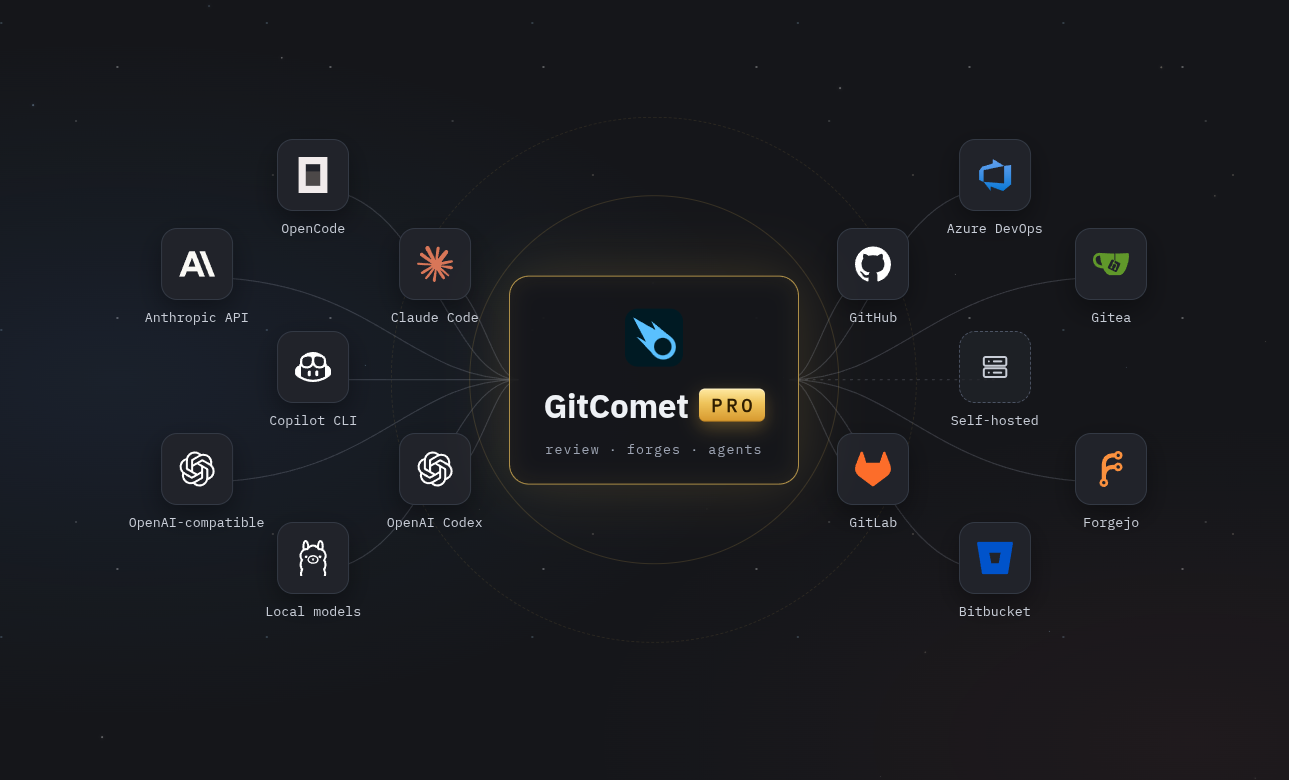
GitComet Pro is available now as a separate desktop app for Linux, macOS, and Windows. Every license includes everything in Open Source, plus:
- Pull request review, comments, approval, and merging on GitHub, GitLab, Azure DevOps, Bitbucket, Gitea, and Forgejo, with capabilities depending on the forge
- Cloud and self-hosted forge connections, with several accounts at once
- Coding agent sessions in History: Claude Code, Codex, OpenCode, and Copilot CLI
- Optional AI for commit messages, explanations, change notes, and pull request descriptions, using your own provider or a local model
- Projects and per-project Git identity
| License | Price | Details |
|---|---|---|
| Personal | €4 / month | Billed annually, plus VAT where applicable. For your own personal or commercial work, on up to five computers. |
| Organization | €4 / user / month | Billed annually, plus VAT where applicable. Minimum 2 seats. Includes team management and Single Sign-On (SSO) support. |
Forge credentials stay in your operating system's keychain, and pull requests, comments, and merges go directly from your desktop to the forge. The Pro service handles your account and license. AI is optional and sends requests to the provider you choose.
Compare plans and buy a license. After purchase, download and install the Pro client, then choose Connect this machine and approve the displayed code in your browser. See the Pro getting started guide for installation and activation.
On Linux, install Clang and mold first; see developer setup.
cargo build -p gitcomet --features ui-gpui,gix
cargo run -p gitcomet --features ui-gpui,gix -- /path/to/repo
Developer setup, workspace layout, testing, and coverage docs live in CONTRIBUTING.md.
GitComet can be used as a standalone diff and merge tool invoked by git difftool and git mergetool. It supports both headless (algorithm-only) and GUI (interactive GPUI window) modes.
# Configure Git globally to use GitComet for both difftool + mergetool
gitcomet setup

# Remove GitComet integration safely
gitcomet uninstall
- Use
--localto target only the current repository instead of global config. - Use
--dry-runto print the commands before applying changes.
This setup registers both headless and GUI variants with guiDefault=auto, so Git chooses GUI when display is available and falls back to headless otherwise.
setup/uninstall are designed to be idempotent.
Show detailed setup/uninstall behavior and manual commands
Built-in setup writes these Git config entries:
GITCOMET_BIN="/absolute/path/to/gitcomet"

# Headless tool: algorithm-only merge/diff for CI, scripts, and no-display environments
git config --global merge.tool gitcomet
git config --global mergetool.gitcomet.cmd \
  "'$GITCOMET_BIN' mergetool --base \"\$BASE\" --local \"\$LOCAL\" --remote \"\$REMOTE\" --merged \"\$MERGED\""
git config --global mergetool.trustExitCode true
git config --global mergetool.gitcomet.trustExitCode true
git config --global mergetool.prompt false

git config --global diff.tool gitcomet
git config --global difftool.gitcomet.cmd \
  "'$GITCOMET_BIN' difftool --local \"\$LOCAL\" --remote \"\$REMOTE\" --path \"\$MERGED\""
git config --global difftool.trustExitCode true
git config --global difftool.gitcomet.trustExitCode true
git config --global difftool.prompt false

# GUI tool: opens focused GPUI windows for interactive diff/merge
git config --global merge.guitool gitcomet-gui
git config --global mergetool.gitcomet-gui.cmd \
  "'$GITCOMET_BIN' mergetool --gui --base \"\$BASE\" --local \"\$LOCAL\" --remote \"\$REMOTE\" --merged \"\$MERGED\""
git config --global mergetool.gitcomet-gui.trustExitCode true

git config --global diff.guitool gitcomet-gui
git config --global difftool.gitcomet-gui.cmd \
  "'$GITCOMET_BIN' difftool --gui --local \"\$LOCAL\" --remote \"\$REMOTE\" --path \"\$MERGED\""
git config --global difftool.gitcomet-gui.trustExitCode true

# Auto-select GUI tool when DISPLAY is available, headless otherwise
git config --global mergetool.guiDefault auto
git config --global difftool.guiDefault auto
Built-in setup stores previous user values for shared generic keys under gitcomet.backup.* (when needed).
Built-in uninstall restores those backups only when the key still has the setup-managed value. If the user changed a setting after setup, uninstall preserves that user-edited value and then removes GitComet-specific keys.
Browser (default):
gitcomet [path] [--foreground]
On Unix, release builds relaunch the browser in a separate session when standard input is a terminal. Debug builds stay attached by default. For a detached launch, the command returns success once its first native window opens (including a first-run dialog), or an existing browser accepts the request. Startup diagnostics remain visible. Failure before that acknowledgement returns exit code 2; startup times out after 60 seconds and stops the launched process group. If the detached copy cannot be started at all (for example, no writable socket directory), the browser runs in the foreground instead. The command does not wait for repository loading, onboarding completion, or eventual window closure.
Pass --foreground (or set GITCOMET_FOREGROUND=1) to keep a newly started browser attached for continuous diagnostics or to wait for completion in a script. A script launched from a terminal can inherit terminal input and detach too; use gitcomet --foreground "$repo" to wait for a browser that the script starts. Requests forwarded to an existing browser still return after it accepts the request. Finder, open, and launches without terminal input do not use automatic terminal detachment. Focused difftool and mergetool modes continue to wait and report their final exit status.
GITCOMET_FOREGROUND accepts 1/true and 0/false (case-insensitive). An empty or unset value uses the build default: attached with debug assertions enabled, automatic detachment otherwise. Set GITCOMET_FOREGROUND=0 to opt into detachment in a debug build. Other values are errors; --foreground overrides the environment.
Products built on the library opt into terminal detachment with AppLaunch::run_cli() or App::run(). Existing AppLaunch::run() and run_with_args() calls do not automatically detach. Use run_cli() at a process entry point whose configuration can be recreated when its executable restarts.
CLI requests to an existing browser are forwarded before preparation hooks or extension registration. A new browser performs that preparation once in its own process. Startup diagnostics use the caller's standard error; a helper started before readiness can retain that stream after the launcher returns.
Difftool:
gitcomet difftool --local <path> --remote <path> [--path <display_name>] [--label-left <label>] [--label-right <label>]
Also reads LOCAL/REMOTE from environment as a fallback when invoked by Git.
Mergetool:
gitcomet mergetool --local <path> --remote <path> --merged <path> [--base <path>] [--label-local <label>] [--label-remote <label>] [--label-base <label>]
Also reads LOCAL/REMOTE/MERGED/BASE from environment. Base is optional for add/add conflicts.
KDiff3 and Meld invocation forms are supported (--L1/--L2/--L3, -o/--output/--out, --base, positional arguments), so GitComet can be a drop-in replacement.
Verification is disabled by default because it can slow down the Git log. Enable Settings → Git log → Verify commit signatures to show verification badges.
GitComet shows verification badges on signed commits. Git performs the check, using gpg for GPG and X.509 signatures and ssh-keygen for SSH signatures, so badges need those programs and the signers' public keys. Settings → Executables shows which programs GitComet found.
To install GnuPG, trust GitHub's signing key, and configure SSH allowed signers, see the commit signature guide.
Choose Settings → Diff → Diff Engine to make Difftastic the default, or use the diff viewer's cog for a temporary override. Both Split and Inline layouts support it. See Difftastic for partial staging and fallbacks.
GitComet supports built-in themes and user-provided custom themes.
Built-in themes are embedded in the GitComet binary. Custom themes are loaded from JSON bundle files in your per-user themes directory, which GitComet creates on startup.
The full theme guide, including file locations, schema details, example bundles, and override behavior, now lives in THEMES.md.
GitComet writes panic logs and abnormal-exit recovery state to:
- Linux:
$XDG_STATE_HOME/gitcomet/crashes/(fallback:~/.local/state/gitcomet/crashes/) - macOS:
~/Library/Logs/gitcomet/crashes/ - Windows:
%LOCALAPPDATA%\gitcomet\crashes\(fallback:%APPDATA%\gitcomet\crashes\)
On Linux, the directory normally is ~/.local/state/gitcomet/crashes/.
GitComet creates a process-specific session-in-progress-<pid>.log before it
starts the GPUI runtime. A native abort, terminated UI, or GPUI event loop exit
without an explicitly requested user shutdown leaves that marker behind; Rust
panics also write panic-*.log, except a panic GitComet contains in code it
does not own (such as Difftastic), which falls back instead. Error-level runtime diagnostics are mirrored to
last-runtime-error-<pid>.log, including their source location and a backtrace,
so fatal errors logged and consumed by the UI runtime remain reportable.
Recovery ignores markers owned by still-running GitComet processes, so one open
instance cannot consume another's crash state.
On the next launch, GitComet snapshots recovered data as
pending-startup-report.log and retains it until the user reports or dismisses
the notification, so a failed subsequent launch cannot discard the report before
its notification is visible.
GitComet presents the report in the next UI launch and also prints its prefilled GitHub issue URL and log path to the launching terminal. The report includes app version, platform, structured failure details, and a trimmed backtrace.
SourceTree, GitKraken, Zed, GPUI, KDiff3, Meld, Github Desktop, Git, Gix, Rust, Smol, and many more.
This project has been created with the help of AI tools, including OpenAI Codex and Claude Code. The AI policy sets how contributors use them.
GitComet is licensed under the GNU Affero General Public License Version 3
(AGPL-3.0-only). See LICENSE-AGPL-3.0.
Copyright (C) 2026 AutoExplore Oy
Contact: [email protected]