GeezerVisonThe World Wide Web, restored to 800 pixels of glory. |
| Home|About|Gaming cabinet|Archives|How it works|Starter sites |
GeezerVison is showing github.com — Install or update plugin Install or update plugin
Olga Naumenko edited this page
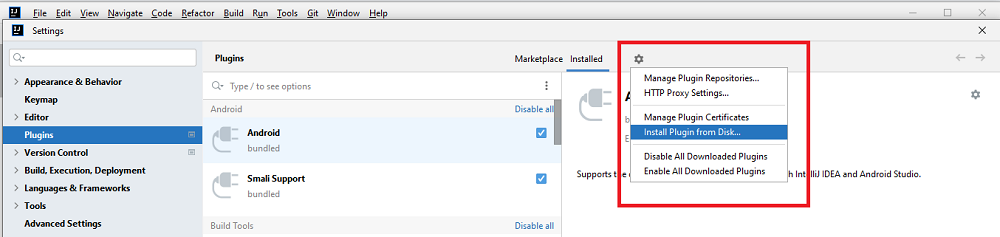
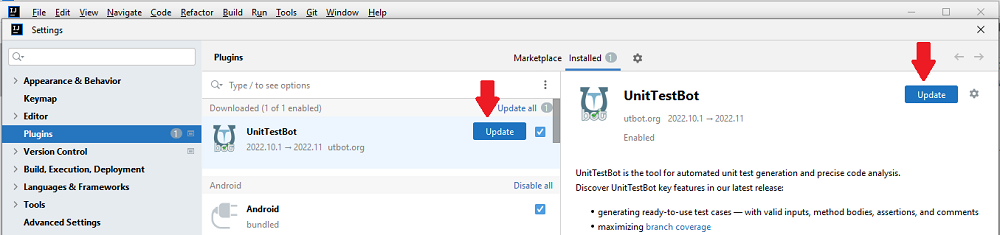
Is it OK for you to simply get the latest version of UnitTestBot? Install it from Marketplace in IntelliJ IDEA. Do you want to manually choose the build? Install the plugin from the downloaded archive. The same approach is applicable for updating the plugin.
To check if UnitTestBot is enabled, go to File > Settings > Plugins and choose Installed.
To check if UnitTestBot is enabled, go to File > Settings > Plugins and choose Installed.
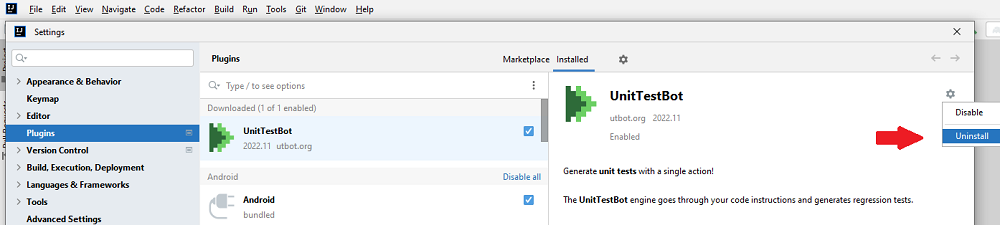
Go to File > Settings > Plugins and choose Installed. Find UnitTestBot plugin and choose the gear icon to the right of the plugin name. Click Uninstall, then click Apply. Restart if prompted.
(redirect to /docs in main repo)
Clone this wiki locally |
| You are visitor 01402503 — GeezerVison does not store the pages you look up. Best viewed with Netscape Navigator 4.7 or Internet Explorer 6 at 800×600. No cookies required. |