Testing Spring-based code
UnitTestBot Java can now generate tests for Spring-based code.
UnitTestBot Java detects if your code is based on the Spring framework and provides you with necessary options right
in the dialog window of the standard UnitTestBot Java plugin.
You may choose from the three approaches to Spring test generation:
Hereinafter, by components we mean Spring components.
For classes under test, select an appropriate type of test generation.
In the sections below, you can find recommendations on how to choose the generation type.
NOTE
UnitTestBot Java with Spring support uses symbolic execution to generate unit tests (both standard and
Spring-specific ones), so it may be not so efficient for:
- multithreaded programs,
- functions with calls to external libraries,
- processing large collections.
Testing frameworks supported:
| Testing framework |
Generating standard and Spring-specific unit tests |
Generating integration tests |
| JUnit 4 |
✔️ |
✔️ |
| JUnit 5 |
✔️ |
✔️ |
| TestNG |
✔️ |
❌ |
In UnitTestBot Java, standard unit tests mock all the Spring environmental dependencies using Mockito.
This test generation type does not process the Spring context of the original application.
This approach is most useful in these cases:
- if the unit under test performs operations with data rather than calls the external Spring components,
- if the unit under test has no Spring specifics while being a part of a Spring project,
- for testing the Service or DAO layer of a Spring application,
- if you need the fastest and the easiest (“one-click”) way of generating tests.
- Open your Spring project in IntelliJ IDEA.
- Choose the required package, class or set of classes in the Project tool window.
Right-click and choose Generate Tests with UnitTestBot or press Alt+Shift+U.
- Alternatively, in the Editor, place the caret at the required class or method.
Press Alt+Shift+U or right-click and choose Generate > Tests with UnitTestBot.
- In the Generate Tests with UnitTestBot window, for Spring configuration, choose No configuration.
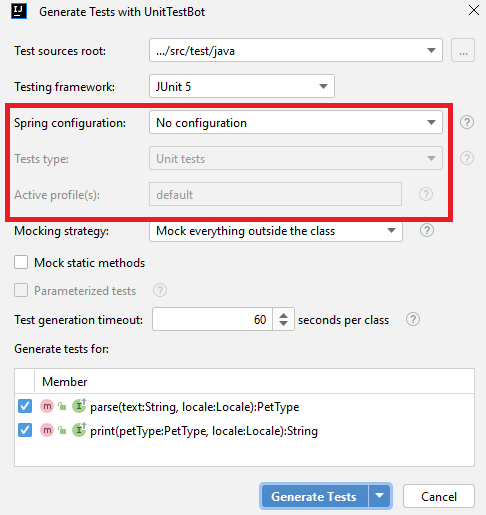
For setting the rest of the options, refer to Fine-tune test generation.
- Press Generate Tests or Generate and Run.
Spring-specific unit tests
To let unit tests get use of injected dependencies, UnitTestBot Java
- starts executing a Spring application based on a user configuration,
- gets information about the bean implementations from bean definitions (already constructed but not initialized yet),
- destroys these definitions and shuts down the application context gracefully.
Dependencies in Spring applications are often injected via interfaces, each having one implementation per context.
UnitTestBot Java uses information about the particular implementation to generate the context-relevant test. If an
interface has more than one implementation, UnitTestBot Java mocks this dependency.
To guide this type of test generation, select a configuration:
| Configuration approaches |
Support |
|
.xml file |
✔️ |
| Java annotation |
✔️ |
| annotation-based configuration for Spring Boot application |
✔️ |
This approach is most useful in these cases:
- when you need to reduce the number of mocks in generated tests,
- when you want to test a particular component implementation—not an interface.
NOTES
- It may provide not the maximum line coverage as it is aimed at covering the lines relevant to the chosen
configuration.
- The generation process may exceed the requested timeout due to symbolic execution limitations.
- Open your Spring project in IntelliJ IDEA.
- Choose the required package, class or set of classes in the Project tool window.
Right-click and choose Generate Tests with UnitTestBot or press Alt+Shift+U.
- Alternatively, in the Editor, place the caret at the required class or method.
Press Alt+Shift+U or right-click and choose Generate > Tests with UnitTestBot.
- In the Generate Tests with UnitTestBot window, for Spring configuration, choose the required one.

- For Test type, choose Unit tests.

-
For setting the rest of the options, refer to Fine-tune test generation.
-
Press Generate Tests or Generate and Run.
For integration testing, UnitTestBot Java does not approximate application's behavior—it executes real application
code. It uses a fuzzing technique (not symbolic execution) to mutate the initial autowired state of the component
under test.
⚠️ WARNING
We strictly recommend creating a separate testing configuration or profile.
If you choose to generate integration tests, you will run your application with real Spring component interactions.
Method calls will be executed with random inputs. By doing this, you may publish or corrupt user data, or inflict other harm.
NOTES
- Integration test generation may take longer than generating unit tests.
- If the method under test contains calls to microservices, you need to start that microservice manually.
- Integration tests are the most appropriate way to test controllers.
- Integration tests are relevant for testing services and microservices.
- Open your Spring project in IntelliJ IDEA.
- Choose the required package, class or set of classes in the Project tool window.
Right-click and choose Generate Tests with UnitTestBot or press Alt+Shift+U.
- Alternatively, in the Editor, place the caret at the required class or method.
Press Alt+Shift+U or right-click and choose Generate > Tests with UnitTestBot.
- In the Generate Tests with UnitTestBot window, for Spring configuration, choose the required one.
- For Test type, choose Integration tests.
- For Active profile(s), enter the profile name:
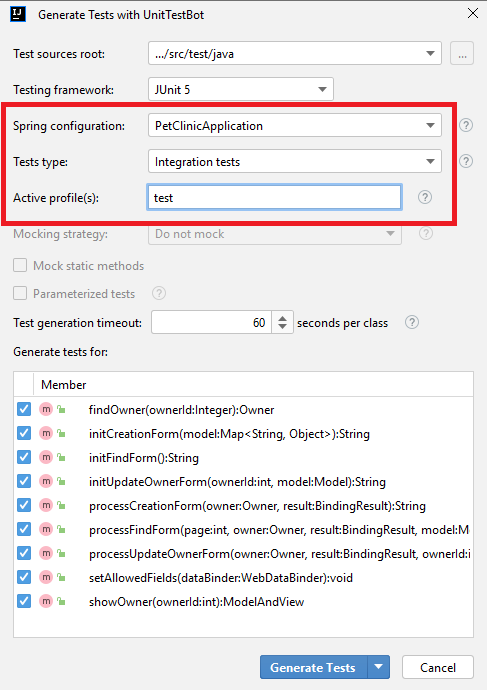
-
For setting the rest of the options, refer to Fine-tune test generation.
-
Press Generate Tests or Generate and Run.
What is a contextLoads test?
For the Microservice layer, UnitTestBot Java creates a contextLoads test: it checks if the Spring application
context has started normally.
Failing test means that the application is not properly configured, so the other test
failures are not related to regression in the tested code. If loading context fails, the test contains a commented
exception type, a message, and a stack trace to help a developer investigate the problem.