GV

GeezerVison

The World Wide Web, restored to 800 pixels of glory.

Home|About|Gaming cabinet|Archives|How it works|Starter sites

On this site

  • Sign in
  • ActionsCI/CD and automation
  • CodespacesCloud development environments
  • All Features
  • Documentation
  • Training
  • Certifications
  • Build with Copilot
  • Customize Copilot
  • Integrations
  • Trending repos
  • GitHub Sponsors
  • Developer articles
  • Enterprises

This view

  • Original page
  • New address

GeezerVison is showing github.com — Troubleshooting

Troubleshooting

Jump to bottom
Olga Naumenko edited this page Oct 4, 2023 · 9 revisions

Troubleshooting

Here is the list of known but unsolved UnitTestBot Java problems with workarounds:

  • InaccessibleObjectException: successful symbolic executions fail due to failing utility methods
  • Package is declared in module, which does not export it to the unnamed module: uncompilable tests

InaccessibleObjectException: successful symbolic executions fail due to failing utility methods

Problem details:

When using JDK 17, you may get this kind of exception for generating tests:

java.lang.reflect.InaccessibleObjectException: Unable to make private native java.lang.reflect.Field[]
java.lang.Class.getDeclaredFields0(boolean) accessible: module java.base does not "opens java.lang" to unnamed module @5afa04c

The symbolic execution engine in UnitTestBot Java may generate tests that should pass, but they fail. The reason is that sometimes UnitTestBot Java cannot build an Object without using Reflection. Reflection methods using setAccessible are forbidden in JDK 17 or later, so the UtUtils methods using setAccessible do not work, and successful executions fail.

See an example in the issue.

Solution:

The solution is to open the necessary packages by editing test run configuration. The same test may require more than one package to open. Please open the packages suggested in the exception messages one by one.

Editing test run configuration depends on the build system you use to run tests.

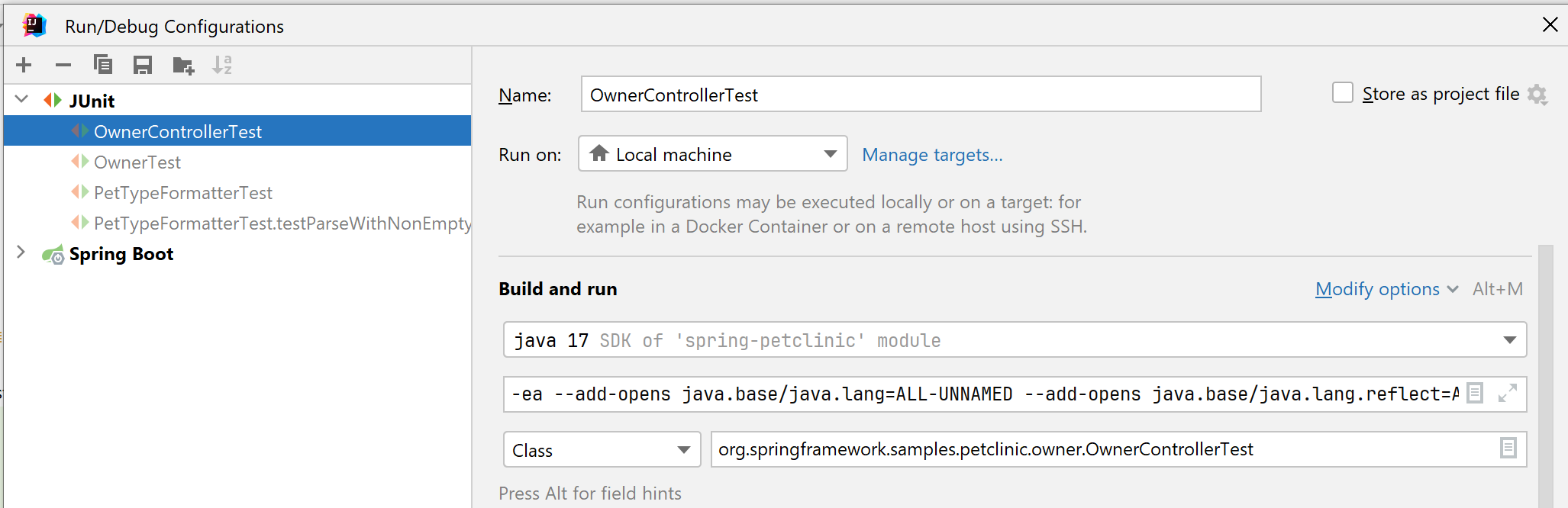
For Maven or IntelliJ, add the keys to the test run configuration—see the most common example:

  1. Choose Edit Configurations.
  2. In Run/Debug Configurations, choose the required test run configuration.
  3. Choose to Modify options and Add VM options.
  4. For VM options, add the following keys:
    --add-opens java.base/java.lang=ALL-UNNAMED --add-opens java.base/java.lang.reflect=ALL-UNNAMED

For example:

For Gradle, add the following VM options to the test task in the build.gradle file:

    jvmArgs += ["--add-opens", "java.base/java.lang=ALL-UNNAMED", 
                "--add-opens", "java.base/java.lang.reflect=ALL-UNNAMED"]

For example:

Package is declared in module, which does not export it to the unnamed module: uncompilable tests

Problem details:

When using JDK 17, you may get uncompilable tests, and IntelliJ IDEA may show something like this:

Package sun.net.util is declared in module java.base, which does not export it to the unnamed module
Add --add-exports java.base/sun.net.util=ALL-UNNAMED to module compiler options

Using JDK 17, UnitTestBot Java may try to mock unexported packages and create uncompilable tests.

See an example in the issue.

Solution:

Add the following key to the test run configuration (see the related solution):
--add-exports java.base/sun.net.util=ALL-UNNAMED

User guides

IntelliJ IDEA plugin

Testing pure Java code

  • Check system requirements
  • Install or update plugin
  • Generate tests with default configuration
  • Fine-tune test generation
  • Get use of test results

Testing Spring-based code

  • General notes
  • Standard unit tests
  • Spring-specific unit tests
  • Integration tests

Troubleshooting

Command-line interface

GitHub Action

Contributor guides

(redirect to /docs in main repo)

General info

  • Contributing guide
  • Developer guide
  • Naming and labeling conventions
  • Interprocess debugging
  • Interprocess logging

Continuous integration

  • CI in UnitTestBot Java
  • Docker for UnitTestBot Java
  • SSH session with GitHub agent

Design docs

  • UnitTestBot overall architecture
  • Android Studio support
  • Assumption mechanism
  • Choosing language-specific IDE
  • Code generation and rendering
  • Fuzzing Platform (FP) Design
  • Instrumented process API: handling errors and results
  • UnitTestBot JavaScript plugin setup
  • Night statistics monitoring
  • RD for UnitTestBot
  • Sandboxing
  • UnitTestBot settings
  • Speculative field non-nullability assumptions
  • Symbolic analysis of static initializers
  • Summarization module
  • Taint analysis
  • UnitTestBot decomposition
  • UtUtils class
  • UnitTestBot Family changes

Clone this wiki locally

You are visitor 01402503 — GeezerVison does not store the pages you look up.
Best viewed with Netscape Navigator 4.7 or Internet Explorer 6 at 800×600. No cookies required.